
Deployment manifest format
Este conteúdo não está disponível em sua língua ainda.
The deployment manifest is a JSON-formatted document generated by Aspire to describe your app’s resources and their relationships. This manifest is consumed by deployment tools to provision and configure infrastructure in target cloud environments.
Generate the manifest
Section titled “Generate the manifest”Create a new Aspire project using the following command:
aspire new --name AspireApp --output AspireAppNavigate to the newly created project directory:
cd ./AspireAppManifest generation is achieved by running the Aspire CLI with the publish command:
aspire do publish-manifest --output-path ./aspire-manifest.json'The previous command produces the following output:
11:55:09 (pipeline execution) → Starting pipeline execution...11:55:09 (publish-manifest) → Starting publish-manifest...11:55:09 (publish-manifest) i [INF] Published manifest to: ./AspireApp/aspire-manifest.json11:55:09 (publish-manifest) ✓ publish-manifest completed successfully11:55:09 (pipeline execution) ✓ Completed successfully------------------------------------------------------------✓ 2/2 steps succeeded • Total time: 0.0s
Steps Summary:   0.0 s  ✓ pipeline execution   0.0 s  ✓ publish-manifest
✓ PIPELINE SUCCEEDED------------------------------------------------------------
The file generated is the Aspire manifest and is used by tools to support deploying into target cloud environments.
Basic manifest format
Section titled “Basic manifest format”Publishing the manifest from the default starter template for Aspire produces the following JSON output:
{ "resources": { "cache": { "type": "container.v0", "connectionString": "{cache.bindings.tcp.host}:{cache.bindings.tcp.port}", "image": "redis:7.4", "bindings": { "tcp": { "scheme": "tcp", "protocol": "tcp", "transport": "tcp", "containerPort": 6379 } } }, "apiservice": { "type": "project.v0", "path": "../AspireApp.ApiService/AspireApp.ApiService.csproj", "env": { "OTEL_DOTNET_EXPERIMENTAL_OTLP_EMIT_EXCEPTION_LOG_ATTRIBUTES": "true", "OTEL_DOTNET_EXPERIMENTAL_OTLP_EMIT_EVENT_LOG_ATTRIBUTES": "true" }, "bindings": { "http": { "scheme": "http", "protocol": "tcp", "transport": "http" }, "https": { "scheme": "https", "protocol": "tcp", "transport": "http" } } }, "webfrontend": { "type": "project.v0", "path": "../AspireApp.Web/AspireApp.Web.csproj", "env": { "OTEL_DOTNET_EXPERIMENTAL_OTLP_EMIT_EXCEPTION_LOG_ATTRIBUTES": "true", "OTEL_DOTNET_EXPERIMENTAL_OTLP_EMIT_EVENT_LOG_ATTRIBUTES": "true", "ConnectionStrings__cache": "{cache.connectionString}", "APISERVICE_HTTP": "{apiservice.bindings.http.url}", "APISERVICE_HTTPS": "{apiservice.bindings.https.url}", "services__apiservice__http__0": "{apiservice.bindings.http.url}", "services__apiservice__https__0": "{apiservice.bindings.https.url}" }, "bindings": { "http": { "scheme": "http", "protocol": "tcp", "transport": "http" }, "https": { "scheme": "https", "protocol": "tcp", "transport": "http" } } } }}The manifest format JSON consists of a single object called resources, which contains a property for each resource specified in Program.cs (the name argument for each name is used as the property for each of the child resource objects in JSON).
Connection string and binding references
Section titled “Connection string and binding references”In the previous example, there are two project resources and one Redis cache resource. The webfrontend depends on both the apiservice (project) and cache (Redis) resources.
This dependency is known because the environment variables for the webfrontend contain placeholders that reference the two other resources:
"env": { // ... other environment variables omitted for clarity "ConnectionStrings__cache": "{cache.connectionString}", "APISERVICE_HTTP": "{apiservice.bindings.http.url}", "APISERVICE_HTTPS": "{apiservice.bindings.https.url}", "services__apiservice__http__0": "{apiservice.bindings.http.url}", "services__apiservice__https__0": "{apiservice.bindings.https.url}"},The apiservice resource is referenced by webfrontend using the call WithReference(apiservice) in the AppHost Program.cs file and redis is referenced using the call WithReference(cache):
var builder = DistributedApplication.CreateBuilder(args);
var cache = builder.AddRedis("cache");
var apiService = builder.AddProject<Projects.AspireApp_ApiService>("apiservice");
builder.AddProject<Projects.AspireApp_Web>("webfrontend")    .WithReference(cache)    .WithReference(apiService);
builder.Build().Run();
References between project resource types result in service discovery variables being injected into the referencing project. References to well known reference types such as Redis result in connection strings being injected.
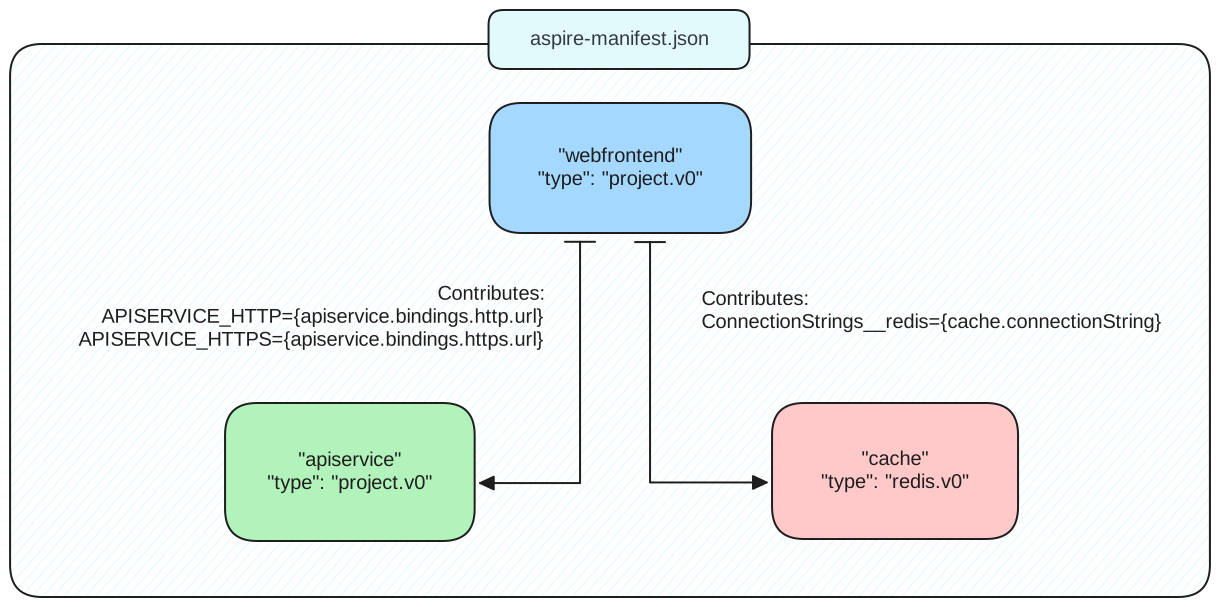
For more information on how resources in the app model and references between them work, see, Aspire orchestration overview.
Placeholder string structure
Section titled “Placeholder string structure”Placeholder strings reference the structure of the Aspire manifest:
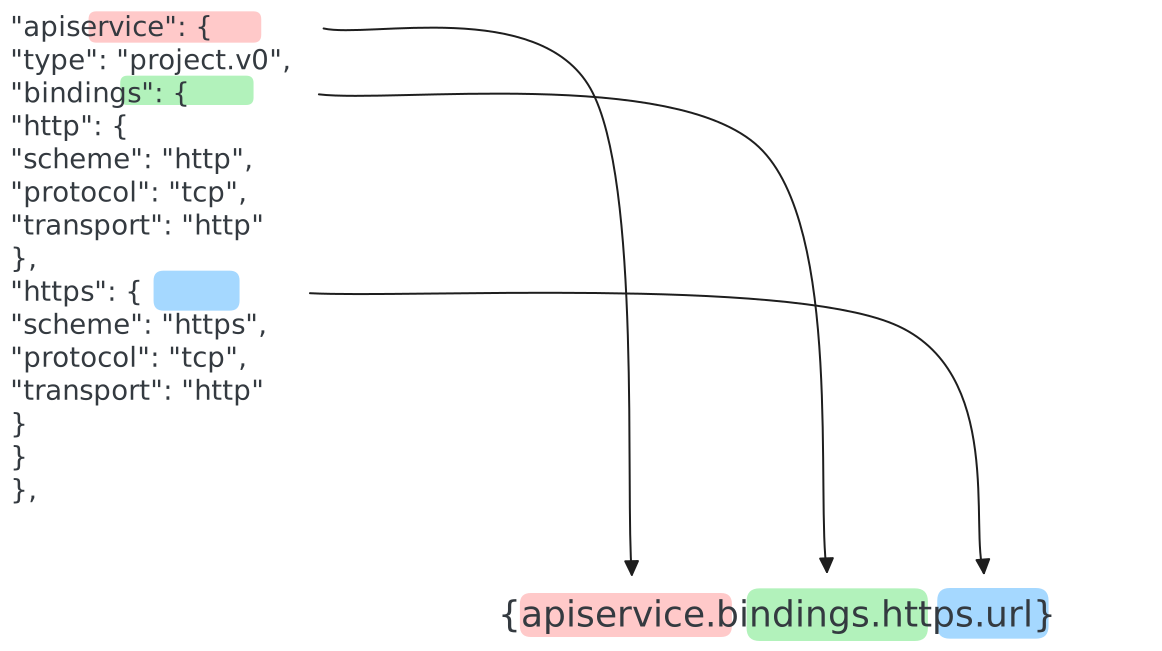
The final segment of the placeholder string (url in this case) is generated by the tool processing the manifest. There are several suffixes that could be used on the placeholder string:
connectionString: For well-known resource types such as Redis. Deployment tools translate the resource in the most appropriate infrastructure for the target cloud environment and then produce an Aspire compatible connection string for the consuming application to use. Oncontainer.v0resources theconnectionStringfield may be present and specified explicitly. This is to support scenarios where a container resource type is referenced using theWithReferenceextension but is desired to be hosted explicitly as a container.url: For service-to-service references where a well-formed URL is required. The deployment tool produces theurlbased on the scheme, protocol, and transport defined in the manifest and the underlying compute/networking topology that was deployed.host: The host segment of the URL.port: The port segment of the URL.
Resource types
Section titled “Resource types”Each resource has a type field. When a deployment tool reads the manifest, it should read the type to verify whether it can correctly process the manifest. During the Aspire preview period, all resource types have a v0 suffix to indicate that they’re subject to change. As Aspire approaches release a v1 suffix will be used to signify that the structure of the manifest for that resource type should be considered stable (subsequent updates increment the version number accordingly).
Common resource fields
Section titled “Common resource fields”The type field is the only field that is common across all resource types, however, the project.v0, container.v0, and executable.v0 resource types also share the env and bindings fields.
The env field type is a basic key/value mapping where the values might contain placeholder strings.
Bindings are specified in the bindings field with each binding contained within its own field under the bindings JSON object. The fields emitted by the Aspire manifest in the bindings node include:
scheme: One of the following valuestcp,udp,http, orhttps.protocol: One of the following valuestcporudptransport: Same asscheme, but used to disambiguate betweenhttpandhttp2.containerPort: Optional, if omitted defaults to port 80.
The inputs field
Section titled “The inputs field”Some resources generate an inputs field. This field is used to specify input parameters for the resource. The inputs field is a JSON object where each property is an input parameter that’s used in placeholder structure resolution. Resources that have a connectionString, for example, might use the inputs field to specify a password for the connection string:
"connectionString": "Host={<resourceName>.bindings.tcp.host};Port={<resourceName>.bindings.tcp.port};Username=admin;Password={<resourceName>.inputs.password};"The connection string placeholder references the password input parameter from the inputs field:
"inputs": { "password": { "type": "string", "secret": true, "default": { "generate": { "minLength": 10 } } }}The preceding JSON snippet shows the inputs field for a resource that has a connectionString field. The password input parameter is a string type and is marked as a secret. The default field is used to specify a default value for the input parameter. In this case, the default value is generated using the generate field, with random string of a minimum length.
When a parameter is using a filter (for example uri), the manifest contains an additional resource that represents the filtered projection.
- The resource type is
"annotated.string". valuereferences the raw parameter value ({parameter-name.value}).filternames the formatter (e.g.,"uri", …).- The resource name is derived from the parameter name and format (
{parameter}-{format}-encoded). Names are deduplicated if multiple projections share the same base.
Example projection generated for a URI-encoded password:
"redis-password-uri-encoded": { "type": "annotated.string", "value": "{redis-password.value}", "filter": "uri"}The original parameter remains in the manifest, preserving its secret metadata. Tools should apply the indicated filter when materializing the value.
Built-in resources
Section titled “Built-in resources”The following table is a list of resource types that are explicitly generated by Aspire and extensions developed by the Aspire team:
Cloud-agnostic resource types
Section titled “Cloud-agnostic resource types”These resources are available in the 📦 Aspire.Hosting NuGet package.
| App model usage | Manifest resource type | Heading link |
|---|---|---|
AddContainer | container.v0 | Container resource type |
PublishAsDockerFile | dockerfile.v0 | Dockerfile resource types |
AddDatabase (MongoDB) | value.v0 | MongoDB Server resource types |
AddMongoDB | container.v0 | MongoDB resource types |
AddDatabase (MySQL) | value.v0 | MySQL Server resource types |
AddMySql | container.v0 | MySQL resource types |
AddDatabase (Postgres) | value.v0 | Postgres resource types |
AddPostgres | container.v0 | Postgres resource types |
AddProject | project.v0 | Project resource type |
AddRabbitMQ | container.v0 | RabbitMQ resource types |
AddRedis | container.v0 | Redis resource type |
AddDatabase (SQL Server) | value.v0 | SQL Server resource types |
AddSqlServer | container.v0 | SQL Server resource types |
Project resource type
Section titled “Project resource type”Example code:
var builder = DistributedApplication.CreateBuilder(args);var apiservice = builder.AddProject<Projects.AspireApp_ApiService>("apiservice");Example manifest:
"apiservice": { "type": "project.v0", "path": "../AspireApp.ApiService/AspireApp.ApiService.csproj", "env": { "OTEL_DOTNET_EXPERIMENTAL_OTLP_EMIT_EXCEPTION_LOG_ATTRIBUTES": "true", "OTEL_DOTNET_EXPERIMENTAL_OTLP_EMIT_EVENT_LOG_ATTRIBUTES": "true" }, "bindings": { "http": { "scheme": "http", "protocol": "tcp", "transport": "http" }, "https": { "scheme": "https", "protocol": "tcp", "transport": "http" } }}Container resource type
Section titled “Container resource type”Example code:
var builder = DistributedApplication.CreateBuilder(args);
builder.AddContainer("mycontainer", "myimage")       .WithEnvironment("LOG_LEVEL", "WARN")       .WithHttpEndpoint(3000);
Example manifest:
{ "resources": { "mycontainer": { "type": "container.v0", "image": "myimage:latest", "env": { "LOG_LEVEL": "WARN" }, "bindings": { "http": { "scheme": "http", "protocol": "tcp", "transport": "http", "containerPort": 3000 } } } }}Dockerfile resource types
Section titled “Dockerfile resource types”Example code:
var builder = DistributedApplication.CreateBuilder(args);
builder.AddNodeApp("nodeapp", "../nodeapp/app.js") .WithHttpEndpoint(hostPort: 5031, env: "PORT") .PublishAsDockerFile();Example manifest:
{ "resources": { "nodeapp": { "type": "dockerfile.v0", "path": "../nodeapp/Dockerfile", "context": "../nodeapp", "env": { "NODE_ENV": "development", "PORT": "{nodeapp.bindings.http.port}" }, "bindings": { "http": { "scheme": "http", "protocol": "tcp", "transport": "http", "containerPort": 5031 } } } }}Postgres resource types
Section titled “Postgres resource types”Example code:
var builder = DistributedApplication.CreateBuilder(args);
builder.AddPostgres("postgres1")       .AddDatabase("shipping");
Example manifest:
{ "resources": { "postgres1": { "type": "container.v0", "connectionString": "Host={postgres1.bindings.tcp.host};Port={postgres1.bindings.tcp.port};Username=postgres;Password={postgres1.inputs.password}", "image": "postgres:17.2", "env": { "POSTGRES_HOST_AUTH_METHOD": "scram-sha-256", "POSTGRES_INITDB_ARGS": "--auth-host=scram-sha-256 --auth-local=scram-sha-256", "POSTGRES_PASSWORD": "{postgres1.inputs.password}" }, "bindings": { "tcp": { "scheme": "tcp", "protocol": "tcp", "transport": "tcp", "containerPort": 5432 } }, "inputs": { "password": { "type": "string", "secret": true, "default": { "generate": { "minLength": 10 } } } } }, "shipping": { "type": "value.v0", "connectionString": "{postgres1.connectionString};Database=shipping" } }}RabbitMQ resource types
Section titled “RabbitMQ resource types”RabbitMQ is modeled as a container resource container.v0. The following sample shows how they’re added to the app model.
var builder = DistributedApplication.CreateBuilder(args);
builder.AddRabbitMQ("rabbitmq1");
The previous code produces the following manifest:
{ "resources": { "rabbitmq1": { "type": "container.v0", "connectionString": "amqp://guest:{rabbitmq1.inputs.password}@{rabbitmq1.bindings.tcp.host}:{rabbitmq1.bindings.tcp.port}", "image": "rabbitmq:3", "env": { "RABBITMQ_DEFAULT_USER": "guest", "RABBITMQ_DEFAULT_PASS": "{rabbitmq1.inputs.password}" }, "bindings": { "tcp": { "scheme": "tcp", "protocol": "tcp", "transport": "tcp", "containerPort": 5672 } }, "inputs": { "password": { "type": "string", "secret": true, "default": { "generate": { "minLength": 10 } } } } } }}Redis resource type
Section titled “Redis resource type”Example code:
var builder = DistributedApplication.CreateBuilder(args);
builder.AddRedis("redis1");
Example manifest:
{ "resources": { "redis1": { "type": "container.v0", "connectionString": "{redis1.bindings.tcp.host}:{redis1.bindings.tcp.port}", "image": "redis:7.4", "bindings": { "tcp": { "scheme": "tcp", "protocol": "tcp", "transport": "tcp", "containerPort": 6379 } } } }}SQL Server resource types
Section titled “SQL Server resource types”Example code:
var builder = DistributedApplication.CreateBuilder(args);
builder.AddSqlServer("sql1")       .AddDatabase("shipping");
Example manifest:
{ "resources": { "sql1": { "type": "container.v0", "connectionString": "Server={sql1.bindings.tcp.host},{sql1.bindings.tcp.port};User ID=sa;Password={sql1.inputs.password};TrustServerCertificate=true", "image": "mcr.microsoft.com/mssql/server:2022-latest", "env": { "ACCEPT_EULA": "Y", "MSSQL_SA_PASSWORD": "{sql1.inputs.password}" }, "bindings": { "tcp": { "scheme": "tcp", "protocol": "tcp", "transport": "tcp", "containerPort": 1433 } }, "inputs": { "password": { "type": "string", "secret": true, "default": { "generate": { "minLength": 10 } } } } }, "shipping": { "type": "value.v0", "connectionString": "{sql1.connectionString};Database=shipping" } }}MongoDB resource types
Section titled “MongoDB resource types”Example code:
var builder = DistributedApplication.CreateBuilder(args);
builder.AddMongoDB("mongodb1")       .AddDatabase("shipping");
Example manifest:
{ "resources": { "mongodb1": { "type": "container.v0", "connectionString": "mongodb://{mongodb1.bindings.tcp.host}:{mongodb1.bindings.tcp.port}", "image": "mongo:8.0", "bindings": { "tcp": { "scheme": "tcp", "protocol": "tcp", "transport": "tcp", "containerPort": 27017 } } }, "shipping": { "type": "value.v0", "connectionString": "{mongodb1.connectionString}/shipping" } }}MySQL resource types
Section titled “MySQL resource types”Example code:
var builder = DistributedApplication.CreateBuilder(args);
builder.AddMySql("mysql1")       .AddDatabase("shipping");
Example manifest:
{ "resources": { "mysql1": { "type": "container.v0", "connectionString": "Server={mysql1.bindings.tcp.host};Port={mysql1.bindings.tcp.port};User ID=root;Password={mysql1.inputs.password}", "image": "mysql:9.1", "env": { "MYSQL_ROOT_PASSWORD": "{mysql1.inputs.password}" }, "bindings": { "tcp": { "scheme": "tcp", "protocol": "tcp", "transport": "tcp", "containerPort": 3306 } }, "inputs": { "password": { "type": "string", "secret": true, "default": { "generate": { "minLength": 10 } } } } }, "shipping": { "type": "value.v0", "connectionString": "{mysql1.connectionString};Database=shipping" } }}Azure-specific resource types
Section titled “Azure-specific resource types”The following resources are available in the 📦 Aspire.Hosting.Azure NuGet package.
| App Model usage | Manifest resource type | Heading link |
|---|---|---|
AddAzureAppConfiguration | azure.bicep.v0 | Azure App Configuration resource types |
AddAzureKeyVault | azure.bicep.v0 | Azure Key Vault resource type |
AddAzureRedis | azure.bicep.v0 | Azure Redis resource types |
AddAzureServiceBus | azure.bicep.v0 | Azure Service Bus resource type |
AddAzureSqlServer(...) | azure.bicep.v0 | Azure SQL resource types |
AddAzureSqlServer(...).AddDatabase(...) | value.v0 | Azure SQL resource types |
AddAzurePostgresFlexibleServer(...) | azure.bicep.v0 | Azure Postgres resource types |
AddAzurePostgresFlexibleServer(...).AddDatabase(...) | value.v0 | Azure Postgres resource types |
AddAzureStorage | azure.storage.v0 | Azure Storage resource types |
AddBlobs | value.v0 | Azure Storage resource types |
AddQueues | value.v0 | Azure Storage resource types |
AddTables | value.v0 | Azure Storage resource types |
Azure Key Vault resource type
Section titled “Azure Key Vault resource type”Example code:
var builder = DistributedApplication.CreateBuilder(args);
builder.AddAzureKeyVault("keyvault1");
Example manifest:
{ "resources": { "keyvault1": { "type": "azure.bicep.v0", "connectionString": "{keyvault1.outputs.vaultUri}", "path": "aspire.hosting.azure.bicep.keyvault.bicep", "params": { "principalId": "", "principalType": "", "vaultName": "keyvault1" } } }}Azure Service Bus resource type
Section titled “Azure Service Bus resource type”Example code:
var builder = DistributedApplication.CreateBuilder(args);
builder.AddAzureServiceBus("sb1")       .AddTopic("topic1", [])       .AddTopic("topic2", [])       .AddQueue("queue1")       .AddQueue("queue2");
Example manifest:
{ "resources": { "sb1": { "type": "azure.bicep.v0", "connectionString": "{sb1.outputs.serviceBusEndpoint}", "path": "aspire.hosting.azure.bicep.servicebus.bicep", "params": { "serviceBusNamespaceName": "sb1", "principalId": "", "principalType": "", "queues": [ "queue1", "queue2" ], "topics": [ { "name": "topic1", "subscriptions": [] }, { "name": "topic2", "subscriptions": [] } ] } } }}Azure Storage resource types
Section titled “Azure Storage resource types”Example code:
var builder = DistributedApplication.CreateBuilder(args);
var storage = builder.AddAzureStorage("images");
storage.AddBlobs("blobs");storage.AddQueues("queues");storage.AddTables("tables");
Example manifest:
{ "resources": { "images": { "type": "azure.bicep.v0", "path": "aspire.hosting.azure.bicep.storage.bicep", "params": { "principalId": "", "principalType": "", "storageName": "images" } }, "blobs": { "type": "value.v0", "connectionString": "{images.outputs.blobEndpoint}" }, "queues": { "type": "value.v0", "connectionString": "{images.outputs.queueEndpoint}" }, "tables": { "type": "value.v0", "connectionString": "{images.outputs.tableEndpoint}" } }}Azure Redis resource type
Section titled “Azure Redis resource type”Example code:
var builder = DistributedApplication.CreateBuilder(args);
builder.AddAzureRedis("azredis1");
Example manifest:
{ "resources": { "azredis": { "type": "azure.bicep.v0", "connectionString": "{azredis.outputs.connectionString}", "path": "azredis.module.bicep", "params": { "principalId": "", "principalName": "" } } }}Azure App Configuration resource type
Section titled “Azure App Configuration resource type”Example code:
var builder = DistributedApplication.CreateBuilder(args);
builder.AddAzureAppConfiguration("appconfig1");
Example manifest:
{ "resources": { "appconfig1": { "type": "azure.bicep.v0", "connectionString": "{appconfig1.outputs.appConfigEndpoint}", "path": "aspire.hosting.azure.bicep.appconfig.bicep", "params": { "configName": "appconfig1", "principalId": "", "principalType": "" } } }}Azure SQL resource types
Section titled “Azure SQL resource types”Example code:
var builder = DistributedApplication.CreateBuilder(args);
builder.AddAzureSqlServer("sql")       .AddDatabase("inventory");
Example manifest:
{ "resources": { "sql": { "type": "azure.bicep.v0", "connectionString": "Server=tcp:{sql.outputs.sqlServerFqdn},1433;Encrypt=True;Authentication=\"Active Directory Default\"", "path": "sql.module.bicep", "params": { "principalId": "", "principalName": "" } }, "inventory": { "type": "value.v0", "connectionString": "{sql.connectionString};Database=inventory" } }}Azure Postgres resource types
Section titled “Azure Postgres resource types”Example code:
var builder = DistributedApplication.CreateBuilder(args);
builder.AddAzurePostgresFlexibleServer("postgres")       .AddDatabase("db");
Example manifest:
{ "resources": { "postgres": { "type": "azure.bicep.v0", "connectionString": "{postgres.outputs.connectionString}", "path": "postgres.module.bicep", "params": { "principalId": "", "principalType": "", "principalName": "" } }, "db": { "type": "value.v0", "connectionString": "{postgres.connectionString};Database=db" } }}Resource types supported in the Azure Developer CLI
Section titled “Resource types supported in the Azure Developer CLI”The Azure Developer CLI (azd) is a tool that can be used to deploy Aspire projects to Azure Container Apps. With the azure.bicep.v0 resource type, cloud-agnostic resource container types can be converted to Azure-specific resources for deployment. The following table shows the mapping between cloud-agnostic and Azure-specific resources:
| Name | Cloud-agnostic API | Azure API |
|---|---|---|
| Redis | AddRedis | AddAzureRedis |
| Postgres | AddPostgres | AddAzurePostgresFlexibleServer |
| SQL Server | AddSqlServer | AddAzureSqlServer |
When resources as configured as Azure resources, the azure.bicep.v0 resource type is generated in the manifest.