


Clone, run, and explore this sample
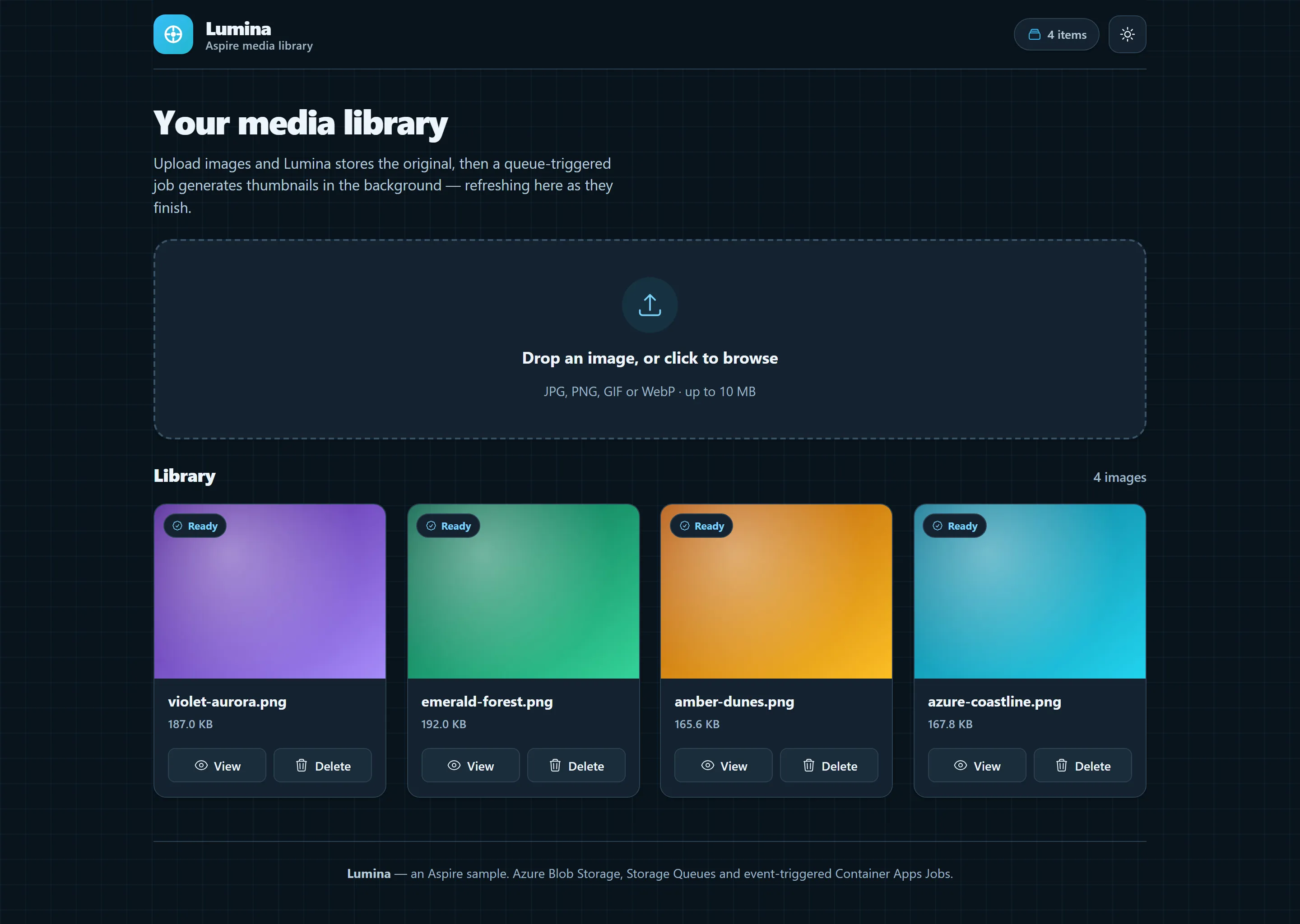
Lumina media library, light theme
The entry point that composes every resource and dependency in this sample's distributed application.
#pragma warning disable ASPIRECSHARPAPPS001#pragma warning disable ASPIREAZURE002
#:sdk Aspire.AppHost.Sdk@13.6.0#:package Aspire.Hosting.Azure.Storage@13.6.0#:package Aspire.Hosting.Azure.Sql@13.6.0#:package Aspire.Hosting.JavaScript@13.6.0#:package Aspire.Hosting.Azure.AppContainers@13.6.0
using Aspire.Hosting.Azure;using Azure.Provisioning.AppContainers;using Azure.Provisioning.Expressions;
var builder = DistributedApplication.CreateBuilder(args);
builder.AddAzureContainerAppEnvironment("env");
// Storage: Use Azurite emulator in run mode, real Azure in publish modevar storage = builder.AddAzureStorage("storage")                .RunAsEmulator();
var blobs = storage.AddBlobContainer("images");var queues = storage.AddQueues("queues");
// Azure SQL Databasevar sql = builder.AddAzureSqlServer("sql")    .RunAsContainer(c => c.WithLifetime(ContainerLifetime.Persistent))    .AddDatabase("imagedb");
// API: Upload images, queue thumbnail jobs, serve metadatavar api = builder.AddCSharpApp("api", "./api")    .WithHttpHealthCheck("/health")    .WithExternalHttpEndpoints()    .WaitFor(sql)    .WithReference(blobs)    .WithReference(queues)    .WithReference(sql)    .WithUrls(context =>    {        foreach (var u in context.Urls)        {            u.DisplayLocation = UrlDisplayLocation.DetailsOnly;        }
        context.Urls.Add(new()        {            Url = "/scalar",            DisplayText = "API Reference",            Endpoint = context.GetEndpoint("https")        });    })    .PublishAsAzureContainerApp((infra, app) =>    {        // Scale to zero when idle        app.Template.Scale.MinReplicas = 0;    });
// Worker: Container Apps Job for queue-triggered thumbnail generation// Event-driven: starts when messages arrive, exits within ~5 seconds when queue is emptyvar worker = builder.AddCSharpApp("worker", "./worker")    .WithReference(blobs)    .WithReference(queues)    .WithReference(sql)    .WaitFor(sql)    .WaitFor(queues);
if (builder.ExecutionContext.IsRunMode){    // In run mode, keep worker running continuously for fast local development    worker = worker.WithEnvironment("WORKER_RUN_CONTINUOUSLY", "true");}else{    // In publish mode, use event-driven scaling based on queue depth    worker.PublishAsAzureContainerAppJob((infra, job) =>    {        var accountNameParameter = queues.Resource.Parent.NameOutputReference.AsProvisioningParameter(infra);
        // Resolve the identity annotation added to the worker app        if (!worker.Resource.TryGetLastAnnotation<AppIdentityAnnotation>(out var identityAnnotation))        {            throw new InvalidOperationException("Identity annotation not found.");        }
        job.Configuration.TriggerType = ContainerAppJobTriggerType.Event;        job.Configuration.EventTriggerConfig.Scale.PollingIntervalInSeconds = 1;        job.Configuration.EventTriggerConfig.Scale.Rules.Add(new ContainerAppJobScaleRule        {            Name = "queue-rule",            JobScaleRuleType = "azure-queue",            Metadata = new ObjectExpression(                new PropertyExpression("accountName", new IdentifierExpression(accountNameParameter.BicepIdentifier)),                new PropertyExpression("queueName", new StringLiteralExpression("thumbnails")),                new PropertyExpression("queueLength", new IntLiteralExpression(1))            ),            Identity = identityAnnotation.IdentityResource.Id.AsProvisioningParameter(infra)        });    });}
// Frontend: Vite+React for upload and gallery UIvar frontend = builder.AddViteApp("frontend", "./frontend")    .WithEndpoint("http", e => e.Port = 9080)    .WithReference(api)    .WithUrl("", "Image Gallery");
// Publish: Embed frontend build output in API containerapi.PublishWithContainerFiles(frontend, "wwwroot");
builder.Build().Run();
Upload images to Azure Blob Storage with queue-triggered thumbnail generation. Demonstrates event-driven Container Apps Jobs with queue-based autoscaling, managed identity authentication, and Azure SQL free tier - can run entirely within Azure free tier limits.
The Lumina front end is a productized media library built with React, TypeScript, CSS Modules and Heroicons. It ships light and dark themes (honoring prefers-color-scheme), an accessible drag-and-drop upload flow, live thumbnail polling and a keyboard-operable lightbox.
Architecture
Section titled ArchitectureRun Mode:
flowchart LR
    Browser --> Vite[Vite Dev Server<br/>HMR enabled]
    Vite -->|Proxy /api| API[C# API]
    API --> Azurite[Azurite Emulator<br/>Blobs + Queues]
    API --> SQL[SQL Server]
    Worker[Background Worker<br/>Runs continuously] --> Azurite
    Worker --> SQL
    Azurite -.Queue Message.-> Worker
Publish Mode:
flowchart LR
    Browser --> API[C# API serving<br/>Vite build output<br/>'npm run build']
    API --> Blobs[Azure Blob Storage]
    API --> Queue[Azure Storage Queue]
    API --> SQL[Azure SQL]
    Job[Container Apps Job<br/>Event-triggered<br/>Scales on queue depth] --> Blobs
    Job --> SQL
    Queue -.Queue Trigger.-> Job
How it works
Section titled How it worksEvent-Driven thumbnail processing
Section titled Event-Driven thumbnail processingUpload: User uploads image → API saves to Azure Blob Storage and metadata to Azure SQL
Queue: API enqueues thumbnail generation message to Azure Storage Queue
Trigger: Azure monitors queue depth and automatically starts a Container Apps Job instance
Process: Job processes messages in batches (up to 10), generates thumbnails using SkiaSharp
Scale Down: After 2 empty polls (~5 seconds), job exits; new instances start automatically when messages arrive
Local development vs production
Section titled Local development vs productionProduction (Event-Triggered):
Job starts when queue depth > 0, exits within ~5 seconds when empty
API and worker both scale to zero when idle
Local Development (Continuous):
Worker runs continuously, polls every 5 seconds
Instant feedback with Azurite emulator and SQL Server container
What this demonstrates
Section titled What this demonstratesEvent-Driven Jobs: Container Apps Jobs with queue-based autoscaling rules using Azure.Provisioning APIs
Dual-Mode Resources: Azurite/SQL Server containers locally, Azure services in production (
.RunAsEmulator(),.RunAsContainer())Free Tier Deployment: Azure SQL free tier with serverless auto-pause, Container Apps scale-to-zero
Managed Identity: Password-less authentication to all Azure resources (Storage, SQL, Queues)
Polyglot Stack: Vite+React frontend embedded in C# API container, SkiaSharp for image processing
OpenTelemetry: Distributed tracing across upload → queue → worker pipeline
Running locally
Section titled Running locallyaspire runNo Azure resources required - uses Azurite emulator and SQL Server container.
Deploying to azure
Section titled Deploying to azurePrerequisites for deployment:
Commands:
aspire run # Run locally with Azuriteaspire publish # Generate Bicep files to explore deployment artifacts (output in ./aspire-output)aspire deploy # Deploy to Azure Container AppsSecurity notes
Section titled Security notesImplemented:
✅ Managed Identity: Password-less authentication to all Azure resources (no connection strings or secrets)
✅ XSRF Protection: Antiforgery tokens protect upload/delete endpoints from cross-site request forgery attacks (docs)
✅ Input Validation: 10 MB file size limit, extension allowlist (.jpg, .jpeg, .png, .gif, .webp), and server-side image byte validation before saving or queueing uploads (file upload security)
✅ Filename Sanitization: Path traversal prevention, 255 char limit
✅ Resource Limits: Pagination (max 100 items), retry limits (3 attempts), size checks (20 MB max)
Not Implemented (Required for Production):
❌ Authentication & Authorization: Endpoints are public - anyone can upload/delete
❌ Rate Limiting: No protection against abuse or DoS (docs)
❌ Malware Scanning: Image byte validation rejects unsupported or malformed images, but production upload workflows should consider malware scanning and the broader ASP.NET Core security guidance
Key aspire patterns
Section titled Key aspire patternsAzure Storage Emulation - Automatic Azurite in run mode, real Azure in publish:
var storage = builder.AddAzureStorage("storage").RunAsEmulator();var blobs = storage.AddBlobContainer("images");var queues = storage.AddQueues("queues");Azure SQL Dual Mode - SQL Server container locally, Azure SQL free tier in production:
var sql = builder.AddAzureSqlServer("sql") .RunAsContainer() .AddDatabase("imagedb");Defaults to Azure SQL free tier with serverless auto-pause (SKU: GP_S_Gen5_2).
Scale to Zero - API only runs when handling requests:
api.PublishAsAzureContainerApp((infra, app) =>{ app.Template.Scale.MinReplicas = 0;});Event-Triggered Container App Job - Direct control over Azure resources with Azure.Provisioning libraries:
This example demonstrates using the Azure.Provisioning libraries to directly configure low-level Azure resources (Bicep/ARM) from the AppHost. This provides complete flexibility and control when Aspire's higher-level APIs don't expose specific features.
worker.PublishAsAzureContainerAppJob((infra, job) =>{    // Direct access to Azure Provisioning APIs - full control over Bicep/ARM templates
    // Get storage account name for queue authentication    var accountNameParameter = queues.Resource.Parent.NameOutputReference.AsProvisioningParameter(infra);
    // Configure event-driven trigger using Container Apps Job APIs    job.Configuration.TriggerType = ContainerAppJobTriggerType.Event;    job.Configuration.EventTriggerConfig.Scale.Rules.Add(new ContainerAppJobScaleRule    {        Name = "queue-rule",        JobScaleRuleType = "azure-queue",        Metadata = new ObjectExpression(            // Bicep expressions - referencing other resources dynamically            new PropertyExpression("accountName", new IdentifierExpression(accountNameParameter.BicepIdentifier)),            new PropertyExpression("queueName", new StringLiteralExpression("thumbnails")),            new PropertyExpression("queueLength", new IntLiteralExpression(1)) // Start job when 1+ messages        ),        Identity = identityAnnotation.IdentityResource.Id.AsProvisioningParameter(infra) // Use managed identity    });});
This approach gives you full control over Azure resource configuration without waiting for Aspire abstractions to expose every feature. The C# strongly-typed APIs generate correct Bicep/ARM templates with automatic dependency tracking and parameter passing between resources. You can seamlessly mix high-level Aspire APIs with low-level Azure Provisioning when you need fine-grained control.
Dual-Mode Worker - Continuous in run mode, event-triggered in publish mode:
// AppHost: Set environment variable only in run modeif (builder.ExecutionContext.IsRunMode){    worker = worker.WithEnvironment("WORKER_RUN_CONTINUOUSLY", "true");}
// Worker: Adapt behavior based on modeif (_configuration.GetValue<bool>("WORKER_RUN_CONTINUOUSLY")){    // Local dev: poll every 5 seconds, run forever    await ExecuteContinuousAsync(stoppingToken);}else{    // Production: poll up to 2 times (5s intervals), exit when empty    // MaxEmptyPolls = 2, EmptyPollWaitSeconds = 5    await ExecuteScheduledAsync(stoppingToken);}
Graceful Shutdown - Event-triggered mode always stops, exceptions crash naturally:
if (_configuration.GetValue<bool>("WORKER_RUN_CONTINUOUSLY")){ // Continuous mode: run forever, let exceptions crash the app await ExecuteContinuousAsync(stoppingToken);}else{ try { // Event-triggered mode: process messages until queue empty, then shutdown await ExecuteScheduledAsync(stoppingToken); } finally { // Always stop application when done (success or exception) // New instances will start automatically when queue has messages _hostApplicationLifetime.StopApplication(); }}Container Files Publishing - Embed Vite build output in API container:
api.PublishWithContainerFiles(frontend, "wwwroot");Performance & cost characteristics
Section titled Performance & cost characteristicsResponse Times:
Thumbnail generation: typically ready within seconds of upload
Local development: instant feedback with continuous polling
Cost Optimization:
Compute: API and worker scale to zero when idle (~5 seconds), only pay for active processing
SQL: Free tier with serverless auto-pause (GP_S_Gen5_2), free up to monthly limits
Storage: Pay only for blob storage used, queues/blobs have minimal costs at low volumes
Result: Can run entirely within Azure free tier limits
Further optimization: Using SAS URLs instead of API blob streaming would eliminate compute/egress costs for serving images
Scalability:
Parallel job instances spawn automatically for high queue depth
Batch processing (up to 10 messages per poll)
Managed identity eliminates secrets management overhead
Sample screenshots
Select the image to zoom in.
 Aspire