


Clone, run, and explore this sample
Distributed task processing with Python, C#, and Node.js workers using RabbitMQ and end-to-end OpenTelemetry tracing.
The entry point that composes every resource and dependency in this sample's distributed application.
import { ContainerLifetime, UrlDisplayLocation, createBuilder } from "./.aspire/modules/aspire.mjs";
const builder = await createBuilder();
await builder.addDockerComposeEnvironment("dc");
const rabbitmq = await builder.addRabbitMQ("messaging")    .withManagementPlugin()    .withLifetime(ContainerLifetime.Persistent)    .withUrlForEndpoint("tcp", async (url) =>    {        url.displayLocation = UrlDisplayLocation.DetailsOnly;    })    .withUrlForEndpoint("management", async (url) =>    {        url.displayText = "RabbitMQ Management UI";    });
const api = await builder.addNodeApp("api", "./api", "index.js")    .withHttpEndpoint({ env: "PORT" })    .withHttpHealthCheck({ path: "/health" })    .waitFor(rabbitmq)    .withReference(rabbitmq);
const frontend = await builder.addViteApp("frontend", "./frontend")    .withReference(api)    .withUrl("", { displayText: "Task Queue UI" });
await builder.addPythonApp("worker-python", "./worker-python", "main.py")    .withUv()    .waitFor(rabbitmq)    .withReference(rabbitmq);
await builder.addCSharpApp("worker-csharp", "./worker-csharp")    .waitFor(rabbitmq)    .withReference(rabbitmq);
await api.publishWithContainerFiles(frontend, "public");
await builder.build().run();
Distributed task processing with Python, C#, and Node.js workers using RabbitMQ and end-to-end OpenTelemetry tracing.
Architecture
Section titled Architecturegraph TB
subgraph Frontend
UI[Vite React UI]
end
subgraph "Node.js API"
HTTP[HTTP Endpoints]
Cache[(In-Memory Cache)]
PubChan[Publisher Channel]
ConsChan[Consumer Channel]
end
subgraph RabbitMQ
TasksQ[tasks queue]
StatusQ[task_status queue]
ResultsQ[results queue]
end
subgraph Workers
PythonW[Python Worker<br/>pandas/numpy]
CSharpW[C# Worker<br/>strong typing]
end
UI -->|HTTP| HTTP
HTTP -->|Read| Cache
HTTP -->|Publish| PubChan
PubChan --> TasksQ
PubChan --> StatusQ
ConsChan -.->|Consume & Update| StatusQ
ConsChan -.->|Consume & Update| ResultsQ
ConsChan --> Cache
TasksQ --> PythonW
TasksQ --> CSharpW
PythonW --> StatusQ
PythonW --> ResultsQ
CSharpW --> StatusQ
CSharpW --> ResultsQRabbitMQ is the source of truth - API maintains in-memory cache built from consuming messages.
What this demonstrates
Section titled What this demonstratesaddRabbitMQ: Message queue with management plugin
addNodeApp: Express API with dual RabbitMQ channels (publisher + consumer)
addPythonApp: Python worker with pandas/numpy for data analysis
addCSharpApp: C# worker with strong typing for reports
addViteApp: React + TypeScript frontend
OpenTelemetry: End-to-end distributed tracing across all services
Trace Context Propagation: OpenTelemetry context through RabbitMQ headers
Messaging Semantic Conventions: Standardized span attributes for queue operations
Event-Driven State: Stateless API, RabbitMQ as source of truth
Running
Section titled Runningaspire runCommands
Section titled Commandsaspire run # Run locallyaspire deploy # Deploy to Docker Composeaspire do docker-compose-down-dc # Teardown deploymentSecurity notes
Section titled Security notesThis sample is intended for local demo use. RabbitMQ messages are treated as trusted internal messages, and the public HTTP endpoints are unauthenticated.
The Node.js API applies simple guardrails for the demo: JSON request bodies are limited to 64 KB, task type must be analyze or report, task data is capped at 10,000 characters, and GET /tasks returns the latest 100 tasks by default with ?limit= capped at 500. Production services should add explicit input schemas, authentication and authorization, rate limits, a RabbitMQ retry/dead-letter policy, and capacity limits for queues, stored results, and in-memory caches.
The workers acknowledge or drop invalid and failed messages instead of requeueing indefinitely. For production, configure bounded retries and a dead-letter exchange so poison messages can be inspected without blocking queue processing.
Relevant references:
Key aspire patterns
Section titled Key aspire patternsRabbitMQ Setup - Message queue with management UI:
const rabbitmq = await builder.addRabbitMQ("messaging") .withManagementPlugin() .withLifetime(ContainerLifetime.Persistent) .withUrlForEndpoint("management", async (url) => { url.displayText = "RabbitMQ Management UI"; });OpenTelemetry - Automatic configuration via environment variables:
OTEL_EXPORTER_OTLP_ENDPOINT: Aspire dashboard endpointOTEL_SERVICE_NAME: Service identifier for traces
Service References - Automatic connection injection:
const api = await builder.addNodeApp("api", "./api", "index.js") .waitFor(rabbitmq) .withReference(rabbitmq); // Injects MESSAGING_URITrace Context Propagation - OpenTelemetry context through message headers:
// Node.js - Inject contextpropagation.inject(context.active(), headers);channel.sendToQueue(queue, Buffer.from(JSON.stringify(message)), { headers });
// Extract contextconst parentContext = propagation.extract(context.active(), msg.properties.headers);
# Python - Extract contextctx = propagate.extract(dict(message.headers) if message.headers else {})with tracer.start_as_current_span('process task', context=ctx): # Process taskMessaging Semantic Conventions:
messaging.system: "rabbitmq"messaging.destination.name: Queue namemessaging.operation: "publish" or "process"
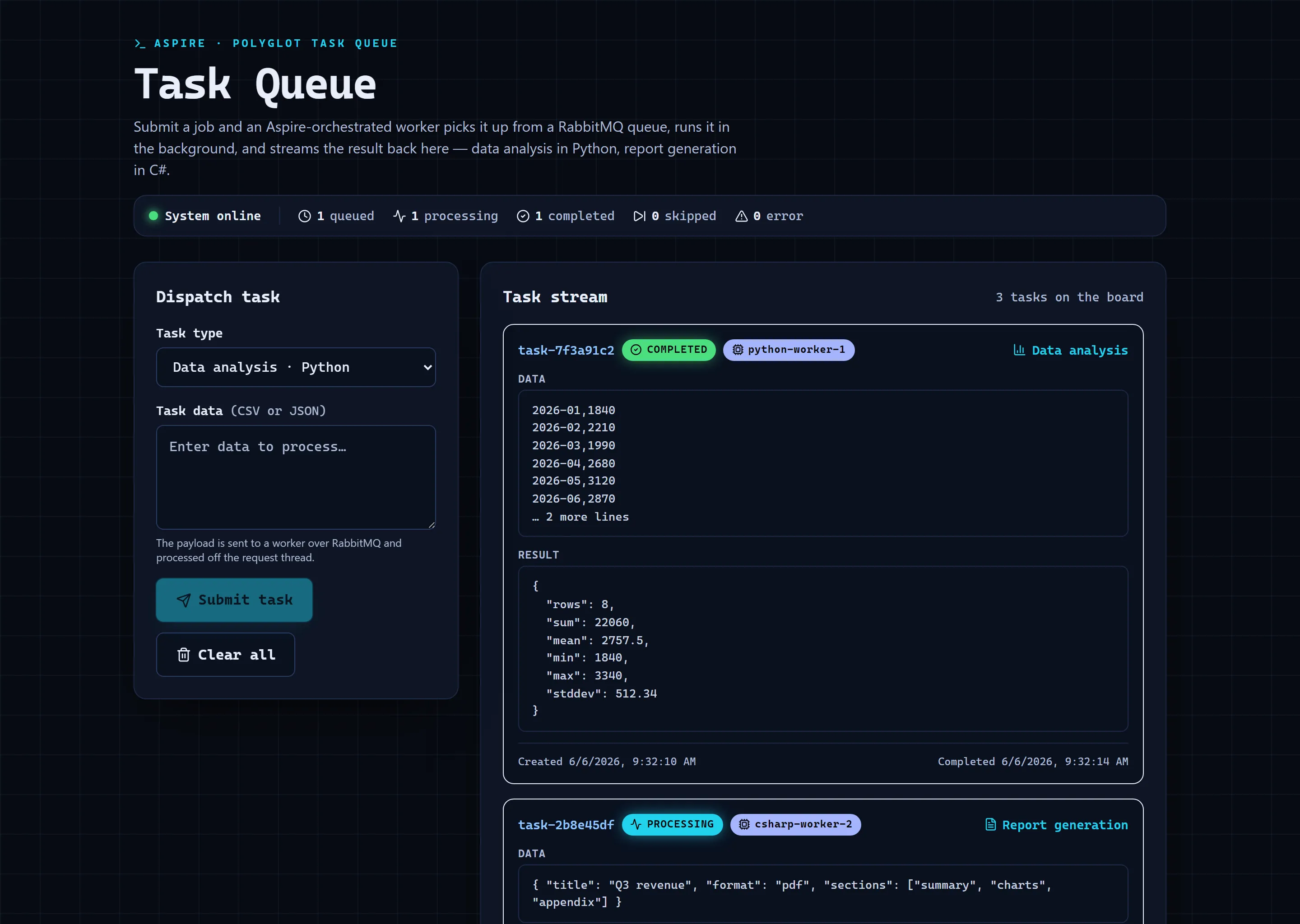
Sample screenshots
Select the image to zoom in.
 Aspire