


Clone, run, and explore this sample
FastAPI REST API with PostgreSQL database using Aspire Python support.
The entry point that composes every resource and dependency in this sample's distributed application.
import { createBuilder } from "./.aspire/modules/aspire.mjs";
const builder = await createBuilder();
await builder.addDockerComposeEnvironment("dc");
const postgres = await builder.addPostgres("postgres")    .withPgAdmin();const db = await postgres.addDatabase("db");
await builder.addUvicornApp("api", "./api", "main:app")    .withExternalHttpEndpoints()    .waitFor(db)    .withReference(db)    .withReference(postgres);
await builder.build().run();
This sample demonstrates Aspire 13's polyglot platform support for Python applications, showcasing a simple CRUD API built with FastAPI and PostgreSQL.
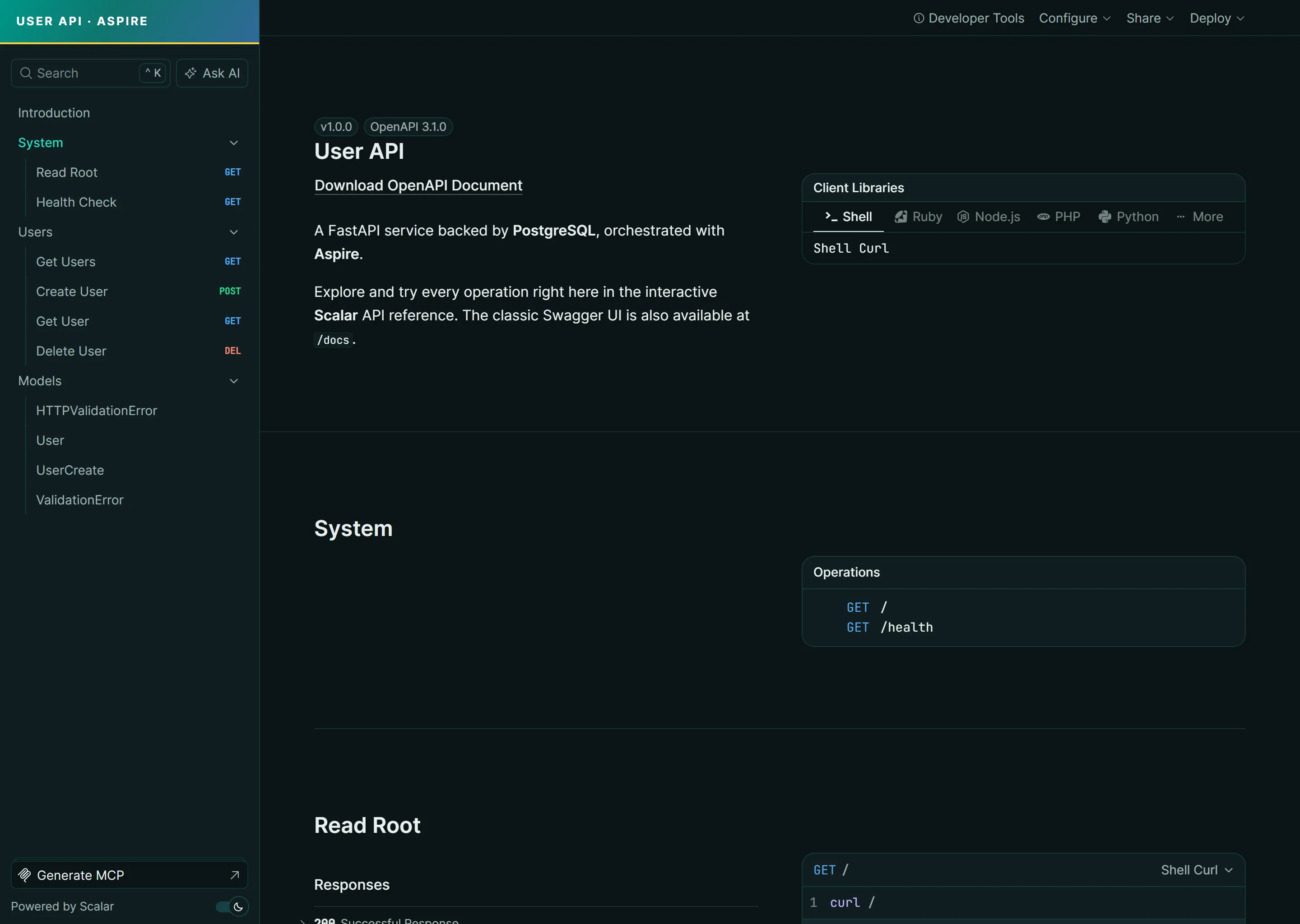
It also ships a bespoke, on-brand Scalar API reference as its developer-facing UX — a themed FastAPI/Python developer portal served at /scalar, with the classic Swagger UI still available at /docs.
Quick start
Section titled Quick startPrerequisites
Section titled PrerequisitesCommands
Section titled Commandsaspire run # Run locallyaspire deploy # Deploy to Docker Composeaspire do docker-compose-down-dc # Teardown deploymentOverview
Section titled OverviewThe application consists of:
Aspire AppHost - Orchestrates the Python API and PostgreSQL database
FastAPI API - Python web API with CRUD operations for users
PostgreSQL - Database for storing user data
pgAdmin - Web-based PostgreSQL administration tool for local/demo use
Key code
Section titled Key codeThe apphost.mts configuration demonstrates Aspire 13's Python support:
import { createBuilder } from "./.aspire/modules/aspire.mjs";
const builder = await createBuilder();
await builder.addDockerComposeEnvironment("dc");
const postgres = await builder.addPostgres("postgres")    .withPgAdmin();const db = await postgres.addDatabase("db");
await builder.addUvicornApp("api", "./api", "main:app")    .withExternalHttpEndpoints()    .waitFor(db)    .withReference(db)    .withReference(postgres);
await builder.build().run();
Key features:
Python Polyglot Support: Uses
addUvicornAppto run FastAPI applicationsPgAdmin Integration:
.withPgAdmin()adds a web-based database management tool for local/demo useStartup Dependencies:
.waitFor(db)ensures the database is ready before starting the APIDatabase Connection: Aspire provides connection properties via
POSTGRES_*environment variablesExternal HTTP Endpoints: Enables external access to the API
Docker Compose Deployment: Ready for containerized deployment
API endpoints
Section titled API endpointsThe FastAPI application provides the following endpoints:
GET /- API informationGET /health- Health check with database connectivity testGET /users?limit=100&offset=0- List users with capped paginationGET /users/{id}- Get a specific userPOST /users- Create a new userDELETE /users/{id}- Delete a user
Interactive API documentation is available at:
GET /scalar- Themed Scalar API reference (the highlighted UX)GET /docs- Swagger UIGET /redoc- ReDoc
How it works
Section titled How it worksVirtual Environment: Aspire automatically creates a
.venvdirectory and installs dependencies fromrequirements.txtModular Architecture: The API is organized into separate modules:
models.py- Pydantic models for data validationdatabase.py- Database connection and repository patternscalar_theme.py- Custom teal/Python theming for the Scalar API referencemain.py- FastAPI routes and application setup
Database Initialization: On startup, the API creates the
userstable if it doesn't existConnection Management: Aspire provides PostgreSQL connection via
POSTGRES_*environment variables (non-.NET connection property pattern)Startup Dependencies: The API waits for PostgreSQL to be ready before starting
Development Experience: Zero configuration - Aspire handles virtual environment, dependency installation, and process management
Security notes
Section titled Security notesThis sample is intentionally simple demo code. The API exposes public, unauthenticated CRUD endpoints and does not implement CSRF protection, rate limiting, authorization, or user/session management. Before using this pattern in production, add authentication and authorization, apply rate limits, review CSRF requirements for browser clients, and follow the FastAPI security documentation and OWASP API Security Top 10.
The POST /users payload uses Pydantic field constraints for name and email, and GET /users uses bounded limit and offset query parameters to avoid returning an unbounded result set. The email check is a lightweight constrained-string pattern to avoid adding the optional email-validator package required by Pydantic EmailStr; use EmailStr or stricter domain-specific validation if your application needs full email address validation. See the FastAPI request body field documentation and Pydantic field validation documentation for more validation options.
The startup database creation path composes the database identifier with psycopg.sql.Identifier instead of string interpolation. In this Aspire sample, DB_DATABASE is generated by the AppHost and trusted for local development, but production code should still quote or validate SQL identifiers and prefer least-privilege credentials that cannot create arbitrary databases. See the Psycopg SQL composition documentation.
pgAdmin is included as local/demo tooling through .withPgAdmin(). Do not expose pgAdmin publicly without strong authentication, network restrictions, TLS, secret management, and operational monitoring.
VS code integration
Section titled VS code integrationThis sample includes VS Code configuration for Python development:
.vscode/settings.json: Configures the Python interpreter to use the Aspire-created virtual environmentAfter running
aspire run, open the sample in VS Code for full IntelliSense and debugging supportThe virtual environment at
api/.venvwill be automatically detected
Deployment
Section titled DeploymentThe sample uses Docker Compose for deployment. Run:
aspire deployThis will:
Generate a Dockerfile for the Python application
Install dependencies and create a container image
Generate Docker Compose files with PostgreSQL
Deploy the complete application stack
To teardown:
aspire do docker-compose-down-dcSample screenshots
Select the image to zoom in.
 Aspire