Aspire 13.6 lets you revisit completed application runs with SQLite-backed telemetry and run history, and work with AppHost-owned terminals without leaving the dashboard. It adds first-party Java and Rust hosting, preview Azure Connector Namespace support, and preview Azure Container Apps Sandboxes. Portable volume paths, coordinated .NET builds, and new CLI workflows make local development and deployment more consistent.
We’d love to hear what you think. Drop by Discord to chat with the team and the community, or file feedback and issues on GitHub.
This release introduces:
Persistent dashboards that store resource snapshots and telemetry in SQLite, so you can revisit up to ten completed runs, keep more logs and traces, and dock AppHost-owned terminals, all on a new Native AOT dashboard with a refreshed Fluent UI v5 interface.
First-party Java and Rust hosting, preview Azure Connector Namespace support, and experimental Azure Container Apps Sandboxes as a deployment target.
More flexible AppHosts, with coordinated .NET project builds, portable volume paths that work the same locally and in containers, and TypeScript AppHost configuration loaded from appsettings.json.
A sharper CLI that pins repository-local versions, selects launch profiles, exports TypeScript API data, and scripts terminals.
A Visual Studio Code extension that drives AppHosts from coding agents, runs deployment and pipeline actions from the Aspire pane, and handles multi-root workspaces and git worktrees.
More predictable deployment, with Azure infrastructure customization from polyglot AppHosts, isolated deployment state, and preserved Kubernetes hostnames and parameter values.
Integration updates including docked database and cache REPLs, Deno hosting, MongoDB replica sets, Foundry Toolboxes, remote Foundry Local services, and Blazor WebAssembly debugging.
Updated emulator images, including Azure App Configuration 1.2.0 and the Linux-based vNext Cosmos DB emulator as the new default.
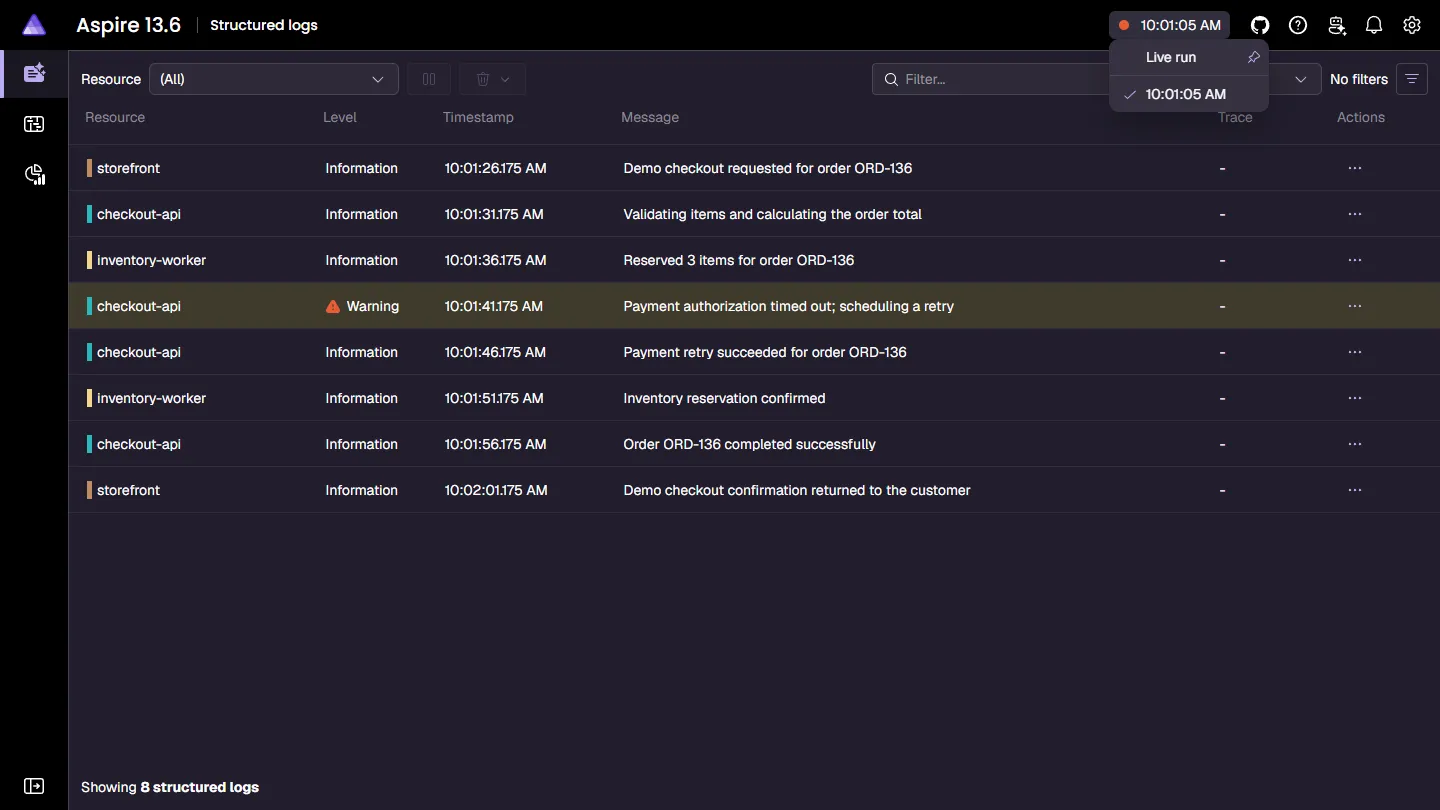
The Aspire dashboard now stores resource snapshots and telemetry in a versioned SQLite database. The dashboard started by an AppHost uses Run persistence by default, retains up to ten runs per application, and adds a header selector for switching between the live run and completed runs. Historical runs are read-only, so you can compare resources, logs, traces, and metrics without changing the earlier application state.
The standalone dashboard still defaults to temporary None persistence. To keep one standalone dashboard database across restarts, give it a stable application name and select Resume:
When you run the dashboard in a container, mount ASPIRE_DASHBOARD_DATA_DIRECTORY from persistent storage and reuse the same application name, directory, and persistence mode.
Filtering, searching, paging, and aggregation operate on persisted telemetry, so you can investigate an earlier run using the same tools as a live one.
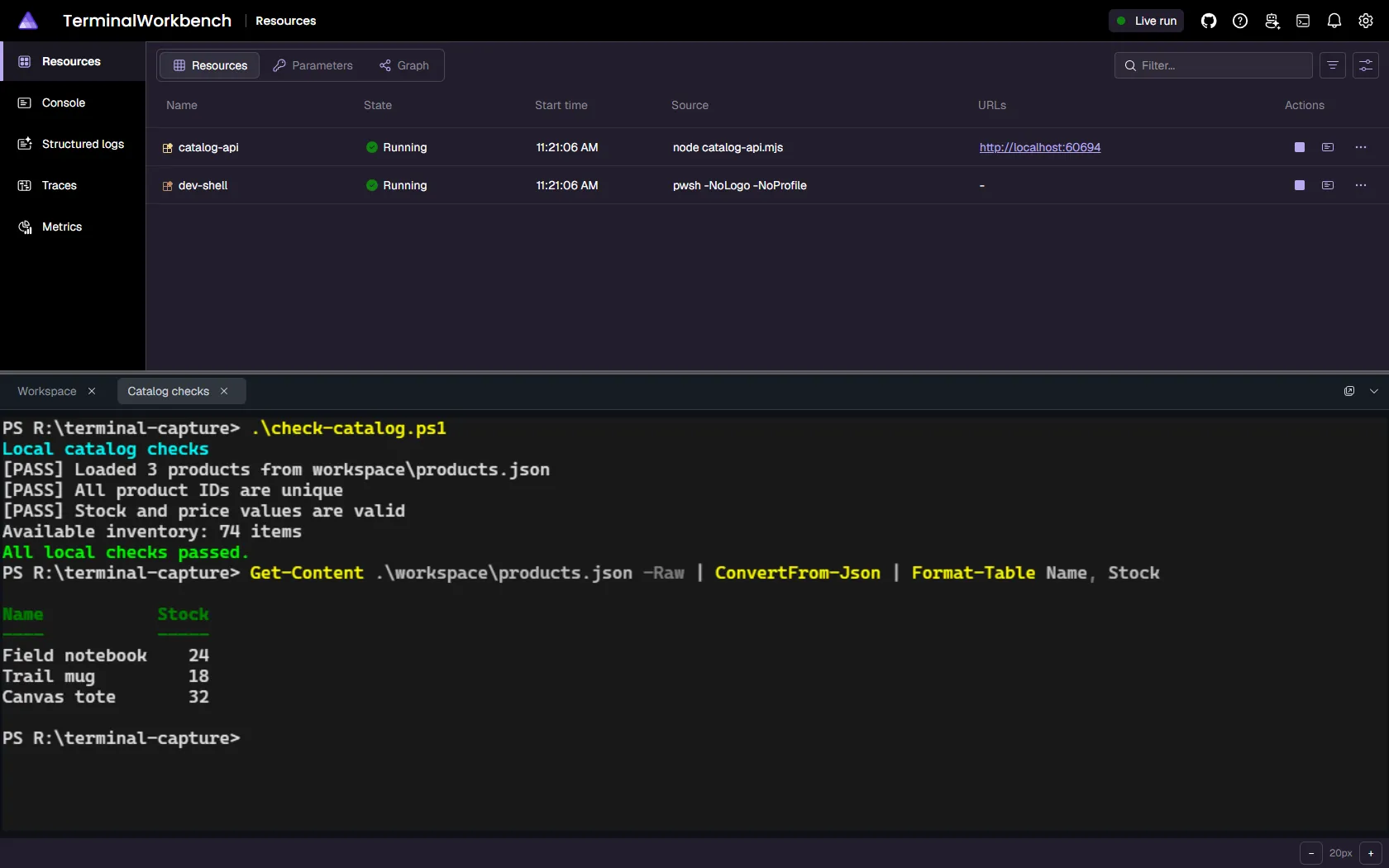
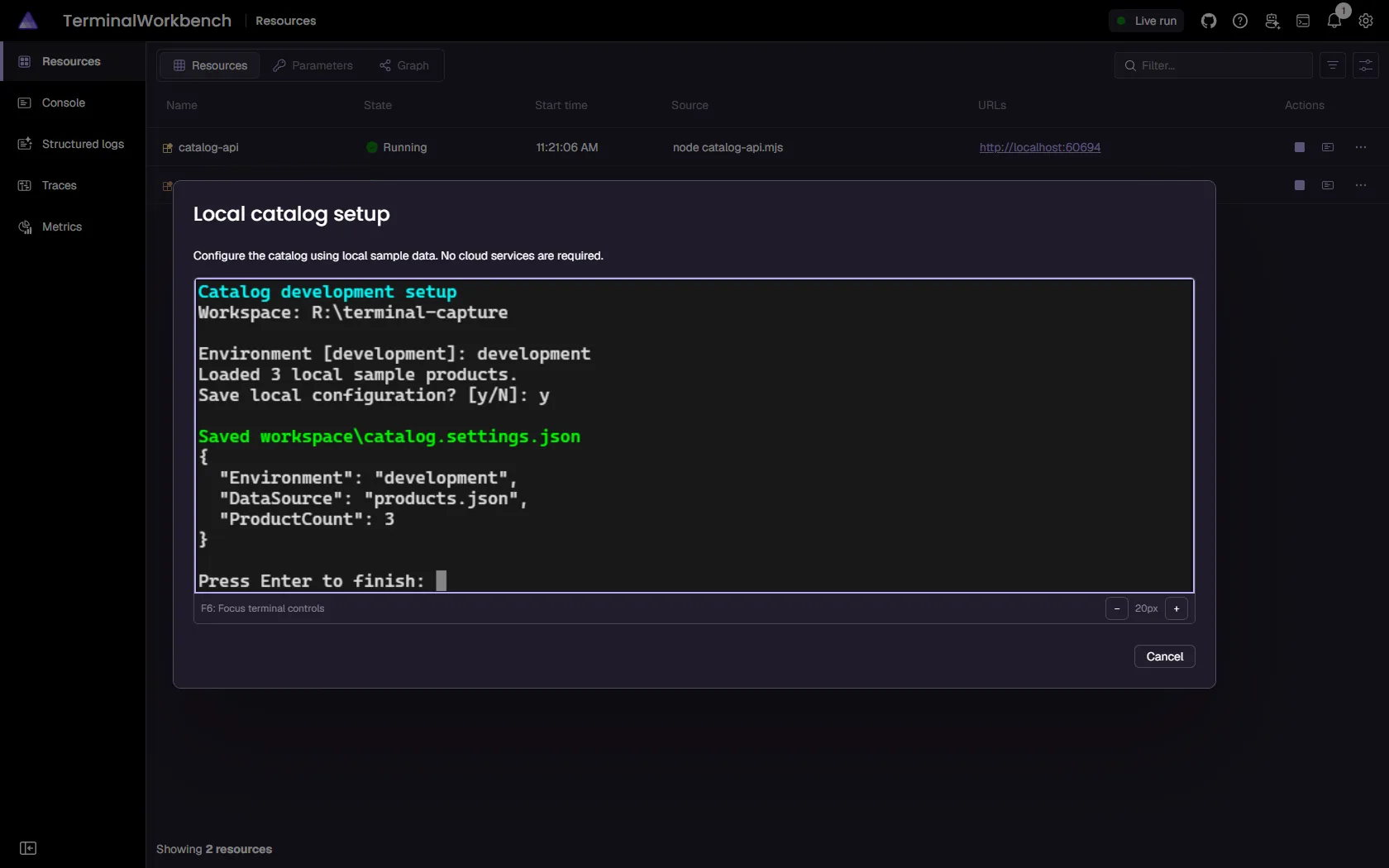
AppHosts can create terminals for setup tools, interactive commands, and other workflows through the experimental TerminalService API. Terminals can appear in a resizable dashboard dock, in an interaction dialog, or in a separate window. AppHost code can send input, read snapshots, and wait for text instead of relying on fixed delays to automate a terminal.
Terminal interactions bring setup workflows into a focused dialog:
These APIs use ASPIRETERMINAL001. An AppHost-owned terminal belongs to its creator: closing a viewer isn’t a general substitute for disposing the terminal, and stopping the AppHost stops its owned terminals. Resource terminals configured with WithTerminal remain separate from AppHost-owned dock tabs. For example, the following AppHost gives a Python REPL its own resource terminal:
Opt into WithRepl / withRepl on PostgreSQL, MySQL, MongoDB, SQL Server, Redis, or Valkey to open the container’s bundled client from a REPL dashboard command. No local database client installation is needed.
var builder =DistributedApplication.CreateBuilder(args);
builder.AddRedis("cache").WithRepl();
builder.Build().Run();
REPL commands are run-only and disabled unless you opt in. They use the resource’s actual credentials and aren’t read-only, so enable them only for trusted dashboard users. Exit the client explicitly before closing its terminal tab; closing the viewer alone can leave the client process running inside the container.
The default limits for console log messages, structured logs, and traces increase to 100,000 each. These are bounded retention limits, not unlimited history; the dashboard removes older entries when a limit is exceeded.
Authentication and antiforgery cookie names now include an application-specific suffix derived from Dashboard:ApplicationName. This avoids cookie collisions between dashboards on the same hostname. Changing the application name requires signing in again; application-name scoping isn’t a security boundary.
Other dashboard improvements include:
The dashboard ships as Native AOT and uses Fluent UI v5. Normal startup selects the packaged dashboard automatically, without a new configuration switch.
Pinning or unpinning a historical run keeps the selector open and preserves the current selection.
The backtick key opens and hides the terminal dock; the dashboard header and mobile navigation don’t include a terminal entry. The empty dock shows No docked terminals and a More information link.
Management UI integrations expose Manage links on the resources they administer, reducing the need to find a separate management container.
The azure-environment resource uses a filled cloud icon instead of the generic resource icon.
Cross-origin or malformed /_blazor WebSocket upgrades are rejected before a dashboard circuit is allocated.
Pausing telemetry displays a consistent warning across telemetry pages.
Dashboard Markdown links use stricter URL validation.
Database spans resolve to the correct database resource, and multi-path icons no longer break the graph view.
Filter controls disable browser autocomplete.
The azure-environment control resource now shows a filled cloud icon on the Resources page instead of the generic fallback icon.
Dialogs expand to use the available vertical space before scrolling, and disabled text inputs, dropdowns, number inputs, and checkboxes use consistent dark-theme surfaces.
The standalone dashboard now publishes and runs as a Native AOT executable, shipping as a self-contained, dedicated bundle instead of routing through the managed dashboard subcommand. Existing aspire dashboard run, AppHost startup, and CLI profile-capture workflows select the right dashboard automatically, and older AppHosts keep a managed fallback, so no command-line changes are required.
The dashboard also moves to Fluent UI Blazor v5. Resources, console logs, structured logs, traces, and metrics keep the same workflows, and the desktop navigation becomes a collapsible rail that you can expand to show page labels or collapse to icons. Your choice of mode persists across reloads.
Aspire 13.6 adds first-party hosting integrations for Java, Rust, Azure Connector Namespace, and Azure Container Apps Sandboxes. Java and Rust build on implementations that originated in the Aspire Community Toolkit.
The new Aspire.Hosting.Java package supports executable JARs, Maven and Gradle wrappers, Spring Boot, Quarkus, and prebuilt Java container images. It can detect the target Java release from Maven or Gradle, generate a multi-stage Dockerfile for publishing, attach the OpenTelemetry Java agent, and run both Java resources and Java AppHosts under the Visual Studio Code debugger.
The generated container path uses the repository’s Maven or Gradle wrapper rather than a machine-global tool, rejects paths outside the build context, and runs the application as a non-root user.
var builder =DistributedApplication.CreateBuilder(args);
builder.AddSpringBootApp("catalog","../catalog")
.WithExternalHttpEndpoints();
builder.Build().Run();
AddSpringBootApp / addSpringBootApp detect Maven or Gradle from the build file, build the app, and declare an HTTP endpoint through SERVER_PORT. Use AddJavaApp, AddQuarkusApp, or AddJavaContainer for other application shapes.
The new Aspire.Hosting.Rust package models Cargo applications through AddRustApp / addRustApp. Configure the Cargo binary target, arguments, and features independently from application arguments, then let Aspire generate a multi-stage Dockerfile for publish and deploy. Visual Studio Code can discover, run, and debug both Rust resources and apphost.rs AppHosts.
var builder =DistributedApplication.CreateBuilder(args);
builder.AddRustApp("api","../rust-api")
.WithHttpEndpoint(env:"PORT")
.WithExternalHttpEndpoints();
builder.Build().Run();
The first-party package doesn’t yet include the Community Toolkit integration’s Bacon support. Custom build and runtime images also remain responsible for ABI and linker compatibility.
The preview Aspire.Hosting.Azure.ConnectorNamespace package lets you model connections to external services and expose selected operations through managed MCP server configurations. Configure explicit operation allow-lists and Microsoft Entra access policies in your AppHost rather than managing each connection separately.
The service requires preview access in your Azure subscription and region. Referencing a connection supplies connection information, not authorization: you must grant the consuming identity access and complete any required OAuth consent separately. Removing a connection or access policy from the AppHost doesn’t revoke an already deployed Azure resource; delete it explicitly when retiring access.
The prerelease Aspire.Hosting.Azure.Sandboxes package adds Azure Container Apps Sandboxes as a deployment target. Add a sandbox group to your AppHost, and aspire deploy provisions the group, an Azure Container Registry, and the identities and role assignments the group needs. It then runs your project, container, and Dockerfile resources as isolated sandboxes. When the sandbox group is the only compute environment, Aspire assigns compute resources to it automatically.
When an AppHost defines multiple compute environments, select the target sandbox group with WithComputeEnvironment / withComputeEnvironment. PublishAsAzureSandbox / publishAsAzureSandbox configures sandbox-specific runtime options without taking a sandbox-group parameter.
Use PublishAsAzureSandbox / publishAsAzureSandbox to choose one of five resource tiers and to configure auto-suspend and auto-delete:
Only endpoints marked as external get a public HTTPS URL. Those URLs require Microsoft Entra ID authentication unless you opt in to anonymous access for a specific endpoint. Aspire resolves images to immutable Linux/amd64 digests and applies a deny-by-default egress policy. It also removes stale sandboxes and disk images on redeploy and on aspire destroy. For setup, identity, endpoint, and lifecycle details, see Deploy to Azure Container Apps Sandboxes.
The AddDotnetProject / addDotnetProject APIs now coordinate compatible projects into shared restore and build groups, avoiding repeated restores of overlapping project graphs. File-based C# apps use serialized direct builds. Use the resource’s Rebuild command after source changes; Start and Restart reuse the coordinated output.
These resources also participate in .NET SDK container publishing. You can select launch profiles from either AppHost language and separate MSBuild inputs with WithBuildEnvironment / withBuildEnvironment from runtime environment variables. Build-only variables aren’t supported for file-based apps and must not be used for secrets.
AddDotnetProject, DotnetProjectResource, and the related WithBuildEnvironment overloads no longer require ASPIREDOTNETPROJECT001 suppression in Aspire 13.6. This diagnostic was unnecessary for Aspire.Hosting.Dotnet because the package is already prerelease. Its APIs remain unstable and may change in future releases.
The diagnostic is also removed from AddDotnetProjectBlazorGateway and its WithBlazorClientApp overload in Aspire.Hosting.Blazor. This package also remains prerelease, and its APIs remain unstable and may change. The separate ASPIREBLAZOR001 diagnostic still applies to experimental Blazor hosting types.
Projects that depend on per-project restore hooks can opt into individual restore with Aspire:Dotnet:RestoreProjectsIndividually in the AppHost configuration.
Aspire also enables MSBuild’s multithreaded task execution (-mt) when the selected SDK supports it. Project and traversal builds require .NET SDK 11.0.100-rc.1 or later; file-based apps require 11.0.100-rtm.26473.104 or a stable 11.0.100 or later. Older or undetected SDKs keep the existing behavior.
To move an existing AppHost onto this model, the CLI bundles a Project V2 migration skill that guides AI coding agents through the conversion.
Applications often need a host filesystem path during local process execution and an in-container mount path after deployment. The new env argument on project and executable volume mounts lets the application consume one environment variable in both modes:
var builder =DistributedApplication.CreateBuilder(args);
builder.AddProject<Projects.Api>("api")
.WithVolume("data","/data", env:"DATA_PATH");
builder.Build().Run();
In run mode, DATA_PATH contains a deterministic, workload-scoped directory in the AppHost’s local store. Docker Compose, Kubernetes, Azure Container Apps, and other published workloads receive /data, so application code doesn’t need separate local and deployment path logic.
This convention also applies to Kubernetes persistent volumes through WithPersistentVolume(..., env: ...) and withKubernetesPersistentVolumeMount(..., { env }).
TypeScript AppHosts now load the standard configuration stack from the directory that contains apphost.mts. Place appsettings.json and environment-specific files beside the AppHost:
The managed server keeps its logging defaults, while application settings can override them. Environment variables and command-line arguments remain part of the configuration stack.
Deno 2 or later can now run the TypeScript AppHost itself, independently of any Deno guest applications it orchestrates. The CLI detects Deno from packageManager, deno.lock, deno.json, or deno.jsonc, uses its native type checking and watch mode, and configures certificate trust through DENO_CERT.
Dashboard-enabled integration tests. Set DistributedApplicationTestingBuilderOptions.EnableDashboard and call GetDashboardUrlAsync() to start a dashboard on dynamic loopback endpoints and obtain an authenticated URL without writing its browser token to logs.
Consistent file upload limits. The Interaction Service now enforces one file for single-file prompts and 100 files for multi-file prompts across dashboard, CLI, and custom clients. Server-generated temporary names and deterministic cleanup protect uploaded content.
Resolved debug environments. Extension authors can opt into the new experimental WithDebugSupport overload that receives LaunchConfigurationCallbackContext, including the resource’s resolved environment variables. Existing mode-based overloads keep their signatures; recompile and confirm binding because the synchronous overload now has OverloadResolutionPriority(-1).
More reliable local orchestration. DCP startup gets a readiness-aware timeout on contended hosts, terminal hosts clean up orphaned sockets, and proxied executable target ports use Aspire’s non-ephemeral range to avoid bind races.
Project and executable references to container network endpoints. Projects and executables can now resolve KnownNetworkIdentifiers.DefaultAspireContainerNetwork endpoints belonging to themselves or other project and executable resources. When the container tunnel is enabled, Aspire registers the referenced endpoint with the tunnel; when it’s disabled, Aspire resolves the endpoint through the container host name. In either case, configuration resolves instead of waiting indefinitely.
Cleaner emulator-only dashboards. When every Azure resource in the app model runs as a local emulator, Aspire hides the azure-environment resource from the dashboard instead of showing it stuck in Not started. Adding any Azure resource that requires provisioning keeps azure-environment visible.
Preserve explicit certificates. Project defaults no longer replace an application’s Kestrel default certificate when its environment already specifies a certificate path, key path, or subject.
aspire run and aspire start now accept --launch-profile with the -lp alias:
Aspire CLI — Select a launch profile
aspirerun--launch-profileDevelopment
aspirestart-lpDevelopment
The selected profile flows through direct AppHost launches, detached child processes, and Visual Studio Code delegation. When the CLI can’t safely reproduce a .NET profile, it delegates to dotnet run so the .NET SDK retains responsibility for validation and diagnostics.
The new aspire sdk export command emits a deterministic TypeScript API reference as JSON. It exports Aspire.Hosting at the running CLI SDK version by default, or an exact PackageName@Version supplied through --package. The exporter and generated TypeScript SDK now share one projector, preventing optional parameters, promise wrappers, DTOs, and enums from drifting between the two representations.
Aspire CLI — Export TypeScript API data
aspiresdkexport--languagetypescript
Repository updates, file-based AppHosts, and certificates
aspire update can update repository-local Aspire CLI references in npm and .NET tool manifests alongside AppHost packages, rather than replacing a globally installed CLI. For a lightweight C# AppHost, aspire init --language csharp --file-based creates apphost.cs in the current directory without discovering or modifying a solution.
A C# AppHost that enables the CLI bundle (AspireUseCliBundle=true) can also control which CLI dotnet run launches through AspireCliInvocationMode. With Dnx, the AppHost runs Aspire.Cli through DNX without a version, so DNX honors an in-scope .config/dotnet-tools.json manifest or selects the latest package when no manifest applies. With DnxPinned, it runs the Aspire.Cli version paired with the AppHost’s Aspire.AppHost.Sdk, ignoring any tool manifest.
The aspire new and aspire init agent setup also changed. Both now preselect the recommended repository-local skills, including aspireify, while leaving the Aspire MCP server unselected. MCP configuration is strictly opt-in.
On Linux, certificate trust now includes Firefox NSS databases. Use the global certificates.nssDbPaths setting when browser profiles live outside the auto-discovered locations.
aspire terminal ps lists resource-owned and AppHost-owned terminals. The new aspire terminal tape play command runs a tape against a resource terminal, so repeatable terminal interactions can be scripted alongside your application.
Terminal CLI commands no longer require the features.terminalCommandsEnabled flag in 13.6. AppHosts still need the terminals.v1 capability, and the terminal hosting APIs remain experimental. A tape can send input to a real process; only run scripts you trust.
Explicit MCP setup.aspire agent init defaults to skills without MCP. Standalone interactive setup offers MCP as an opt-in, or you can pass --mcp; setup chained from aspire new and aspire init doesn’t offer it.
Project v2 migration skill. The seven-skill catalog includes aspire-project-v2-migration, which proposes approval-first migrations for eligible 13.6 AppHosts without upgrading their Aspire version.
GitHub Copilot app detection. Agent setup recognizes an installed Copilot app even when the standalone Copilot CLI isn’t on PATH. See AI coding agents.
In-process NuGet operations. Bundled package search and restore no longer launch aspire-managed and now initialize installed credential-provider plugins. See authenticated-feed troubleshooting.
Repository-aware DNX. C# AppHosts can opt into DNX invocation that respects local tool manifests. New C# templates and file-based AppHosts created by aspire init use the CLI bundle by default. See Aspire SDK for repository-pinned invocation.
Channel-aware self-update. A CLI installed or updated from a nonstable channel preserves that acquisition channel for later self-updates.
Complete describe --follow startup. The current state of every resource is emitted immediately, even when no later update occurs, before subsequent state changes stream.
Stricter wait failures.aspire wait exits with code 18 as soon as a resource reaches FailedToStart, including when the requested target status is down.
Safer resource descriptions.aspire describe redacts a resource’s own secret environment-variable values as well as secrets passed to dependents. Secrets embedded inside larger connection strings aren’t automatically detected.
Clearer terminal output.aspire ps colorizes statuses, and progress rendering is suppressed when console logging is enabled.
Opt-in volume cleanup.aspire stop --force continues to preserve persistent volumes by default. Add --volumes to also remove volumes that Aspire created and owns:
Aspire CLI — Remove persistent volumes on stop
aspirestop--force--volumes
--volumes requires --force. Only Aspire-owned named volumes are removed. Anonymous volumes and bind mounts aren’t targeted by --volumes, but anonymous volumes associated with a persistent container may be removed when --force removes that container. Volumes that existed before the AppHost started are left intact.
The Aspire extension brings more of the development lifecycle into the Aspire pane and makes complex workspaces more predictable:
Agent-driven AppHosts. Coding agents can start and stop AppHosts through the extension’s lifecycle tools instead of spawning an unrelated CLI process.
Deployment actions where you work. AppHost items expose Deploy, Publish, Run pipeline step, and Debug pipeline step alongside run actions. The pane also adds Create with Aspire… for creating an app or adding Aspire to the current workspace.
Multi-root and worktree awareness. The Aspire pane discovers AppHosts from every workspace root. AppHost lifecycle operations are scoped to the current git worktree, and launch arguments survive extension delegation.
Outdated-CLI warning. When an extension operation uses an Aspire CLI that’s behind its installed release lane, the extension surfaces a one-click Update Aspire CLI action that updates that exact executable. Don’t Show Again suppresses the warning for that specific path and version.
Cleaner debugging. AppHost logs appear once in the debug console with log-level color, and resources show setup guidance when their Visual Studio Code debugger extension is missing.
Fewer disruptive prompts. The C# Dev Kit Hot Reload advisory appears at most once per workspace and can be disabled. Reloading Visual Studio Code no longer forces the Aspire view into focus or restores a hidden Activity Bar entry.
More reliable sessions. Closing the window stops extension-owned CLI processes, browser launch no longer blocks startup completion, and Azure Functions and browser-debugging lifecycles report exits accurately.
The new experimental Aspire.Hosting.Azure.Provisioning.* packages expose Azure Provisioning SDK model proxies to polyglot AppHosts. Opt into the package for the service you need, then use configureInfrastructure to customize supported resource properties and compose Bicep expressions.
These packages extend existing hosting integrations; they aren’t new deployment targets, and installing a hosting package doesn’t automatically install its provisioning proxies. The shared runtime reports ASPIREAZUREPROVISIONING001, and the projected SDK surface has documented exclusions.
Deployment state and Kubernetes output are more portable and predictable:
Isolated state under ASPIRE_HOME. Deployment state now lives under <ASPIRE_HOME>/deployments/<AppHostSha>/<environment>.json, keeping side-by-side CLI and CI runs out of the shared user profile. Sibling single-file AppHosts in one directory also receive distinct state identities.
Correct hostname inheritance. Kubernetes Ingress paths and Gateway routes without an explicit host inherit WithHostname(...); explicit path hosts still win, and default backends remain catch-all.
Complete Helm values. Parameters embedded in environment expressions are emitted as their own values and resolved during deployment instead of producing incomplete strings such as http:///.
Portable volume paths. The AppHost volume convention described earlier publishes the same environment-variable contract through Docker Compose, Kubernetes, and Azure Container Apps.
AKS persistent storage. Azure Kubernetes Service environments can provision persistent volume resources for workloads that need data to survive container restarts.
Inline CSI volumes.CsiVolumeSourceV1 and VolumeV1.Csi model ephemeral, pod-scoped CSI mounts, including secret and certificate projections. These aren’t persistent volume claims; see inline CSI volumes.
Reliable AKS cleanup. Destroy acquires target-cluster credentials and performs Helm cleanup before removing the Azure provisioning resources. See AKS cleanup.
Portable connection-string names. Aspire projects connection-string environment variables into names accepted by stricter deployment targets. Updated client integrations resolve the logical name first and fall back to its portable alias. Direct consumers and older clients should review the migration guidance.
Azure Container Apps environments can opt into the Express preview with AsExpress. Express offers rapid provisioning and fewer infrastructure settings to configure, helping you get HTTP APIs, web frontends, and AI backends deployed quickly. Automatic scaling to zero when idle, on-demand scale-out, and optimized cold starts make it a good fit for apps with intermittent or unpredictable traffic.
Existing integrations add new workflows and safer defaults:
Docked database and cache REPLs. Opt into WithRepl() / withRepl() on PostgreSQL, Redis, Valkey, MongoDB, MySQL, and SQL Server resources to open an interactive client for the resource in the dashboard terminal dock, using bundled clients and the resource’s configured credentials. It’s run-mode only and leaves existing apps unchanged unless you enable it. See Database and cache REPLs.
Deno hosting.Aspire.Hosting.JavaScript adds experimental AddDenoApp / addDenoApp, which runs a script from an app directory, with task and serve modes, permission controls, and runtime flags. These APIs report ASPIREDENO001, and Deno must be installed for local execution. The first-party API differs from the Community Toolkit’s Deno integration.
MongoDB replica sets. Experimental WithReplicaSet / withReplicaSet configures and initializes a single-member replica set, enabling transactions and change streams after readiness. A separate AddMongoDBReplicaSet API supports multi-member local scenarios. Both paths are local-run-only and reject publishing; see MongoDB replica sets.
MongoDB automatic TLS. Local MongoDB resources now use Aspire’s shared certificate configuration, including standalone servers. Existing plaintext clients should review the TLS migration guidance.
Microsoft Foundry Toolboxes.AddToolbox / addToolbox bundles tools behind one MCP endpoint and manages immutable versions as tool configuration changes. MCP approval policies are discovery metadata that the consuming application must enforce. See the Toolbox walkthrough.
Remote Foundry Local services.RunAsFoundryLocal / runAsFoundryLocal now accepts an endpoint, so an AppHost, including one on WSL2 or Linux, can observe a Foundry Local service already running on another host (for example, a Windows GPU box) without starting, stopping, or downloading models on it. The integration also handles the newer foundry server CLI generation. See Connect to a remote Foundry Local service.
Blazor WebAssembly debugging. Standalone and hosted WebAssembly apps can expose dashboard commands for starting and stopping an Edge or Chrome debugging session during local runs. The related Dotnet project gateway APIs are also available to polyglot AppHosts and participate in publishing, but remain unstable and may change. See Blazor gateway hosting.
Dev Tunnel discovery and expiration. Tunnel, inspect, and local endpoint URLs appear as highlighted resource properties, and a Show tunnel URLs command surfaces them through the dashboard Interaction Service. WithExpiration / withExpiration also configures idle expiration for new or reused tunnels, in whole hours from one hour through 30 days.
Radius recipe configuration. Experimental APIs configure recipe parameters and required secrets globally or per resource from the AppHost. The integration now recommends Radius v0.60.2; v0.60.0 remains the minimum supported control-plane version.
Radius backing connections. Consumer addresses and credentials now come from the backing resource’s deployed schema and recipe outputs rather than local endpoint guesses. New publish diagnostics catch unsupported endpoints, database mappings, credentials, and secret collisions. Review the Radius deployment guide before upgrading.
Safer Azure location changes. Changing a location-immutable Azure resource requires an explicit confirmation before Aspire deletes and recreates it. The CLI projects that confirmation as --confirm-delete.
Azure identity reliability. Role-assignment Bicep detects service principal and federated workload identity credentials more accurately.
Cosmos DB client health.AddAzureCosmosClient and AddKeyedAzureCosmosClient register default-on health checks that probe account reachability. Set DisableHealthChecks to opt out.
AI Inference client health. Chat-completions and embeddings health checks now call GetModelInfoAsync against /info. Endpoints without this route may need DisableHealthChecks; this doesn’t add Azure OpenAI health checks. See AI Inference health checks.
Cosmos DB emulator telemetry. The vNext emulator exports its own traces and metrics to the dashboard automatically, separately from consuming application instrumentation.
Cosmos DB emulator defaults.RunAsEmulator / runAsEmulator now uses the Linux-based vNext emulator. Use RunAsClassicEmulator / runAsClassicEmulator to retain the classic emulator, or configure the vNext Data Explorer without suppressing ASPIRECOSMOSDB001. See the Cosmos DB emulator guide and migration guidance.
Foundry model refreshes. Generated Foundry model constants were refreshed throughout the release cycle without changing the hosting API shape.
Typed guest callbacks. Callbacks with Action<IResourceBuilder<T>> arguments retain the concrete resource identity, fixing Python callback methods that previously received an unwrapped handle. See multi-language integration authoring.
Front Door origin identity. Generated origin names now include the origin’s backend hostname, so switching backends creates a distinct origin instead of reusing the previous origin’s Azure identity. Review the breaking-change guidance before upgrading.
The following AppHost combines two of these additions: a first-party Deno app that can only reach one host, and a Foundry Toolbox that a project references:
Aspire’s App Configuration emulator now checks the /health endpoint on the 1.2.0 image, so OnResourceReady runs only after the emulator accepts requests. The Cosmos DB change also affects runtime behavior and persisted data; review the breaking-change guidance before upgrading.
Starting in Aspire 13.6, MongoDB server resources participate in shared certificate configuration. When a certificate is configured and available, normally the developer certificate under default settings, Aspire starts the server with --tlsMode requireTLS and adds tls=true to its generated connection string. This changes the previous plaintext default for ordinary AddMongoDB resources, even if you don’t use replica sets.
Use the complete generated connection string instead of constructing a URI from host and port. Clients must trust the server certificate and use a hostname it covers. A container client connecting by the MongoDB resource name can encounter a hostname mismatch with the developer certificate; trusting the certificate alone doesn’t fix that.
For an explicit local-development opt-out, use WithoutHttpsCertificate() / withoutHttpsCertificate() on a standalone server or the simple WithReplicaSet() / withReplicaSet() configuration. This disables transport encryption. Don’t apply it to advanced AddMongoDBReplicaSet(...).WithMember(...) members, which require TLS/SNI for split-horizon discovery.
PreferTls accepts plaintext and TLS clients but still advertises TLS in generated connection strings. The global ASPIRE_DEVELOPER_CERTIFICATE_DEFAULT_HTTPS_TERMINATION=false switch affects ambient defaults for other resources too; it doesn’t disable explicit member certificates. These local-run defaults don’t automatically configure certificates for published MongoDB containers.
RunAsEmulator / runAsEmulator now selects the vnext-latest Linux-based emulator instead of the stable classic emulator. To keep the previous behavior, switch to RunAsClassicEmulator / runAsClassicEmulator:
var builder =DistributedApplication.CreateBuilder(args);
var cosmos =builder.AddAzureCosmosDB("cosmos-db")
.RunAsClassicEmulator();
builder.Build().Run();
If you adopt the new default:
Re-seed persisted emulator data. The vNext emulator stores data under /data, while the classic emulator uses /tmp/cosmos/appdata; existing classic data doesn’t carry over.
Remove WithPartitionCount / withPartitionCount. Partition count isn’t supported by the vNext emulator and now throws NotSupportedException.
Call WithDataExplorer / withDataExplorer if you need the Data Explorer. Aspire disables it by default for vNext, and the API isn’t supported with the classic emulator.
Update experimental calls from RunAsPreviewEmulator / runAsPreviewEmulator to RunAsEmulator / runAsEmulator. The preview methods remain as obsolete compatibility aliases, and ASPIRECOSMOSDB001 is retired.
Revalidate emulator-dependent tests and startup expectations. The classic emulator requires its TLS certificate, while the vNext emulator uses a different startup and health model.
Azure Front Door origin names generated by the Aspire hosting integration now combine the resource group ID with the origin’s backend hostname, instead of hashing the resource group ID alone. This is a breaking deployment change: upgrading to Aspire 13.6 changes the generated origin resource names, even when the backend hostname hasn’t changed. Endpoint, origin-group, and route names are unchanged.
Incremental ARM deployments don’t remove resources omitted from the new template, so existing origins can remain alongside the newly named origins in the same origin group.
Recommended approach: Adopt the new naming policy, which gives an origin a new identity when its backend hostname changes:
Deploy your app with Aspire 13.6 using the new default origin names.
Confirm that the newly named origins are healthy and serve the intended backends.
Manually delete the old origins from each affected origin group.
Fallback: If the recommended deployment and cleanup approach isn’t feasible, preserve the previous default origin names by overriding them with ConfigureInfrastructure before the first deployment after upgrading:
The callback runs after the integration’s defaults and applies to every configured origin. This override opts out of hostname-based origin identity, so switching backends no longer creates a new origin; if the new naming scheme has already been deployed, applying the override doesn’t delete the newly created origins, so disable or remove unwanted origins separately after confirming which origins should serve traffic.
Connection names containing hyphens or repeated underscores now have a portable environment-variable alias. For example, the logical connection name my-db maps to ConnectionStrings__my_db. Aspire supplies both the original and portable names when the target supports them, but Azure App Service, Kubernetes-based publishers, and Foundry Hosted Agents emit only the portable alias.
If your application reads environment variables directly, or uses an older client integration, don’t assume ConnectionStrings__my-db is present after deployment. Update Aspire client integrations with your AppHost packages, use a portable explicit connection name such as my_db consistently in both the reference and consumer, or add logical-name-then-portable-name fallback in custom configuration code.
Names that collapse to the same physical alias, such as my-db and my_db, now fail during environment resolution rather than overwriting each other. Give those references distinct connection names.
The experimental terminal types previously in Aspire.Hosting.Terminals now live in Aspire.Hosting.ApplicationModel, alongside ResourceNotificationService and the rest of the app model. TerminalService, AspireTerminal, AspireTerminalKey, TerminalLaunchOptions, TerminalOwner, and TerminalPlacement move without a compatibility shim, so any code referencing the old namespace fails to build until updated:
Update terminal namespace imports
// Before
usingAspire.Hosting.Terminals;
// After
usingAspire.Hosting.ApplicationModel;
AppHosts that rely on the SDK’s implicit usings already import Aspire.Hosting.ApplicationModel and require no source change beyond removing an explicit using Aspire.Hosting.Terminals; if present. TerminalInteractionOptions and the WithTerminal builder extensions remain in Aspire.Hosting and are unaffected. If your code resolves TerminalService from the DI container or calls IInteractionService.PromptTerminalAsync, update the type references there too:
Resolve TerminalService from the built application
usingAspire.Hosting.ApplicationModel;
usingMicrosoft.Extensions.DependencyInjection;
#pragmawarningdisable ASPIRETERMINAL001
var terminalService =app.Services.GetRequiredService<TerminalService>();
The category produced by ILogger<TerminalService> also changes to Aspire.Hosting.ApplicationModel.TerminalService. Update namespace-specific logging filters if you configured any against the old category. Terminal ownership, lifetimes, wire protocols, and dashboard/CLI behavior are unchanged, and the experimental diagnostic remains ASPIRETERMINAL001.



 Adam Ratzman
 Ankit Jain
 Damian Edwards
 David Fowler
 David Negstad
 David Pine
 Ella Hathaway
 Eric Erhardt
 James Newton-King
 José Pérez
 Karol Zadora-Przylecki
 Maddy Montaquila
 Mitch Denny
 Sébastien Ros
 Aspire