Health checks
Health checks provide availability and state information about an app. Health checks are often exposed as HTTP endpoints, but can also be used internally by the app to write logs or perform other tasks based on the current health. Health checks are typically used in combination with an external monitoring service or container orchestrator to check the status of an app.
Two types of health checks
Section titled “Two types of health checks”Aspire uses health checks in two distinct contexts. Understanding the difference is crucial:
| Health check type | Where it runs | What it checks | Used for |
|---|---|---|---|
| AppHost resource checks | AppHost project | ”Is my dependency ready?” | Startup orchestration, WaitFor() |
| Service endpoint checks | Your application | ”Am I healthy?” | Load balancers, Kubernetes probes |
Readiness vs. Liveness
Section titled “Readiness vs. Liveness”The two endpoint types serve different purposes:
-
Readiness (
/health) - “Am I ready to receive traffic?” Checks that dependencies are connected, initialization is complete, and the service can handle requests. A failing readiness check means “don’t send me traffic yet.” -
Liveness (
/alive) - “Am I still running?” Checks that the process hasn’t deadlocked or crashed. A failing liveness check means “restart me.”
Aspire health check endpoints
Section titled “Aspire health check endpoints”Aspire exposes two default health check HTTP endpoints in Development environments when the AddServiceDefaults and MapDefaultEndpoints methods are called from the Program.cs file:
-
The
/healthendpoint indicates if the app is running normally where it’s ready to receive requests. All health checks must pass for app to be considered ready to accept traffic after starting.HTTP GET /healthThe
/healthendpoint returns an HTTP status code 200 and atext/plainvalue ofHealthywhen the app is healthy. -
The
/aliveindicates if an app is running or has crashed and must be restarted. Only health checks tagged with the live tag must pass for app to be considered alive.HTTP GET /aliveThe
/aliveendpoint returns an HTTP status code 200 and atext/plainvalue ofHealthywhen the app is alive.
The AddServiceDefaults and MapDefaultEndpoints methods also apply various configurations to your app beyond just health checks, such as OpenTelemetry and service discovery configurations.
Non-development environments
Section titled “Non-development environments”In non-development environments, the /health and /alive endpoints are disabled by default. If you need to enable them, its recommended to protect these endpoints with various routing features, such as host filtering and/or authorization. For more information, see Health checks in ASP.NET Core.
Additionally, it may be advantageous to configure request timeouts and output caching for these endpoints to prevent abuse or denial-of-service attacks. To do so, consider the following modified AddDefaultHealthChecks method:
public static IHostApplicationBuilder AddDefaultHealthChecks( this IHostApplicationBuilder builder){ builder.Services.AddRequestTimeouts( configure: static timeouts => timeouts.AddPolicy("HealthChecks", TimeSpan.FromSeconds(5)));
builder.Services.AddOutputCache( configureOptions: static caching => caching.AddPolicy("HealthChecks", build: static policy => policy.Expire(TimeSpan.FromSeconds(10))));
builder.Services.AddHealthChecks() // Add a default liveness check to ensure app is responsive .AddCheck("self", () => HealthCheckResult.Healthy(), ["live"]);
return builder;}package main
import ( "net/http")
// healthHandler returns HTTP 200 when the app is healthy.func healthHandler(w http.ResponseWriter, r *http.Request) { w.Header().Set("Content-Type", "text/plain") w.WriteHeader(http.StatusOK) w.Write([]byte("Healthy"))}
// aliveHandler returns HTTP 200 when the app is running.func aliveHandler(w http.ResponseWriter, r *http.Request) { w.Header().Set("Content-Type", "text/plain") w.WriteHeader(http.StatusOK) w.Write([]byte("Healthy"))}from fastapi import FastAPI
app = FastAPI()
@app.get("/health")async def health(): """Readiness check — returns 200 when the app is ready for traffic.""" return {"status": "Healthy"}
@app.get("/alive")async def alive(): """Liveness check — returns 200 when the app is running.""" return {"status": "Healthy"}import express from 'express';
const app = express();
// Readiness check — returns 200 when the app is ready for trafficapp.get('/health', (req, res) => { res.type('text/plain').send('Healthy');});
// Liveness check — returns 200 when the app is runningapp.get('/alive', (req, res) => { res.type('text/plain').send('Healthy');});The preceding code:
- Adds a timeout of 5 seconds to the health check requests with a policy named
HealthChecks. - Adds a 10-second cache to the health check responses with a policy named
HealthChecks.
Now consider the updated MapDefaultEndpoints method:
public static WebApplication MapDefaultEndpoints( this WebApplication app){ var healthChecks = app.MapGroup("");
healthChecks .CacheOutput("HealthChecks") .WithRequestTimeout("HealthChecks");
// All health checks must pass for app to be // considered ready to accept traffic after starting healthChecks.MapHealthChecks("/health");
// Only health checks tagged with the "live" tag // must pass for app to be considered alive healthChecks.MapHealthChecks("/alive", new() { Predicate = static r => r.Tags.Contains("live") });
return app;}package main
import ( "net/http" "time")
func main() { mux := http.NewServeMux() mux.HandleFunc("/health", healthHandler) mux.HandleFunc("/alive", aliveHandler)
server := &http.Server{ Addr: ":8080", Handler: mux, ReadTimeout: 5 * time.Second, WriteTimeout: 5 * time.Second, }
server.ListenAndServe()}import uvicorn
# The /health and /alive endpoints defined above# are automatically available when running the FastAPI appif __name__ == "__main__": uvicorn.run("health:app", host="0.0.0.0", port=8080)// The /health and /alive endpoints defined above// are automatically available when the Express app startsapp.listen(8080, () => { console.log('Server running on port 8080');});The preceding code:
- Groups the health check endpoints under the
/path. - Caches the output and specifies a request time with the corresponding
HealthCheckspolicy.
In addition to the updated AddDefaultHealthChecks and MapDefaultEndpoints methods, you must also add the corresponding services for both request timeouts and output caching.
In the appropriate consuming app’s entry point (usually the Program.cs file), add the following code:
// Wherever your services are being registered.// Before the call to Build().builder.Services.AddRequestTimeouts();builder.Services.AddOutputCache();
var app = builder.Build();
// Wherever your app has been built, before the call to Run().app.UseRequestTimeouts();app.UseOutputCache();
app.Run();import ( "context" "net/http" "time" )
// In Go, use context timeouts for request timeout controlfunc healthHandler(w http.ResponseWriter, r *http.Request) { ctx, cancel := context.WithTimeout(r.Context(), 5*time.Second) defer cancel() // Use the ctx for your health check logic _ = ctx }from starlette.middleware import Middlewarefrom starlette.middleware.base import BaseHTTPMiddlewareimport asyncio
# FastAPI supports request timeouts via middleware or# server-level configuration (e.g., uvicorn --timeout-keep-alive)// In Express, use middleware for request timeoutsimport timeout from 'connect-timeout';
app.use('/health', timeout('5s'));app.use('/alive', timeout('5s'));For more information, see Request timeouts middleware in ASP.NET Core and Output caching middleware in ASP.NET Core.
Integration health checks
Section titled “Integration health checks”Aspire integrations can also register additional health checks for your app. These health checks contribute to the returned status of the /health and /alive endpoints. For example, the Aspire PostgreSQL integration automatically adds a health check to verify the following conditions:
- A database connection could be established.
- A database query could be executed successfully.
If either of these operations fail, the corresponding health check also fails.
Configure health checks
Section titled “Configure health checks”You can disable health checks for a given integration using one of the available configuration options. Aspire integrations support Microsoft.Extensions.Configurations to apply settings through config files such as appsettings.json:
{ "Aspire": { "Npgsql": { "DisableHealthChecks": true } }}You can also use an inline delegate to configure health checks:
builder.AddNpgsqlDbContext<MyDbContext>( "postgresdb", static settings => settings.DisableHealthChecks = true);package main
import ( "net/http" "os" "context" "github.com/jackc/pgx/v4")
connStr := os.Getenv("ConnectionStrings__postgresdb")conn, err := pgx.Connect(context.Background(), connStr)
// Health endpoint returns healthy without checking// the database. In Go, health checks are explicit —// omit a database ping to disable them.http.HandleFunc("/health", func(w http.ResponseWriter, r *http.Request) { w.WriteHeader(http.StatusOK) w.Write([]byte("Healthy"))})import osimport psycopg2
if __name__ == "__main__": uvicorn.run("health:app", host="0.0.0.0", port=8080)
conn_str = os.environ.get("ConnectionStrings__postgresdb")conn = psycopg2.connect(conn_str)
# Health endpoint returns healthy without checking# the database. In Python, health checks are explicit —# omit a database ping to disable them.@app.get("/health")async def health(): return {"status": "Healthy"}import pg from 'pg';import express from 'express';
const app = express();
const pool = new pg.Pool({ connectionString: process.env.ConnectionStrings__postgresdb,});
// Health endpoint returns healthy without checking// the database. In TypeScript, health checks are explicit —// omit a database ping to disable them.app.get('/health', (req, res) => { res.type('text/plain').send('Healthy');});AppHost resource health checks
Section titled “AppHost resource health checks”AppHost resource health checks are different from the health check endpoints described earlier. These health checks are configured in the AppHost project and determine the readiness of resources from the orchestrator’s perspective. They’re particularly important for controlling when dependent resources start via the WaitFor functionality and are displayed in the Aspire dashboard.
Resource readiness with health checks
Section titled “Resource readiness with health checks”When a resource has health checks configured, the AppHost uses them to determine if the resource is ready before starting dependent resources. If no health checks are registered for a resource, the AppHost waits for the resource to be in the Running state.
HTTP health checks for resources
Section titled “HTTP health checks for resources”For resources that expose HTTP endpoints, you can add health checks that poll specific paths:
var builder = DistributedApplication.CreateBuilder(args);
var catalogApi = builder.AddContainer("catalog-api", "catalog-api") .WithHttpEndpoint(targetPort: 8080) .WithHttpHealthCheck("/health");
builder.AddProject<Projects.WebApp>("webapp") .WithReference(catalogApi) .WaitFor(catalogApi); // Waits for /health to return HTTP 200import { function createBuilder(): IDistributedApplicationBuilder
Creates a new distributed application builder
createBuilder } from './.modules/aspire.js';
const const builder: IDistributedApplicationBuilder
builder = await function createBuilder(): IDistributedApplicationBuilder
Creates a new distributed application builder
createBuilder();
const const catalogApi: ContainerResource
catalogApi = await const builder: IDistributedApplicationBuilder
builder .IDistributedApplicationBuilder.addContainer(name: string, image: AddContainerOptions): ContainerResource
Adds a container resource
addContainer('catalog-api', { AddContainerOptions.image: string
image: 'catalog-api', AddContainerOptions.tag: string
tag: 'latest' }) .ContainerResource.withHttpEndpoint(options?: { port?: number; targetPort?: number; name?: string; env?: string; isProxied?: boolean;} | undefined): ContainerResource (+1 overload)
Adds an HTTP endpoint
withHttpEndpoint({ targetPort?: number | undefined
targetPort: 8080 }) .ContainerResource.withHttpHealthCheck(path?: string, statusCode?: number, endpointName?: string): ContainerResource (+1 overload)
Adds an HTTP health check
withHttpHealthCheck('/health');
await const builder: IDistributedApplicationBuilder
builder .IDistributedApplicationBuilder.addProject(name: string, projectPath: string, options?: { launchProfileOrOptions?: ProjectResourceOptions;}): ProjectResource (+1 overload)
Adds a .NET project resource
addProject('webapp', './WebApp/WebApp.csproj') .ProjectResource.withReference(source: EndpointReference | string | uri, options?: { connectionName?: string; optional?: boolean; name?: string;} | undefined): ProjectResource (+2 overloads)
Adds a reference to another resource
withReference(const catalogApi: ContainerResource
catalogApi) .ProjectResource.waitFor(dependency: IResource, waitBehavior?: WaitBehavior): ProjectResource
Waits for another resource to be ready
waitFor(const catalogApi: ContainerResource
catalogApi);
await const builder: IDistributedApplicationBuilder
builder.IDistributedApplicationBuilder.build(): DistributedApplication
Builds the distributed application
build().DistributedApplication.run(cancellationToken?: cancellationToken): void
Runs the distributed application
run();The WithHttpHealthCheck method can also be applied to project resources:
var backend = builder.AddProject<Projects.Backend>("backend") .WithHttpHealthCheck("/health");
builder.AddProject<Projects.Frontend>("frontend") .WithReference(backend) .WaitFor(backend);import { function createBuilder(): IDistributedApplicationBuilder
Creates a new distributed application builder
createBuilder } from './.modules/aspire.js';
const const builder: IDistributedApplicationBuilder
builder = await function createBuilder(): IDistributedApplicationBuilder
Creates a new distributed application builder
createBuilder();
const const backend: ProjectResource
backend = await const builder: IDistributedApplicationBuilder
builder .IDistributedApplicationBuilder.addProject(name: string, projectPath: string, options?: { launchProfileOrOptions?: ProjectResourceOptions;}): ProjectResource (+1 overload)
Adds a .NET project resource
addProject('backend', './Backend/Backend.csproj') .ProjectResource.withHttpHealthCheck(path?: string, statusCode?: number, endpointName?: string): ProjectResource (+1 overload)
Adds an HTTP health check
withHttpHealthCheck('/health');
await const builder: IDistributedApplicationBuilder
builder .IDistributedApplicationBuilder.addProject(name: string, projectPath: string, options?: { launchProfileOrOptions?: ProjectResourceOptions;}): ProjectResource (+1 overload)
Adds a .NET project resource
addProject('frontend', './Frontend/Frontend.csproj') .ProjectResource.withReference(source: EndpointReference | string | uri, options?: { connectionName?: string; optional?: boolean; name?: string;} | undefined): ProjectResource (+2 overloads)
Adds a reference to another resource
withReference(const backend: ProjectResource
backend) .ProjectResource.waitFor(dependency: IResource, waitBehavior?: WaitBehavior): ProjectResource
Waits for another resource to be ready
waitFor(const backend: ProjectResource
backend);
await const builder: IDistributedApplicationBuilder
builder.IDistributedApplicationBuilder.build(): DistributedApplication
Builds the distributed application
build().DistributedApplication.run(cancellationToken?: cancellationToken): void
Runs the distributed application
run();Custom resource health checks
Section titled “Custom resource health checks”You can create custom health checks for more complex readiness scenarios. Start by defining the health check in the AppHost’s service collection, then associate it with resources:
var builder = DistributedApplication.CreateBuilder(args);
var startAfter = DateTime.Now.AddSeconds(30);
builder.Services.AddHealthChecks().AddCheck("mycheck", () => { return DateTime.Now > startAfter ? HealthCheckResult.Healthy() : HealthCheckResult.Unhealthy(); });
var pg = builder.AddPostgres("pg") .WithHealthCheck("mycheck");
builder.AddProject<Projects.MyApp>("myapp") .WithReference(pg) .WaitFor(pg); // Waits for both the Postgres container to be running // AND the custom "mycheck" health check to be healthyimport { function createBuilder(): IDistributedApplicationBuilder
Creates a new distributed application builder
createBuilder } from './.modules/aspire.js';
const const builder: IDistributedApplicationBuilder
builder = await function createBuilder(): IDistributedApplicationBuilder
Creates a new distributed application builder
createBuilder();
const const pg: PostgresServerResource
pg = await const builder: IDistributedApplicationBuilder
builder .IDistributedApplicationBuilder.addPostgres(name: string, options?: { userName?: string | ParameterResource; password?: string | ParameterResource; port?: number;}): PostgresServerResource (+1 overload)
Adds a PostgreSQL server resource
addPostgres('pg') .ContainerResource.withHttpHealthCheck(path?: string, statusCode?: number, endpointName?: string): PostgresServerResource (+1 overload)
Adds an HTTP health check
withHttpHealthCheck('/health');
await const builder: IDistributedApplicationBuilder
builder .IDistributedApplicationBuilder.addProject(name: string, projectPath: string, options?: { launchProfileOrOptions?: ProjectResourceOptions;}): ProjectResource (+1 overload)
Adds a .NET project resource
addProject('myapp', './MyApp/MyApp.csproj') .ProjectResource.withReference(source: EndpointReference | string | uri, options?: { connectionName?: string; optional?: boolean; name?: string;} | undefined): ProjectResource (+2 overloads)
Adds a reference to another resource
withReference(const pg: PostgresServerResource
pg) .ProjectResource.waitFor(dependency: IResource, waitBehavior?: WaitBehavior): ProjectResource
Waits for another resource to be ready
waitFor(const pg: PostgresServerResource
pg);
await const builder: IDistributedApplicationBuilder
builder.IDistributedApplicationBuilder.build(): DistributedApplication
Builds the distributed application
build().DistributedApplication.run(cancellationToken?: cancellationToken): void
Runs the distributed application
run();The AddCheck method registers the health check, and WithHealthCheck associates it with specific resources. For more details about creating and registering custom health checks, see Create health checks.
Dashboard integration
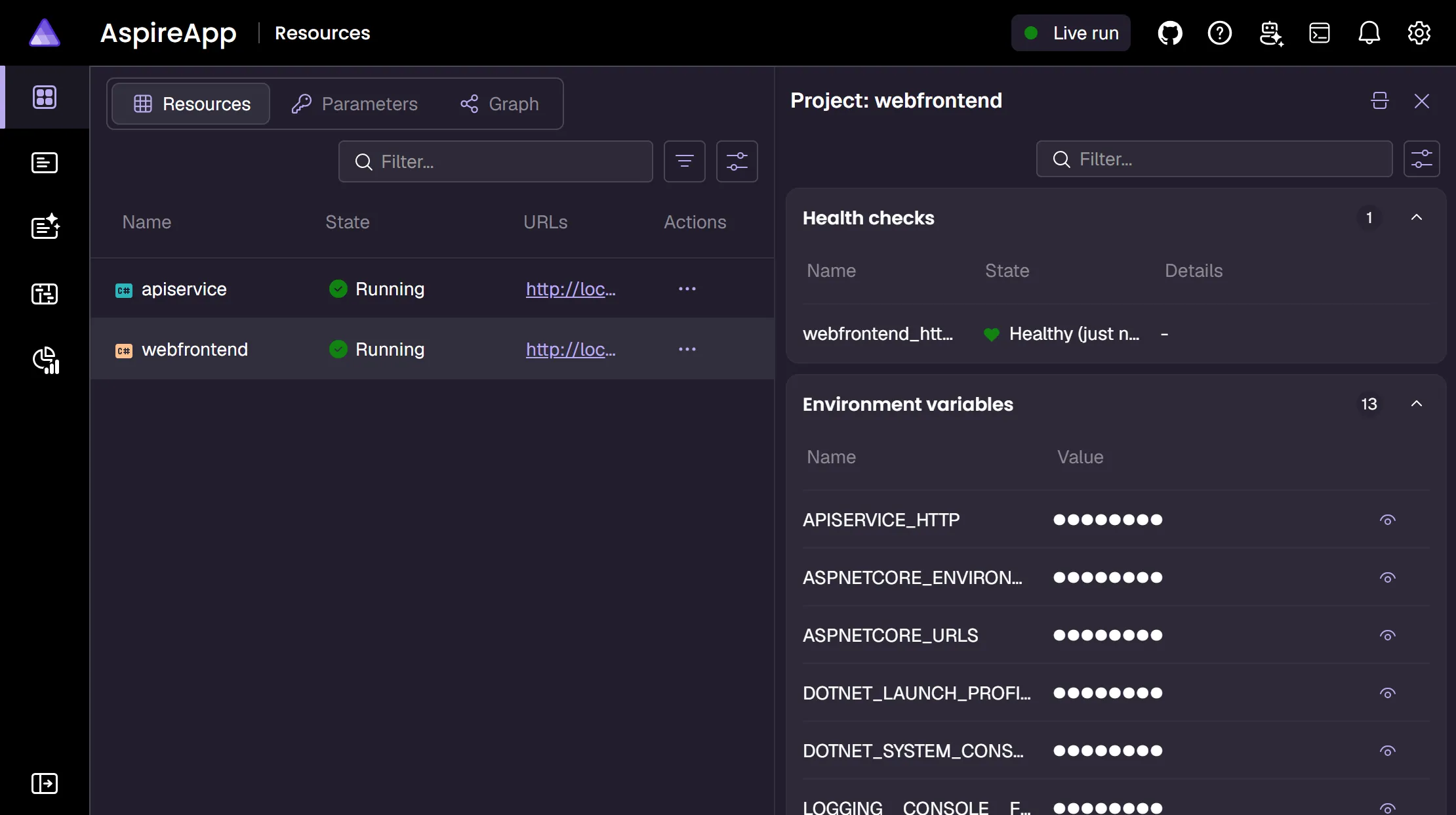
Section titled “Dashboard integration”Resource health check status is displayed in the Aspire dashboard, providing real-time visibility into resource readiness. When resources are waiting for health checks to pass, the dashboard shows the current status and any failure details.