


The entry point that composes every resource and dependency in this sample's distributed application.
import { createBuilder } from "./.aspire/modules/aspire.mjs";
const builder = await createBuilder();
await builder.addDockerComposeEnvironment("dc");
const openAiApiKey = await builder.addParameter("openai-api-key", { secret: true });
await builder.addOpenAI("openai")    .withApiKey(openAiApiKey);
await builder.addUvicornApp("ai-agent", "./agent", "main:app")    .withUv()    .withExternalHttpEndpoints()    .withEnvironment("OPENAI_API_KEY", openAiApiKey);
await builder.build().run();Python FastAPI AI agent with OpenAI integration demonstrating AI workloads with Aspire.
This sample demonstrates Aspire 13's Python support combined with AI workloads, showcasing a Python-based AI chat agent powered by OpenAI.
Quick start
Section titled Quick startPrerequisites
Section titled PrerequisitesOpenAI API key
Commands
Section titled Commandsaspire run # Run locallyaspire deploy # Deploy to Docker Composeaspire do docker-compose-down-dc # Teardown deploymentWhen you run the app for the first time, Aspire will prompt you for your OpenAI API key.
Overview
Section titled OverviewThe application consists of:
Aspire AppHost - Orchestrates the Python AI agent
Python AI Agent - FastAPI service with web UI and REST API powered by OpenAI
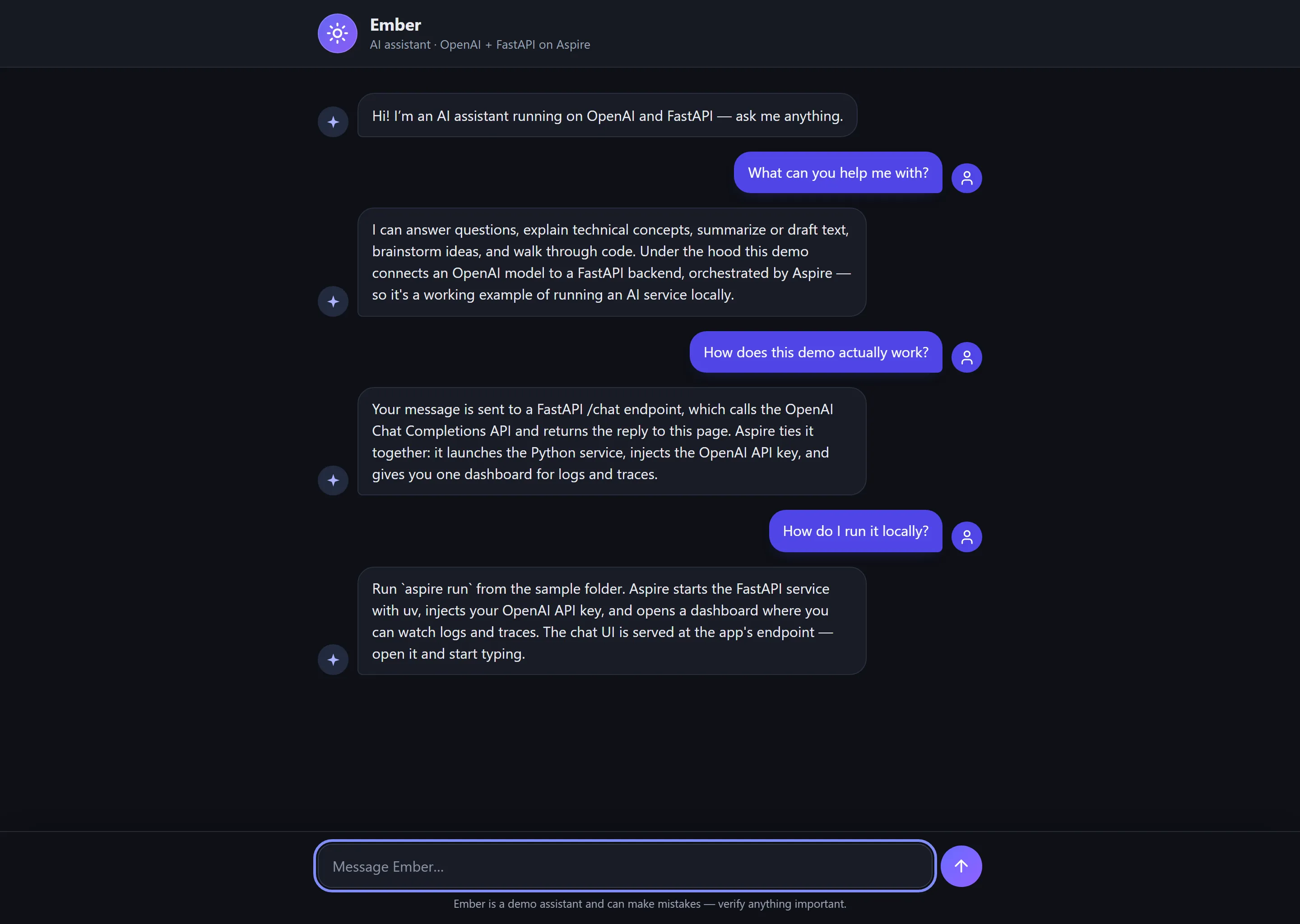
Chat UI - Simple web interface for chatting with the AI agent
Key code
Section titled Key codeThe apphost.mts configuration demonstrates AI workloads with Aspire:
import { createBuilder } from "./.aspire/modules/aspire.mjs";
const builder = await createBuilder();
await builder.addDockerComposeEnvironment("dc");
const openAiApiKey = await builder.addParameter("openai-api-key", { secret: true });
await builder.addOpenAI("openai")    .withApiKey(openAiApiKey);
await builder.addUvicornApp("ai-agent", "./agent", "main:app")    .withUv()    .withExternalHttpEndpoints()    .withEnvironment("OPENAI_API_KEY", openAiApiKey);
await builder.build().run();
Key features:
Python AI Integration: Uses
addUvicornAppto run FastAPI with OpenAI SDKOpenAI Integration:
addOpenAIprompts for API key on first run and securely stores itDirect Key Injection: The OpenAI API key is passed directly to the Python app as
OPENAI_API_KEYuv Package Manager: Uses
.withUv()for fast dependency installation frompyproject.tomlWeb UI: Clean, modern chat interface for interacting with the AI
Automatic Virtual Environment: Aspire creates
.venvand installs dependencies with uvExternal HTTP Endpoints: AI agent accessible externally for testing
Session Management: Maintains conversation history per session for context-aware responses
Accessing the application
Section titled Accessing the applicationOnce you run aspire run, you can access the AI agent in two ways:
1. web UI (recommended)
Section titled 1. web UI (recommended)Open your browser and navigate to the AI agent's endpoint shown in the Aspire Dashboard. You'll see a clean chat interface where you can:
Type messages and get AI responses
See conversation history
Watch typing indicators while the AI thinks
Get automatic session management
2. REST API
Section titled 2. REST APIThe Python AI agent also provides REST endpoints:
GET /- Serves the chat UIGET /api- API informationGET /health- Health check (shows OpenAI availability)POST /chat- Send a message and get AI responseGET /sessions- List active conversation sessionsDELETE /sessions/{id}- Clear a conversation session
Security notes
Section titled Security notesThis sample is instructional and is not production-ready; see the repository's
security disclaimer. By default, /chat
is anonymous. If you configure AGENT_API_KEY, /chat, GET /sessions, and
DELETE /sessions/{id} require the same value in the X-API-Key header.
The code includes basic OpenAI quota and cost controls: message length, session/history caps, response token caps, per-client rate limiting, and a model allow-list. Production deployments should add real authentication and authorization (see FastAPI security), abuse monitoring, persistent session storage if conversations must survive process restarts, and prompt/content safety controls aligned with OpenAI production best practices, OpenAI safety best practices, and OWASP LLM Prompt Injection guidance.
Example API usage
Section titled Example API usageYou can also interact with the AI agent programmatically via its REST API:
# Send a chat messagecurl -X POST http://localhost:<port>/chat \  -H "Content-Type: application/json" \  -d '{"message": "What is the fastest land animal?", "session_id": "my-session"}'
# Check healthcurl http://localhost:<port>/health
# List active sessionscurl http://localhost:<port>/sessions
How it works
Section titled How it worksVirtual Environment: Aspire automatically creates a
.venvdirectory for the Python agentFast Dependency Installation: uv installs dependencies from
pyproject.toml(much faster than pip)AI Agent Startup: The Python FastAPI app initializes the OpenAI client with the provided API key
Web UI: The root endpoint (
/) serves a static HTML chat interfaceREST API: Additional endpoints for programmatic access
Session Management: The agent maintains conversation history per session for context-aware responses
VS code integration
Section titled VS code integrationThis sample includes VS Code configuration for Python development:
.vscode/settings.json: Configures the Python interpreter to use the Aspire-created virtual environmentAfter running
aspire run, open the sample in VS Code for full IntelliSense and debugging supportThe virtual environment at
agent/.venvwill be automatically detected
Deployment
Section titled DeploymentDeploy to Docker Compose:
aspire deployThis will:
Generate a Dockerfile for the Python application
Install Python dependencies and build container image
Generate Docker Compose configuration
Deploy the application stack
Development tips
Section titled Development tipsThe Python app uses automatic dependency installation via
pyproject.tomlwith uv (much faster than pip)Hot reload is enabled for local development
OpenAI responses are stored in session history for contextual conversations
Use the Aspire Dashboard to view logs and monitor the agent
uv automatically creates a
uv.lockfile for reproducible builds
Sample screenshots
Select the image to zoom in.
 Aspire