


Clone, run, and explore this sample
A compact Petclinic-style application demonstrating the official Aspire Java hosting
The entry point that composes every resource and dependency in this sample's distributed application.
import { EndpointProperty, createBuilder } from "./.aspire/modules/aspire.mjs";
const builder = await createBuilder();const mavenWrapper = process.platform === "win32" ? "tools/run-mvnw.cmd" : "./mvnw";
// Disposable demo database: no persistent volume; the API lets Hibernate update its schema.const postgres = await builder.addPostgres("postgres");const database = await postgres.addDatabase("petclinic");
// Local demo: the HTTP API has no authentication or transport encryption. Use synthetic owner data only.const api = await builder.addJavaApp("api", "./api")  .withWrapperPath(mavenWrapper)  .withMavenGoal("spring-boot:run", [])  .withOtelAgentDefaultPath()  .withJvmArgs(["-Xms128m", "-Xmx512m"])  .withHttpEndpoint({ targetPort: 8080, env: "SERVER_PORT" })  .withEnvironment("SPRING_DATASOURCE_URL", await database.jdbcConnectionString())  .withEnvironment("SPRING_DATASOURCE_USERNAME", await postgres.userNameReference())  .withEnvironment("SPRING_DATASOURCE_PASSWORD", postgres.passwordParameter.get())  .withReference(database)  .waitFor(database)  .withHttpHealthCheck({ path: "/actuator/health" })  .withExternalHttpEndpoints()  .withUrls(async (context) => {    const endpoint = context.getEndpoint("http");    const urls = await context.urls();    await urls.addForEndpoint(endpoint, `${await endpoint.url()}/scalar`, { displayText: "API Reference" });  });
// Angular listens on all interfaces; keep both HTTP endpoints private and do not publicly forward them.await builder.addJavaScriptApp("frontend", "./frontend", { runScriptName: "start" })  .withHttpEndpoint({ targetPort: 4200 })  .withEnvironment("PETCLINIC_API_URL", api.getEndpoint("http").property(EndpointProperty.Url))  .withReference(api)  .waitFor(api)  .withHttpHealthCheck({ path: "/" })  .withExternalHttpEndpoints();
await builder.build().run();
A compact Petclinic-style application demonstrating the official Aspire Java hosting integration from a TypeScript AppHost.
Architecture
Section titled Architectureflowchart LR
Browser --> Angular[Angular frontend]
Angular -->|/api| API[Spring Boot API]
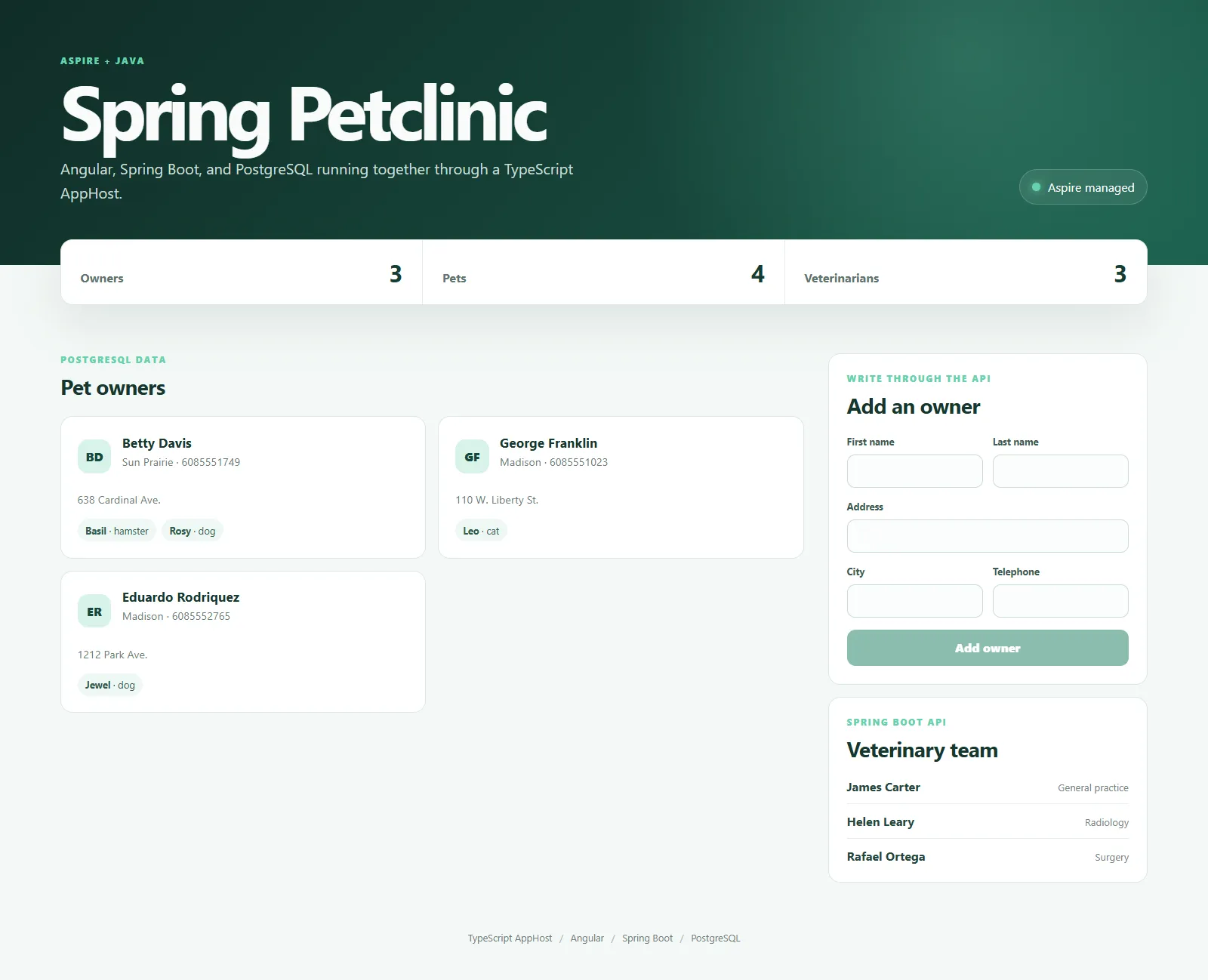
API --> PostgreSQLThe frontend lists owners, pets, and veterinarians and can create owners through the API. The API persists data in an Aspire-managed PostgreSQL database.
What this demonstrates
Section titled What this demonstratesaddJavaAppwith Maven and Spring BootwithWrapperPathfor a cross-platform Maven wrapperPostgreSQL JDBC URL and credentials supplied through Aspire expressions
Angular-to-API endpoint wiring without hardcoded service URLs
Resource references, startup ordering, health checks, and external endpoints
A TypeScript AppHost orchestrating Java, TypeScript, and a container resource
Generated OpenAPI documentation and an interactive Scalar API reference
Java agent instrumentation exporting traces, metrics, and logs to Aspire
Prerequisites
Section titled PrerequisitesAspire CLI 13.6.0, installed using the root installation instructions
Java Development Kit 21 or later
Node.js 20.19, 22.13, or 24 or later
Docker Desktop or another Docker-compatible container runtime
Follow the root installation instructions to install
the matching released CLI. The CLI/SDK and other integrations use 13.6.0, while the
Java integration uses the accompanying 13.6.0-preview.1.26479.8 package.
All packages are available on NuGet.org; no staging feed is required.
From this sample's directory:
aspire startOpen the frontend endpoint from the Aspire dashboard. The AppHost starts PostgreSQL,
builds the API and downloads its pinned OpenTelemetry agent, waits for the database
to become ready, starts the Spring Boot API, and then starts Angular.
Explore the API and telemetry
Section titled Explore the API and telemetryOpen API Reference on the api resource in the Aspire dashboard to use Scalar at
/scalar. Its OpenAPI document is generated from the existing controllers and validation
rules at /v3/api-docs. Scalar and its JavaScript bundle are served by the Spring Boot API;
there is no additional frontend service or documentation build.
Use Scalar's Test Request to list owners or veterinarians, or create an owner in the
Angular frontend. Then select the api resource in the Aspire dashboard:
Traces shows HTTP requests and their PostgreSQL/JDBC spans.
Metrics shows JVM and HTTP measurements.
Structured logs includes the
Created ownerevent, correlated with its request trace.
Maven copies the pinned Java agent to api/target/agent/opentelemetry-javaagent.jar.
withOtelAgentDefaultPath() makes Aspire build the agent dependency before launching
the API. The Java integration supplies the OTLP endpoint and authentication settings;
no collector, hardcoded telemetry endpoint, or application-level telemetry SDK is needed.
Project layout
Section titled Project layoutapphost.mts- TypeScript AppHost and resource graphapi- Spring Boot REST API using Spring Data JPAfrontend- Angular single-page application
On Windows, api/tools/run-mvnw.cmd preserves the wrapper's directory-qualified path.
The helper invokes .\mvnw.cmd explicitly so Windows resolves it from the working directory.
Security notes
Section titled Security notesThis is a trusted local demo, not a production template. Its HTTP endpoints have no
application authentication or transport encryption. Anyone who can reach the API can
read all owner records and create owners. Do not publicly expose or forward these
endpoints; the Angular development server listens on all interfaces (0.0.0.0).
Use synthetic data only. PostgreSQL uses Aspire-generated development credentials,
has no persistent volume configured, and should be treated as disposable. Hibernate
automatically updates the database schema (spring.jpa.hibernate.ddl-auto=update).
Before adapting this sample for production, add authentication, authorization,
transport encryption, request-rate controls, and production secret management.
Sample screenshots
Select the image to zoom in.
 Aspire