


Display interactive terminals in dialogs
Este conteúdo não está disponível em sua língua ainda.
Terminal interactions
Section titled “Terminal interactions”PromptTerminalAsync(message, terminal, options, cancellationToken) displays an existing terminal in a dashboard dialog. Use it for interactive tools, authentication flows, or automation that a user should be able to watch and cancel. To create a terminal, resolve TerminalService from the AppHost’s dependency injection container.
The following example shows a local configuration workflow after it saves the selected settings:
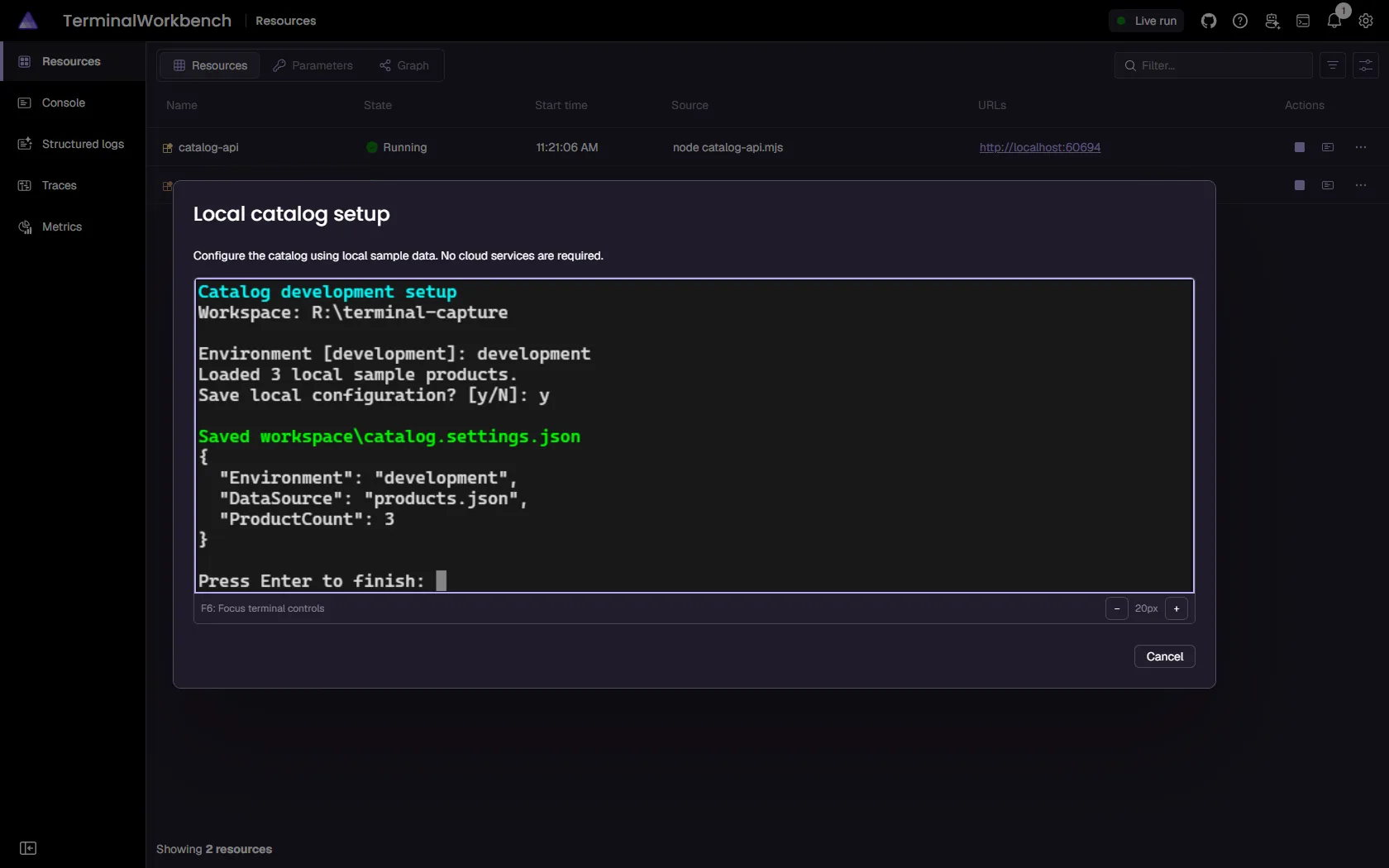
See AppHost terminals in Aspire 13.6 and resource terminals for the distinction between AppHost-owned and resource-owned sessions.
Create the terminal with TerminalPlacement.Dialog. The supplied handle must be the exact instance registered with the same AppHost’s TerminalService. A disposed handle, a handle from another AppHost, or a terminal with Dock, None, or ResourceView placement is rejected before the dialog is published.
The caller controls the terminal’s lifetime:
- Create the terminal and keep its handle.
- Call
terminal.Start()to schedule its workload without waiting for output. - Await
PromptTerminalAsyncto borrow the terminal for an interaction. - Reuse the live terminal if needed, then dispose it when the caller is finished.
An interaction never disposes or stops the terminal. Prompt completion, cancellation, and a disconnected viewer don’t transfer ownership. A disconnected viewer can reconnect to the pending interaction. The terminal’s process exiting doesn’t complete the interaction either.
Control work and cancellation
Section titled “Control work and cancellation”Set TerminalInteractionOptions.Title for an optional dialog title. Set PrimaryButtonText = "Cancel" to display a cancel button; by default there is no button. The primary button requests cancellation, not successful submission, regardless of its label. Secondary and dismiss buttons aren’t shown.
Use TerminalInteractionOptions.Work, a Func<TerminalContext, Task>, to run work after the interaction is published:
- Successful callback completion closes the dialog and returns a successful
InteractionResult<bool>. - User cancellation or cancellation of the supplied token closes the dialog and signals
TerminalContext.CancellationToken. The prompt waits for the callback to finish before returning a canceled result. Pass that token to automation calls, delays, and other asynchronous work; a callback that ignores it can delay completion indefinitely. - A callback failure propagates to the caller after the interaction is removed. An
OperationCanceledExceptionunrelated to the interaction’s cancellation also propagates. - Without
Work, the prompt waits for explicit interaction completion, the optional cancel button, or external cancellation. It doesn’t wait for process exit.
Use await using around a dialog terminal when the command owns the entire workflow. Cancellation then stops the AppHost-owned workload when control leaves that scope and disposes the terminal, not because the prompt itself owns the process.
Guide an authentication flow
Section titled “Guide an authentication flow”This example runs on Linux or macOS with /bin/bash, the Azure CLI on PATH, and Docker available for the tools command resource. It launches az login --use-device-code locally, lets the user complete authentication in their browser, and closes the dialog when the wrapper reports completion.
The wrapper deliberately remains alive after az login finishes. Screen reads on a stopped AppHost-owned terminal throw, so a completion marker must be observed while the terminal workload is still running. The outer await using then performs cleanup.
using Microsoft.Extensions.DependencyInjection;
#pragma warning disable ASPIRETERMINAL001
var builder = DistributedApplication.CreateBuilder(args);
builder.AddContainer("tools", "alpine", "3.22")    .WithArgs("sleep", "infinity")    .WithCommand("azure-login", "Sign in to Azure", async commandContext =>    {        var interactions = commandContext.Services            .GetRequiredService<IInteractionService>();        if (!interactions.IsAvailable)        {            return CommandResults.Failure("Sign in from the dashboard.");        }
        var terminals = commandContext.Services            .GetRequiredService<TerminalService>();        await using var terminal = terminals.CreateTerminal(new TerminalLaunchOptions        {            Title = "Azure sign-in",            Executable = "/bin/bash",            Arguments =            [                "-c",                """                if az login --use-device-code --output none; then                    printf '\nASPIRE_LOGIN_SUCCEEDED\n'                else                    printf '\nASPIRE_LOGIN_FAILED\n'                fi                printf 'ASPIRE_LOGIN_FINISHED\n'                read -r finish                """            ],            Placement = TerminalPlacement.Dialog        });
        using var timeout = CancellationTokenSource.CreateLinkedTokenSource(            commandContext.CancellationToken);        timeout.CancelAfter(TimeSpan.FromMinutes(5));        terminal.Start();
        var signedIn = false;        var result = await interactions.PromptTerminalAsync(            "Follow the Azure CLI instructions to sign in in your browser.",            terminal,            new TerminalInteractionOptions            {                Title = "Sign in to Azure",                PrimaryButtonText = "Cancel",                Work = async context =>                {                    await terminal.WaitForTextAsync(                        "ASPIRE_LOGIN_FINISHED",                        TimeSpan.FromMinutes(5),                        context.CancellationToken);                    signedIn = terminal.GetScreenText().Contains(                        "ASPIRE_LOGIN_SUCCEEDED", StringComparison.Ordinal);                }            },            timeout.Token);
        return !result.Canceled && signedIn            ? CommandResults.Success()            : CommandResults.Failure("Sign-in was canceled or didn't succeed.");    });
builder.Build().Run();
The five-minute bound prevents an unattended prompt from waiting forever. Adapt it to your authentication provider. The terminal starts independently; Work observes application-level completion, not an invented terminal process-exit API.
Automate a number-guessing game
Section titled “Automate a number-guessing game”This example adapts the upstream terminal interaction commands. It prompts for an upper limit, launches an ordinary console game, and solves it by binary search while the dashboard displays every guess.
To reproduce it:
- Use a C# AppHost with Aspire 13.6 or later, Docker, and .NET 10 or later for file-based apps.
- Copy the upstream
numberguess.csintoScripts/numberguess.csunder your AppHost directory. Keep its prompt and reply formats unchanged. It intentionally waits for another input after the winning guess so the terminal stays alive for the final screen read. - Use this complete AppHost and run it. Select Play number guess on the
toolsresource in the dashboard.
For a project-based AppHost, add this item group to your AppHost’s .csproj file so the game isn’t compiled as part of the AppHost itself. The example launches the script from its source directory:
<ItemGroup> <Compile Remove="Scripts/numberguess.cs" /></ItemGroup>using System.Globalization;using Microsoft.Extensions.DependencyInjection;
#pragma warning disable ASPIRETERMINAL001
var builder = DistributedApplication.CreateBuilder(args);var scriptPath = Path.Combine(builder.AppHostDirectory, "Scripts", "numberguess.cs");var dotnet = Environment.GetEnvironmentVariable("DOTNET_HOST_PATH") is { Length: > 0 } hostPath ? hostPath : "dotnet";
builder.AddContainer("tools", "alpine", "3.22") .WithArgs("sleep", "infinity") .WithCommand("number-guess", "Play number guess", async commandContext => { var interactions = commandContext.Services .GetRequiredService<IInteractionService>(); if (!interactions.IsAvailable) { return CommandResults.Failure("Play from the dashboard."); }
var input = await interactions.PromptInputsAsync( "Number guess", "Choose an upper limit.", [ new InteractionInput { Name = "limit", Label = "Upper limit", InputType = InputType.Number, Value = "100", Required = true } ], cancellationToken: commandContext.CancellationToken); if (input.Canceled) { return CommandResults.Failure("Canceled."); }
var limit = int.TryParse( input.Data["limit"].Value, CultureInfo.InvariantCulture, out var parsed) ? Math.Clamp(parsed, 2, 1_000_000) : 100; var terminals = commandContext.Services .GetRequiredService<TerminalService>(); await using var terminal = terminals.CreateTerminal(new TerminalLaunchOptions { Title = "Number guess", Executable = dotnet, Arguments = [ "run", "--file", scriptPath, "--", limit.ToString(CultureInfo.InvariantCulture) ], Placement = TerminalPlacement.Dialog }); terminal.Start();
(int Number, int Attempts) answer = default; var result = await interactions.PromptTerminalAsync( $"The AppHost will guess a number between 1 and {limit}.", terminal, new TerminalInteractionOptions { Title = "Number guess", PrimaryButtonText = "Cancel", Work = async context => { answer = await PlayAsync(terminal, limit, context.CancellationToken); await Task.Delay(TimeSpan.FromSeconds(2), context.CancellationToken); } }, commandContext.CancellationToken); if (result.Canceled) { return CommandResults.Failure("Canceled."); }
await interactions.PromptMessageBoxAsync( "Number guess", $"Found {answer.Number} in {answer.Attempts} guesses.", cancellationToken: commandContext.CancellationToken); return CommandResults.Success(); });
builder.Build().Run();
static async Task<(int Number, int Attempts)> PlayAsync( AspireTerminal terminal, int limit, CancellationToken cancellationToken){ await terminal.WaitForTextAsync( $"between 1 and {limit}", TimeSpan.FromMinutes(2), cancellationToken); var low = 1; var high = limit;
for (var attempt = 1; low <= high; attempt++) { await terminal.WaitForTextAsync( $"Guess #{attempt}: ", TimeSpan.FromSeconds(30), cancellationToken); await Task.Delay(TimeSpan.FromSeconds(1), cancellationToken); var guess = low + (high - low) / 2; await terminal.SendTextAsync( guess.ToString(CultureInfo.InvariantCulture), cancellationToken); await terminal.SendKeyAsync(AspireTerminalKey.Enter, cancellationToken);
var reply = await ReadReplyAsync(terminal, attempt, guess, cancellationToken); if (reply == "correct") { return (guess, attempt); } if (reply == "too low") { low = guess + 1; } else { high = guess - 1; } }
throw new InvalidOperationException("The game rejected every number in the range.");}
static async Task<string> ReadReplyAsync( AspireTerminal terminal, int attempt, int guess, CancellationToken cancellationToken){ var prefix = FormattableString.Invariant($">> #{attempt}: {guess} is "); var deadline = DateTime.UtcNow + TimeSpan.FromSeconds(30); while (DateTime.UtcNow < deadline) { cancellationToken.ThrowIfCancellationRequested(); var screen = terminal.GetScreenText(); foreach (var reply in new[] { "correct", "too low", "too high" }) { if (screen.Contains(prefix + reply, StringComparison.Ordinal)) { return reply; } } await Task.Delay(TimeSpan.FromMilliseconds(100), cancellationToken); }
throw new TimeoutException($"No reply to guess #{attempt}.");}The first wait allows two minutes for a cold file-based-app compilation. Each later prompt and reply has a 30-second bound. Matching a complete reply tagged with the attempt number avoids confusing an old answer with the current one or reading a partially written response. Binary search bounds the number of guesses; cancellation reaches every delay and terminal operation.
Reuse the same live terminal
Section titled “Reuse the same live terminal”You can borrow a terminal more than once without restarting its workload. This Linux/macOS helper runs two sequential prompts against the same shell. The environment variable set during the first interaction remains available in the second:
#pragma warning disable ASPIRETERMINAL001
static async Task RunTwoStepsAsync(    TerminalService terminals,    IInteractionService interactions,    CancellationToken cancellationToken){    if (!interactions.IsAvailable)    {        throw new InvalidOperationException("This workflow requires the dashboard.");    }
    await using var terminal = terminals.CreateTerminal(new TerminalLaunchOptions    {        Title = "Two-step workflow",        Executable = "/bin/sh",        Arguments = ["-i"],        Placement = TerminalPlacement.Dialog    });    terminal.Start();
    foreach (var step in new[] { "one", "two" })    {        var result = await interactions.PromptTerminalAsync(            $"Running step {step}.",            terminal,            new TerminalInteractionOptions            {                Title = $"Step {step}",                PrimaryButtonText = "Cancel",                Work = async context =>                {                    if (step == "one")                    {                        await terminal.SendTextAsync(                            "export ASPIRE_DEMO=ready\r", context.CancellationToken);                    }                    await terminal.SendTextAsync(                        $"printf 'step-{step}:%s\\n' \"$ASPIRE_DEMO\"\r",                        context.CancellationToken);                    await terminal.WaitForTextAsync(                        $"step-{step}:ready", TimeSpan.FromSeconds(30),                        context.CancellationToken);                }            },            cancellationToken);        if (result.Canceled)        {            return;        }    }}
Add this local function to your AppHost file after the top-level app setup, with the diagnostic suppression at the top. Call it from an async callback with both services and the callback’s cancellation token. Each completed Work closes only that prompt. The shell stops only when the helper leaves its await using scope. A previously ended process can’t be revived by prompting with its handle.
Migrate older terminal inputs
Section titled “Migrate older terminal inputs”If you have an earlier experimental example that uses InputType.Terminal inside an input form, replace that pattern with TerminalService.CreateTerminal and PromptTerminalAsync. Keep ordinary form fields in PromptInputAsync or PromptInputsAsync; create, start, and dispose the terminal separately. Don’t treat an interaction input’s lifetime as ownership of a process.
 Aspire