
Create custom client integrations
이 콘텐츠는 아직 번역되지 않았습니다.
This article is a continuation of the Create custom hosting integrations article. It guides you through creating an Aspire client integration that uses MailKit to send emails. This integration is then added into the Newsletter app you previously built. The previous example omitted the creation of a client integration and instead relied on the existing .NET SmtpClient. It’s best to use MailKit’s SmtpClient over the official .NET SmtpClient for sending emails, as it’s more modern and supports more features/protocols. For more information, see .NET SmtpClient: Remarks.
Prerequisites
Section titled “Prerequisites”If you’re following along, you should have a Newsletter app from the steps in the Create custom hosting integrations article.
Create library for integration
Section titled “Create library for integration”Aspire integrations are delivered as NuGet packages, but in this example, it’s beyond the scope of this article to publish a NuGet package. Instead, you create a class library project that contains the integration and reference it as a project. Aspire integration packages are intended to wrap a client library, such as MailKit, and provide production-ready telemetry, health checks, configurability, and testability. Let’s start by creating a new class library project.
-
Create a new class library project named
MailKit.Clientin the same directory as theMailDevResource.slnfrom the previous article..NET CLI dotnet new classlib -o MailKit.Client -
Add the project to the solution.
.NET CLI dotnet sln ./MailDevResource.sln add MailKit.Client/MailKit.Client.csproj
The next step is to add the following NuGet packages that the integration relies on. Add the following package references to your MailKit.Client.csproj file:
<Project Sdk="Microsoft.NET.Sdk">
  <PropertyGroup>    <TargetFramework>net10.0</TargetFramework>    <ImplicitUsings>enable</ImplicitUsings>    <Nullable>enable</Nullable>  </PropertyGroup>
  <ItemGroup>    <PackageReference Include="MailKit" Version="4.14.1" />    <PackageReference Include="Microsoft.Extensions.Configuration.Binder" Version="10.0.0" />    <PackageReference Include="Microsoft.Extensions.Resilience" Version="10.0.0" />    <PackageReference Include="Microsoft.Extensions.Hosting.Abstractions" Version="10.0.0" />    <PackageReference Include="Microsoft.Extensions.Diagnostics.HealthChecks" Version="10.0.0" />    <PackageReference Include="OpenTelemetry.Extensions.Hosting" Version="1.14.0" />  </ItemGroup>
</Project>
Define integration settings
Section titled “Define integration settings”Whenever you’re creating an Aspire integration, it’s best to understand the client library that you’re mapping to. With MailKit, you need to understand the configuration settings that are required to connect to a Simple Mail Transfer Protocol (SMTP) server. But it’s also important to understand if the library has support for health checks, tracing and metrics. MailKit supports tracing and metrics, through its Telemetry.SmtpClient class. When adding health checks, you should use any established or existing health checks where possible. Otherwise, you might consider implementing your own in the integration. Replace the Class1.cs file with the following code to the MailKit.Client project in rename it as MailKitClientSettings.cs:
using System.Data.Common;
namespace MailKit.Client;
/// <summary>/// Provides the client configuration settings for connecting MailKit to an SMTP server./// </summary>public sealed class MailKitClientSettings{    internal const string DefaultConfigSectionName = "MailKit:Client";
    /// <summary>    /// Gets or sets the SMTP server <see cref="Uri"/>.    /// </summary>    /// <value>    /// The default value is <see langword="null"/>.    /// </value>    public Uri? Endpoint { get; set; }
    /// <summary>    /// Gets or sets a boolean value that indicates whether the database health check is disabled or not.    /// </summary>    /// <value>    /// The default value is <see langword="false"/>.    /// </value>    public bool DisableHealthChecks { get; set; }
    /// <summary>    /// Gets or sets a boolean value that indicates whether the OpenTelemetry tracing is disabled or not.    /// </summary>    /// <value>    /// The default value is <see langword="false"/>.    /// </value>    public bool DisableTracing { get; set; }
    /// <summary>    /// Gets or sets a boolean value that indicates whether the OpenTelemetry metrics are disabled or not.    /// </summary>    /// <value>    /// The default value is <see langword="false"/>.    /// </value>    public bool DisableMetrics { get; set; }
    internal void ParseConnectionString(string? connectionString)    {        if (string.IsNullOrWhiteSpace(connectionString))        {            throw new InvalidOperationException($"""                ConnectionString is missing.                It should be provided in 'ConnectionStrings:<connectionName>'                or '{DefaultConfigSectionName}:Endpoint' key.'                configuration section.                """);        }
        if (Uri.TryCreate(connectionString, UriKind.Absolute, out var uri))        {            Endpoint = uri;        }        else        {            var builder = new DbConnectionStringBuilder            {                ConnectionString = connectionString            };
            if (builder.TryGetValue("Endpoint", out var endpoint) is false)            {                throw new InvalidOperationException($"""                    The 'ConnectionStrings:<connectionName>' (or 'Endpoint' key in                    '{DefaultConfigSectionName}') is missing.                    """);            }
            if (Uri.TryCreate(endpoint.ToString(), UriKind.Absolute, out uri) is false)            {                throw new InvalidOperationException($"""                    The 'ConnectionStrings:<connectionName>' (or 'Endpoint' key in                    '{DefaultConfigSectionName}') isn't a valid URI.                    """);            }
            Endpoint = uri;        }    }}
The preceding code defines the MailKitClientSettings class with:
Endpointproperty that represents the connection string to the SMTP server.DisableHealthChecksproperty that determines whether health checks are enabled.DisableTracingproperty that determines whether tracing is enabled.DisableMetricsproperty that determines whether metrics are enabled.Credentialsproperty for storing username and password credentials.
Parse connection string logic
Section titled “Parse connection string logic”The settings class also contains a ParseConnectionString method that parses the connection string into a valid Uri. The configuration is expected to be provided in the following format:
ConnectionStrings:<connectionName>: The connection string to the SMTP server.MailKit:Client:ConnectionString: The connection string to the SMTP server.
If neither of these values are provided, an exception is thrown.
Expose client functionality
Section titled “Expose client functionality”The goal of Aspire integrations is to expose the underlying client library to consumers through dependency injection. With MailKit and for this example, the SmtpClient class is what you want to expose. You’re not wrapping any functionality, but rather mapping configuration settings to an SmtpClient class. It’s common to expose both standard and keyed-service registrations for integrations. Standard registrations are used when there’s only one instance of a service, and keyed-service registrations are used when there are multiple instances of a service. Sometimes, to achieve multiple registrations of the same type you use a factory pattern. Add the following code to the MailKit.Client project in a file named MailKitClientFactory.cs:
using MailKit.Net.Smtp;
namespace MailKit.Client;
/// <summary>/// A factory for creating <see cref="ISmtpClient"/> instances/// given a <paramref name="smtpUri"/> (and optional <paramref name="credentials"/>)./// </summary>/// <param name="settings">/// The <see cref="MailKitClientSettings"/> settings for the SMTP server/// </param>public sealed class MailKitClientFactory(MailKitClientSettings settings){    /// <summary>    /// Gets an <see cref="ISmtpClient"/> instance in the connected state    /// (and that's been authenticated if configured).    /// </summary>    /// <param name="cancellationToken">Used to abort client creation and connection.</param>    /// <returns>A connected (and authenticated) <see cref="ISmtpClient"/> instance.</returns>    /// <remarks>    /// Since both the connection and authentication are considered expensive operations,    /// the <see cref="ISmtpClient"/> returned is intended to be used for the duration of a request    /// (registered as 'Scoped') and is automatically disposed of.    /// </remarks>    public async Task<ISmtpClient> GetSmtpClientAsync(        CancellationToken cancellationToken = default)    {        var client = new SmtpClient();        try        {            if (settings.Endpoint is not null)            {                await client.ConnectAsync(settings.Endpoint, cancellationToken)                    .ConfigureAwait(false);            }
            return client;        }        catch        {            await client.DisconnectAsync(true, cancellationToken);            client.Dispose();            throw;        }    }}
The MailKitClientFactory class is a factory that creates an ISmtpClient instance based on the configuration settings. It’s responsible for returning an ISmtpClient implementation that has an active connection to a configured SMTP server. Next, you need to expose the functionality for the consumers to register this factory with the dependency injection container. Add the following code to the MailKit.Client project in a file named MailKitExtensions.cs:
using MailKit;using MailKit.Client;using MailKit.Net.Smtp;using Microsoft.Extensions.Configuration;using Microsoft.Extensions.DependencyInjection;
namespace Microsoft.Extensions.Hosting;
/// <summary>/// Provides extension methods for registering a <see cref="SmtpClient"/> as a/// scoped-lifetime service in the services provided by the <see cref="IHostApplicationBuilder"/>./// </summary>public static class MailKitExtensions{    /// <summary>    /// Registers 'Scoped' <see cref="MailKitClientFactory" /> for creating    /// connected <see cref="SmtpClient"/> instance for sending emails.    /// </summary>    /// <param name="builder">    /// The <see cref="IHostApplicationBuilder" /> to read config from and add services to.    /// </param>    /// <param name="connectionName">    /// A name used to retrieve the connection string from the ConnectionStrings configuration section.    /// </param>    /// <param name="configureSettings">    /// An optional delegate that can be used for customizing options.    /// It's invoked after the settings are read from the configuration.    /// </param>    public static void AddMailKitClient(        this IHostApplicationBuilder builder,        string connectionName,        Action<MailKitClientSettings>? configureSettings = null) =>        AddMailKitClient(            builder,            MailKitClientSettings.DefaultConfigSectionName,            configureSettings,            connectionName,            serviceKey: null);
    /// <summary>    /// Registers 'Scoped' <see cref="MailKitClientFactory" /> for creating    /// connected <see cref="SmtpClient"/> instance for sending emails.    /// </summary>    /// <param name="builder">    /// The <see cref="IHostApplicationBuilder" /> to read config from and add services to.    /// </param>    /// <param name="name">    /// The name of the component, which is used as the <see cref="ServiceDescriptor.ServiceKey"/> of the    /// service and also to retrieve the connection string from the ConnectionStrings configuration section.    /// </param>    /// <param name="configureSettings">    /// An optional method that can be used for customizing options. It's invoked after the settings are    /// read from the configuration.    /// </param>    public static void AddKeyedMailKitClient(        this IHostApplicationBuilder builder,        string name,        Action<MailKitClientSettings>? configureSettings = null)    {        ArgumentNullException.ThrowIfNull(name);
        AddMailKitClient(            builder,            $"{MailKitClientSettings.DefaultConfigSectionName}:{name}",            configureSettings,            connectionName: name,            serviceKey: name);    }
    private static void AddMailKitClient(        this IHostApplicationBuilder builder,        string configurationSectionName,        Action<MailKitClientSettings>? configureSettings,        string connectionName,        object? serviceKey)    {        ArgumentNullException.ThrowIfNull(builder);
        var settings = new MailKitClientSettings();
        builder.Configuration               .GetSection(configurationSectionName)               .Bind(settings);
        if (builder.Configuration.GetConnectionString(connectionName) is string connectionString)        {            settings.ParseConnectionString(connectionString);        }
        configureSettings?.Invoke(settings);
        if (serviceKey is null)        {            builder.Services.AddScoped(CreateMailKitClientFactory);        }        else        {            builder.Services.AddKeyedScoped(serviceKey, (sp, key) => CreateMailKitClientFactory(sp));        }
        MailKitClientFactory CreateMailKitClientFactory(IServiceProvider _)        {            return new MailKitClientFactory(settings);        }
        if (settings.DisableHealthChecks is false)        {            builder.Services.AddHealthChecks()                .AddCheck<MailKitHealthCheck>(                    name: serviceKey is null ? "MailKit" : $"MailKit_{connectionName}",                    failureStatus: default,                    tags: []);        }
        if (settings.DisableTracing is false)        {            builder.Services.AddOpenTelemetry()                .WithTracing(                    traceBuilder => traceBuilder.AddSource(                        Telemetry.SmtpClient.ActivitySourceName));        }
        if (settings.DisableMetrics is false)        {            // Required by MailKit to enable metrics            Telemetry.SmtpClient.Configure();
            builder.Services.AddOpenTelemetry()                .WithMetrics(                    metricsBuilder => metricsBuilder.AddMeter(                        Telemetry.SmtpClient.MeterName));        }    }}
The preceding code adds two extension methods on the IHostApplicationBuilder type, one for the standard registration of MailKit and another for keyed-registration of MailKit.
Both extensions ultimately rely on the private AddMailKitClient method to register the MailKitClientFactory with the dependency injection container as a scoped service. The reason for registering the MailKitClientFactory as a scoped service is because the connection operations are considered expensive and should be reused within the same scope where possible. In other words, for a single request, the same ISmtpClient instance should be used. The factory holds on to the instance of the SmtpClient that it creates and disposes of it.
Configuration binding
Section titled “Configuration binding”One of the first things that the private implementation of the AddMailKitClient methods does, is to bind the configuration settings to the MailKitClientSettings class. The settings class is instantiated and then binding is performed with the specific section of configuration. Then the optional configureSettings delegate is invoked with the current settings. This allows the consumer to further configure the settings, ensuring that manual code settings are honored over configuration settings. After that, depending on whether the serviceKey value was provided, the MailKitClientFactory should be registered with the dependency injection container as either a standard or keyed service.
The registration of health checks, and telemetry are described in a bit more detail in the following sections.
Add health checks
Section titled “Add health checks”Health checks are a way to monitor the health of an integration. With MailKit, you can check if the connection to the SMTP server is healthy. Add the following code to the MailKit.Client project in a file named MailKitHealthCheck.cs:
using Microsoft.Extensions.Diagnostics.HealthChecks;
namespace MailKit.Client;
internal sealed class MailKitHealthCheck(MailKitClientFactory factory) : IHealthCheck{    public async Task<HealthCheckResult> CheckHealthAsync(        HealthCheckContext context,        CancellationToken cancellationToken = default)    {        try        {            // The factory connects (and authenticates).            _ = await factory.GetSmtpClientAsync(cancellationToken);
            return HealthCheckResult.Healthy();        }        catch (Exception ex)        {            return HealthCheckResult.Unhealthy(exception: ex);        }    }}
The preceding health check implementation:
- Implements the
IHealthCheckinterface. - Accepts the
MailKitClientFactoryas a primary constructor parameter. - Satisfies the
CheckHealthAsyncmethod by:- Attempting to get an
ISmtpClientinstance from thefactory. If successful, it returnsHealthCheckResult.Healthy. - If an exception is thrown, it returns
HealthCheckResult.Unhealthy.
- Attempting to get an
As previously shared in the registration of the MailKitClientFactory, the MailKitHealthCheck is conditionally registered with the IHeathChecksBuilder:
if (settings.DisableHealthChecks is false){ builder.Services.AddHealthChecks() .AddCheck<MailKitHealthCheck>( name: serviceKey is null ? "MailKit" : $"MailKit_{connectionName}", failureStatus: default, tags: []);}The consumer could choose to omit health checks by setting the DisableHealthChecks property to true in the configuration. A common pattern for integrations is to have optional features and Aspire integrations strongly encourages these types of configurations. For more information on health checks and a working sample that includes a user interface, see Aspire ASP.NET Core HealthChecksUI sample.
Wire up telemetry
Section titled “Wire up telemetry”As a best practice, the MailKit client library exposes telemetry. Aspire can take advantage of this telemetry and display it in the Aspire dashboard. Depending on whether or not tracing and metrics are enabled, telemetry is wired up as shown in the following code snippet:
if (settings.DisableTracing is false){    builder.Services.AddOpenTelemetry()        .WithTracing(            traceBuilder => traceBuilder.AddSource(                SmtpClient.ActivitySourceName));}
if (settings.DisableMetrics is false){    // Required by MailKit to enable metrics    SmtpClient.Configure();
    builder.Services.AddOpenTelemetry()        .WithMetrics(            metricsBuilder => metricsBuilder.AddMeter(                SmtpClient.MeterName));}
Update the Newsletter service
Section titled “Update the Newsletter service”With the integration library created, you can now update the Newsletter service to use the MailKit client. The first step is to add a reference to the MailKit.Client project. Add the MailKit.Client.csproj project reference to the MailDevResource.NewsletterService project:
dotnet add ./MailDevResource.NewsletterService/MailDevResource.NewsletterService.csproj reference MailKit.Client/MailKit.Client.csprojNext, add a reference to the ServiceDefaults project:
dotnet add ./MailDevResource.NewsletterService/MailDevResource.NewsletterService.csproj reference MailDevResource.ServiceDefaults/MailDevResource.ServiceDefaults.csprojTo make it easier to test the endpoints, add Scalar for a pleasant HTTP request user experience. Add the following NuGet package to the MailDevResource.NewsletterService project:
dotnet add package Scalar.AspNetCore --project ./MailDevResource.NewsletterService/MailDevResource.NewsletterService.csprojThe final step is to replace the existing Program.cs file in the MailDevResource.NewsletterService project with the following C# code:
using System.Net.Mail;using MailKit.Client;using MailKit.Net.Smtp;using MimeKit;using Scalar.AspNetCore;
var builder = WebApplication.CreateBuilder(args);
builder.AddServiceDefaults();
builder.Services.AddOpenApi();
// Add services to the container.builder.AddMailKitClient("maildev");
var app = builder.Build();
if (app.Environment.IsDevelopment()){    app.MapOpenApi();    app.MapScalarApiReference();}
app.MapDefaultEndpoints();
// Configure the HTTP request pipeline.app.UseHttpsRedirection();
app.MapPost("/subscribe",    async (MailKitClientFactory factory, string email) =>{    ISmtpClient client = await factory.GetSmtpClientAsync();
    using var message = new MailMessage("newsletter@yourcompany.com", email)    {        Subject = "Welcome to our newsletter!",        Body = "Thank you for subscribing to our newsletter!"    };
    await client.SendAsync(MimeMessage.CreateFromMailMessage(message));});
app.MapPost("/unsubscribe",    async (MailKitClientFactory factory, string email) =>{    ISmtpClient client = await factory.GetSmtpClientAsync();
    using var message = new MailMessage("newsletter@yourcompany.com", email)    {        Subject = "You are unsubscribed from our newsletter!",        Body = "Sorry to see you go. We hope you will come back soon!"    };
    await client.SendAsync(MimeMessage.CreateFromMailMessage(message));});
app.Run();
The most notable changes in the preceding code are:
- The updated
usingstatements that include theMailKit.Client,MailKit.Net.Smtp,MimeKit, andScalar.AspNetCorenamespaces. - The replacement of the registration for the official .NET
SmtpClientwith the call to theAddMailKitClientextension method. - The replacement of both
/subscribeand/unsubscribemap post calls to instead inject theMailKitClientFactoryand use theISmtpClientinstance to send the email.
Back in the AppHost.cs file, update it to configure the scalar API reference endpoint:
var builder = DistributedApplication.CreateBuilder(args);
var maildev = builder.AddMailDev("maildev");
builder.AddProject<Projects.MailDevResource_NewsletterService>("newsletterservice")    .WithUrlForEndpoint("https", e =>    {        e.DisplayText = "Scalar";        e.Url += "/scalar";    })    .WithReference(maildev);
builder.Build().Run();
Run the sample
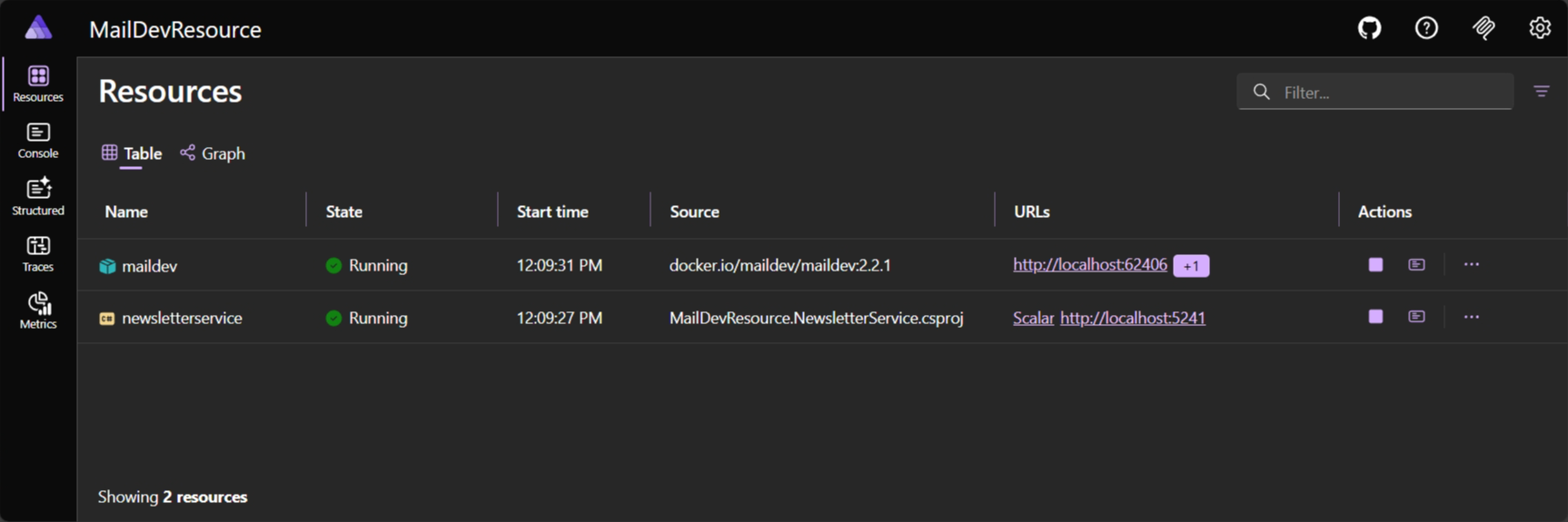
Section titled “Run the sample”Now that you’ve created the MailKit client integration and updated the Newsletter service to use it, you can run the sample. From your IDE, select aspire run from the root directory of the solution to start the application—you should see the Aspire dashboard:
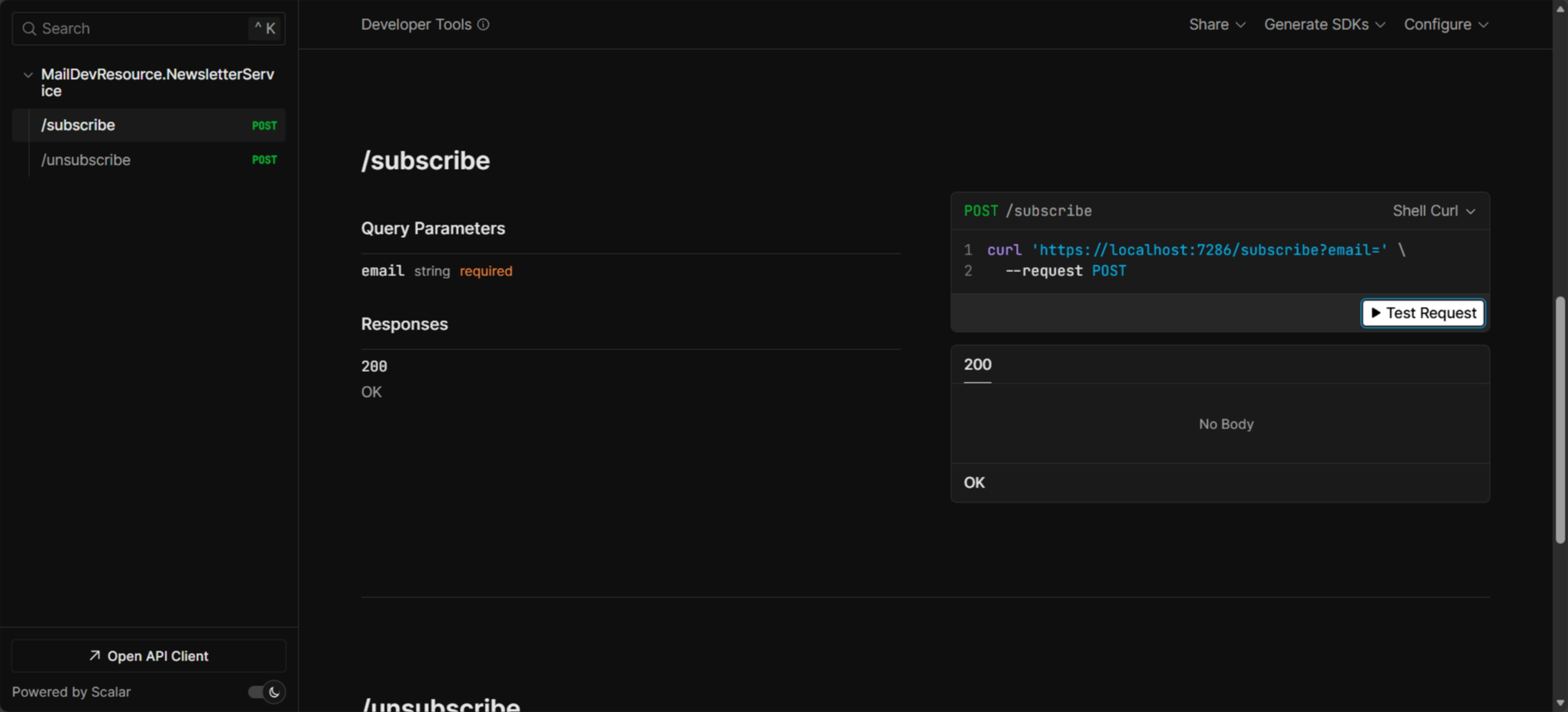
Once the application is running, navigate to the Scalar UI by seleting the added Scalar link from the dashboard on the newsletterservice resource and test the /subscribe and /unsubscribe endpoints. Select the down arrow to expand the endpoint:
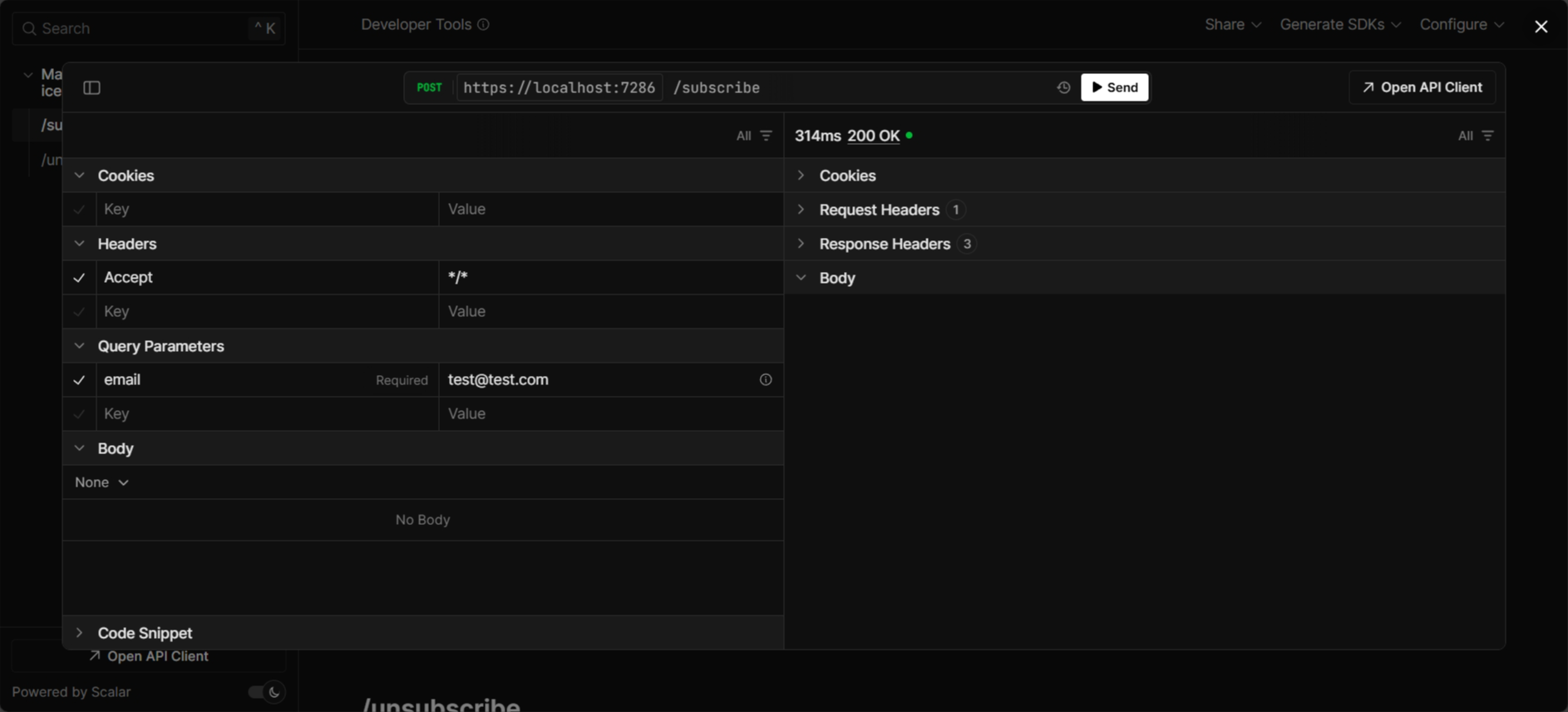
Then select the Try it out button. Enter an email address, and then select the Execute button.
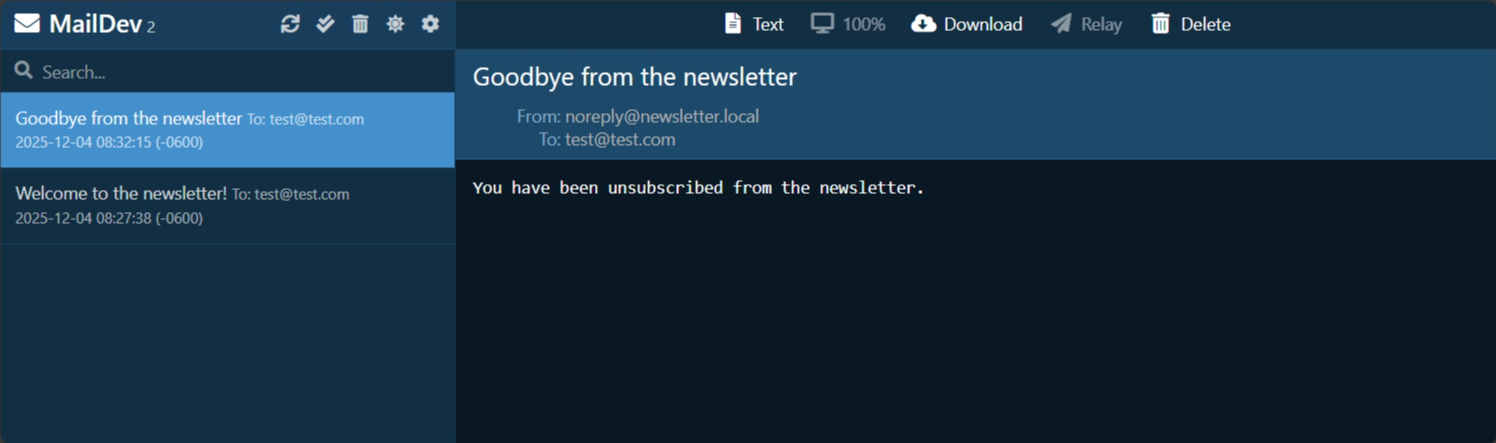
Repeat this several times, to add multiple email addresses. You should see the email sent to the MailDev inbox:
Stop the application by selecting
View MailKit telemetry
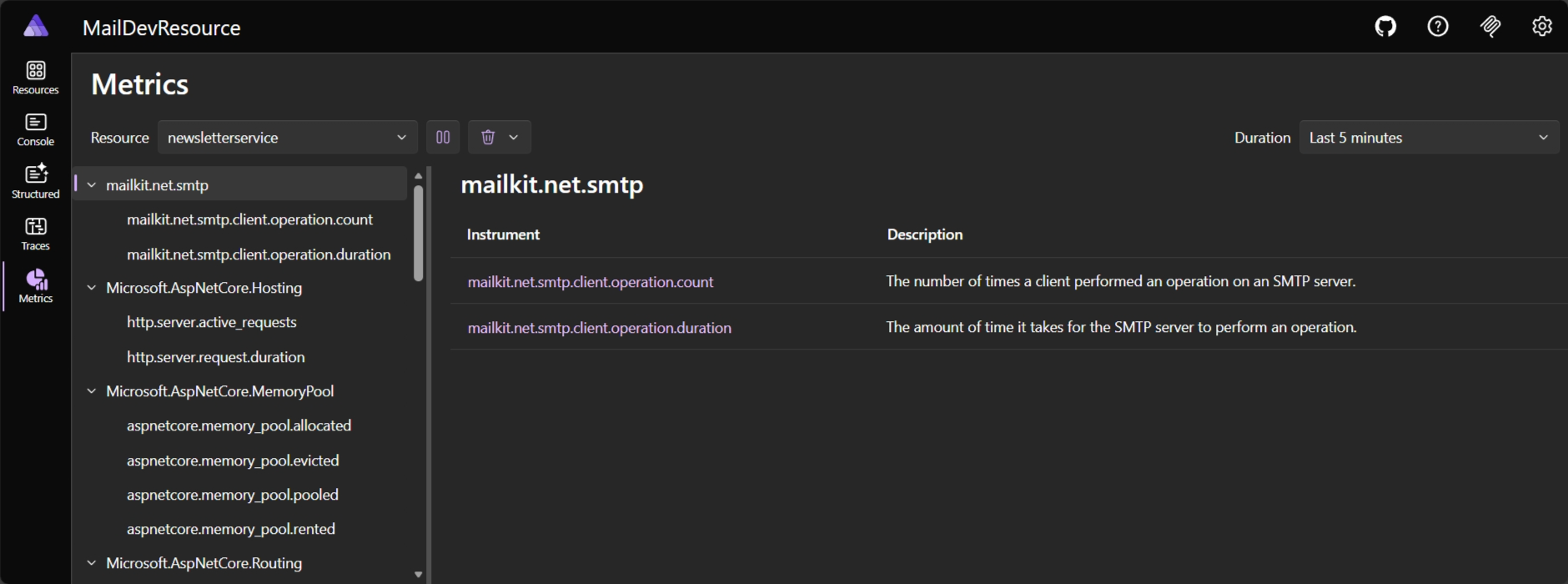
Section titled “View MailKit telemetry”The MailKit client library exposes telemetry that can be viewed in the Aspire dashboard. To view the telemetry, navigate to the Aspire dashboard. Select the newsletter resource to view the telemetry on the Metrics page:
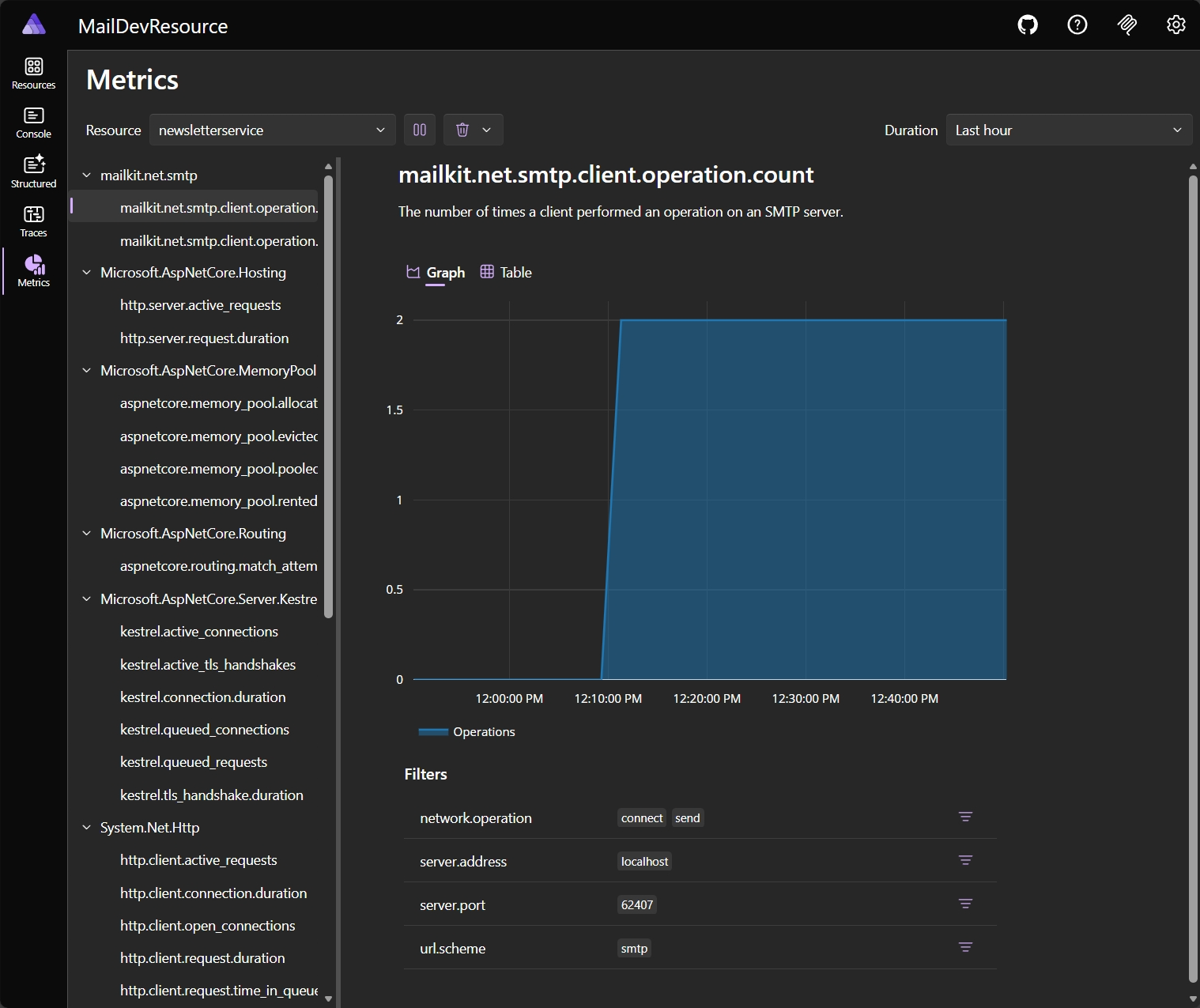
Open up the Scalar UI again, and make some requests to the /subscribe and /unsubscribe endpoints. Then, navigate back to the Aspire dashboard and select the newsletter resource. Select a metric under the mailkit.net.smtp node, such as mailkit.net.smtp.client.operation.count. You should see the telemetry for the MailKit client:
Summary
Section titled “Summary”In this article, you learned how to create an Aspire integration that uses MailKit to send emails. You also learned how to integrate this integration into the Newsletter app you previously built. You learned about the core principles of Aspire integrations, such as exposing the underlying client library to consumers through dependency injection, and how to add health checks and telemetry to the integration. You also learned how to update the Newsletter service to use the MailKit client.
Go forth and build your own Aspire integrations. If you believe that there’s enough community value in the integration you’re building, consider publishing it as a NuGet package for others to use. Furthermore, consider submitting a pull request to the Aspire GitHub repository for consideration to be included in the official Aspire integrations.