


External parameters
Dieser Inhalt ist noch nicht in deiner Sprache verfügbar.
Environments provide context for the application to run in. Parameters express the ability to ask for an external value when running the app. Parameters can be used to provide values to the app when running locally, or to prompt for values when deploying. They can be used to model a wide range of scenarios including secrets, connection strings, and other configuration values that might vary between environments.
Parameter values
Section titled “Parameter values”Parameter values are read from the Parameters section of the AppHost’s configuration and are used to provide values to the app while running locally. When you run or publish the app, if the value isn’t configured you’re prompted to provide it.
Consider the following example AppHost AppHost.cs file:
import { function createBuilder(): IDistributedApplicationBuilder
Creates a new distributed application builder
createBuilder } from './.aspire/modules/aspire.mjs';
const const builder: IDistributedApplicationBuilder
function createBuilder(): IDistributedApplicationBuilder
Creates a new distributed application builder
createBuilder();
// Add a parameter named "example-parameter-name"const const parameter: ParameterResource
const builder: IDistributedApplicationBuilder
IDistributedApplicationBuilder.addParameter(name: string, options?: { value?: string; publishValueAsDefault?: boolean; secret?: boolean;}): ParameterResource (+1 overload)
Adds a parameter resource
addParameter('example-parameter-name');
const const api: ProjectResource
const builder: IDistributedApplicationBuilder
IDistributedApplicationBuilder.addProject(name: string, projectPath: string, options?: { launchProfileOrOptions?: string | ProjectResourceOptions;}): ProjectResource (+1 overload)
Adds a .NET project resource
addProject('api', '../ApiService/ApiService.csproj');await const api: ProjectResource
ProjectResource.withEnvironment(name: string, value: string | IResourceWithConnectionString | IValueProvider): ProjectResource
Sets an environment variable
withEnvironment('ENVIRONMENT_VARIABLE_NAME', const parameter: ParameterResource
var builder = DistributedApplication.CreateBuilder(args);
// Add a parameter named "example-parameter-name"var parameter = builder.AddParameter("example-parameter-name");
builder.AddProject<Projects.ApiService>("api")       .WithEnvironment("ENVIRONMENT_VARIABLE_NAME", parameter);
The preceding code adds a parameter named example-parameter-name to the AppHost. The parameter is then passed to the Projects.ApiService project as an environment variable named ENVIRONMENT_VARIABLE_NAME.
Configure parameter values
Section titled “Configure parameter values”Adding parameters to the builder is only one aspect of the configuration. You must also provide the value for the parameter. The value can be provided in the AppHost configuration file, set as a user secret, or configured in any other standard configuration. When parameter values aren’t found, they’re prompted for when you run or publish the app.
Consider the following AppHost configuration file appsettings.json:
{ "Parameters": { "example-parameter-name": "local-value" }}The preceding JSON configures a parameter in the Parameters section of the AppHost configuration. In other words, that AppHost is able to find the parameter as it’s configured. For example, you could access the value using the Parameters:example-parameter-name key:
import { function createBuilder(): IDistributedApplicationBuilder
Creates a new distributed application builder
createBuilder } from './.aspire/modules/aspire.mjs';
const const builder: IDistributedApplicationBuilder
function createBuilder(): IDistributedApplicationBuilder
Creates a new distributed application builder
createBuilder();
const const key: "Parameters:example-parameter-name"
const value: string
const builder: IDistributedApplicationBuilder
IDistributedApplicationBuilder.getConfiguration(): IConfiguration
Gets the application configuration.
getConfiguration().IConfiguration.getConfigValue(key: string): string
Gets a configuration value by key.
getConfigValue(const key: "Parameters:example-parameter-name"
var builder = DistributedApplication.CreateBuilder(args);
var key = $"Parameters:example-parameter-name";var value = builder.Configuration[key]; // value = "local-value"Set parameter values using environment variables
Section titled “Set parameter values using environment variables”Parameters can be set using environment variables, which is particularly useful in CI/CD pipelines and deployment scenarios. The environment variable name follows the pattern Parameters__{parameter_name}, using double underscores (__) to separate the configuration section from the parameter name and a single underscore to represent dashes.
Consider the following example AppHost AppHost.cs file:
import { function createBuilder(): IDistributedApplicationBuilder
Creates a new distributed application builder
createBuilder } from './.aspire/modules/aspire.mjs';
const const builder: IDistributedApplicationBuilder
function createBuilder(): IDistributedApplicationBuilder
Creates a new distributed application builder
createBuilder();
// Define container registry parametersconst const endpoint: ParameterResource
const builder: IDistributedApplicationBuilder
IDistributedApplicationBuilder.addParameter(name: string, options?: { value?: string; publishValueAsDefault?: boolean; secret?: boolean;}): ParameterResource (+1 overload)
Adds a parameter resource
addParameter('registry-endpoint');const const repository: ParameterResource
const builder: IDistributedApplicationBuilder
IDistributedApplicationBuilder.addParameter(name: string, options?: { value?: string; publishValueAsDefault?: boolean; secret?: boolean;}): ParameterResource (+1 overload)
Adds a parameter resource
addParameter('registry-repository');
await const builder: IDistributedApplicationBuilder
IDistributedApplicationBuilder.addContainerRegistry(name: string, endpoint: string | ParameterResource, repository?: string | ParameterResource): ContainerRegistryResource (+1 overload)
Adds a container registry resource
addContainerRegistry('container-registry', const endpoint: ParameterResource
const repository: ParameterResource
const builder: IDistributedApplicationBuilder
IDistributedApplicationBuilder.build(): DistributedApplication
Builds the distributed application
build().DistributedApplication.run(cancellationToken?: cancellationToken): void
Runs the distributed application
run();var builder = DistributedApplication.CreateBuilder(args);
// Define container registry parametersvar endpoint = builder.AddParameter("registry-endpoint");var repository = builder.AddParameter("registry-repository");
builder.AddContainerRegistry("container-registry", endpoint, repository);
builder.Build().Run();These parameters can be provided via environment variables:
Parameters__registry_endpoint- Registry URL (e.g.,ghcr.io)Parameters__registry_repository- Repository path (e.g.,username/reponame)
Example: GitHub Actions workflow
Section titled “Example: GitHub Actions workflow”The following example shows how to set parameters as environment variables in a GitHub Actions workflow:
- name: Login to GHCR  uses: docker/login-action@v3  with:    registry: ghcr.io    username: ${{ github.actor }}    password: ${{ secrets.GITHUB_TOKEN }}
- name: Push images with Aspire  env:    Parameters__registry_endpoint: ghcr.io    Parameters__registry_repository: your-org/your-repo  run: aspire do push
How parameters are resolved
Section titled “How parameters are resolved”Aspire resolves parameter values in the following order:
- Environment variables - Values set using the
Parameters__*syntax - Configuration files - Values from appsettings.json, user secrets, or other configuration sources
- User prompts - If no value is found, the dashboard or CLI prompts for the value
This resolution order allows you to override configuration file values with environment variables, making it easy to adapt your application to different environments without modifying configuration files.
Prompt for parameter values in the dashboard
Section titled “Prompt for parameter values in the dashboard”If your code adds parameters but doesn’t set them, you’ll see a prompt to configure their values in the Aspire dashboard. The Unresolved parameters message appears, and you can select Enter values to resolve the problem:

When you select Enter values, Aspire displays a form that you can use to configure values for each of the missing parameters.
You can also control how the dashboard displays these parameters, by using these methods:
WithDescriptionwithDescription: Use this method to provide a text description that helps users understand the purpose of the parameter. To provide a formatted description in Markdown, use theenableMarkdown: trueparameter.WithCustomInputwithCustomInput: Use this method to provide a callback method that customizes the parameter dialog. For example, in this callback you can customize the default value, input type, label, and placeholder text. When usingWithCustomInput, you must copy theEnableDescriptionMarkdownproperty from the parameter to theInteractionInputobject to preserve markdown rendering.
This code shows how to set a description and use the callback:
import { type InputType = "Text" | "SecretText" | "Choice" | "Boolean" | "Number" | "File"const InputType: { readonly Text: "Text"; readonly SecretText: "SecretText"; readonly Choice: "Choice"; readonly Boolean: "Boolean"; readonly Number: "Number"; readonly File: "File";}
Enum Aspire.Hosting.InputType
InputType, function createBuilder(): IDistributedApplicationBuilder
Creates a new distributed application builder
createBuilder } from './.aspire/modules/aspire.mjs';
const const builder: IDistributedApplicationBuilder
function createBuilder(): IDistributedApplicationBuilder
Creates a new distributed application builder
createBuilder();
const const externalServiceUrl: ParameterResource
const builder: IDistributedApplicationBuilder
IDistributedApplicationBuilder.addParameter(name: string, options?: { value?: string; publishValueAsDefault?: boolean; secret?: boolean;}): ParameterResource (+1 overload)
Adds a parameter resource
addParameter('external-service-url');await const externalServiceUrl: ParameterResource
ParameterResource.withDescription(description: string, options?: { enableMarkdown?: boolean;} | undefined): ParameterResource (+1 overload)
Sets the description of the parameter resource.
withDescription( 'The URL of the external service. See [example.com](https://example.com) for details.', { enableMarkdown?: boolean | undefined
ParameterResource.withCustomInput(options: ParameterCustomInputOptions): ParameterResource (+1 overload)
Customizes the parameter input shown by the dashboard
withCustomInput({ ParameterCustomInputOptions.inputType?: InputType | undefined
const InputType: { readonly Text: "Text"; readonly SecretText: "SecretText"; readonly Choice: "Choice"; readonly Boolean: "Boolean"; readonly Number: "Number"; readonly File: "File";}
Enum Aspire.Hosting.InputType
InputType.type Text: "Text"
ParameterCustomInputOptions.label?: string | undefined
ParameterCustomInputOptions.placeholder?: string | undefined
const builder: IDistributedApplicationBuilder
IDistributedApplicationBuilder.addExternalService(name: string, url: string | uri | ParameterResource): ExternalServiceResource
Adds an external service resource
addExternalService('external-service', const externalServiceUrl: ParameterResource
const builder: IDistributedApplicationBuilder
IDistributedApplicationBuilder.build(): DistributedApplication
Builds the distributed application
build().DistributedApplication.run(cancellationToken?: cancellationToken): void
Runs the distributed application
run();var builder = DistributedApplication.CreateBuilder(args);
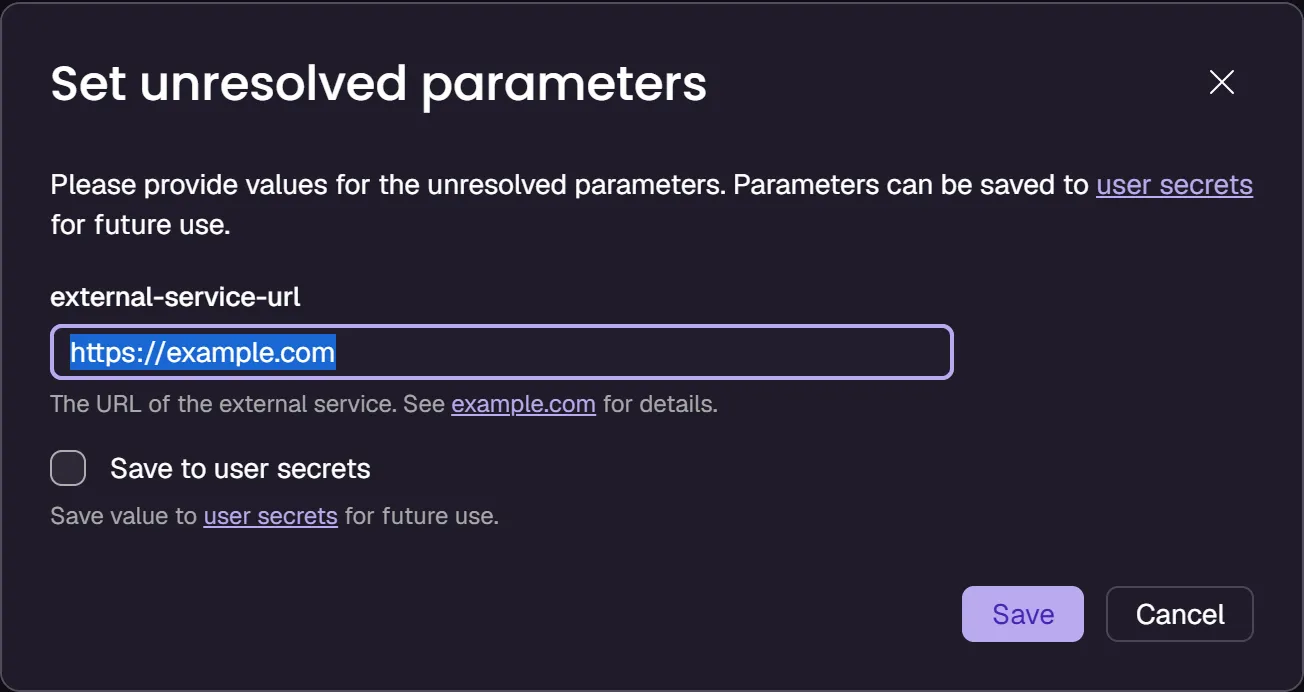
#pragma warning disable ASPIREINTERACTION001 // Type is for evaluation purposes only and is subject to change or removal in future updates. Suppress this diagnostic to proceed.var externalServiceUrl = builder.AddParameter("external-service-url") .WithDescription("The URL of the external service. See [example.com](https://example.com) for details.", enableMarkdown: true) .WithCustomInput(p => new() { InputType = InputType.Text, Value = "https://example.com", Name = p.Name, Placeholder = $"Enter value for {p.Name}", Description = p.Description, EnableDescriptionMarkdown = p.EnableDescriptionMarkdown });var externalService = builder.AddExternalService("external-service", externalServiceUrl);#pragma warning restore ASPIREINTERACTION001
builder.Build().Run();The code renders this control in the dashboard:
Secret values
Section titled “Secret values”Parameters can be used to model secrets. When a parameter is marked as a secret, it serves as a hint to the deployment system that the value should be treated as a secret. When you publish the app, the value is prompted for and stored in a secure location. When you run the app locally, the value is read from the Parameters section of the AppHost configuration.
Consider the following example AppHost AppHost.cs file:
import { function createBuilder(): IDistributedApplicationBuilder
Creates a new distributed application builder
createBuilder } from './.aspire/modules/aspire.mjs';
const const builder: IDistributedApplicationBuilder
function createBuilder(): IDistributedApplicationBuilder
Creates a new distributed application builder
createBuilder();
// Add a secret parameter named "secret"const const secret: ParameterResource
const builder: IDistributedApplicationBuilder
IDistributedApplicationBuilder.addParameter(name: string, options?: { value?: string; publishValueAsDefault?: boolean; secret?: boolean;}): ParameterResource (+1 overload)
Adds a parameter resource
addParameter('secret', { secret?: boolean | undefined
const api: ProjectResource
const builder: IDistributedApplicationBuilder
IDistributedApplicationBuilder.addProject(name: string, projectPath: string, options?: { launchProfileOrOptions?: string | ProjectResourceOptions;}): ProjectResource (+1 overload)
Adds a .NET project resource
addProject('api', '../ApiService/ApiService.csproj');await const api: ProjectResource
ProjectResource.withEnvironment(name: string, value: string | IResourceWithConnectionString | IValueProvider): ProjectResource
Sets an environment variable
withEnvironment('SECRET', const secret: ParameterResource
const builder: IDistributedApplicationBuilder
IDistributedApplicationBuilder.build(): DistributedApplication
Builds the distributed application
build().DistributedApplication.run(cancellationToken?: cancellationToken): void
Runs the distributed application
run();var builder = DistributedApplication.CreateBuilder(args);
// Add a secret parameter named "secret"var secret = builder.AddParameter("secret", secret: true);
builder.AddProject<Projects.ApiService>("api") .WithEnvironment("SECRET", secret);
builder.Build().Run();Now consider the following AppHost configuration file appsettings.json:
{ "Parameters": { "secret": "local-secret" }}The manifest representation is as follows:
{ "resources": { "value": { "type": "parameter.v0", "value": "{value.inputs.value}", "inputs": { "value": { "type": "string", "secret": true } } } }}Add parameters from configuration
Section titled “Add parameters from configuration”In some scenarios, you might want to read parameter values directly from a specific configuration key rather than following the standard Parameters:* pattern. The AddParameterFromConfigurationaddParameterFromConfiguration method allows you to specify a custom configuration key for a parameter.
API signature
Section titled “API signature”public static IResourceBuilder<ParameterResource> AddParameterFromConfiguration( this IDistributedApplicationBuilder builder, string name, string configurationKey, bool secret = false);Parameters
Section titled “Parameters”name- The name of the parameter resourceconfigurationKey- The configuration key to read the value fromsecret- Optional flag indicating whether the parameter should be treated as a secret (default:false)
Example usage
Section titled “Example usage”Consider a scenario where you have configuration values stored in a custom section:
import { function createBuilder(): IDistributedApplicationBuilder
Creates a new distributed application builder
createBuilder } from './.aspire/modules/aspire.mjs';
const const builder: IDistributedApplicationBuilder
function createBuilder(): IDistributedApplicationBuilder
Creates a new distributed application builder
createBuilder();
// Read from a custom configuration keyconst const dbPassword: ParameterResource
const builder: IDistributedApplicationBuilder
IDistributedApplicationBuilder.addParameterFromConfiguration(name: string, configurationKey: string, options?: { secret?: boolean;}): ParameterResource (+1 overload)
Adds a parameter resource to the application, with a value coming from configuration.
addParameterFromConfiguration( 'db-password', 'CustomConfig:Database:Password', { secret?: boolean | undefined
const api: ProjectResource
const builder: IDistributedApplicationBuilder
IDistributedApplicationBuilder.addProject(name: string, projectPath: string, options?: { launchProfileOrOptions?: string | ProjectResourceOptions;}): ProjectResource (+1 overload)
Adds a .NET project resource
addProject('api', '../ApiService/ApiService.csproj');await const api: ProjectResource
ProjectResource.withEnvironment(name: string, value: string | IResourceWithConnectionString | IValueProvider): ProjectResource
Sets an environment variable
withEnvironment('DB_PASSWORD', const dbPassword: ParameterResource
const builder: IDistributedApplicationBuilder
IDistributedApplicationBuilder.build(): DistributedApplication
Builds the distributed application
build().DistributedApplication.run(cancellationToken?: cancellationToken): void
Runs the distributed application
run();var builder = DistributedApplication.CreateBuilder(args);
// Read from a custom configuration keyvar dbPassword = builder.AddParameterFromConfiguration( "db-password", "CustomConfig:Database:Password", secret: true);
builder.AddProject<Projects.ApiService>("api") .WithEnvironment("DB_PASSWORD", dbPassword);
builder.Build().Run();The corresponding configuration file would look like:
{ "CustomConfig": { "Database": { "Password": "your-secure-password" } }}This method is useful when:
- You need to integrate with existing configuration structures
- Your configuration follows a different pattern than the standard
Parameters:*convention - You want to read values from specific configuration sections
Connection string values
Section titled “Connection string values”Parameters can be used to model connection strings. When you publish the app, the value is prompted for and stored in a secure location. When you run the app locally, the value is read from the ConnectionStrings section of the AppHost configuration.
Consider the following example AppHost AppHost.cs file:
import { function createBuilder(): IDistributedApplicationBuilder
Creates a new distributed application builder
createBuilder } from './.aspire/modules/aspire.mjs';
const const builder: IDistributedApplicationBuilder
function createBuilder(): IDistributedApplicationBuilder
Creates a new distributed application builder
createBuilder();
const const redis: IResourceWithConnectionString
const builder: IDistributedApplicationBuilder
IDistributedApplicationBuilder.addConnectionString(name: string, options?: { environmentVariableNameOrExpression?: string | ReferenceExpression;}): IResourceWithConnectionString (+1 overload)
Adds a connection string resource
addConnectionString('redis');
const const api: ProjectResource
const builder: IDistributedApplicationBuilder
IDistributedApplicationBuilder.addProject(name: string, projectPath: string, options?: { launchProfileOrOptions?: string | ProjectResourceOptions;}): ProjectResource (+1 overload)
Adds a .NET project resource
addProject( 'api', '../WebApplication/WebApplication.csproj');await const api: ProjectResource
ProjectResource.withReference(source: IResource | EndpointReference | string | uri, options?: { connectionName?: string; optional?: boolean; name?: string;} | undefined): ProjectResource (+1 overload)
Adds a reference to another resource
withReference(const redis: IResourceWithConnectionString
ProjectResource.waitFor(dependency: IResource | IResourceWithConnectionString, waitBehavior?: WaitBehavior): ProjectResource
Waits for another resource to be ready
waitFor(const redis: IResourceWithConnectionString
const builder: IDistributedApplicationBuilder
IDistributedApplicationBuilder.build(): DistributedApplication
Builds the distributed application
build().DistributedApplication.run(cancellationToken?: cancellationToken): void
Runs the distributed application
run();var builder = DistributedApplication.CreateBuilder(args);
var redis = builder.AddConnectionString("redis");
builder.AddProject<Projects.WebApplication>("api") .WithReference(redis) .WaitFor(redis);
builder.Build().Run();Now consider the following AppHost configuration file appsettings.json:
{ "ConnectionStrings": { "redis": "local-connection-string" }}Build connection strings with reference expressions
Section titled “Build connection strings with reference expressions”If you want to construct a connection string from parameters and ensure that it’s handled correctly in both development and production, use AddConnectionStringaddConnectionString with a ReferenceExpression.
For example, if you have a secret parameter that stores a small part of a connection string, use this code to insert it:
import { function createBuilder(): IDistributedApplicationBuilder
Creates a new distributed application builder
createBuilder, function refExpr(strings: TemplateStringsArray, ...values: unknown[]): ReferenceExpression
Creates a reference expression from a tagged template literal
refExpr } from './.aspire/modules/aspire.mjs';
const const builder: IDistributedApplicationBuilder
function createBuilder(): IDistributedApplicationBuilder
Creates a new distributed application builder
createBuilder();
const const secretKey: ParameterResource
const builder: IDistributedApplicationBuilder
IDistributedApplicationBuilder.addParameter(name: string, options?: { value?: string; publishValueAsDefault?: boolean; secret?: boolean;}): ParameterResource (+1 overload)
Adds a parameter resource
addParameter('secretkey', { secret?: boolean | undefined
const connectionString: IResourceWithConnectionString
const builder: IDistributedApplicationBuilder
IDistributedApplicationBuilder.addConnectionString(name: string, options?: { environmentVariableNameOrExpression?: string | ReferenceExpression;}): IResourceWithConnectionString (+1 overload)
Adds a connection string resource
addConnectionString( 'composedconnectionstring', { environmentVariableNameOrExpression?: string | ReferenceExpression | undefined
function refExpr(strings: TemplateStringsArray, ...values: unknown[]): ReferenceExpression
Creates a reference expression from a tagged template literal
refExpr`Endpoint=https://api.contoso.com/v1;Key=${const secretKey: ParameterResource
const catalogApi: ProjectResource
const builder: IDistributedApplicationBuilder
IDistributedApplicationBuilder.addProject(name: string, projectPath: string, options?: { launchProfileOrOptions?: string | ProjectResourceOptions;}): ProjectResource (+1 overload)
Adds a .NET project resource
addProject( 'catalogapi', '../CatalogApi/CatalogApi.csproj');await const catalogApi: ProjectResource
ProjectResource.withReference(source: IResource | EndpointReference | string | uri, options?: { connectionName?: string; optional?: boolean; name?: string;} | undefined): ProjectResource (+1 overload)
Adds a reference to another resource
withReference(const connectionString: IResourceWithConnectionString
ProjectResource.waitFor(dependency: IResource | IResourceWithConnectionString, waitBehavior?: WaitBehavior): ProjectResource
Waits for another resource to be ready
waitFor(const connectionString: IResourceWithConnectionString
var secretKey = builder.AddParameter("secretkey", secret: true);
var connectionString = builder.AddConnectionString(    "composedconnectionstring",    ReferenceExpression.Create($"Endpoint=https://api.contoso.com/v1;Key={secretKey}"));
builder.AddProject<Projects.AspireReferenceExpressions_CatalogAPI>("catalogapi")       .WithReference(connectionString)       .WaitFor(connectionString);
You can also use reference expressions to append text to connection strings created by Aspire resources. For example, when you add a PostgreSQL resource to your Aspire solution, the database server runs in a container and a connection string is formulated for it. In the following code, the extra property Include Error Details is appended to that connection string before it’s passed to consuming projects:
import { function createBuilder(): IDistributedApplicationBuilder
Creates a new distributed application builder
createBuilder, function refExpr(strings: TemplateStringsArray, ...values: unknown[]): ReferenceExpression
Creates a reference expression from a tagged template literal
refExpr } from './.aspire/modules/aspire.mjs';
const const builder: IDistributedApplicationBuilder
function createBuilder(): IDistributedApplicationBuilder
Creates a new distributed application builder
createBuilder();
const const postgres: PostgresServerResource
const builder: IDistributedApplicationBuilder
IDistributedApplicationBuilder.addPostgres(name: string, options?: { userName?: string | ParameterResource; password?: string | ParameterResource; port?: number;}): PostgresServerResource (+1 overload)
Adds a PostgreSQL resource to the application model. A container is used for local development.
addPostgres('postgres');const const database: PostgresDatabaseResource
const postgres: PostgresServerResource
PostgresServerResource.addDatabase(name: string, options?: { databaseName?: string;} | undefined): PostgresDatabaseResource (+1 overload)
Adds a PostgreSQL database to the application model.
addDatabase('db');
const const pgConnectionString: IResourceWithConnectionString
const builder: IDistributedApplicationBuilder
IDistributedApplicationBuilder.addConnectionString(name: string, options?: { environmentVariableNameOrExpression?: string | ReferenceExpression;}): IResourceWithConnectionString (+1 overload)
Adds a connection string resource
addConnectionString('pgdatabase', { environmentVariableNameOrExpression?: string | ReferenceExpression | undefined
function refExpr(strings: TemplateStringsArray, ...values: unknown[]): ReferenceExpression
Creates a reference expression from a tagged template literal
refExpr`${const database: PostgresDatabaseResource
const customerApi: ProjectResource
const builder: IDistributedApplicationBuilder
IDistributedApplicationBuilder.addProject(name: string, projectPath: string, options?: { launchProfileOrOptions?: string | ProjectResourceOptions;}): ProjectResource (+1 overload)
Adds a .NET project resource
addProject( 'customerapi', '../CustomerApi/CustomerApi.csproj');await const customerApi: ProjectResource
ProjectResource.withReference(source: IResource | EndpointReference | string | uri, options?: { connectionName?: string; optional?: boolean; name?: string;} | undefined): ProjectResource (+1 overload)
Adds a reference to another resource
withReference(const pgConnectionString: IResourceWithConnectionString
ProjectResource.waitFor(dependency: IResource | IResourceWithConnectionString, waitBehavior?: WaitBehavior): ProjectResource
Waits for another resource to be ready
waitFor(const pgConnectionString: IResourceWithConnectionString
var postgres = builder.AddPostgres("postgres");var database = postgres.AddDatabase("db");
var pgConnectionString = builder.AddConnectionString(    "pgdatabase",    ReferenceExpression.Create($"{database};Include Error Details=true"));
builder.AddProject<Projects.AspireReferenceExpressions_CustomerAPI>("customerapi")       .WithReference(pgConnectionString)       .WaitFor(pgConnectionString);
Parameter example
Section titled “Parameter example”To express a parameter, consider the following example code:
import { function createBuilder(): IDistributedApplicationBuilder
Creates a new distributed application builder
createBuilder } from './.aspire/modules/aspire.mjs';
const const builder: IDistributedApplicationBuilder
function createBuilder(): IDistributedApplicationBuilder
Creates a new distributed application builder
createBuilder();
// In run mode, add the actual SQL Server resource.// In publish mode, use a connection string representing an external SQL Server instance.const const isRunMode: boolean
const builder: IDistributedApplicationBuilder
IDistributedApplicationBuilder.executionContext: PropertyAccessor<DistributedApplicationExecutionContext>
Execution context for this invocation of the AppHost.
executionContext.DistributedApplicationExecutionContext.isRunMode: () => Promise<boolean>
Returns true if the current operation is running.
isRunMode();
const const db: IResourceWithConnectionString
const isRunMode: boolean
const builder: IDistributedApplicationBuilder
IDistributedApplicationBuilder.addSqlServer(name: string, options?: { password?: string | ParameterResource; port?: number;}): SqlServerServerResource (+1 overload)
Adds a SQL Server resource to the application model. A container is used for local development.
addSqlServer('sql')).SqlServerServerResource.addDatabase(name: string, options?: { databaseName?: string;} | undefined): SqlServerDatabaseResource (+1 overload)
Adds a SQL Server database resource
addDatabase('db') : await const builder: IDistributedApplicationBuilder
IDistributedApplicationBuilder.addConnectionString(name: string, options?: { environmentVariableNameOrExpression?: string | ReferenceExpression;}): IResourceWithConnectionString (+1 overload)
Adds a connection string resource
addConnectionString('db');
const const insertionRows: ParameterResource
const builder: IDistributedApplicationBuilder
IDistributedApplicationBuilder.addParameter(name: string, options?: { value?: string; publishValueAsDefault?: boolean; secret?: boolean;}): ParameterResource (+1 overload)
Adds a parameter resource
addParameter('insertionRows');
const const api: ProjectResource
const builder: IDistributedApplicationBuilder
IDistributedApplicationBuilder.addProject(name: string, projectPath: string, options?: { launchProfileOrOptions?: string | ProjectResourceOptions;}): ProjectResource (+1 overload)
Adds a .NET project resource
addProject( 'api', '../Parameters.ApiService/Parameters.ApiService.csproj');await const api: ProjectResource
ProjectResource.withEnvironment(name: string, value: string | IResourceWithConnectionString | IValueProvider): ProjectResource
Sets an environment variable
withEnvironment('InsertionRows', const insertionRows: ParameterResource
const api: ProjectResource
ProjectResource.withReference(source: IResource | EndpointReference | string | uri, options?: { connectionName?: string; optional?: boolean; name?: string;} | undefined): ProjectResource (+1 overload)
Adds a reference to another resource
withReference(const db: IResourceWithConnectionString
const builder: IDistributedApplicationBuilder
IDistributedApplicationBuilder.build(): DistributedApplication
Builds the distributed application
build().DistributedApplication.run(cancellationToken?: cancellationToken): void
Runs the distributed application
run();var builder = DistributedApplication.CreateBuilder(args);
// In run mode, add the actual SQL Server resource.// In publish mode, use a connection string representing an external SQL Server instance.IResourceBuilder<IResourceWithConnectionString> db = builder.ExecutionContext.IsRunMode ? builder.AddSqlServer("sql").AddDatabase("db") : builder.AddConnectionString("db");
var insertionRows = builder.AddParameter("insertionRows");
builder.AddProject<Projects.Parameters_ApiService>("api") .WithEnvironment("InsertionRows", insertionRows) .WithReference(db);
builder.Build().Run();The following steps are performed:
- In run mode, adds a SQL Server resource named
sqland a database nameddb. In publish mode, uses an external connection string nameddb. - Adds a parameter named
insertionRows. - Adds a project named
apiand associates it with theProjects.Parameters_ApiServiceproject resource type-parameter. - Passes the
insertionRowsparameter to theapiproject. - References the
dbdatabase.
The value for the insertionRows parameter is read from the Parameters section of the AppHost configuration file appsettings.json:
{ "Logging": { "LogLevel": { "Default": "Information", "Microsoft.AspNetCore": "Warning", "Aspire.Hosting.Dcp": "Warning" } }, "Parameters": { "insertionRows": "1" }}The Parameters_ApiService project consumes the insertionRows parameter. Consider the Program.cs example file:
using Microsoft.EntityFrameworkCore;
var builder = WebApplication.CreateBuilder(args);
int insertionRows = builder.Configuration.GetValue<int>("InsertionRows", 1);
builder.AddServiceDefaults();
builder.AddSqlServerDbContext<MyDbContext>("db");
var app = builder.Build();
app.MapGet("/", async (MyDbContext context) =>{    // You wouldn't normally do this on every call,    // but doing it here just to make this simple.    context.Database.EnsureCreated();
    for (var i = 0; i < insertionRows; i++)    {        var entry = new Entry();        await context.Entries.AddAsync(entry);    }
    await context.SaveChangesAsync();
    var entries = await context.Entries.ToListAsync();
    return new    {        totalEntries = entries.Count,        entries    };});
app.Run();package main
import ( "database/sql" "fmt" "net/http" "os" "strconv")
func main() { insertionRows, _ := strconv.Atoi(os.Getenv("InsertionRows")) if insertionRows == 0 { insertionRows = 1 }
connStr := os.Getenv("ConnectionStrings__db")
http.HandleFunc("/", func(w http.ResponseWriter, r *http.Request) { db, _ := sql.Open("sqlserver", connStr) defer db.Close()
for i := 0; i < insertionRows; i++ { db.Exec("INSERT INTO Entries DEFAULT VALUES") }
rows, _ := db.Query("SELECT COUNT(*) FROM Entries") var count int rows.Next() rows.Scan(&count)
fmt.Fprintf(w, `{"totalEntries": %d}`, count) })
http.ListenAndServe(":8080", nil)}import osfrom fastapi import FastAPI
app = FastAPI()
insertion_rows = int(os.getenv("InsertionRows", "1"))conn_str = os.getenv("ConnectionStrings__db")
@app.get("/")async def root(): # Connect to the database using conn_str # Insert insertion_rows entries # Return the total count return { "totalEntries": insertion_rows, }import express from 'express';
const app = express();const insertionRows = parseInt(process.env.InsertionRows ?? '1', 10);const connStr = process.env.ConnectionStrings__db;
app.get('/', async (req, res) => { // Connect to the database using connStr // Insert insertionRows entries // Return the total count res.json({ totalEntries: insertionRows, });});
app.listen(8080); Aspire