
Aspire 9.1
Dieser Inhalt ist noch nicht in deiner Sprache verfügbar.
📢 Aspire 9.1 is the next minor version release of Aspire; it supports both:
- .NET 8.0 Long Term Support (LTS) or
- .NET 9.0 Standard Term Support (STS).
As always, we focused on highly requested features and pain points from the community. Our theme for 9.1 was “polish, polish, polish”—so you see quality of life fixes throughout the whole platform. Some highlights from this release are resource relationships in the dashboard, support for working in GitHub Codespaces, and publishing resources as a Dockerfile.
If you have feedback, questions, or want to contribute to Aspire, collaborate with us on GitHub or join us on Discord to chat with team members.
Whether you’re new to Aspire or have been with us since the preview, it’s important to note that Aspire releases out-of-band from .NET releases. While major versions of Aspire align with .NET major versions, minor versions are released more frequently. For more details on .NET and Aspire version support, see:
- .NET support policy: Definitions for LTS and STS.
- Aspire support policy: Important unique product life cycle details.
⬆️ Upgrade to Aspire 9.1
Section titled “⬆️ Upgrade to Aspire 9.1”Moving between minor releases of Aspire is simple:
-
In your AppHost project file (that is, MyApp.AppHost.csproj), update the 📦 Aspire.AppHost.Sdk NuGet package to version
9.1.0:<Project Sdk="Microsoft.NET.Sdk"><Sdk Name="Aspire.AppHost.Sdk" Version="9.1.0" /><!-- Omitted for brevity --></Project>For more information, see Aspire SDK.
-
Check for any NuGet package updates, either using the NuGet Package Manager in Visual Studio or the Update NuGet Package command in VS Code.
-
Update to the latest Aspire templates by running the following .NET command line:
Terminal window dotnet new update
If your AppHost project file doesn’t have the Aspire.AppHost.Sdk reference, you might still be using Aspire 8. To upgrade to 9.0, you can follow the documentation from last release.
🌱 Improved onboarding experience
Section titled “🌱 Improved onboarding experience”The onboarding experience for Aspire is improved with 9.1. The team worked on creating a GitHub Codespaces template that installs all the necessary dependencies for Aspire, making it easier to get started, including the templates and the ASP.NET Core developer certificate. Additionally, there’s support for Dev Containers. For more information, see:
🔧 Dashboard UX and customization
Section titled “🔧 Dashboard UX and customization”With every release of Aspire, the dashboard gets more powerful and customizable, this release is no exception. The following features were added to the dashboard in Aspire 9.1:
🧩 Resource relationships
Section titled “🧩 Resource relationships”The dashboard now supports “parent” and “child” resource relationships. For instance, when you create a Postgres instance with multiple databases, these databases are nested under the same instance on the Resource page.
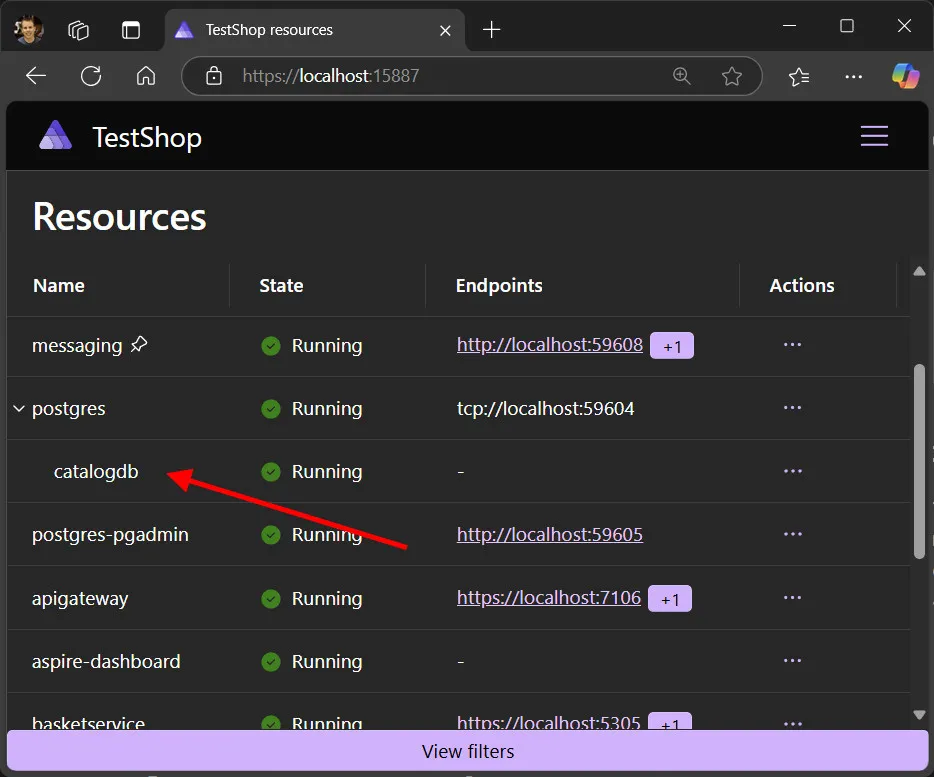
For more information, see Explore the Aspire dashboard.
🔤 Localization overrides
Section titled “🔤 Localization overrides”The dashboard defaults to the language set in your browser. This release introduces the ability to override this setting and change the dashboard language independently from the browser language. Consider the following screen capture that demonstrates the addition of the language dropdown in the dashboard:
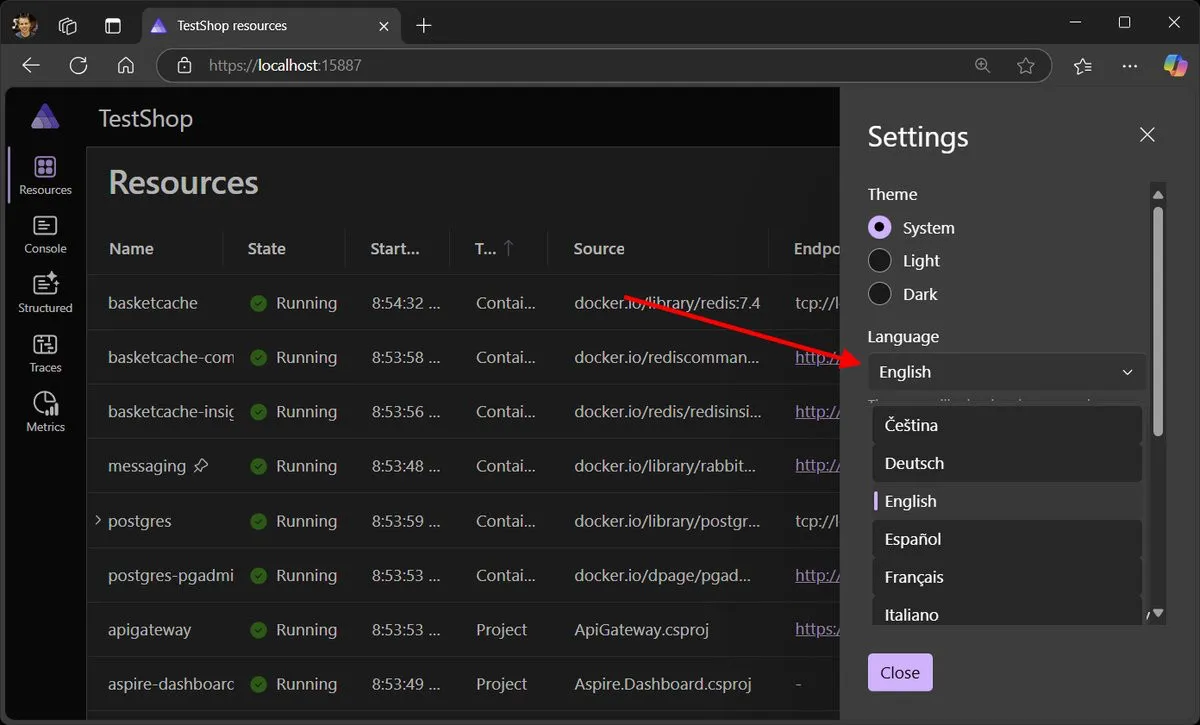
🗑️ Clear logs and telemetry from the dashboard
Section titled “🗑️ Clear logs and telemetry from the dashboard”New buttons were added to the Console logs, Structured logs, Traces and Metrics pages to clear data. There’s also a “Remove all” button in the settings popup to remove everything with one action.
Now you use this feature to reset the dashboard to a blank slate, test your app, view only the relevant logs and telemetry, and repeat.
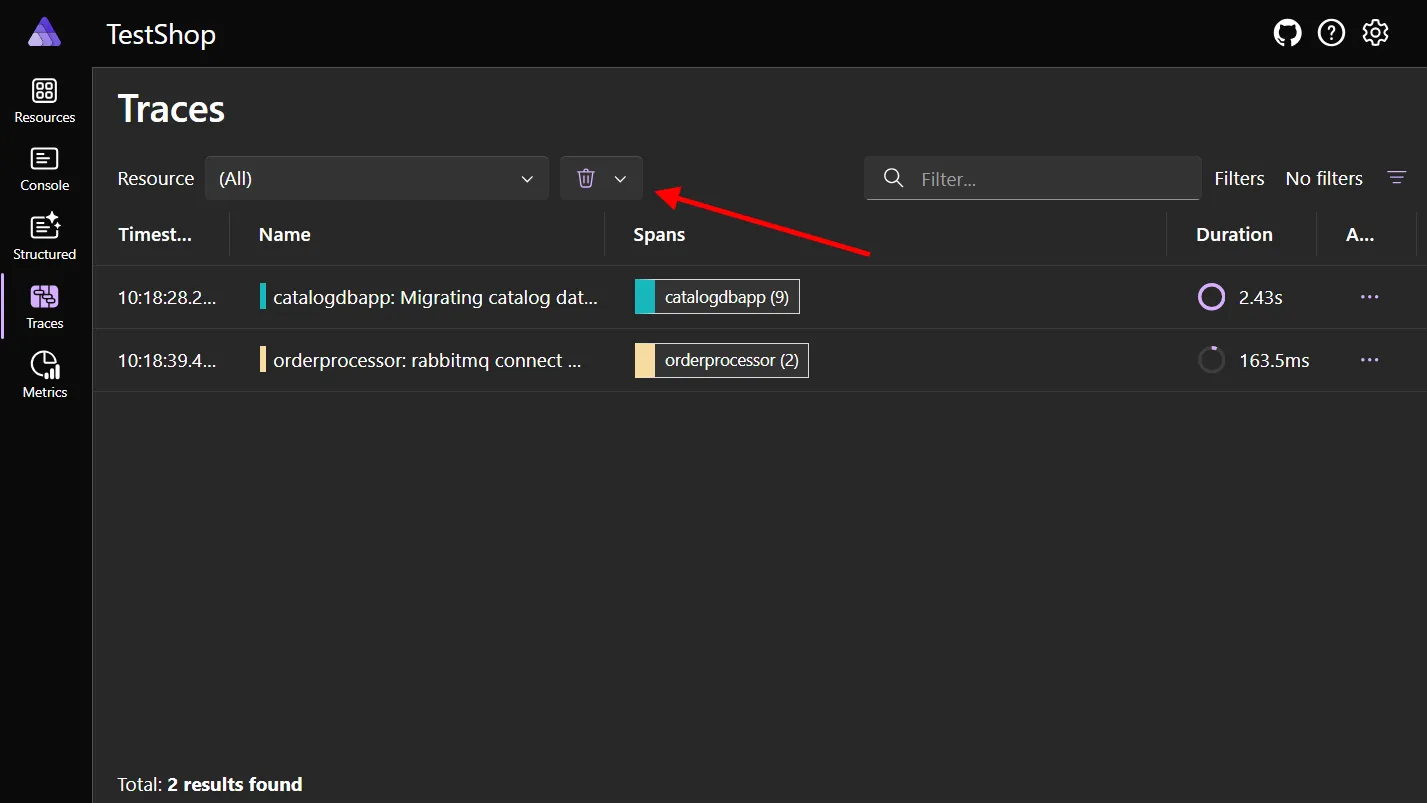
We 💜 love the developer community and thrive on its feedback, collaboration, and contributions. This feature is a community contribution from @Daluur. Join us in celebrating their contribution by using the feature!
🔢 New filtering
Section titled “🔢 New filtering”You can now filter what you see in the Resource page by Resource type, State, and Health state. Consider the following screen capture, which demonstrates the addition of the filter options in the dashboard:
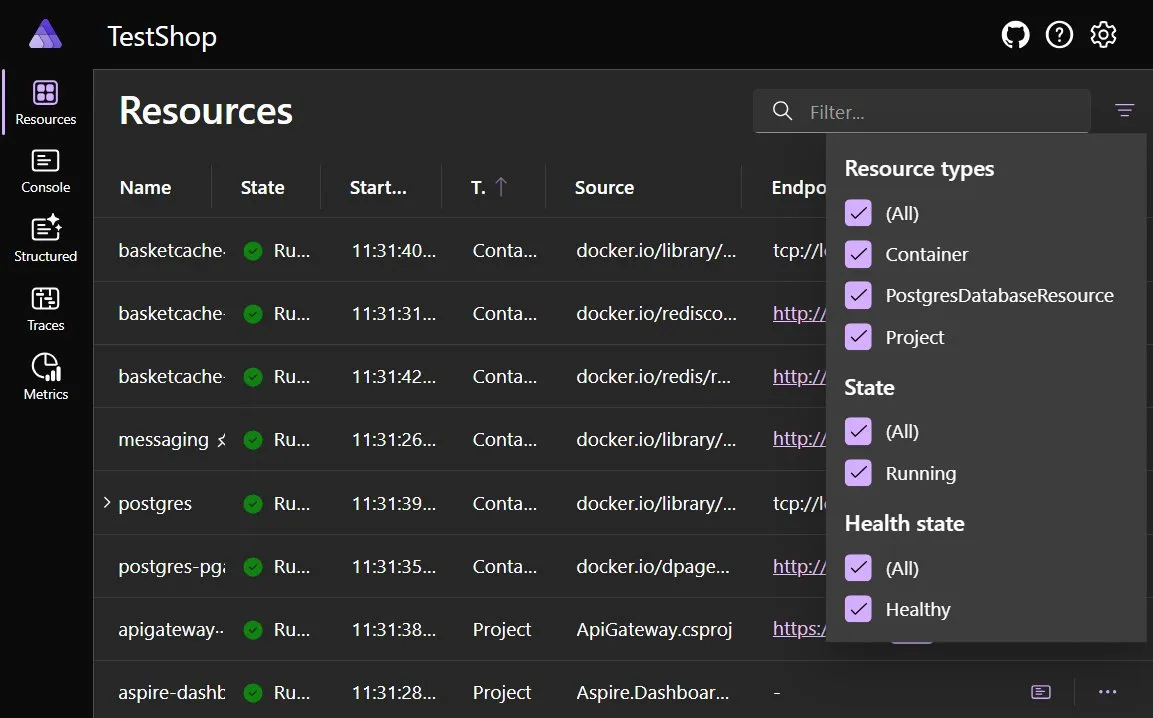
📝 More resource details
Section titled “📝 More resource details”When you select a resource in the dashboard, the details pane now displays new data points, including References, Back references, and Volumes with their mount types. This enhancement provides a clearer and more comprehensive view of your resources, improving the overall user experience by making relevant details more accessible.
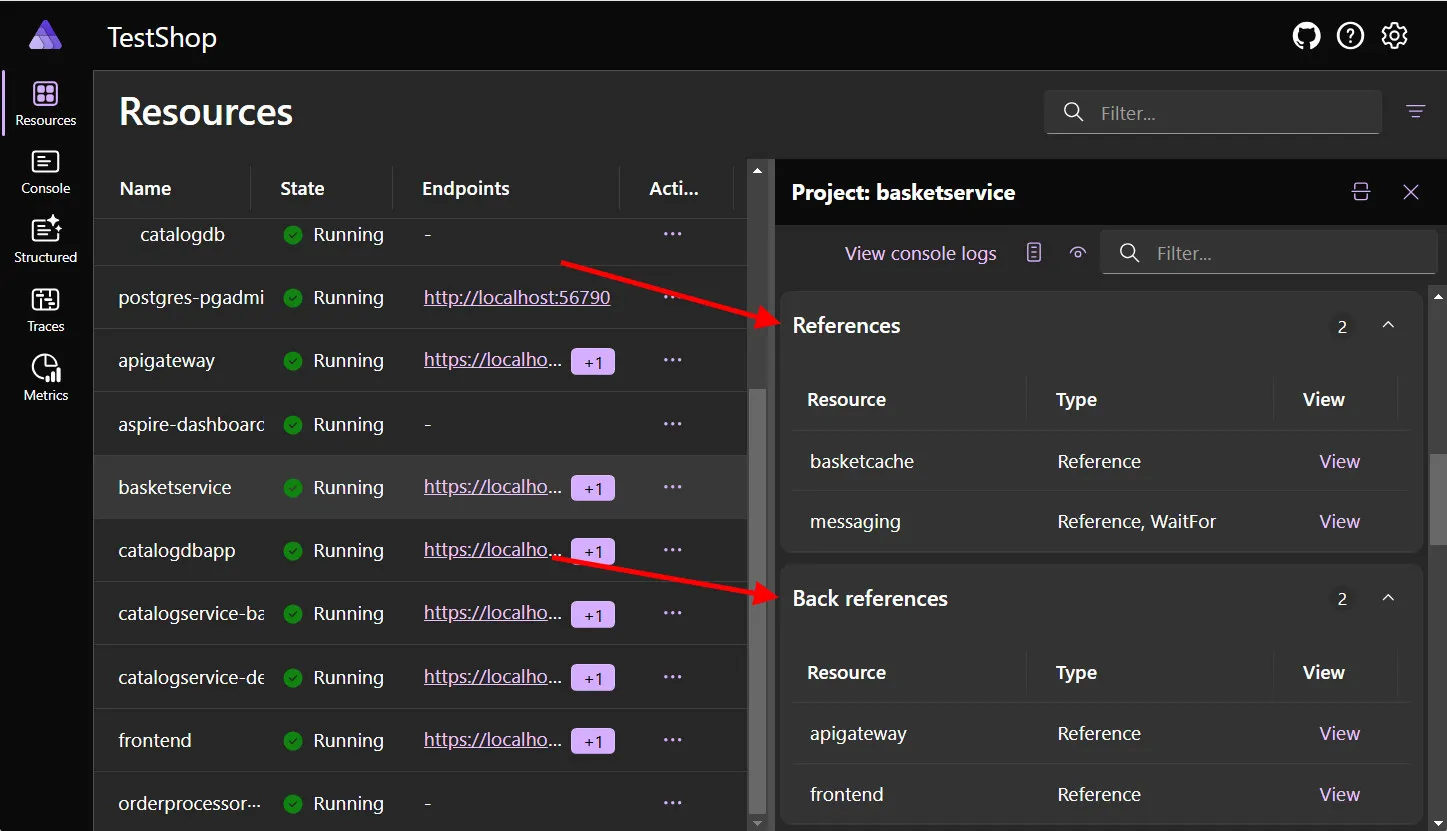
For more information, see Aspire dashboard: Resources page.
🛡️ CORS support for custom local domains
Section titled “🛡️ CORS support for custom local domains”You can now set the ASPIRE_DASHBOARD_CORS_ALLOWED_ORIGINS environment variable to allow the dashboard to receive telemetry from other browser apps, such as if you have resources running on custom localhost domains.
For more information, see Aspire AppHost: Dashboard configuration.
🪵 Flexibility with console logs
Section titled “🪵 Flexibility with console logs”The console log page has two new options. You’re now able to download your logs so you can view them in your own diagnostics tools. Plus, you can turn timestamps on or off to reduce visual clutter when needed.
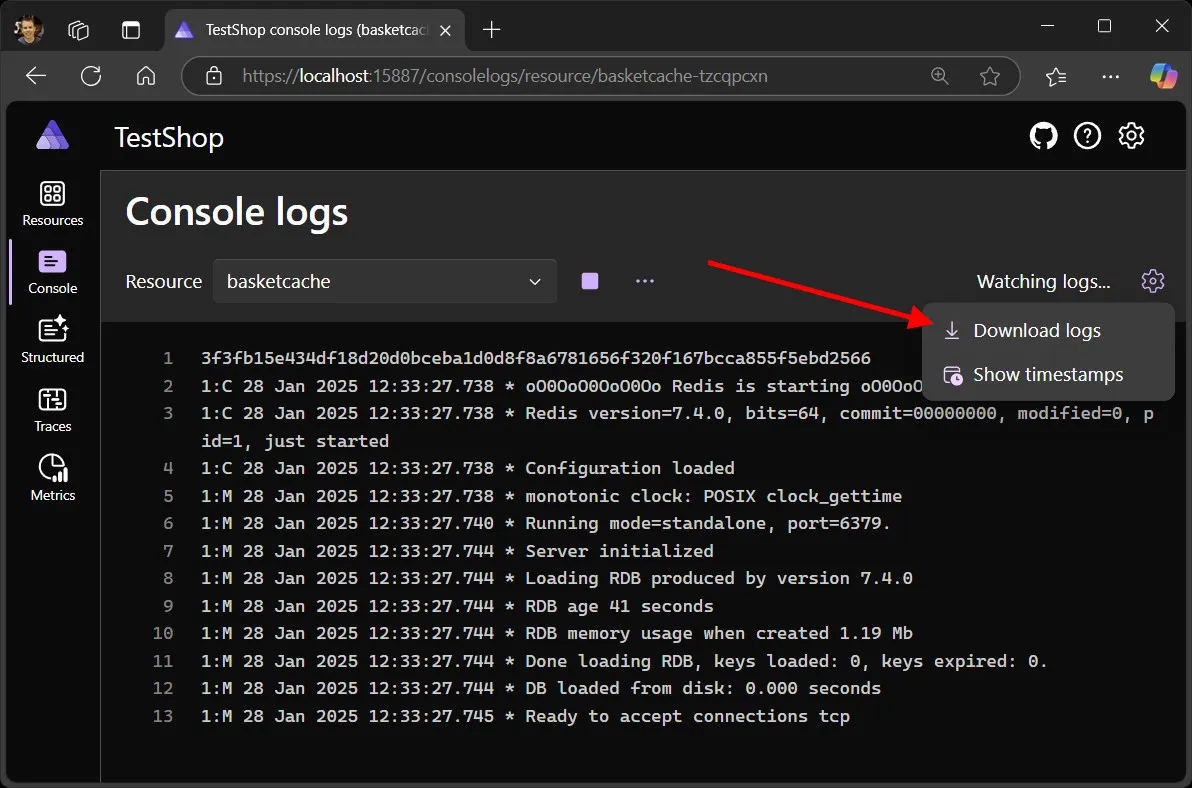
For more information, see Aspire dashboard: Console logs page.
🎨 Various UX improvements
Section titled “🎨 Various UX improvements”Several new features in Aspire 9.1 enhance and streamline the following popular tasks:
- ▶️ Resource commands, such as Start and Stop buttons, are now available on the Console logs page.
- 🔍 Single selection to open in the text visualizer.
- 🔗 URLs within logs are now automatically clickable, with commas removed from endpoints.
Additionally, the 🖱️ scroll position resets when switching between different resources—this helps to visually reset the current resource view.
For more details on the latest dashboard enhancements, check out James Newton-King on Bluesky, where he’s been sharing new features daily.
⚙️ Local development enhancements
Section titled “⚙️ Local development enhancements”In Aspire 9.1, several improvements to streamline your local development experience were an emphasis. These enhancements are designed to provide greater flexibility, better integration with Docker, and more efficient resource management. Here are some of the key updates:
▶️ Start resources on demand
Section titled “▶️ Start resources on demand”You can now tell resources not to start with the rest of your app by using WithExplicitStart on the resource in your AppHost. Then, you can start it whenever you’re ready from inside the dashboard.
🐳 Better Docker integration
Section titled “🐳 Better Docker integration”The PublishAsDockerfile() feature was introduced for all projects and executable resources. This enhancement allows for complete customization of the Docker container and Dockerfile used during the publish process.
While this API was available in previous versions, it couldn’t be used with project or executable resource types.
🧹 Cleaning up Docker networks
Section titled “🧹 Cleaning up Docker networks”In 9.1, we addressed a persistent issue where Docker networks created by Aspire would remain active even after the application was stopped. This bug, tracked in Aspire GitHub issue #6504, is resolved. Now, Docker networks are properly cleaned up, ensuring a more efficient and tidy development environment.
✅ Socket address issues fixed
Section titled “✅ Socket address issues fixed”Several users reported issues (#6693, #6704, #7095) with restarting the Aspire AppHost, including reconciliation errors and “address already in use” messages.
This release introduces a more robust approach to managing socket addresses, ensuring only one instance of each address is used at a time. Additionally, improvements were made to ensure proper project restarts and resource releases, preventing hanging issues. These changes enhance the stability and reliability of the AppHost, especially during development and testing.
🔌 Integration updates
Section titled “🔌 Integration updates”Aspire continues to excel through its integrations with various platforms. This release includes numerous updates to existing integrations and details about ownership migrations, enhancing the overall functionality and user experience.
☁️ Azure updates
Section titled “☁️ Azure updates”This release also focused on improving various Azure integrations:
🆕 New emulators
Section titled “🆕 New emulators”We’re excited to bring new emulators for making local development easier. The following integrations got new emulators in this release:
var serviceBus = builder.AddAzureServiceBus("servicebus")                        .RunAsEmulator();
#pragma warning disable ASPIRECOSMOSDB001var cosmosDb = builder.AddAzureCosmosDB("cosmosdb")                      .RunAsPreviewEmulator();
var signalr = builder.AddAzureSignalR("signalr", AzureSignalRServiceMode.Serverless)                      .RunAsEmulator();
These new emulators work side-by-side with the existing emulators for:
🌌 Cosmos DB
Section titled “🌌 Cosmos DB”Along with support for the new emulator, Cosmos DB added the following features.
🔒 Support for Entra ID authentication by default
Section titled “🔒 Support for Entra ID authentication by default”Previously, the Cosmos DB integration used access keys and a Key Vault secret to connect to the service. Aspire 9.1 added support for using more secure authentication using managed identities by default. If you need to keep using access key authentication, you can get back to the previous behavior by calling WithAccessKeyAuthentication.
💽 Support for modeling Database and Containers in the AppHost
Section titled “💽 Support for modeling Database and Containers in the AppHost”You can define a Cosmos DB database and containers in the AppHost and these resources are available when you run the application in both the emulator and in Azure. This allows you to define these resources up front and no longer need to create them from the application, which might not have permission to create them.
For example API usage to add database and containers, see the following related articles:
⚡ Support for Cosmos DB-based triggers in Azure Functions
Section titled “⚡ Support for Cosmos DB-based triggers in Azure Functions”The Azure Cosmos DB resource was modified to support consumption in Azure Functions applications that uses the Cosmos DB trigger. A Cosmos DB resource can be initialized and added as a reference to an Azure Functions resource with the following code:
var cosmosDb = builder.AddAzureCosmosDB("cosmosdb")                      .RunAsEmulator();var database = cosmosDb.AddCosmosDatabase("mydatabase");database.AddContainer("mycontainer", "/id");
var funcApp = builder.AddAzureFunctionsProject<Projects.AzureFunctionsEndToEnd_Functions>("funcapp")       .WithReference(cosmosDb)    .WaitFor(cosmosDb);
The resource can be used in the Azure Functions trigger as follows:
public class MyCosmosDbTrigger(ILogger<MyCosmosDbTrigger> logger){ [Function(nameof(MyCosmosDbTrigger))] public void Run([CosmosDBTrigger( databaseName: "mydatabase", containerName: "mycontainer", CreateLeaseContainerIfNotExists = true, Connection = "cosmosdb")] IReadOnlyList<Document> input) { logger.LogInformation( "C# cosmosdb trigger function processed: {Count} messages", input.Count); }}For more information using Azure Functions with Aspire, see Aspire Azure Functions integration (Preview).
🚚 Service Bus and Event Hubs
Section titled “🚚 Service Bus and Event Hubs”Similar to Cosmos DB, the Service Bus and Event Hubs integrations now allow you to define Azure Service Bus queues, topics, subscriptions, and Azure Event Hubs instances and consumer groups directly in your AppHost code. This enhancement simplifies your application logic by enabling the creation and management of these resources outside the application itself.
For more information, see the following updated articles:
♻️ Working with existing resources
Section titled “♻️ Working with existing resources”There’s consistent feedback about making it easier to connect to existing Azure resources in Aspire. With 9.1, you can now easily connect to an existing Azure resource either directly by string name, or with app model parameters which can be changed at deployment time. For example to connect to an Azure Service Bus account, we can use the following code:
var existingServiceBusName = builder.AddParameter("serviceBusName");var existingServiceBusResourceGroup = builder.AddParameter("serviceBusResourceGroup");
var serviceBus = builder.AddAzureServiceBus("messaging")                        .AsExisting(existingServiceBusName, existingServiceBusResourceGroup);
The preceding code reads the name and resource group from the parameters, and connects to the existing resource when the application is run or deployed. For more information, see use existing Azure resources.
🌍 Azure Container Apps
Section titled “🌍 Azure Container Apps”Experimental support for configuring custom domains in Azure Container Apps (ACA) was added. For example:
#pragma warning disable ASPIREACADOMAINS001
var customDomain = builder.AddParameter("customDomain");var certificateName = builder.AddParameter("certificateName");
builder.AddProject<Projects.AzureContainerApps_ApiService>("api")       .WithExternalHttpEndpoints()       .PublishAsAzureContainerApp((infra, app) =>       {           app.ConfigureCustomDomain(customDomain, certificateName);       });
For more information, see Aspire diagnostics overview.
➕ Even more integration updates
Section titled “➕ Even more integration updates”- OpenAI now supports the 📦 Microsoft.Extensions.AI NuGet package.
- RabbitMQ updated to version 7, and MongoDB to version 3. These updates introduced breaking changes, leading to the release of new packages with version-specific suffixes. The original packages continue to use the previous versions, while the new packages are as follows:
- 📦 Aspire.RabbitMQ.Client.v7 NuGet package. For more information, see the Aspire RabbitMQ client integration documentation.
- 📦 Aspire.MongoDB.Driver.v3 NuGet package. For more information, see the Aspire MongoDB client integration documentation.
- Dapr migrated to the CommunityToolkit to facilitate faster innovation.
- Numerous other integrations received updates, fixes, and new features. For detailed information, refer to our GitHub release notes.
The 📦 Aspire.Hosting.AWS NuGet package and source code migrated under Amazon Web Services (AWS)) ownership. This migration happened as part of Aspire 9.0, we’re just restating that change here.
🧪 Testing in Aspire
Section titled “🧪 Testing in Aspire”Aspire 9.1 simplifies writing cross-functional integration tests with a robust approach. The AppHost allows you to create, evaluate, and manage containerized environments seamlessly within a test run. This functionality supports popular testing frameworks like xUnit, NUnit, and MSTest, enhancing your testing capabilities and efficiency.
Now, you’re able to disable port randomization or enable the dashboard. For more information, see Aspire testing overview. Additionally, you can now Pass arguments to your AppHost.
Some of these enhancements were introduced as a result of stability issues that were reported, such as Aspire GitHub issue #6678—where some resources failed to start do to “address in use” errors.
🚀 Deployment
Section titled “🚀 Deployment”Significant improvements to the Azure Container Apps (ACA) deployment process are included in Aspire 9.1, enhancing both the azd CLI and AppHost options. One of the most requested features—support for deploying npm applications to ACA—is now implemented. This new capability allows npm apps to be deployed to ACA just like other resources, streamlining the deployment process and providing greater flexibility for developers.
We recognize there’s more work to be done in the area of deployment. Future releases will continue to address these opportunities for improvement. For more information on deploying Aspire to ACA, see Deploy an Aspire project to Azure Container Apps.
⚠️ Breaking changes
Section titled “⚠️ Breaking changes”Aspire is moving quickly, and with that comes breaking changes. Breaking are categorized as either:
- Binary incompatible: The assembly version has changed, and you need to recompile your code.
- Source incompatible: The source code has changed, and you need to change your code.
- Behavioral change: The code behaves differently, and you need to change your code.
Typically APIs are decorated with the obsolete attribute giving you a warning when you compile, and an opportunity to adjust your code. For an overview of breaking changes in Aspire 9.1, see Breaking changes in Aspire 9.1.
🎯 Upgrade today
Section titled “🎯 Upgrade today”Follow the directions outlined in the Upgrade to Aspire 9.1 section to make the switch to 9.1 and take advantage of all these new features today! As always, we’re listening for your feedback on GitHub-and looking out for what you want to see in 9.2 ☺️.
For a complete list of issues addressed in this release, see Aspire GitHub repository—9.1 milestone.