
AppHost configuration
Это содержимое пока не доступно на вашем языке.
The AppHost project configures and starts your distributed application. When a DistributedApplication runs it reads configuration from the AppHost. Configuration is loaded from environment variables that are set on the AppHost and DistributedApplicationOptions. Configuration includes:
- Settings for hosting the resource service, such as the address and authentication options.
- Settings used to start the Aspire dashboard, such the dashboard’s frontend and OpenTelemetry Protocol (OTLP) addresses.
- Internal settings that Aspire uses to run the AppHost. These are set internally but can be accessed by integrations that extend Aspire.
AppHost configuration is provided by the AppHost launch profile. The AppHost has a launch settings file call launchSettings.json which has a list of launch profiles. Each launch profile is a collection of related options which defines how you would like dotnet to start your application.
{ "$schema": "https://json.schemastore.org/launchsettings.json", "profiles": { "https": { "commandName": "Project", "dotnetRunMessages": true, "launchBrowser": true, "applicationUrl": "https://localhost:17134;http://localhost:15170", "environmentVariables": { "ASPNETCORE_ENVIRONMENT": "Development", "DOTNET_ENVIRONMENT": "Development", "ASPIRE_DASHBOARD_OTLP_ENDPOINT_URL": "https://localhost:21030", "ASPIRE_RESOURCE_SERVICE_ENDPOINT_URL": "https://localhost:22057" } } }}The preceding launch settings file:
- Has one launch profile named
https. - Configures an Aspire AppHost project:
- The
applicationUrlproperty configures the dashboard launch address (ASPNETCORE_URLS). - Environment variables such as
ASPIRE_DASHBOARD_OTLP_ENDPOINT_URLandASPIRE_RESOURCE_SERVICE_ENDPOINT_URLare set on the AppHost.
- The
For more information, see Launch profiles.
Common configuration
Section titled “Common configuration”| Option | Default value | Description |
|---|---|---|
ASPIRE_ALLOW_UNSECURED_TRANSPORT | false | Allows communication with the AppHost without https. ASPNETCORE_URLS (dashboard address) and ASPIRE_RESOURCE_SERVICE_ENDPOINT_URL (AppHost resource service address) must be secured with HTTPS unless true. |
ASPIRE_CONTAINER_RUNTIME | docker | Allows the user of alternative container runtimes for resources backed by containers. Possible values are docker (default) or podman. |
ASPIRE_VERSION_CHECK_DISABLED | false | When set to true, Aspire doesn’t check for newer versions on startup. |
Version update notifications
Section titled “Version update notifications”When an Aspire app starts, it checks if a newer version of Aspire is available on NuGet. If a new version is found, a notification appears in the dashboard with the latest version number, a link to upgrade instructions, and button to ignore that version in the future.
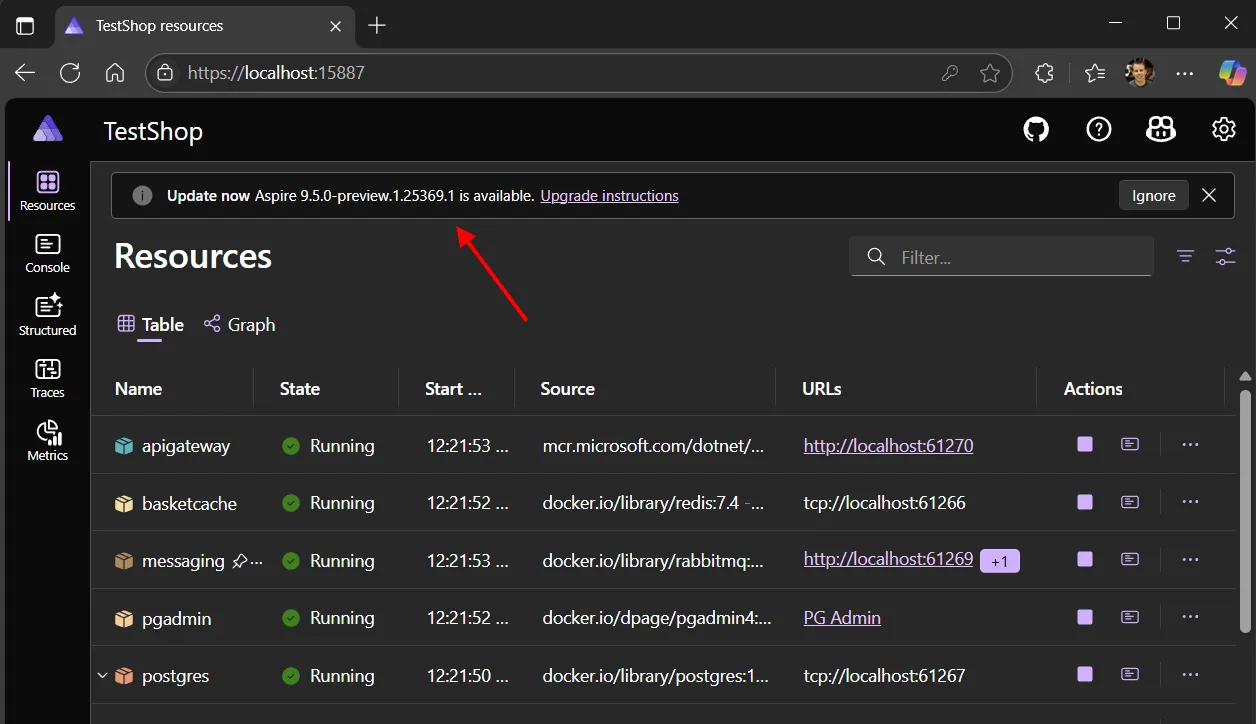
The version check runs only when:
- The dashboard is enabled (interaction service is available).
- At least 2 days have passed since the last check.
- The check hasn’t been disabled via the
ASPIRE_VERSION_CHECK_DISABLEDconfiguration setting. - The app is not running in publish mode.
Updates are manual. You need to edit your project file to upgrade the Aspire SDK and package versions.
Resource service
Section titled “Resource service”A resource service is hosted by the AppHost. The resource service is used by the dashboard to fetch information about resources which are being orchestrated by Aspire.
| Option | Default value | Description |
|---|---|---|
ASPIRE_RESOURCE_SERVICE_ENDPOINT_URL | null | Configures the address of the resource service hosted by the AppHost. Automatically generated with launchSettings.json to have a random port on localhost. For example, https://localhost:17037. |
ASPIRE_DASHBOARD_RESOURCESERVICE_APIKEY | Automatically generated 128-bit entropy token. | The API key used to authenticate requests made to the AppHost’s resource service. The API key is required if the AppHost is in run mode, the dashboard isn’t disabled, and the dashboard isn’t configured to allow anonymous access with ASPIRE_DASHBOARD_UNSECURED_ALLOW_ANONYMOUS. |
Dashboard
Section titled “Dashboard”By default, the dashboard is automatically started by the AppHost. The dashboard supports its own set of configuration, and some settings can be configured from the AppHost.
| Option | Default value | Description |
|---|---|---|
ASPNETCORE_URLS | null | Dashboard address. Must be https unless ASPIRE_ALLOW_UNSECURED_TRANSPORT or DistributedApplicationOptions.AllowUnsecuredTransport is true. Automatically generated with launchSettings.json to have a random port on localhost. The value in launch settings is set on the applicationUrls property. |
ASPNETCORE_ENVIRONMENT | Production | Configures the environment the dashboard runs as. For more information, see Use multiple environments in ASP.NET Core. |
ASPIRE_DASHBOARD_OTLP_ENDPOINT_URL | http://localhost:18889 if no gRPC endpoint is configured. | Configures the dashboard OTLP gRPC address. Used by the dashboard to receive telemetry over OTLP. Set on resources as the OTEL_EXPORTER_OTLP_ENDPOINT env var. The OTEL_EXPORTER_OTLP_PROTOCOL env var is grpc. Automatically generated with launchSettings.json to have a random port on localhost. |
ASPIRE_DASHBOARD_OTLP_HTTP_ENDPOINT_URL | null | Configures the dashboard OTLP HTTP address. Used by the dashboard to receive telemetry over OTLP. If only ASPIRE_DASHBOARD_OTLP_HTTP_ENDPOINT_URL is configured then it is set on resources as the OTEL_EXPORTER_OTLP_ENDPOINT env var. The OTEL_EXPORTER_OTLP_PROTOCOL env var is http/protobuf. |
ASPIRE_DASHBOARD_CORS_ALLOWED_ORIGINS | null | Overrides the CORS allowed origins configured in the dashboard. This setting replaces the default behavior of calculating allowed origins based on resource endpoints. |
ASPIRE_DASHBOARD_FRONTEND_BROWSERTOKEN | Automatically generated 128-bit entropy token. | Configures the frontend browser token. This is the value that must be entered to access the dashboard when the auth mode is BrowserToken. If no browser token is specified then a new token is generated each time the AppHost is launched. |
ASPIRE_DASHBOARD_TELEMETRY_OPTOUT | false | Configures the dashboard to never send usage telemetry. |
ASPIRE_DASHBOARD_AI_DISABLED | false | GitHub Copilot in the dashboard is available when the AppHost is launched by a supported IDE. When set to true Copilot is disabled in the dashboard and no Copilot UI is visible. |
ASPIRE_DASHBOARD_FORWARDEDHEADERS_ENABLED | false | Enables the Forwarded headers middleware that replaces the scheme and host values on the Request context with the values coming from the X-Forwarded-Proto and X-Forwarded-Host headers. |
Internal
Section titled “Internal”Internal settings are used by the AppHost and integrations. Internal settings aren’t designed to be configured directly.
| Option | Default value | Description |
|---|---|---|
AppHost:Directory | The content root if there’s no project. | Directory of the project where the AppHost is located. Accessible from the IDistributedApplicationBuilder.AppHostDirectory. |
AppHost:Path | The directory combined with the application name. | The path to the AppHost. It combines the directory with the application name. |
AppHost:Sha256 | It is created from the AppHost name when the AppHost is in publish mode. Otherwise it is created from the AppHost path. | Hex encoded hash for the current application. The hash is based on the location of the app on the current machine so it is stable between launches of the AppHost. |
AppHost:OtlpApiKey | Automatically generated 128-bit entropy token. | The API key used to authenticate requests sent to the dashboard OTLP service. The value is present if needed: the AppHost is in run mode, the dashboard isn’t disabled, and the dashboard isn’t configured to allow anonymous access with ASPIRE_DASHBOARD_UNSECURED_ALLOW_ANONYMOUS. |
AppHost:BrowserToken | Automatically generated 128-bit entropy token. | The browser token used to authenticate browsing to the dashboard when it is launched by the AppHost. The browser token can be set by ASPIRE_DASHBOARD_FRONTEND_BROWSERTOKEN. The value is present if needed: the AppHost is in run mode, the dashboard isn’t disabled, and the dashboard isn’t configured to allow anonymous access with ASPIRE_DASHBOARD_UNSECURED_ALLOW_ANONYMOUS. |
AppHost:ResourceService:AuthMode | ApiKey. If ASPIRE_DASHBOARD_UNSECURED_ALLOW_ANONYMOUS is true then the value is Unsecured. | The authentication mode used to access the resource service. The value is present if needed: the AppHost is in run mode and the dashboard isn’t disabled. |
AppHost:ResourceService:ApiKey | Automatically generated 128-bit entropy token. | The API key used to authenticate requests made to the AppHost’s resource service. The API key can be set by ASPIRE_DASHBOARD_RESOURCESERVICE_APIKEY. The value is present if needed: the AppHost is in run mode, the dashboard isn’t disabled, and the dashboard isn’t configured to allow anonymous access with ASPIRE_DASHBOARD_UNSECURED_ALLOW_ANONYMOUS. |
Advanced orchestration properties
Section titled “Advanced orchestration properties”DcpCliPath
Section titled “DcpCliPath”The DcpCliPath property specifies the path to the Developer Control Plane (DCP) executable. The DCP is the core orchestration engine that Aspire uses to run and manage distributed application resources locally during development.
How it works
Section titled “How it works”When you use the Aspire SDK, the build system automatically:
- Imports the platform-specific
Aspire.Hosting.OrchestrationNuGet package (for example,Aspire.Hosting.Orchestration.win-x64). - Sets
DcpCliPathto point to thedcpexecutable within that package. - Embeds this path as assembly metadata in your compiled AppHost.
At runtime, the AppHost reads this metadata to locate and start the DCP process, which then orchestrates your application’s resources.
Override options
Section titled “Override options”In rare cases, you may need to override the default DCP path:
| Method | Example |
|---|---|
| MSBuild property | <DcpCliPath>C:\path\to\dcp.exe</DcpCliPath> |
| Command-line argument | --dcp-cli-path /path/to/dcp |
| Configuration | DcpPublisher:CliPath |
When to use
Section titled “When to use”You might override DcpCliPath in these scenarios:
- Aspire contributors: Testing with a custom or debug build of DCP when developing Aspire itself.
- CI/CD pipelines: Non-standard SDK layouts where automatic discovery doesn’t work.
- Troubleshooting: Temporarily pointing to a specific DCP version to diagnose issues.