


Project resources

Project resources let a C# AppHost model .NET projects as first-class Aspire resources. Use AddProject when you want the AppHost to start, configure, and connect another .NET project through its .csproj and ProjectReference metadata.
When to use project resources
Section titled “When to use project resources”Use project resources when you need to:
- Orchestrate an ASP.NET Core, worker, or console project from a C# AppHost.
- Reference a project through generated
Projects.*types instead of hard-coded file paths. - Reuse launch profile settings and ASP.NET Core endpoint discovery from
launchSettings.json. - Connect the project to other Aspire resources with
WithReference, service discovery, and generated connection strings.
For single-file apps or quick experiments that don’t need a ProjectReference, use C# file-based apps instead.
Basic workflow
Section titled “Basic workflow”Start by adding a ProjectReference from the AppHost to the target project:
<ItemGroup> <ProjectReference Include="..\ApiService\ApiService.csproj" /></ItemGroup>When the AppHost builds, Aspire generates a metadata type in the Projects namespace for that reference. Use the generated type with AddProject:
var builder = DistributedApplication.CreateBuilder(args);
var api = builder.AddProject<Projects.ApiService>("api");
builder.Build().Run();
The path to the project comes from the ProjectReference, so AddProject doesn’t need a .csproj path. This is the main difference from AddCSharpApp, which points directly to a file, project, or directory.
Resource dependencies
Section titled “Resource dependencies”Project resources participate fully in the Aspire application model. You can reference other resources, flow connection strings and service discovery information, and expose endpoints like any other Aspire resource:
var builder = DistributedApplication.CreateBuilder(args);
var cache = builder.AddRedis("cache");var db = builder.AddPostgres("postgres").AddDatabase("appdb");
builder.AddProject<Projects.ApiService>("api")    .WithReference(cache)    .WithReference(db)    .WithExternalHttpEndpoints();
builder.Build().Run();
The referenced project receives connection strings and service discovery information through environment variables, just like other Aspire resources.
Control launch settings and endpoints
Section titled “Control launch settings and endpoints”Project resources read launch profiles from the target project’s launchSettings.json file:
{ "$schema": "http://json.schemastore.org/launchsettings.json", "profiles": { "http": { "commandName": "Project", "applicationUrl": "http://localhost:5066", "environmentVariables": { "ASPNETCORE_ENVIRONMENT": "Development" } }, "https": { "commandName": "Project", "applicationUrl": "https://localhost:7239;http://localhost:5066", "environmentVariables": { "ASPNETCORE_ENVIRONMENT": "Development" } } }}Use the launchProfileName argument when you want a specific profile:
var builder = DistributedApplication.CreateBuilder(args);
builder.AddProject<Projects.InventoryService>(    "inventoryservice",    launchProfileName: "https");
builder.Build().Run();
The launchProfileName argument has the highest precedence. When you don’t specify it, Aspire selects the effective launch profile in this order:
- The explicit
launchProfileNameargument, if supplied. - The AppHost default launch profile from
AppHost:DefaultLaunchProfileNameorDOTNET_LAUNCH_PROFILE. - The first profile in launchSettings.json.
- No launch profile.
To force a project resource to run without a launch profile, pass launchProfileName: null:
var builder = DistributedApplication.CreateBuilder(args);
builder.AddProject<Projects.InventoryService>(    "inventoryservice",    launchProfileName: null);
builder.Build().Run();
For consistency with dotnet run and dotnet watch, Aspire sets DOTNET_LAUNCH_PROFILE on the launched project when an effective launch profile is selected. The selected profile’s environmentVariables are also passed through to the process.
The applicationUrl values in a project’s launchSettings.json are the project-resource equivalent of configuring explicit HTTP and HTTPS endpoints:
builder.AddProject<Projects.Networking_Frontend>("frontend") .WithHttpEndpoint(port: 5066) .WithHttpsEndpoint(port: 7239);If there’s no launchSettings.json file or selected launch profile, project resources don’t get HTTP or HTTPS bindings by default.
When you want to ignore launch profile endpoints or prefer Kestrel endpoint configuration, use the configure callback.
For ASP.NET Core projects, Aspire can also read endpoint information from Kestrel configuration:
{ "Kestrel": { "Endpoints": { "Https": { "Url": "https://*:5271" } } }}With a Kestrel endpoint configured, remove any applicationUrl from launchSettings.json before telling the project resource to use Kestrel endpoints.
var builder = DistributedApplication.CreateBuilder(args);
builder.AddProject<Projects.InventoryService>(    name: "inventoryservice",    configure: static project =>    {        project.ExcludeLaunchProfile = true;        project.ExcludeKestrelEndpoints = false;    })    .WithHttpsEndpoint();
For ASP.NET Core projects, Aspire reads the selected launch profile and can create endpoints from the applicationUrl field in launchSettings.json. You can then customize those endpoints with methods like WithEndpoint.
var builder = DistributedApplication.CreateBuilder(args);
builder.AddProject<Projects.InventoryService>("inventoryservice")    .WithEndpoint("https", endpoint => endpoint.IsProxied = false);
For more information about launch profile selection and endpoint generation, see Launch profiles.
Ports, proxies, and replicas
Section titled “Ports, proxies, and replicas”When you define a host port for a project resource, Aspire assigns that host port to the proxy in front of the project, not directly to the underlying service. This keeps single-instance and replicated projects consistent, and it means WithReference consumers use the proxy endpoint from the generated environment variables.
builder.AddProject<Projects.Networking_Frontend>("frontend") .WithHttpEndpoint(port: 5066) .WithReplicas(2);The following diagram shows this setup:
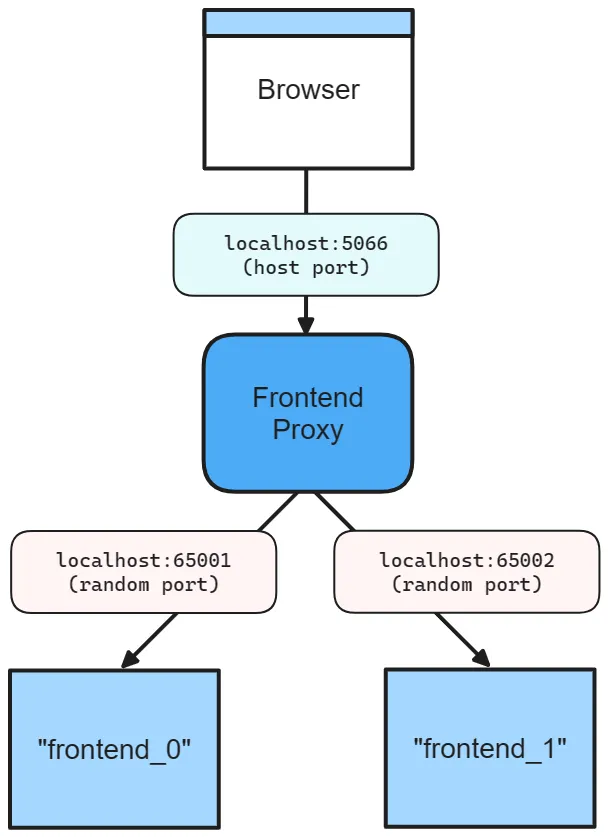
With that configuration:
- The proxy listens on host port
5066. - Each project replica listens on its own random internal port.
- The project receives its internal binding through
ASPNETCORE_URLS. - Browsers and dependent resources talk to the proxy endpoint, not directly to a replica.
Without WithReplicas, the proxy still fronts the project resource. The host port stays stable, while the project itself listens on a random internal port.
builder.AddProject<Projects.Networking_Frontend>("frontend") .WithHttpEndpoint(port: 5066);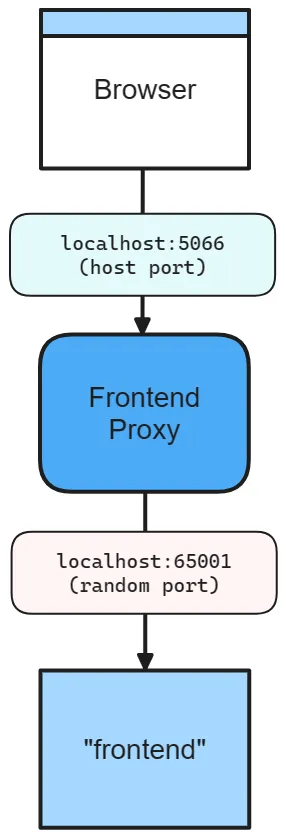
In this configuration:
- The proxy still listens on host port
5066. - The project listens on a random internal port.
ASPNETCORE_URLSpoints the project at the internal port, while browsers and other resources continue to use the stable proxy port.
If you omit the host port entirely, Aspire chooses random host and service ports for the endpoint:
builder.AddProject<Projects.Networking_Frontend>("frontend") .WithHttpEndpoint();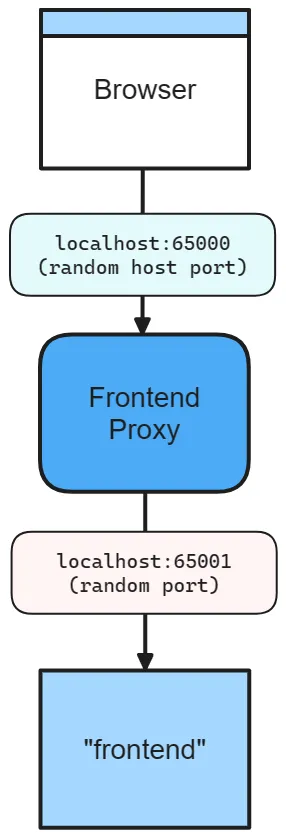
In this configuration, Aspire assigns a random proxy port for the host-facing endpoint and a separate random internal port for the project.
Filter endpoints in environment variables
Section titled “Filter endpoints in environment variables”Project resource endpoints follow default heuristics. Some endpoints are included in ASPNETCORE_URLS, some are published as HTTP/HTTPS_PORTS, and some are resolved from Kestrel configuration. Use WithEndpointsInEnvironment when you need to filter which endpoints are exposed through environment variables:
builder.AddProject<Projects.Networking_ApiService>("apiservice") .WithHttpsEndpoint() .WithHttpsEndpoint(port: 19227, name: "admin") .WithEndpointsInEnvironment( filter: static endpoint => { return endpoint.Name is not "admin"; });This keeps the admin endpoint out of the environment variables while still defining it in the application model.
For more background on bindings, proxies, and endpoint annotations, see Inner-loop networking.
How project references work
Section titled “How project references work”Project references in the AppHost aren’t treated as ordinary build references. Instead, Aspire uses them to create project resource metadata that the AppHost can launch and configure as part of the application model. For the SDK-level build behavior behind this generation step, see Aspire SDK.
This is what enables the AddProject<Projects.ApiService>("api") pattern. The Projects.ApiService type is generated from the referenced project during build.
Exclude a project from orchestration
Section titled “Exclude a project from orchestration”If you need a regular project reference that shouldn’t become an Aspire resource, set IsAspireProjectResource="false":
<ProjectReference Include="..\MyProject\MyProject.csproj" IsAspireProjectResource="false" />Customize generated project type names
Section titled “Customize generated project type names”If multiple projects would generate the same Projects.* type name, set AspireProjectMetadataTypeName on the ProjectReference:
<ItemGroup> <ProjectReference Include="..\Microservice1\Presentation.Api\Presentation.Api.csproj" AspireProjectMetadataTypeName="MicroService1" /> <ProjectReference Include="..\Microservice2\Presentation.Api\Presentation.Api.csproj" AspireProjectMetadataTypeName="MicroService2" /></ItemGroup>Then reference those generated types explicitly:
var builder = DistributedApplication.CreateBuilder(args);
var microservice1 = builder.AddProject<Projects.MicroService1>("micro1");var microservice2 = builder.AddProject<Projects.MicroService2>("micro2");
builder.Build().Run();
AddProject vs. AddCSharpApp
Section titled “AddProject vs. AddCSharpApp”Use AddProject<T> when you have a standard .csproj, can add a ProjectReference from the AppHost, and want generated Projects.* types plus launch-profile integration.
Use AddCSharpApp when you want to run a single .cs file, or when you want to point at a project path directly without adding a ProjectReference from the AppHost.
Some .NET app types use specialized integrations instead of AddProject. For example, .NET MAUI integration uses AddMauiProject because MAUI apps aren’t added to the AppHost through ProjectReference metadata.