


Entity Framework Core integrations overview

Entity Framework Core (EF Core) is Microsoft’s modern, open-source object-relational mapper (O/RM) for .NET. Aspire provides EF Core client integrations for the most popular relational and document databases, making it straightforward to register a pooled DbContext, enable health checks and distributed tracing, and configure connection-retry resiliency — all from the consuming project’s Program.cs. Because EF Core is a .NET library, all client-side registration code is C# only; the AppHost hosting integrations for the underlying databases support both C# and TypeScript.
Why use EF Core with Aspire
Section titled “Why use EF Core with Aspire”Aspire’s EF Core integrations build on standard EF Core patterns and extend them for cloud-native microservices:
- Centrally managed connections — Database resources (containers or connection strings) are declared once in the
AppHostproject and forwarded as named references to any consuming service. - Pooled
DbContextby default —Add<DatabaseSystem>DbContextregisters a context pool automatically, reducing per-request allocation overhead. - Built-in observability — Health checks, OpenTelemetry distributed tracing, and connection-retry resiliency are enabled out of the box.
- Enrichment API — When you need custom
AddDbContextPoolconfiguration, callEnrich<DatabaseSystem>DbContextafterwards to layer Aspire’s defaults on top of your own setup. - Migrations support — Run EF Core schema migrations at startup or publish them as container images for deployment. See Apply EF Core migrations in Aspire.
- .NET-only client code — EF Core runs inside consuming .NET services; all
DbContextregistration code is C#.
Supported EF Core integrations
Section titled “Supported EF Core integrations”Each database has its own Aspire EF Core client integration package. Select an integration to get started:
 Azure Cosmos DBEntity Framework Core integration for Azure Cosmos DB
 Azure PostgreSQLEntity Framework Core integration for Azure Database for PostgreSQL
 Azure SQLEntity Framework Core integration for Azure SQL Database
 MongoDBEntity Framework Core integration for MongoDB
 MySQL (Pomelo)Pomelo Entity Framework Core integration for MySQL
 OracleEntity Framework Core integration for Oracle Database
 PostgreSQLEntity Framework Core integration for PostgreSQL
 SQL ServerEntity Framework Core integration for SQL Server
Underlying database hosting integrations
Section titled “Underlying database hosting integrations”EF Core is a client integration — it runs inside consuming .NET services, not in the AppHost. The AppHost uses separate hosting integrations to model and launch the database container or cloud resource. The following hosting integrations pair with the EF Core client integrations listed above:
| Database | Hosting integration |
|---|---|
| PostgreSQL | PostgreSQL hosting |
| SQL Server | SQL Server hosting |
| MySQL | MySQL hosting |
| MongoDB | MongoDB hosting |
| Oracle | Oracle hosting |
| Azure Cosmos DB | Azure Cosmos DB hosting |
| Azure SQL | Azure SQL hosting |
EF Core model fundamentals
Section titled “EF Core model fundamentals”O/RMs create a model that maps to the schema and relationships defined in the database. In EF Core the model consists of:
- A set of entity classes, each of which represents a table in the database.
- A context class that represents the whole database and inherits from
Microsoft.EntityFrameworkCore.DbContext.
An entity class might look like this:
using System.ComponentModel.DataAnnotations;
namespace SupportDeskProject.Data;
public sealed class SupportTicket{    public int Id { get; set; }    [Required]    public string Title { get; set; } = string.Empty;    [Required]    public string Description { get; set; } = string.Empty;}
This entity class represents a database table with three columns: Id, Title, and Description.
A context class looks like this:
using Microsoft.EntityFrameworkCore;
namespace SupportDeskProject.Data;
public class TicketContext(DbContextOptions options) : DbContext(options){    public DbSet<SupportTicket> Tickets => Set<SupportTicket>();}
This context represents a database with a single table of support tickets. An instance of the context is usually created for each unit of work in the database and disposed once that work is complete.
Once you’ve created a model, you can use LINQ to query it:
using (var db = new TicketContext()){ var tickets = await db.Tickets .Where(t => t.Title == "Unable to log on") .OrderBy(t => t.Description) .ToListAsync();}How Aspire orchestrates EF Core
Section titled “How Aspire orchestrates EF Core”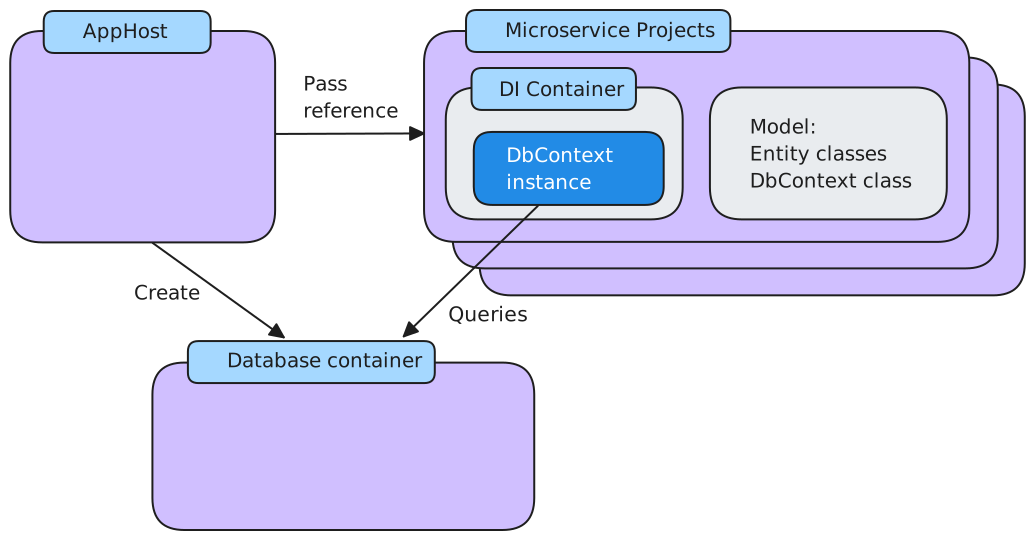
To use EF Core in your microservice with Aspire:
- Define the EF Core model with entity classes and a context class in your service project.
- Register the context using an Aspire
Add<DatabaseSystem>DbContextextension method inProgram.cs, passing the connection name used in the AppHost. - Inject and use the context via constructor injection in your service classes, exactly as you would in any EF Core app.
Both defining the EF Core model and querying the database are identical in Aspire projects to any other EF Core application. Only the context registration step differs, which is where Aspire adds health checks, tracing, and resiliency.
Use Aspire to create an EF Core context
Section titled “Use Aspire to create an EF Core context”In EF Core, a context is a class used to interact with the database. Contexts inherit from the Microsoft.EntityFrameworkCore.DbContext class. They provide access to the database through properties of type DbSet<T>, where each DbSet represents a table or collection of entities in the database. The context also manages database connections, tracks changes to entities, and handles operations like saving data and executing queries.
The Aspire EF Core client integrations each include extension methods named Add<DatabaseSystem>DbContext, where <DatabaseSystem> is the name identifying the database product you’re using. For example, the SQL Server EF Core client integration exposes AddSqlServerDbContext and the PostgreSQL client integration exposes AddNpgsqlDbContext.
These Aspire Add*DbContext methods:
- Check that a context of the same type isn’t already registered in the dependency injection (DI) container.
- Resolve the connection string from the application configuration using the name you pass to the method. This name must match the resource name used in the AppHost project.
- Apply any
DbContextoptions you provide. - Register the specified
DbContextin the DI container with context pooling enabled. - Apply the recommended defaults unless you’ve disabled them via the Aspire EF Core settings:
- Enable tracing.
- Enable health checks.
- Enable connection resiliency.
Use these methods when you want a simple way to create a context and don’t yet need advanced EF Core customization.
builder.AddSqlServerDbContext<ExampleDbContext>( connectionName: "database");builder.AddNpgsqlDbContext<ExampleDbContext>( connectionName: "database");builder.AddOracleDatabaseDbContext<ExampleDbContext>( connectionName: "database");builder.AddMySqlDbContext<ExampleDbContext>( connectionName: "database");You obtain the ExampleDbContext object from the DI container in the same way as for any other service:
public class ExampleService(ExampleDbContext context){ // Use context...}Use EF Core to add and enrich context
Section titled “Use EF Core to add and enrich context”Alternatively, you can add a context to the DI container using the standard EF Core AddDbContextPool method, as commonly used in non-Aspire projects:
builder.Services.AddDbContextPool<ExampleDbContext>(options =>{ var connectionString = builder.Configuration.GetConnectionString("database") ?? throw new InvalidOperationException("Connection string 'database' not found."); options.UseSqlServer(connectionString);});builder.Services.AddDbContextPool<ExampleDbContext>(options =>{ var connectionString = builder.Configuration.GetConnectionString("database") ?? throw new InvalidOperationException("Connection string 'database' not found."); options.UseNpgsql(connectionString);});builder.Services.AddDbContextPool<ExampleDbContext>(options =>{ var connectionString = builder.Configuration.GetConnectionString("database") ?? throw new InvalidOperationException("Connection string 'database' not found."); options.UseOracle(connectionString);});builder.Services.AddDbContextPool<ExampleDbContext>(options =>{ var connectionString = builder.Configuration.GetConnectionString("database") ?? throw new InvalidOperationException("Connection string 'database' not found."); options.UseMySql(connectionString);});You have more flexibility when you create the context this way, for example:
- You can reuse existing context configuration code without rewriting it for Aspire.
- You can choose not to use EF Core context pooling. For more information, see Use EF Core context pooling in Aspire.
- You can use EF Core context factories or change the service lifetime. For more information, see Use EF Core context factories in Aspire.
- You can use dynamic connection strings. For more information, see Use EF Core with dynamic connection strings in Aspire.
- You can use EF Core interceptors that depend on DI services. For more information, see Use EF Core interceptors in Aspire.
By default, a context configured this way doesn’t include Aspire features such as telemetry and health checks. To add those features, each Aspire EF Core client integration includes a method named Enrich<DatabaseSystem>DbContext. These enrich methods:
- Apply an EF Core settings object, if you passed one.
- Configure connection retry settings.
- Apply the recommended defaults unless you’ve disabled them via the Aspire EF Core settings:
- Enable tracing.
- Enable health checks.
- Enable connection resiliency.
builder.EnrichSqlServerDbContext<ExampleDbContext>( configureSettings: settings => { settings.DisableRetry = false; settings.CommandTimeout = 30; // seconds });builder.EnrichNpgsqlDbContext<ExampleDbContext>( configureSettings: settings => { settings.DisableRetry = false; settings.CommandTimeout = 30; // seconds });builder.EnrichOracleDatabaseDbContext<ExampleDbContext>( configureSettings: settings => { settings.DisableRetry = false; settings.CommandTimeout = 30; // seconds });builder.EnrichMySqlDbContext<ExampleDbContext>( configureSettings: settings => { settings.DisableRetry = false; settings.CommandTimeout = 30; // seconds });Obtain the context from the DI container using the same constructor-injection pattern:
public class ExampleService(ExampleDbContext context){ // Use context...}Use EF Core interceptors with Aspire
Section titled “Use EF Core interceptors with Aspire”EF Core interceptors allow developers to hook into and modify database operations at various points during query and command execution. You can use them to log, modify, or suppress operations. Your interceptor must implement one or more interfaces from Microsoft.EntityFrameworkCore.Diagnostics.
Interceptors that depend on DI services are not supported by the Aspire Add<DatabaseSystem>DbContext methods. Use the EF Core AddDbContextPool method and call AddInterceptors in the options builder:
builder.Services.AddDbContextPool<ExampleDbContext>((serviceProvider, options) =>    {        options.UseSqlServer(builder.Configuration.GetConnectionString("database"));        options.AddInterceptors(serviceProvider.GetRequiredService<ExampleInterceptor>());    });
builder.EnrichSqlServerDbContext<ExampleDbContext>( configureSettings: settings => { settings.DisableRetry = false; settings.CommandTimeout = 30; // seconds });builder.Services.AddDbContextPool<ExampleDbContext>((serviceProvider, options) => { options.UseNpgsql(builder.Configuration.GetConnectionString("database")); options.AddInterceptors(serviceProvider.GetRequiredService<ExampleInterceptor>()); });
builder.EnrichNpgsqlDbContext<ExampleDbContext>( configureSettings: settings => { settings.DisableRetry = false; settings.CommandTimeout = 30; // seconds });builder.Services.AddDbContextPool<ExampleDbContext>((serviceProvider, options) => { options.UseOracle(builder.Configuration.GetConnectionString("database")); options.AddInterceptors(serviceProvider.GetRequiredService<ExampleInterceptor>()); });
builder.EnrichOracleDatabaseDbContext<ExampleDbContext>( configureSettings: settings => { settings.DisableRetry = false; settings.CommandTimeout = 30; // seconds });builder.Services.AddDbContextPool<ExampleDbContext>((serviceProvider, options) => { options.UseMySql(builder.Configuration.GetConnectionString("database")); options.AddInterceptors(serviceProvider.GetRequiredService<ExampleInterceptor>()); });
builder.EnrichMySqlDbContext<ExampleDbContext>( configureSettings: settings => { settings.DisableRetry = false; settings.CommandTimeout = 30; // seconds });Use EF Core with dynamic connection strings in Aspire
Section titled “Use EF Core with dynamic connection strings in Aspire”Most microservices always connect to the same database with the same credentials, so they always use the same connection string. However, you may need to change the connection string per request, for example:
- Multi-tenant services that route to a different database per customer.
- Services that authenticate with a different database user account per customer.
For these requirements, formulate a dynamic connection string at runtime, then register the context manually and enrich it:
var connectionStringTemplate = builder.Configuration.GetConnectionString("database")    ?? throw new InvalidOperationException("Connection string 'database' not found.");
var connectionString = connectionStringTemplate.Replace("{DatabaseName}", "ContosoDatabase");
builder.Services.AddDbContext<ExampleDbContext>(options =>    options.UseSqlServer(connectionString));
builder.EnrichSqlServerDbContext<ExampleDbContext>( configureSettings: settings => { settings.DisableRetry = false; settings.CommandTimeout = 30; // seconds });var connectionStringTemplate = builder.Configuration.GetConnectionString("database") ?? throw new InvalidOperationException("Connection string 'database' not found.");
var connectionString = connectionStringTemplate.Replace("{DatabaseName}", "ContosoDatabase");
builder.Services.AddDbContext<ExampleDbContext>(options => options.UseNpgsql(connectionString));
builder.EnrichNpgsqlDbContext<ExampleDbContext>( configureSettings: settings => { settings.DisableRetry = false; settings.CommandTimeout = 30; // seconds });var connectionStringTemplate = builder.Configuration.GetConnectionString("database") ?? throw new InvalidOperationException("Connection string 'database' not found.");
var connectionString = connectionStringTemplate.Replace("{DatabaseName}", "ContosoDatabase");
builder.Services.AddDbContext<ExampleDbContext>(options => options.UseOracle(connectionString));
builder.EnrichOracleDatabaseDbContext<ExampleDbContext>( configureSettings: settings => { settings.DisableRetry = false; settings.CommandTimeout = 30; // seconds });var connectionStringTemplate = builder.Configuration.GetConnectionString("database") ?? throw new InvalidOperationException("Connection string 'database' not found.");
var connectionString = connectionStringTemplate.Replace("{DatabaseName}", "ContosoDatabase");
builder.Services.AddDbContext<ExampleDbContext>(options => options.UseMySql(connectionString));
builder.EnrichMySqlDbContext<ExampleDbContext>( configureSettings: settings => { settings.DisableRetry = false; settings.CommandTimeout = 30; // seconds });The preceding code replaces the {DatabaseName} placeholder in the connection string with ContosoDatabase at runtime before creating and enriching the context.
Use EF Core context factories in Aspire
Section titled “Use EF Core context factories in Aspire”An EF Core context is designed for a single unit of work. In many ASP.NET Core applications, each HTTP request maps to one unit of work, so you can register a pooled context tied to the request lifetime using AddDbContextPool paired with Enrich<DatabaseSystem>DbContext.
Other application types, such as ASP.NET Core Blazor, use a different dependency-injection scope and may need multiple units of work within a single request. In those cases, register a context factory using AddPooledDbContextFactory:
builder.Services.AddPooledDbContextFactory<ExampleDbContext>(options =>    options.UseSqlServer(builder.Configuration.GetConnectionString("database")        ?? throw new InvalidOperationException("Connection string 'database' not found.")));
builder.EnrichSqlServerDbContext<ExampleDbContext>( configureSettings: settings => { settings.DisableRetry = false; settings.CommandTimeout = 30; // seconds });builder.Services.AddPooledDbContextFactory<ExampleDbContext>(options => options.UseNpgsql(builder.Configuration.GetConnectionString("database") ?? throw new InvalidOperationException("Connection string 'database' not found.")));
builder.EnrichNpgsqlDbContext<ExampleDbContext>( configureSettings: settings => { settings.DisableRetry = false; settings.CommandTimeout = 30; // seconds });builder.Services.AddPooledDbContextFactory<ExampleDbContext>(options => options.UseOracle(builder.Configuration.GetConnectionString("database") ?? throw new InvalidOperationException("Connection string 'database' not found.")));
builder.EnrichOracleDatabaseDbContext<ExampleDbContext>( configureSettings: settings => { settings.DisableRetry = false; settings.CommandTimeout = 30; // seconds });builder.Services.AddPooledDbContextFactory<ExampleDbContext>(options => options.UseMySql(builder.Configuration.GetConnectionString("database") ?? throw new InvalidOperationException("Connection string 'database' not found.")));
builder.EnrichMySqlDbContext<ExampleDbContext>( configureSettings: settings => { settings.DisableRetry = false; settings.CommandTimeout = 30; // seconds });When you register a context factory, resolve an IDbContextFactory<T> from the DI container and create contexts from it explicitly:
public class ExampleService(IDbContextFactory<ExampleDbContext> contextFactory){ using (var context = contextFactory.CreateDbContext()) { // Use context... }}Contexts created from factories are not tied to an HTTP request lifetime and are not disposed automatically. Always dispose of them explicitly, as shown with the using block above.
Use EF Core context pooling in Aspire
Section titled “Use EF Core context pooling in Aspire”In EF Core, a context is relatively inexpensive to create, but if your microservice creates contexts at high frequency you may observe overhead. Context pooling mitigates this: when a context is disposed it is reset and returned to a pool, so the next request reuses it rather than creating a new one.
In an Aspire consuming project, there are three ways to use context pooling:
-
Use
Add<DatabaseSystem>DbContext— pools are created automatically by the Aspire method. -
Call
AddDbContextPoolinstead ofAddDbContext:Program.cs builder.Services.AddDbContextPool<ExampleDbContext>(options =>options.UseSqlServer(builder.Configuration.GetConnectionString("database")?? throw new InvalidOperationException("Connection string 'database' not found.")));Program.cs builder.Services.AddDbContextPool<ExampleDbContext>(options =>options.UseNpgsql(builder.Configuration.GetConnectionString("database")?? throw new InvalidOperationException("Connection string 'database' not found.")));Program.cs builder.Services.AddDbContextPool<ExampleDbContext>(options =>options.UseOracle(builder.Configuration.GetConnectionString("database")?? throw new InvalidOperationException("Connection string 'database' not found.")));Program.cs builder.Services.AddDbContextPool<ExampleDbContext>(options =>options.UseMySql(builder.Configuration.GetConnectionString("database")?? throw new InvalidOperationException("Connection string 'database' not found."))); -
Call
AddPooledDbContextFactoryinstead ofAddDbContextFactory:Program.cs builder.Services.AddPooledDbContextFactory<ExampleDbContext>(options =>options.UseSqlServer(builder.Configuration.GetConnectionString("database")?? throw new InvalidOperationException("Connection string 'database' not found.")));Program.cs builder.Services.AddPooledDbContextFactory<ExampleDbContext>(options =>options.UseNpgsql(builder.Configuration.GetConnectionString("database")?? throw new InvalidOperationException("Connection string 'database' not found.")));Program.cs builder.Services.AddPooledDbContextFactory<ExampleDbContext>(options =>options.UseOracle(builder.Configuration.GetConnectionString("database")?? throw new InvalidOperationException("Connection string 'database' not found.")));Program.cs builder.Services.AddPooledDbContextFactory<ExampleDbContext>(options =>options.UseMySql(builder.Configuration.GetConnectionString("database")?? throw new InvalidOperationException("Connection string 'database' not found.")));
Remember to call the appropriate Enrich<DatabaseSystem>DbContext method after using the last two approaches, as described above.
See also
Section titled “See also”- Entity Framework Core documentation hub
- Apply Entity Framework Core migrations in Aspire
- Seed a database in Aspire
- Get started with the SQL Server EF Core integration
- Get started with the PostgreSQL EF Core integration
- Get started with the MySQL EF Core integration
- Get started with the Oracle EF Core integration
- Get started with the Azure Cosmos DB EF Core integration
- PostgreSQL hosting integration
- SQL Server hosting integration
- MySQL hosting integration
- DbContext Lifetime, Configuration, and Initialization
- Advanced Performance Topics
- Entity Framework Core Interceptors
 Aspire