


コンテナの永続的なライフタイム
Aspire では、コンテナは典型的なライフサイクルに従い、AppHost の起動時に作成され停止時に破棄されます。ただし、この標準ライフサイクルから外れる永続コンテナを使用するよう指定できます。永続コンテナは Aspire オーケストレーターによって作成・起動されますが、AppHost の停止時に破棄されず、実行をまたいで存続できます。
この機能は、データベースなど起動時間が長いコンテナにとって特に有益で、AppHost を再起動するたびにサービスの初期化を待つ必要がなくなります。
永続コンテナを設定する
Section titled “永続コンテナを設定する”永続的なライフタイムを持つコンテナリソースを設定するには、 WithLifetimewithLifetime メソッドを使用して ContainerLifetime.Persistent を渡します:
import { function createBuilder(): IDistributedApplicationBuilder
Creates a new distributed application builder
createBuilder, type ContainerLifetime = "Session" | "Persistent"const ContainerLifetime: { readonly Session: "Session"; readonly Persistent: "Persistent";}
Enum Aspire.Hosting.ApplicationModel.ContainerLifetime
ContainerLifetime } from './.aspire/modules/aspire.mjs';
const const builder: IDistributedApplicationBuilder
function createBuilder(): IDistributedApplicationBuilder
Creates a new distributed application builder
createBuilder();
const const postgres: PostgresServerResource
const builder: IDistributedApplicationBuilder
IDistributedApplicationBuilder.addPostgres(name: string, options?: { userName?: string | ParameterResource; password?: string | ParameterResource; port?: number;}): PostgresServerResource (+1 overload)
Adds a PostgreSQL resource to the application model. A container is used for local development.
addPostgres("postgres") .ContainerResource.withLifetime(lifetime: ContainerLifetime): PostgresServerResource
Sets the lifetime behavior of the container resource.
withLifetime(const ContainerLifetime: { readonly Session: "Session"; readonly Persistent: "Persistent";}
Enum Aspire.Hosting.ApplicationModel.ContainerLifetime
ContainerLifetime.type Persistent: "Persistent"
PostgresServerResource.withDataVolume(options?: { name?: string; isReadOnly?: boolean;} | undefined): PostgresServerResource (+1 overload)
Adds a named volume for the data folder to a PostgreSQL container resource.
withDataVolume();
const const db: PostgresDatabaseResource
const postgres: PostgresServerResource
PostgresServerResource.addDatabase(name: string, options?: { databaseName?: string;} | undefined): PostgresDatabaseResource (+1 overload)
Adds a PostgreSQL database to the application model.
addDatabase("inventorydb");
await const builder: IDistributedApplicationBuilder
IDistributedApplicationBuilder.addProject(name: string, projectPath: string, options?: { launchProfileOrOptions?: string | ProjectResourceOptions;}): ProjectResource (+1 overload)
Adds a .NET project resource
addProject("inventory", "./InventoryService/InventoryService.csproj") .ProjectResource.withReference(source: IResource | EndpointReference | string | uri, options?: { connectionName?: string; optional?: boolean; name?: string;} | undefined): ProjectResource (+1 overload)
Adds a reference to another resource
withReference(const db: PostgresDatabaseResource
const builder: IDistributedApplicationBuilder
IDistributedApplicationBuilder.build(): DistributedApplication
Builds the distributed application
build().DistributedApplication.run(cancellationToken?: cancellationToken): void
Runs the distributed application
run();var builder = DistributedApplication.CreateBuilder(args);
var postgres = builder.AddPostgres("postgres") .WithLifetime(ContainerLifetime.Persistent) .WithDataVolume();
var db = postgres.AddDatabase("inventorydb");
builder.AddProject<Projects.InventoryService>("inventory") .WithReference(db);
builder.Build().Run();上記の例では、 PostgreSQL コンテナが AppHost の実行をまたいで永続化されるよう設定されており、 WithDataVolume() によりデータベースのデータがコンテナ再作成後も存続する名前付きボリュームに保存されます。 inventory プロジェクトは通常どおりデータベースを参照します。
ダッシュボードの視覚化
Section titled “ダッシュボードの視覚化”Aspire ダッシュボードでは、永続コンテナに特徴的なピンアイコン(📌)が表示され、識別しやすくなっています:
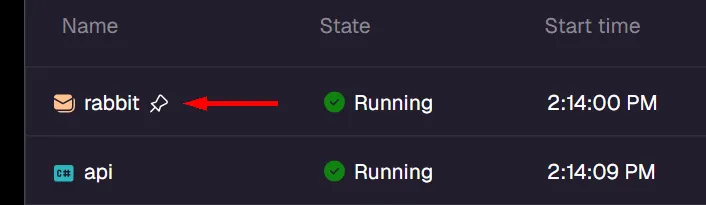
AppHost が停止した後も、永続コンテナは動作し続け、コンテナランタイム( Docker Desktop など)で確認できます:

設定変更の検知
Section titled “設定変更の検知”永続コンテナは、 AppHost が重要な設定変更を検知した際に自動的に再作成されます。 Aspire は各コンテナの作成に使用した設定のハッシュを追跡し、その後の実行で現在の設定と比較します。設定が異なる場合、コンテナは新しい設定で再作成されます。
このメカニズムにより、手動での操作を必要とせず、永続コンテナが AppHost の設定と同期し続けることが保証されます。
コンテナの命名と一意性
Section titled “コンテナの命名と一意性”デフォルトでは、永続コンテナは以下を組み合わせた命名パターンを使用します:
- AppHost で指定したサービス名。
- AppHost プロジェクトパスのハッシュに基づくポストフィックス。
この命名スキームにより、永続コンテナが各 AppHost プロジェクトに固有のものとなり、複数の Aspire プロジェクトが同じサービス名を使用する際の競合を防ぎます。
例えば、 /path/to/MyApp.AppHost にある AppHost プロジェクトで "postgres" という名前のサービスがある場合、コンテナ名は postgres-abc123def のようになります。 abc123def はプロジェクトパスのハッシュから導出されます。
カスタムコンテナ名
Section titled “カスタムコンテナ名”高度なシナリオでは、 WithContainerNamewithContainerName メソッドを使用してカスタムコンテナ名を設定できます:
import { function createBuilder(): IDistributedApplicationBuilder
Creates a new distributed application builder
createBuilder, type ContainerLifetime = "Session" | "Persistent"const ContainerLifetime: { readonly Session: "Session"; readonly Persistent: "Persistent";}
Enum Aspire.Hosting.ApplicationModel.ContainerLifetime
ContainerLifetime } from './.aspire/modules/aspire.mjs';
const const builder: IDistributedApplicationBuilder
function createBuilder(): IDistributedApplicationBuilder
Creates a new distributed application builder
createBuilder();
const const postgres: PostgresServerResource
const builder: IDistributedApplicationBuilder
IDistributedApplicationBuilder.addPostgres(name: string, options?: { userName?: string | ParameterResource; password?: string | ParameterResource; port?: number;}): PostgresServerResource (+1 overload)
Adds a PostgreSQL resource to the application model. A container is used for local development.
addPostgres("postgres") .ContainerResource.withLifetime(lifetime: ContainerLifetime): PostgresServerResource
Sets the lifetime behavior of the container resource.
withLifetime(const ContainerLifetime: { readonly Session: "Session"; readonly Persistent: "Persistent";}
Enum Aspire.Hosting.ApplicationModel.ContainerLifetime
ContainerLifetime.type Persistent: "Persistent"
ContainerResource.withContainerName(name: string): PostgresServerResource
Overrides the default container name for this resource. By default Aspire generates a unique container name based on the resource name and a random postfix (or a postfix based on a hash of the AppHost project path for persistent container resources). This method allows you to override that behavior with a custom name, but could lead to naming conflicts if the specified name is not unique.
withContainerName("my-shared-postgres");
await const builder: IDistributedApplicationBuilder
IDistributedApplicationBuilder.build(): DistributedApplication
Builds the distributed application
build().DistributedApplication.run(cancellationToken?: cancellationToken): void
Runs the distributed application
run();var builder = DistributedApplication.CreateBuilder(args);
var postgres = builder.AddPostgres("postgres") .WithLifetime(ContainerLifetime.Persistent) .WithContainerName("my-shared-postgres");
builder.Build().Run();カスタムコンテナ名を指定した場合、 Aspire はまずその名前のコンテナが既に存在するかどうかを確認します。その名前のコンテナが存在し、 Aspire によって以前に作成されたものであれば、通常の永続コンテナの動作に従い、設定が変更された際に自動的に再作成されます。その名前のコンテナが存在するが Aspire によって作成されたものでない場合、 AppHost によって管理または再作成されません。カスタム名のコンテナが存在しない場合、 Aspire が新たに作成します。
手動クリーンアップ
Section titled “手動クリーンアップ”Docker CLI コマンドを使用して永続コンテナをクリーンアップできます:
# コンテナを停止するdocker stop my-container-name
# コンテナを削除するdocker rm my-container-name
または、 Docker Desktop やお好みのコンテナ管理ツールを使用して永続コンテナを停止・削除することもできます。
ユースケースとメリット
Section titled “ユースケースとメリット”永続コンテナに最適なシナリオ:
- データベースサービス: PostgreSQL、SQL Server、MySQL など、初期化とデータ読み込みに時間がかかるデータベース。
- メッセージブローカー: RabbitMQ、Redis など、実行をまたいで状態を保持することで恩恵を受けるサービス。
- 開発データ: 開発の反復中に保持したいテストデータや設定を含むコンテナ。
- 共有サービス: 複数の AppHost または開発チームメンバーが共有できるサービス。
コンテナのライフタイムとデータの永続性
Section titled “コンテナのライフタイムとデータの永続性”ContainerLifetime.Persistent と WithDataVolume() はそれぞれ異なる目的を持ち、多くの場合組み合わせて使用されます。次の表は各組み合わせの動作をまとめたものです:
| 設定 | コンテナの動作 | データの動作 |
|---|---|---|
| なし(デフォルト) | 起動時に作成、停止時に破棄 | AppHost が停止するたびに失われる |
WithLifetime(ContainerLifetime.Persistent) のみ | AppHost の実行をまたいで動作し続ける | AppHost の再起動後も存続するが、コンテナが再作成された場合は失われる(設定変更、プルーニング、イメージ更新) |
WithDataVolume() のみ | 起動時に作成、停止時に破棄 | 名前付きボリュームに永続化—コンテナ再作成後も存続 |
| 両方(データベースに推奨) | AppHost の実行をまたいで動作し続ける | 名前付きボリュームに永続化—コンテナ再作成後も存続 |
データベースやその他のステートフルなサービスでは、高速な起動(コンテナが動作し続ける)_と_データの安全性(コンテナが再作成されてもボリュームがデータを保護する)を両立するために、両方の API を組み合わせて使用してください:
const postgres = await builder.addPostgres("postgres") .withLifetime(ContainerLifetime.Persistent) .withDataVolume();var postgres = builder.AddPostgres("postgres") .WithLifetime(ContainerLifetime.Persistent) .WithDataVolume();キャッシュやその他のエフェメラルな状態の場合、コンテナ再作成時にデータが失われても問題ないため、 WithLifetime(ContainerLifetime.Persistent) 単独でも十分な場合があります。
 Aspire