


正常性チェック
正常性チェックは、アプリの可用性と状態に関する情報を提供します。正常性チェックは多くの場合 HTTP エンドポイントとして公開されますが、現在の正常性に基づいてログを書き込んだり、ほかのタスクを実行したりするために、アプリ内部でも使用できます。正常性チェックは通常、外部の監視サービスやコンテナー オーケストレーターと組み合わせて、アプリの状態確認に使用されます。
正常性チェックの 2 つの種類
Section titled “正常性チェックの 2 つの種類”Aspire は、2 つの異なるコンテキストで正常性チェックを利用します。この違いを理解することが重要です:
| 正常性チェックの種類 | 実行場所 | チェック内容 | 用途 |
|---|---|---|---|
| AppHost リソース チェック | AppHost プロジェクト | 「依存関係の準備はできているか?」 | 起動オーケストレーション、WaitForwaitFor |
| サービス エンドポイント チェック | アプリケーション | 「自分は正常か?」 | ロード バランサー、Kubernetes プローブ |
Readiness と Liveness
Section titled “Readiness と Liveness”2 種類のエンドポイントは、それぞれ異なる目的を持ちます:
-
Readiness (
/health) - 「トラフィックを受け付ける準備はできているか?」 依存関係が接続され、初期化が完了し、サービスが要求を処理可能であることを確認します。Readiness チェックの失敗は「まだトラフィックを送らないでください」を意味します。 -
Liveness (
/alive) - 「まだ実行中か?」 プロセスがデッドロックやクラッシュを起こしていないことを確認します。Liveness チェックの失敗は「再起動してください」を意味します。
Aspire の正常性チェック エンドポイント
Section titled “Aspire の正常性チェック エンドポイント”Aspire では、Program.cs ファイルから AddServiceDefaults と MapDefaultEndpoints メソッドを呼び出すと、Development 環境で既定の正常性チェック HTTP エンドポイントが 2 つ公開されます:
-
/healthエンドポイントは、アプリが正常に動作していて要求を受け付ける準備ができているかどうかを示します。起動後にトラフィック受け入れ可能と判断されるには、すべての正常性チェックが成功する必要があります。HTTP GET /health/healthエンドポイントは、アプリが healthy のときに HTTP ステータス コード 200 とtext/plain値Healthyを返します。 -
/aliveは、アプリが実行中か、クラッシュして再起動が必要かどうかを示します。アプリが alive と判断されるには、live タグ付きの正常性チェックのみが成功する必要があります。HTTP GET /alive/aliveエンドポイントは、アプリが alive のときに HTTP ステータス コード 200 とtext/plain値Healthyを返します。
AddServiceDefaults と MapDefaultEndpoints は、正常性チェック以外にも、OpenTelemetry や サービス検出 の構成など、アプリにさまざまな設定を適用します。
非 Development 環境
Section titled “非 Development 環境”非 Development 環境では、/health と /alive エンドポイントは既定で無効です。これらを有効にする必要がある場合は、ホスト フィルタリングや認可などのルーティング機能で保護することを推奨します。詳細は ASP.NET Core の正常性チェック を参照してください。
さらに、悪用やサービス拒否攻撃を防ぐため、これらのエンドポイントに要求タイムアウトと出力キャッシュを構成すると有効な場合があります。次のように変更した AddDefaultHealthChecks メソッドを検討してください:
public static IHostApplicationBuilder AddDefaultHealthChecks(    this IHostApplicationBuilder builder){    builder.Services.AddRequestTimeouts(        configure: static timeouts =>            timeouts.AddPolicy("HealthChecks", TimeSpan.FromSeconds(5)));
    builder.Services.AddOutputCache(        configureOptions: static caching =>            caching.AddPolicy("HealthChecks",            build: static policy => policy.Expire(TimeSpan.FromSeconds(10))));
    builder.Services.AddHealthChecks()        // アプリが応答可能であることを確認する既定の liveness チェックを追加        .AddCheck("self", () => HealthCheckResult.Healthy(), ["live"]);
return builder;}package main
import ( "net/http")
// healthHandler は、アプリが正常なときに HTTP 200 を返します。func healthHandler(w http.ResponseWriter, r *http.Request) { w.Header().Set("Content-Type", "text/plain") w.WriteHeader(http.StatusOK) w.Write([]byte("Healthy"))}
// aliveHandler は、アプリが実行中のときに HTTP 200 を返します。func aliveHandler(w http.ResponseWriter, r *http.Request) { w.Header().Set("Content-Type", "text/plain") w.WriteHeader(http.StatusOK) w.Write([]byte("Healthy"))}from fastapi import FastAPI
app = FastAPI()
@app.get("/health")async def health(): """Readiness check — returns 200 when the app is ready for traffic.""" return {"status": "Healthy"}
@app.get("/alive")async def alive(): """Liveness check — returns 200 when the app is running.""" return {"status": "Healthy"}import express from 'express';
const app = express();
// Readiness チェック - アプリがトラフィックを受け付ける準備ができたら 200 を返しますapp.get('/health', (req, res) => { res.type('text/plain').send('Healthy');});
// Liveness チェック - アプリが実行中なら 200 を返しますapp.get('/alive', (req, res) => { res.type('text/plain').send('Healthy');});前述のコードでは、次を行います:
HealthChecksという名前のポリシーで、正常性チェック要求に 5 秒のタイムアウトを追加します。HealthChecksという名前のポリシーで、正常性チェック応答に 10 秒のキャッシュを追加します。
次に、更新した MapDefaultEndpoints メソッドを見てみましょう:
public static WebApplication MapDefaultEndpoints(    this WebApplication app){    var healthChecks = app.MapGroup("");
    healthChecks        .CacheOutput("HealthChecks")        .WithRequestTimeout("HealthChecks");
    // アプリ起動後にトラフィック受け入れ可能と判断されるには    // すべての正常性チェックが成功する必要があります    healthChecks.MapHealthChecks("/health");
    // アプリが alive と判断されるには "live" タグ付きの正常性チェックのみ    // 成功する必要があります    healthChecks.MapHealthChecks("/alive", new()    {        Predicate = static r => r.Tags.Contains("live")    });
return app;}package main
import ( "net/http" "time")
func main() { mux := http.NewServeMux() mux.HandleFunc("/health", healthHandler) mux.HandleFunc("/alive", aliveHandler)
server := &http.Server{ Addr: ":8080", Handler: mux, ReadTimeout: 5 * time.Second, WriteTimeout: 5 * time.Second, }
server.ListenAndServe()}import uvicorn
# 上で定義した /health と /alive エンドポイントは# FastAPI アプリ実行時に自動的に公開されますif __name__ == "__main__": uvicorn.run("health:app", host="0.0.0.0", port=8080)// 上で定義した /health と /alive エンドポイントは// Express アプリ起動時に自動的に公開されますapp.listen(8080, () => { console.log('Server running on port 8080');});前述のコードでは、次を行います:
- 正常性チェック エンドポイントを
/パス配下でグループ化します。 - 対応する
HealthChecksポリシーで出力をキャッシュし、要求タイムアウトを指定します。
更新した AddDefaultHealthChecks と MapDefaultEndpoints に加えて、要求タイムアウトと出力キャッシュに対応するサービスも追加する必要があります。
利用側アプリのエントリ ポイント (通常は Program.cs ファイル) に、次のコードを追加します:
// サービスを登録している場所。// Build() 呼び出しの前。builder.Services.AddRequestTimeouts();builder.Services.AddOutputCache();
var app = builder.Build();
// アプリをビルドした場所で、Run() 呼び出しの前。app.UseRequestTimeouts();app.UseOutputCache();
app.Run();import ( "context" "net/http" "time" )
// Go では、要求タイムアウト制御に context のタイムアウトを使いますfunc healthHandler(w http.ResponseWriter, r *http.Request) { ctx, cancel := context.WithTimeout(r.Context(), 5*time.Second) defer cancel() // 正常性チェック ロジックで ctx を使います _ = ctx }from starlette.middleware import Middlewarefrom starlette.middleware.base import BaseHTTPMiddlewareimport asyncio
# FastAPI はミドルウェアまたは# サーバー レベル構成 (例: uvicorn --timeout-keep-alive) で要求タイムアウトをサポートします// Express では、要求タイムアウトにミドルウェアを使いますimport timeout from 'connect-timeout';
app.use('/health', timeout('5s'));app.use('/alive', timeout('5s'));詳細は ASP.NET Core の要求タイムアウト ミドルウェア と ASP.NET Core の出力キャッシュ ミドルウェア を参照してください。
統合正常性チェック
Section titled “統合正常性チェック”Aspire の統合機能は、アプリに追加の正常性チェックを登録できます。これらの正常性チェックは、/health と /alive エンドポイントが返す状態に反映されます。たとえば Aspire PostgreSQL 統合は、次の条件を検証する正常性チェックを自動的に追加します:
- データベース接続を確立できること。
- データベース クエリを正常に実行できること。
これらのいずれかが失敗すると、対応する正常性チェックも失敗します。
正常性チェックを構成する
Section titled “正常性チェックを構成する”利用中の統合機能に対する正常性チェックは、利用可能な構成オプションのいずれかで無効化できます。Aspire の統合機能は、appsettings.json などの構成ファイル経由で設定を適用するために Microsoft.Extensions.Configuration をサポートしています:
{ "Aspire": { "Npgsql": { "DisableHealthChecks": true } }}インライン デリゲートを使って正常性チェックを構成することもできます:
builder.AddNpgsqlDbContext<MyDbContext>( "postgresdb", static settings => settings.DisableHealthChecks = true);package main
import ( "net/http" "os" "context" "github.com/jackc/pgx/v4")
connStr := os.Getenv("ConnectionStrings__postgresdb")conn, err := pgx.Connect(context.Background(), connStr)
// Health エンドポイントはデータベースを確認せずに healthy を返します// Go では正常性チェックが明示的なため、無効化するには// データベース ping を省略しますhttp.HandleFunc("/health", func(w http.ResponseWriter, r *http.Request) { w.WriteHeader(http.StatusOK) w.Write([]byte("Healthy"))})import osimport psycopg2
if __name__ == "__main__": uvicorn.run("health:app", host="0.0.0.0", port=8080)
conn_str = os.environ.get("ConnectionStrings__postgresdb")conn = psycopg2.connect(conn_str)
# Health エンドポイントはデータベースを確認せずに healthy を返します# Python では正常性チェックが明示的なため、無効化するには# データベース ping を省略します@app.get("/health")async def health(): return {"status": "Healthy"}import pg from 'pg';import express from 'express';
const app = express();
const pool = new pg.Pool({ connectionString: process.env.ConnectionStrings__postgresdb,});
// Health エンドポイントはデータベースを確認せずに healthy を返します// TypeScript では正常性チェックが明示的なため、無効化するには// データベース ping を省略しますapp.get('/health', (req, res) => { res.type('text/plain').send('Healthy');});AppHost リソース正常性チェック
Section titled “AppHost リソース正常性チェック”AppHost リソース正常性チェックは、前述の正常性チェック エンドポイントとは異なります。これらの正常性チェックは AppHost プロジェクトで構成され、オーケストレーターの観点でリソースの準備完了を判断します。特に、WaitFor 機能で依存リソースの起動タイミングを制御するうえで重要であり、Aspire ダッシュボードにも表示されます。
正常性チェックによるリソース準備完了
Section titled “正常性チェックによるリソース準備完了”リソースに正常性チェックが構成されている場合、AppHost はそれらを使って、依存リソースを起動する前に対象リソースの準備完了を判断します。リソースに正常性チェックが登録されていない場合、AppHost はそのリソースが Running 状態になるまで待機します。
リソース向け HTTP 正常性チェック
Section titled “リソース向け HTTP 正常性チェック”HTTP エンドポイントを公開するリソースには、特定パスをポーリングする正常性チェックを追加できます:
import { function createBuilder(): IDistributedApplicationBuilder
Creates a new distributed application builder
createBuilder } from './.aspire/modules/aspire.mjs';
const const builder: IDistributedApplicationBuilder
function createBuilder(): IDistributedApplicationBuilder
Creates a new distributed application builder
createBuilder();
const const catalogApi: ContainerResource
const builder: IDistributedApplicationBuilder
IDistributedApplicationBuilder.addContainer(name: string, image: string | AddContainerOptions): ContainerResource
Adds a container resource to the application.
addContainer('catalog-api', { AddContainerOptions.image?: string | undefined
AddContainerOptions.tag?: string | undefined
ContainerResource.withHttpEndpoint(options?: { port?: number; targetPort?: number; name?: string; env?: string; isProxied?: boolean;} | undefined): ContainerResource (+1 overload)
Adds an HTTP endpoint
withHttpEndpoint({ targetPort?: number | undefined
ContainerResource.withHttpHealthCheck(path?: string, statusCode?: number, endpointName?: string): ContainerResource (+1 overload)
Adds a health check to the resource which is mapped to a specific endpoint.
withHttpHealthCheck('/health');
await const builder: IDistributedApplicationBuilder
IDistributedApplicationBuilder.addProject(name: string, projectPath: string, options?: { launchProfileOrOptions?: string | ProjectResourceOptions;}): ProjectResource (+1 overload)
Adds a .NET project resource
addProject('webapp', './WebApp/WebApp.csproj') .ProjectResource.withReference(source: IResource | EndpointReference | string | uri, options?: { connectionName?: string; optional?: boolean; name?: string;} | undefined): ProjectResource (+1 overload)
Adds a reference to another resource
withReference(const catalogApi: ContainerResource
ProjectResource.waitFor(dependency: IResource | IResourceWithConnectionString, waitBehavior?: WaitBehavior): ProjectResource
Waits for another resource to be ready
waitFor(const catalogApi: ContainerResource
const builder: IDistributedApplicationBuilder
IDistributedApplicationBuilder.build(): DistributedApplication
Builds the distributed application
build().DistributedApplication.run(cancellationToken?: cancellationToken): void
Runs the distributed application
run();var builder = DistributedApplication.CreateBuilder(args);
var catalogApi = builder.AddContainer("catalog-api", "catalog-api") .WithHttpEndpoint(targetPort: 8080) .WithHttpHealthCheck("/health");
builder.AddProject<Projects.WebApp>("webapp") .WithReference(catalogApi) .WaitFor(catalogApi); // /health が HTTP 200 を返すまで待機WithHttpHealthCheckwithHttpHealthCheck メソッドは、プロジェクト リソースにも適用できます:
import { function createBuilder(): IDistributedApplicationBuilder
Creates a new distributed application builder
createBuilder } from './.aspire/modules/aspire.mjs';
const const builder: IDistributedApplicationBuilder
function createBuilder(): IDistributedApplicationBuilder
Creates a new distributed application builder
createBuilder();
const const backend: ProjectResource
const builder: IDistributedApplicationBuilder
IDistributedApplicationBuilder.addProject(name: string, projectPath: string, options?: { launchProfileOrOptions?: string | ProjectResourceOptions;}): ProjectResource (+1 overload)
Adds a .NET project resource
addProject('backend', './Backend/Backend.csproj') .ProjectResource.withHttpHealthCheck(path?: string, statusCode?: number, endpointName?: string): ProjectResource (+1 overload)
Adds a health check to the resource which is mapped to a specific endpoint.
withHttpHealthCheck('/health');
await const builder: IDistributedApplicationBuilder
IDistributedApplicationBuilder.addProject(name: string, projectPath: string, options?: { launchProfileOrOptions?: string | ProjectResourceOptions;}): ProjectResource (+1 overload)
Adds a .NET project resource
addProject('frontend', './Frontend/Frontend.csproj') .ProjectResource.withReference(source: IResource | EndpointReference | string | uri, options?: { connectionName?: string; optional?: boolean; name?: string;} | undefined): ProjectResource (+1 overload)
Adds a reference to another resource
withReference(const backend: ProjectResource
ProjectResource.waitFor(dependency: IResource | IResourceWithConnectionString, waitBehavior?: WaitBehavior): ProjectResource
Waits for another resource to be ready
waitFor(const backend: ProjectResource
const builder: IDistributedApplicationBuilder
IDistributedApplicationBuilder.build(): DistributedApplication
Builds the distributed application
build().DistributedApplication.run(cancellationToken?: cancellationToken): void
Runs the distributed application
run();var backend = builder.AddProject<Projects.Backend>("backend") .WithHttpHealthCheck("/health");
builder.AddProject<Projects.Frontend>("frontend") .WithReference(backend) .WaitFor(backend);カスタム リソース正常性チェック
Section titled “カスタム リソース正常性チェック”より複雑な準備完了シナリオでは、カスタム正常性チェックを作成できます。まず AppHost のサービス コレクションで正常性チェックを定義し、その後リソースに関連付けます:
import { function createBuilder(): IDistributedApplicationBuilder
Creates a new distributed application builder
createBuilder } from './.aspire/modules/aspire.mjs';
const const builder: IDistributedApplicationBuilder
function createBuilder(): IDistributedApplicationBuilder
Creates a new distributed application builder
createBuilder();
const const pg: PostgresServerResource
const builder: IDistributedApplicationBuilder
IDistributedApplicationBuilder.addPostgres(name: string, options?: { userName?: string | ParameterResource; password?: string | ParameterResource; port?: number;}): PostgresServerResource (+1 overload)
Adds a PostgreSQL resource to the application model. A container is used for local development.
addPostgres('pg') .ContainerResource.withHttpHealthCheck(path?: string, statusCode?: number, endpointName?: string): PostgresServerResource (+1 overload)
Adds a health check to the resource which is mapped to a specific endpoint.
withHttpHealthCheck('/health');
await const builder: IDistributedApplicationBuilder
IDistributedApplicationBuilder.addProject(name: string, projectPath: string, options?: { launchProfileOrOptions?: string | ProjectResourceOptions;}): ProjectResource (+1 overload)
Adds a .NET project resource
addProject('myapp', './MyApp/MyApp.csproj') .ProjectResource.withReference(source: IResource | EndpointReference | string | uri, options?: { connectionName?: string; optional?: boolean; name?: string;} | undefined): ProjectResource (+1 overload)
Adds a reference to another resource
withReference(const pg: PostgresServerResource
ProjectResource.waitFor(dependency: IResource | IResourceWithConnectionString, waitBehavior?: WaitBehavior): ProjectResource
Waits for another resource to be ready
waitFor(const pg: PostgresServerResource
const builder: IDistributedApplicationBuilder
IDistributedApplicationBuilder.build(): DistributedApplication
Builds the distributed application
build().DistributedApplication.run(cancellationToken?: cancellationToken): void
Runs the distributed application
run();var builder = DistributedApplication.CreateBuilder(args);
var startAfter = DateTime.Now.AddSeconds(30);
builder.Services.AddHealthChecks().AddCheck("mycheck", () => { return DateTime.Now > startAfter ? HealthCheckResult.Healthy() : HealthCheckResult.Unhealthy(); });
var pg = builder.AddPostgres("pg") .WithHealthCheck("mycheck");
builder.AddProject<Projects.MyApp>("myapp") .WithReference(pg) .WaitFor(pg); // Postgres コンテナーが実行中になるのを待ち // かつカスタム "mycheck" が healthy になるのを待機AddCheck メソッドは正常性チェックを登録し、WithHealthCheckwithHealthCheck はそれを特定リソースに関連付けます。カスタム正常性チェックの作成と登録の詳細は、正常性チェックの作成 を参照してください。
ダッシュボード統合
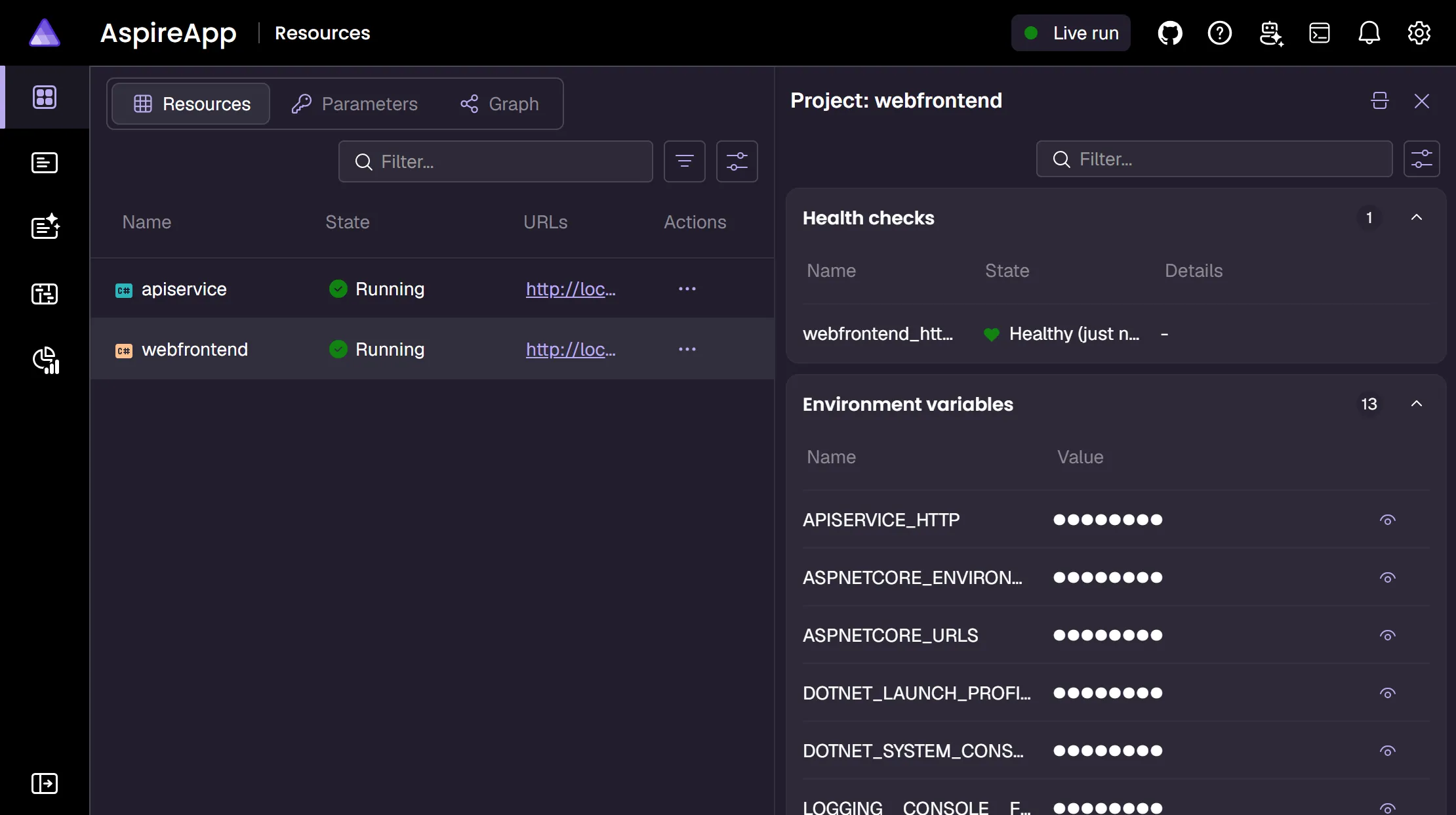
Section titled “ダッシュボード統合”リソース正常性チェックの状態は Aspire ダッシュボードに表示され、リソース準備完了の状況をリアルタイムで可視化します。リソースが正常性チェック合格待ちのとき、ダッシュボードは現在の状態と失敗詳細を表示します。
 Aspire