


外部パラメーター
環境は、アプリケーションが実行されるためのコンテキストを提供します。パラメーターは、アプリの実行時に外部の値を要求できる仕組みを表します。パラメーターは、ローカル実行時にアプリへ値を提供したり、デプロイ時に値の入力を求めたりするために使用できます。また、シークレットや接続文字列、その他の環境ごとに異なる可能性のある構成値など、幅広いシナリオをモデル化するためにも利用できます。
パラメーター値
Section titled “パラメーター値”パラメーター値は、AppHost の構成内にある Parameters セクションから読み取られ、ローカル実行時にアプリへ値を提供するために使用されます。アプリを実行または公開する際に値が構成されていない場合は、入力を求められます。
以下の AppHost の AppHost.cs ファイルの例をご覧ください:
import { function createBuilder(): IDistributedApplicationBuilder
Creates a new distributed application builder
createBuilder } from './.aspire/modules/aspire.mjs';
const const builder: IDistributedApplicationBuilder
function createBuilder(): IDistributedApplicationBuilder
Creates a new distributed application builder
createBuilder();
// "example-parameter-name" という名前のパラメーターを追加const const parameter: ParameterResource
const builder: IDistributedApplicationBuilder
IDistributedApplicationBuilder.addParameter(name: string, options?: { value?: string; publishValueAsDefault?: boolean; secret?: boolean;}): ParameterResource (+1 overload)
Adds a parameter resource
addParameter("example-parameter-name");
await const builder: IDistributedApplicationBuilder
IDistributedApplicationBuilder.addProject(name: string, projectPath: string, options?: { launchProfileOrOptions?: string | ProjectResourceOptions;}): ProjectResource (+1 overload)
Adds a .NET project resource
addProject("api", "./ApiService/ApiService.csproj") .ProjectResource.withEnvironment(name: string, value: string | IResourceWithConnectionString | IValueProvider): ProjectResource
Sets an environment variable
withEnvironment("ENVIRONMENT_VARIABLE_NAME", const parameter: ParameterResource
const builder: IDistributedApplicationBuilder
IDistributedApplicationBuilder.build(): DistributedApplication
Builds the distributed application
build().DistributedApplication.run(cancellationToken?: cancellationToken): void
Runs the distributed application
run();var builder = DistributedApplication.CreateBuilder(args);
// "example-parameter-name" という名前のパラメーターを追加var parameter = builder.AddParameter("example-parameter-name");
builder.AddProject<Projects.ApiService>("api") .WithEnvironment("ENVIRONMENT_VARIABLE_NAME", parameter);上記のコードでは、AppHost に example-parameter-name という名前のパラメーターを追加しています。このパラメーターは、Projects.ApiService プロジェクトに対して ENVIRONMENT_VARIABLE_NAME という名前の環境変数として渡されます。
パラメーター値の構成
Section titled “パラメーター値の構成”ビルダーにパラメーターを追加することは、構成の一部にすぎません。パラメーターの値もあわせて指定する必要があります。値は、AppHost の構成ファイルで指定するか、ユーザーシークレットとして設定するか、あるいは その他の標準的な構成 で設定できます。パラメーター値が見つからない場合、アプリの実行または公開時に入力を求められます。
以下の AppHost 構成ファイル appsettings.json をご覧ください:
{ "Parameters": { "example-parameter-name": "local-value" }}上記の JSON では、AppHost 構成の Parameters セクションにパラメーターを設定しています。つまり、この AppHost は構成済みのパラメーターを参照できます。たとえば、IDistributedApplicationBuilder.Configuration にアクセスし、Parameters:example-parameter-name キーを使用して値を取得できます:
import { function createBuilder(): IDistributedApplicationBuilder
Creates a new distributed application builder
createBuilder } from './.aspire/modules/aspire.mjs';
const const builder: IDistributedApplicationBuilder
function createBuilder(): IDistributedApplicationBuilder
Creates a new distributed application builder
createBuilder();
const const key: "Parameters:example-parameter-name"
var builder = DistributedApplication.CreateBuilder(args);
var key = $"Parameters:example-parameter-name";var value = builder.Configuration[key]; // value = "local-value"環境変数を使用してパラメーター値を設定する
Section titled “環境変数を使用してパラメーター値を設定する”パラメーターは環境変数を使って設定できます。これは、特に CI/CD パイプラインやデプロイシナリオにおいて便利です。環境変数名は Parameters__{parameter_name} という形式に従います。構成セクションとパラメーター名を区切るためにダブルアンダースコア (__) を使用し、ダッシュはシングルアンダースコアで表します。
以下の AppHost の AppHost.cs ファイルの例をご覧ください:
import { function createBuilder(): IDistributedApplicationBuilder
Creates a new distributed application builder
createBuilder } from './.aspire/modules/aspire.mjs';
const const builder: IDistributedApplicationBuilder
function createBuilder(): IDistributedApplicationBuilder
Creates a new distributed application builder
createBuilder();
// コンテナー レジストリ パラメーターを定義const const endpoint: ParameterResource
const builder: IDistributedApplicationBuilder
IDistributedApplicationBuilder.addParameter(name: string, options?: { value?: string; publishValueAsDefault?: boolean; secret?: boolean;}): ParameterResource (+1 overload)
Adds a parameter resource
addParameter("registry-endpoint");const const repository: ParameterResource
const builder: IDistributedApplicationBuilder
IDistributedApplicationBuilder.addParameter(name: string, options?: { value?: string; publishValueAsDefault?: boolean; secret?: boolean;}): ParameterResource (+1 overload)
Adds a parameter resource
addParameter("registry-repository");
await const builder: IDistributedApplicationBuilder
IDistributedApplicationBuilder.addContainerRegistry(name: string, endpoint: string | ParameterResource, repository?: string | ParameterResource): ContainerRegistryResource (+1 overload)
Adds a container registry resource
addContainerRegistry("container-registry", const endpoint: ParameterResource
const repository: ParameterResource
const builder: IDistributedApplicationBuilder
IDistributedApplicationBuilder.build(): DistributedApplication
Builds the distributed application
build().DistributedApplication.run(cancellationToken?: cancellationToken): void
Runs the distributed application
run();var builder = DistributedApplication.CreateBuilder(args);
// コンテナ レジストリ用のパラメーターを定義var endpoint = builder.AddParameter("registry-endpoint");var repository = builder.AddParameter("registry-repository");
builder.AddContainerRegistry("container-registry", endpoint, repository);
builder.Build().Run();これらのパラメーターは、次の環境変数によって指定できます:
Parameters__registry_endpoint- レジストリの URL (例:ghcr.io)Parameters__registry_repository- リポジトリ パス (例:username/reponame)
例: GitHub Actions ワークフロー
Section titled “例: GitHub Actions ワークフロー”以下の例は、GitHub Actions のワークフロー内でパラメーターを環境変数として設定する方法を示しています:
- name: Login to GHCR  uses: docker/login-action@v3  with:    registry: ghcr.io    username: ${{ github.actor }}    password: ${{ secrets.GITHUB_TOKEN }}
- name: Push images with Aspire  env:    Parameters__registry_endpoint: ghcr.io    Parameters__registry_repository: your-org/your-repo  run: aspire do push
パラメーターの解決方法
Section titled “パラメーターの解決方法”Aspire は、次の順序でパラメーター値を解決します:
- 環境変数 -
Parameters__*構文を使用して設定された値 - 構成ファイル - appsettings.json、ユーザーシークレット、またはその他の構成ソースからの値
- ユーザー入力 - 値が見つからない場合、ダッシュボードまたは CLI が入力を求めます
この解決順序により、構成ファイルの値を環境変数で上書きできます。これにより、構成ファイルを変更せずに、さまざまな環境に合わせてアプリケーションを柔軟に適応させることができます。
ダッシュボードでパラメーター値を入力する
Section titled “ダッシュボードでパラメーター値を入力する”コードでパラメーターを追加していても値を設定していない場合、Aspire ダッシュボードに値の入力を促す画面が表示されます。Unresolved parameters というメッセージが表示され、Enter values を選択すると問題を解決できます:

Enter values を選択すると、不足している各パラメーターの値を設定できるフォームが表示されます。
また、以下のメソッドを使用して、ダッシュボード上でのパラメーター表示方法を制御できます:
WithDescriptionwithDescription: パラメーターの目的をユーザーが理解しやすくするための説明テキストを指定します。Markdown 形式で記述する場合は、enableMarkdown: trueパラメーターを使用します。WithCustomInputwithCustomInput: コールバックメソッドを指定して、パラメーター ダイアログをカスタマイズします。たとえば、このコールバックでは既定値、入力タイプ、ラベル、プレースホルダー テキストをカスタマイズできます。WithCustomInputを使用する場合、Markdown のレンダリングを維持するために、EnableDescriptionMarkdownプロパティをパラメーターからInteractionInputオブジェクトにコピーする必要があります。
以下のコードは、説明を設定し、コールバックを使用する方法を示しています:
import { InputType, createBuilder } from './.aspire/modules/aspire.mjs';
const builder = await createBuilder();
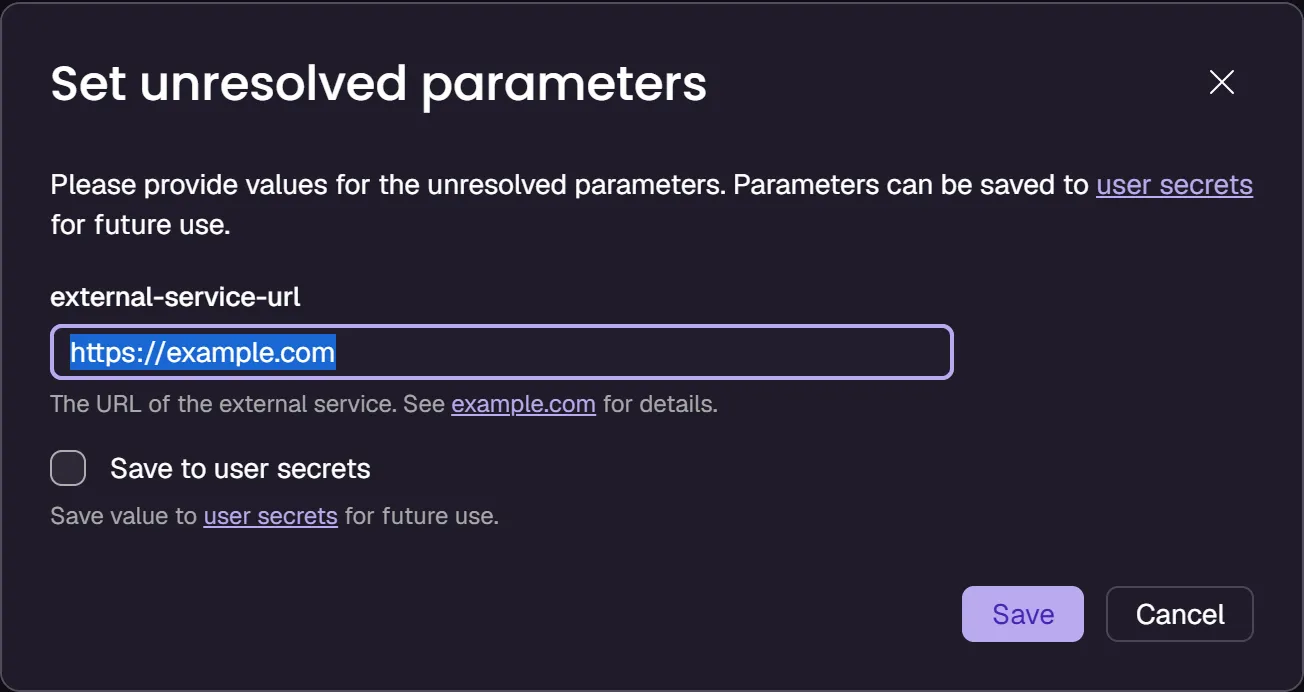
const externalServiceUrl = await builder.addParameter('external-service-url');await externalServiceUrl  .withDescription(    'The URL of the external service. See [example.com](https://example.com) for details.',    { enableMarkdown: true }  )  .withCustomInput({    inputType: InputType.Text,    label: 'External service URL',    placeholder: 'Enter value for external-service-url',  });
await builder.addExternalService('external-service', externalServiceUrl);
await builder.build().run();var builder = DistributedApplication.CreateBuilder(args);
#pragma warning disable ASPIREINTERACTION001 // この型は評価目的のものであり、将来の更新で変更または削除される可能性があります。この診断を抑制して続行してください。var externalServiceUrl = builder.AddParameter("external-service-url") .WithDescription("The URL of the external service. See [example.com](https://example.com) for details.", enableMarkdown: true) .WithCustomInput(p => new() { InputType = InputType.Text, Value = "https://example.com", Name = p.Name, Placeholder = $"Enter value for {p.Name}", Description = p.Description, EnableDescriptionMarkdown = p.EnableDescriptionMarkdown });var externalService = builder.AddExternalService("external-service", externalServiceUrl);#pragma warning restore ASPIREINTERACTION001
builder.Build().Run();このコードを実行すると、ダッシュボードでは次のような入力コントロールが表示されます:
シークレット値
Section titled “シークレット値”パラメーターはシークレットを表現する目的でも使用できます。パラメーターがシークレットとしてマークされると、マニフェストに対して「この値はシークレットとして扱うべき」というヒントになります。アプリを公開する際には値の入力が求められ、安全な場所に保存されます。ローカルでアプリを実行する場合は、AppHost 構成の Parameters セクションから値が読み取られます。
以下の AppHost の AppHost.cs ファイルの例をご覧ください:
import { function createBuilder(): IDistributedApplicationBuilder
Creates a new distributed application builder
createBuilder } from './.aspire/modules/aspire.mjs';
const const builder: IDistributedApplicationBuilder
function createBuilder(): IDistributedApplicationBuilder
Creates a new distributed application builder
createBuilder();
// "secret" という名前のシークレット パラメーターを追加const const secret: ParameterResource
const builder: IDistributedApplicationBuilder
IDistributedApplicationBuilder.addParameter(name: string, options?: { value?: string; publishValueAsDefault?: boolean; secret?: boolean;}): ParameterResource (+1 overload)
Adds a parameter resource
addParameter("secret", { secret?: boolean | undefined
const builder: IDistributedApplicationBuilder
IDistributedApplicationBuilder.addProject(name: string, projectPath: string, options?: { launchProfileOrOptions?: string | ProjectResourceOptions;}): ProjectResource (+1 overload)
Adds a .NET project resource
addProject("api", "./ApiService/ApiService.csproj") .ProjectResource.withEnvironment(name: string, value: string | IResourceWithConnectionString | IValueProvider): ProjectResource
Sets an environment variable
withEnvironment("SECRET", const secret: ParameterResource
const builder: IDistributedApplicationBuilder
IDistributedApplicationBuilder.build(): DistributedApplication
Builds the distributed application
build().DistributedApplication.run(cancellationToken?: cancellationToken): void
Runs the distributed application
run();var builder = DistributedApplication.CreateBuilder(args);
// "secret" という名前のシークレット パラメーターを追加var secret = builder.AddParameter("secret", secret: true);
builder.AddProject<Projects.ApiService>("api") .WithEnvironment("SECRET", secret);
builder.Build().Run();次に、以下の AppHost 構成ファイル appsettings.json をご覧ください:
{ "Parameters": { "secret": "local-secret" }}マニフェストでの表現は次のとおりです:
{ "resources": { "value": { "type": "parameter.v0", "value": "{value.inputs.value}", "inputs": { "value": { "type": "string", "secret": true } } } }}構成からパラメーターを追加する
Section titled “構成からパラメーターを追加する”特定のシナリオでは、標準の Parameters:* パターンに従うのではなく、特定の構成キーから直接パラメーター値を読み取りたい場合があります。AddParameterFromConfigurationaddParameterFromConfiguration メソッドを使用すると、パラメーターに対してカスタムの構成キーを指定できます。
API シグネチャ
Section titled “API シグネチャ”public static IResourceBuilder<ParameterResource> AddParameterFromConfiguration( this IDistributedApplicationBuilder builder, string name, string configurationKey, bool secret = false);パラメーター
Section titled “パラメーター”name- パラメーター リソースの名前configurationKey- 値を読み取る構成キーsecret- パラメーターをシークレットとして扱うかどうかを示す任意のフラグ (既定値:false)
カスタム セクションに構成値が保存されているシナリオを考えてみましょう:
var builder = DistributedApplication.CreateBuilder(args);
// カスタム構成キーから読み取るvar dbPassword = builder.AddParameterFromConfiguration(    "db-password",    "CustomConfig:Database:Password",    secret: true);
builder.AddProject<Projects.ApiService>("api")       .WithEnvironment("DB_PASSWORD", dbPassword);
builder.Build().Run();
対応する構成ファイルは次のようになります:
{ "CustomConfig": { "Database": { "Password": "your-secure-password" } }}このメソッドは、次のような場合に役立ちます:
- 既存の構成構造と統合する必要がある場合
- 構成が標準の
Parameters:*規約とは異なるパターンに従っている場合 - 特定の構成セクションから値を読み取りたい場合
接続文字列の値
Section titled “接続文字列の値”パラメーターは接続文字列を表現する目的でも使用できます。アプリを公開する際には値の入力が求められ、安全な場所に保存されます。ローカルでアプリを実行する場合は、AppHost 構成の ConnectionStrings セクションから値が読み取られます。
以下の AppHost の AppHost.cs ファイルの例をご覧ください:
import { function createBuilder(): IDistributedApplicationBuilder
Creates a new distributed application builder
createBuilder } from './.aspire/modules/aspire.mjs';
const const builder: IDistributedApplicationBuilder
function createBuilder(): IDistributedApplicationBuilder
Creates a new distributed application builder
createBuilder();
const const redis: IResourceWithConnectionString
const builder: IDistributedApplicationBuilder
IDistributedApplicationBuilder.addConnectionString(name: string, options?: { environmentVariableNameOrExpression?: string | ReferenceExpression;}): IResourceWithConnectionString (+1 overload)
Adds a connection string resource
addConnectionString("redis");
await const builder: IDistributedApplicationBuilder
IDistributedApplicationBuilder.addProject(name: string, projectPath: string, options?: { launchProfileOrOptions?: string | ProjectResourceOptions;}): ProjectResource (+1 overload)
Adds a .NET project resource
addProject("api", "./WebApplication/WebApplication.csproj") .ProjectResource.withReference(source: IResource | EndpointReference | string | uri, options?: { connectionName?: string; optional?: boolean; name?: string;} | undefined): ProjectResource (+1 overload)
Adds a reference to another resource
withReference(const redis: IResourceWithConnectionString
const builder: IDistributedApplicationBuilder
IDistributedApplicationBuilder.build(): DistributedApplication
Builds the distributed application
build().DistributedApplication.run(cancellationToken?: cancellationToken): void
Runs the distributed application
run();var builder = DistributedApplication.CreateBuilder(args);
var redis = builder.AddConnectionString("redis");
builder.AddProject<Projects.WebApplication>("api") .WithReference(redis) .WaitFor(redis);
builder.Build().Run();次に、以下の AppHost 構成ファイル appsettings.json をご覧ください:
{ "ConnectionStrings": { "redis": "local-connection-string" }}参照式を使用して接続文字列を構築する
Section titled “参照式を使用して接続文字列を構築する”パラメーターから接続文字列を構築し、開発環境と本番環境の両方で正しく扱われるようにしたい場合は、ReferenceExpression を指定した AddConnectionStringaddConnectionString を使用します。
たとえば、接続文字列の一部を保持するシークレット パラメーターがある場合、次のコードでそれを組み込めます:
var secretKey = builder.AddParameter("secretkey", secret: true);
var connectionString = builder.AddConnectionString(    "composedconnectionstring",    ReferenceExpression.Create($"Endpoint=https://api.contoso.com/v1;Key={secretKey}"));
builder.AddProject<Projects.AspireReferenceExpressions_CatalogAPI>("catalogapi") .WithReference(connectionString) .WaitFor(connectionString);また、Aspire リソースによって作成された接続文字列にテキストを追加するために、参照式を使用することもできます。たとえば、Aspire ソリューションに PostgreSQL リソースを追加すると、データベース サーバーはコンテナー内で実行され、そのための接続文字列が生成されます。次のコードでは、その接続文字列に Include Error Details という追加プロパティを付与してから、利用するプロジェクトに渡しています:
var postgres = builder.AddPostgres("postgres");var database = postgres.AddDatabase("db");
var pgConnectionString = builder.AddConnectionString(    "pgdatabase",    ReferenceExpression.Create($"{database};Include Error Details=true"));
builder.AddProject<Projects.AspireReferenceExpressions_CustomerAPI>("customerapi")       .WithReference(pgConnectionString)       .WaitFor(pgConnectionString);
パラメーターの例
Section titled “パラメーターの例”パラメーターを表現する例として、次のコードをご覧ください:
import { function createBuilder(): IDistributedApplicationBuilder
Creates a new distributed application builder
createBuilder } from './.aspire/modules/aspire.mjs';
const const builder: IDistributedApplicationBuilder
function createBuilder(): IDistributedApplicationBuilder
Creates a new distributed application builder
createBuilder();
// 実行モードでは実際の SQL Server リソースを追加します。// 発行モードでは外部 SQL Server インスタンスを表す接続文字列を使用します。const const isRunMode: boolean
const builder: IDistributedApplicationBuilder
IDistributedApplicationBuilder.executionContext: PropertyAccessor<DistributedApplicationExecutionContext>
Execution context for this invocation of the AppHost.
executionContext.DistributedApplicationExecutionContext.isRunMode: () => Promise<boolean>
Returns true if the current operation is running.
isRunMode();
const const db: IResourceWithConnectionString
const isRunMode: boolean
const builder: IDistributedApplicationBuilder
IDistributedApplicationBuilder.addSqlServer(name: string, options?: { password?: string | ParameterResource; port?: number;}): SqlServerServerResource (+1 overload)
Adds a SQL Server resource to the application model. A container is used for local development.
addSqlServer("sql")).SqlServerServerResource.addDatabase(name: string, options?: { databaseName?: string;} | undefined): SqlServerDatabaseResource (+1 overload)
Adds a SQL Server database resource
addDatabase("db") : await const builder: IDistributedApplicationBuilder
IDistributedApplicationBuilder.addConnectionString(name: string, options?: { environmentVariableNameOrExpression?: string | ReferenceExpression;}): IResourceWithConnectionString (+1 overload)
Adds a connection string resource
addConnectionString("db");
const const insertionRows: ParameterResource
const builder: IDistributedApplicationBuilder
IDistributedApplicationBuilder.addParameter(name: string, options?: { value?: string; publishValueAsDefault?: boolean; secret?: boolean;}): ParameterResource (+1 overload)
Adds a parameter resource
addParameter("insertionRows");
await const builder: IDistributedApplicationBuilder
IDistributedApplicationBuilder.addProject(name: string, projectPath: string, options?: { launchProfileOrOptions?: string | ProjectResourceOptions;}): ProjectResource (+1 overload)
Adds a .NET project resource
addProject("api", "./Parameters.ApiService/Parameters.ApiService.csproj") .ProjectResource.withEnvironment(name: string, value: string | IResourceWithConnectionString | IValueProvider): ProjectResource
Sets an environment variable
withEnvironment("InsertionRows", const insertionRows: ParameterResource
ProjectResource.withReference(source: IResource | EndpointReference | string | uri, options?: { connectionName?: string; optional?: boolean; name?: string;} | undefined): ProjectResource (+1 overload)
Adds a reference to another resource
withReference(const db: IResourceWithConnectionString
const builder: IDistributedApplicationBuilder
IDistributedApplicationBuilder.build(): DistributedApplication
Builds the distributed application
build().DistributedApplication.run(cancellationToken?: cancellationToken): void
Runs the distributed application
run();var builder = DistributedApplication.CreateBuilder(args);
// 実行モードでは実際の SQL Server リソースを追加します。// 発行モードでは外部 SQL Server インスタンスを表す接続文字列を使用します。IResourceBuilder<IResourceWithConnectionString> db = builder.ExecutionContext.IsRunMode ? builder.AddSqlServer("sql").AddDatabase("db") : builder.AddConnectionString("db");
var insertionRows = builder.AddParameter("insertionRows");
builder.AddProject<Projects.Parameters_ApiService>("api") .WithEnvironment("InsertionRows", insertionRows) .WithReference(db);
builder.Build().Run();この例では、次の処理を行っています:
- 実行モードでは
sqlという名前の SQL Server リソースとdbという名前のデータベースを追加します。発行モードではdbという名前の外部接続文字列を使用します。 insertionRowsという名前のパラメーターを追加します。apiという名前のプロジェクトを追加し、それをProjects.Parameters_ApiServiceのプロジェクト リソース型として関連付けます。insertionRowsパラメーターをapiプロジェクトに渡します。dbデータベースを参照します。
insertionRows パラメーターの値は、AppHost 構成ファイル appsettings.json の Parameters セクションから読み取られます:
{ "Logging": { "LogLevel": { "Default": "Information", "Microsoft.AspNetCore": "Warning", "Aspire.Hosting.Dcp": "Warning" } }, "Parameters": { "insertionRows": "1" }}Parameters_ApiService プロジェクトは insertionRows パラメーターを利用します。以下は Program.cs の例です:
using Microsoft.EntityFrameworkCore;
var builder = WebApplication.CreateBuilder(args);
int insertionRows = builder.Configuration.GetValue<int>("InsertionRows", 1);
builder.AddServiceDefaults();
builder.AddSqlServerDbContext<MyDbContext>("db");
var app = builder.Build();
app.MapGet("/", async (MyDbContext context) =>{    // 通常は毎回の呼び出しで行うものではありませんが、    // ここでは例を簡単にするために実行しています。    context.Database.EnsureCreated();
    for (var i = 0; i < insertionRows; i++)    {        var entry = new Entry();        await context.Entries.AddAsync(entry);    }
    await context.SaveChangesAsync();
    var entries = await context.Entries.ToListAsync();
    return new    {        totalEntries = entries.Count,        entries    };});
app.Run();package main
import ( "database/sql" "fmt" "net/http" "os" "strconv")
func main() { insertionRows, _ := strconv.Atoi(os.Getenv("InsertionRows")) if insertionRows == 0 { insertionRows = 1 }
connStr := os.Getenv("ConnectionStrings__db")
http.HandleFunc("/", func(w http.ResponseWriter, r *http.Request) { db, _ := sql.Open("sqlserver", connStr) defer db.Close()
for i := 0; i < insertionRows; i++ { db.Exec("INSERT INTO Entries DEFAULT VALUES") }
rows, _ := db.Query("SELECT COUNT(*) FROM Entries") var count int rows.Next() rows.Scan(&count)
fmt.Fprintf(w, `{"totalEntries": %d}`, count) })
http.ListenAndServe(":8080", nil)}import osfrom fastapi import FastAPI
app = FastAPI()
insertion_rows = int(os.getenv("InsertionRows", "1"))conn_str = os.getenv("ConnectionStrings__db")
@app.get("/")async def root(): # conn_str を使ってデータベースに接続 # insertion_rows 件のエントリを挿入 # 合計件数を返す return { "totalEntries": insertion_rows, }import express from 'express';
const app = express();const insertionRows = parseInt(process.env.InsertionRows ?? '1', 10);const connStr = process.env.ConnectionStrings__db;
app.get('/', async (req, res) => { // connStr を使ってデータベースに接続 // insertionRows 件のエントリを挿入 // 合計件数を返す res.json({ totalEntries: insertionRows, });});
app.listen(8080); Aspire