



What's new in Aspire 17.0
Bu içerik henüz dilinizde mevcut değil.
Aspire 17.0 puts your resources at the center of a redesigned dashboard, with a resource table home page, a dedicated Terminals page, and graph export to Mermaid. Go AppHosts are in preview, a tray companion keeps running AppHosts within reach, and the Kubernetes deployment packages are stable. Many APIs that previously required an experimental-warning suppression are now stable, too.
This release introduces:
- Upgrade guidance for your CLI and Aspire packages.
- A redesigned dashboard with a resource table home page, a Terminals page, Mermaid export, and first-run telemetry guidance.
- A CLI that adds shell completion, environment-specific secrets, team template, integration, and skill sources, plus a preview tray companion.
- Go AppHosts in preview with templates, debugging,
aspire doctorchecks, and SDK export. - A VS Code extension that attaches the debugger to running .NET and Go resources, plus new language model tools for coding agents.
- AppHost updates including optional parameters, browser-origin references, TypeScript Azure Functions, and graduated APIs.
- New Microsoft Entra ID and Azure API Management integrations, plus Azure AI client packages built on the OpenAI SDK.
- Stable Kubernetes deployment with Helm 4, AKS Standard tier and OS SKU selection, and cert-manager External Account Binding.
- Integration updates for Azure Web PubSub, Azure Service Bus, Redis output caching, and Deno.
- Updated default container images, including MongoDB
9.0, PostgreSQL18.6, and Redis8.10. - Breaking-change guidance for project registration, Kubernetes deployment, and removed APIs.
We’d love to hear what you think. Drop by Discord to chat with the team and the community, or file feedback and issues on GitHub.
🆙 Upgrade to Aspire 17.0
Section titled “🆙 Upgrade to Aspire 17.0”For general purpose upgrade guidance, see Upgrade Aspire.
To upgrade to Aspire 17.0, use the aspire update command:
-
Update the Aspire CLI itself:
Aspire CLI — Update the CLI aspire update --self -
Update your projects from the repository root:
Aspire CLI — Update all Aspire packages aspire update
For more details on installing the Aspire CLI, see Install the CLI.
📊 Dashboard updates
Section titled “📊 Dashboard updates”Keep the resources you’re investigating in view as you move between logs, traces, and metrics. The redesigned dashboard adds a shared resource pane with search, filters, and multi-selection, plus grouping by tags, resource type, or state.
The new experience is still evolving. You can switch to the previous dashboard from Settings when the previous experience is available in your dashboard distribution.
See Explore dashboard features for resource navigation, telemetry, and dashboard actions.
Resource table home page
Section titled “Resource table home page”The dashboard opens to a full-width table of every resource. Select a row, All resources, or a tab to drill in. Select the application name in the header to return to the table. Error badges in the resource list now open that resource’s structured logs filtered to errors.

Resources also show friendly type labels such as Redis or PostgreSQL Server in the dashboard and in the Type column of aspire describe.
See Filter and group resources to focus the dashboard on the resources you’re investigating.
All resources
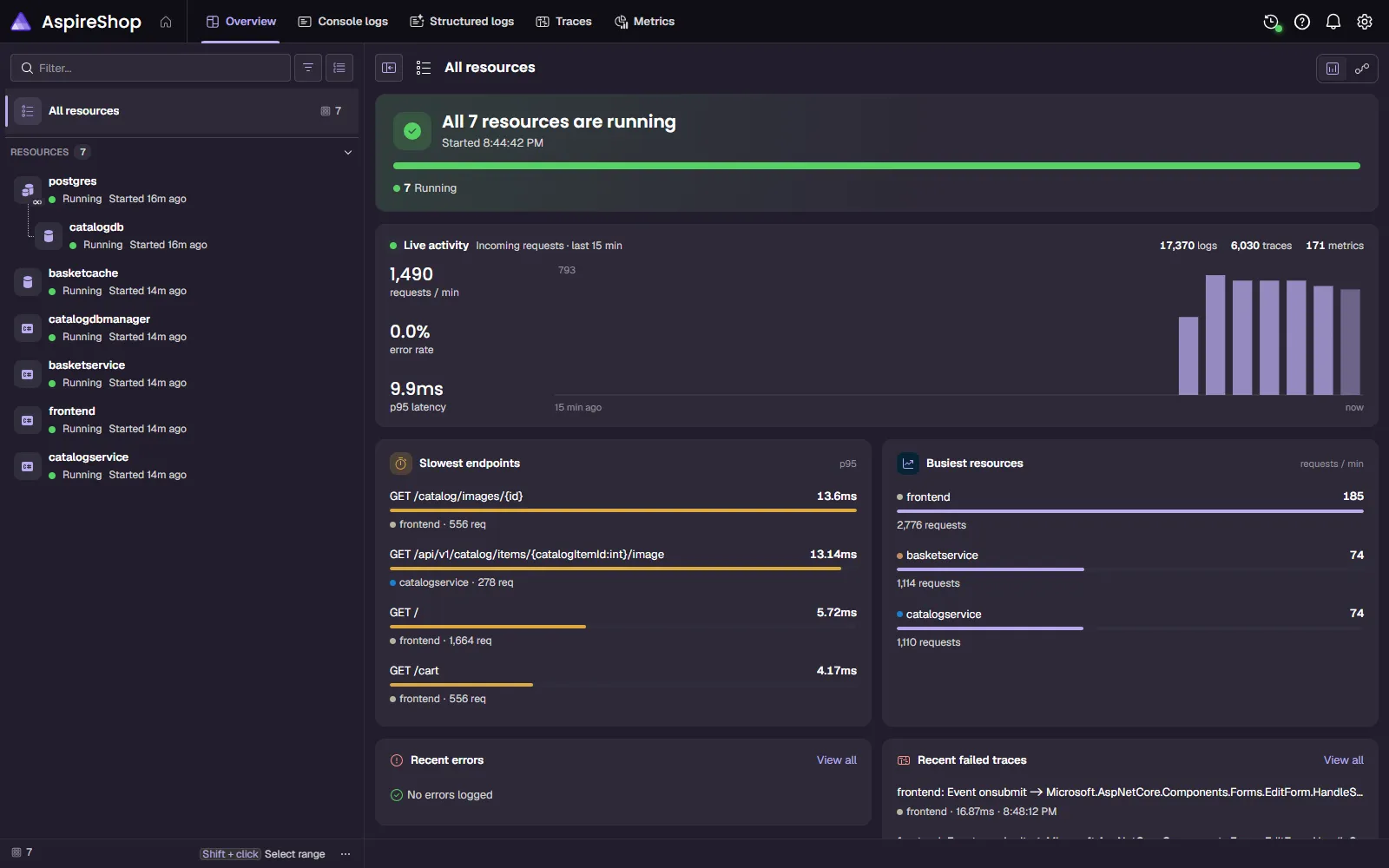
Section titled “All resources”Open All resources for a health summary of your whole app: resource states, live request activity, error rate, p95 latency, the slowest endpoints, and the busiest resources. Select View all to open recent errors or failed traces.
Resource graph
Section titled “Resource graph”Switch to the graph to see how TestShop’s services and infrastructure are connected.

Resource details
Section titled “Resource details”Select a resource to bring its health, endpoints, logs, and telemetry into one view. Here, frontend is the store used to browse the catalog and check out.

Distributed traces
Section titled “Distributed traces”Expand a trace to see the time spent in each service and dependency. This trace follows TestShop’s activity generator through the frontend, catalog service, basket service, PostgreSQL, and Redis.

Metrics
Section titled “Metrics”Metrics appear as cards with live sparklines. Group instruments by resource, meter, or instrument, and pin the ones you want to return to instead of finding them again in the full instrument list. Collapse the resource list to give the cards more room.

Terminals page
Section titled “Terminals page”Interactive resource terminals have their own Terminals page instead of sharing Console logs. The selector lists only terminal-capable resources and their replicas, and terminals resize to fit the available space.
Terminal host resources are always hidden from the resource list. To see them, turn on Show hidden resources.
See Dashboard terminals for terminal-capable resources and the terminal dock.
Export the resource graph as Mermaid
Section titled “Export the resource graph as Mermaid”Share your app’s architecture in a pull request or design doc. Choose Export as Mermaid from the resource graph, or generate the same diagram from the CLI:
aspire describe --format mermaidThe aspire resources alias accepts the same option. Mermaid output can’t be combined with --follow.
See aspire describe for output
formats.
More dashboard improvements
Section titled “More dashboard improvements”- Telemetry setup guidance: Empty Structured logs, Traces, and Metrics pages offer an Add telemetry dialog with your dashboard’s OTLP endpoints and container guidance.
- SQL highlighting: The text visualizer highlights SQL syntax.
- Aspire Outage: Press
OOOOOO on the resource graph to play an arcade game where your resources are the enemies. In the optional hardcore mode, destroying an enemy really stops its resource.
🛠️ CLI updates
Section titled “🛠️ CLI updates”Shell completion
Section titled “Shell completion”Complete Aspire commands and options in Bash, Fish, PowerShell, and Zsh. Generate a completion script with aspire completions script, specifying bash, fish, pwsh, or zsh when you want to select the shell explicitly.
For example, generate and load a Bash completion script for your current shell session:
aspire completions script bash > aspire-completion.bashsource ./aspire-completion.bashEnvironment-specific secrets
Section titled “Environment-specific secrets”Keep deployment secrets separate by using --environment or -e with the aspire secret commands.
Run the secret commands from your AppHost directory. You can set a secret without putting its value in the command line: omit the value to enter it at a masked interactive prompt, or use --envvar to read an environment variable:
aspire secret set Parameters:database-password --environment production --envvar DATABASE_PASSWORDSet DATABASE_PASSWORD in your environment before running this command. Non-interactive calls must supply a value or --envvar; they don’t open an input prompt.
Custom templates, integrations, and skills
Section titled “Custom templates, integrations, and skills”Bring your team’s project scaffolding, hosting packages, and agent guidance into the Aspire CLI. Named sources let you reuse these across apps without replacing Aspire’s built-in choices. Use sources you trust: templates and agent plugins can contain executable code.
Custom templates
Section titled “Custom templates”Try templates directly from a Git repository without registering a source. For example, browse the Azure-focused templates in Azure/aspire-templates:
aspire new --template-repository https://github.com/Azure/aspire-templatesFork the repository and customize a template for your team. Push your changes to a branch, then use --template-repository-ref to test it before merging:
aspire new --template-repository https://github.com/example-org/aspire-templates \ --template-repository-ref custom-starterReplace example-org with your fork’s owner and custom-starter with your branch. The ref can also be a tag or full commit SHA; omitting it uses the repository’s default branch. Use --template-path to select a directory within the repository.
When you want to reuse a source, add a persistent reference in your global Aspire settings:
aspire template source add azure --repository https://github.com/Azure/aspire-templatesaspire newThe CLI asks you to confirm that you trust the source before registering it. Use --path for a template directory within the repository and --ref to pin a branch, tag, or full commit SHA.
See aspire new for project creation.
Custom integrations
Section titled “Custom integrations”Make your hosting integrations discoverable from a NuGet server. Add an integrationSources entry to aspire.config.json; optional package patterns limit which packages the source offers:
{ "integrationSources": { "team": { "source": "https://nuget.example.com/v3/index.json", "patterns": ["Team.Hosting.*"] } }}Replace the illustrative feed URL with your NuGet server’s service index and publish your Team.Hosting.* packages there. Matching integrations appear in discovery and the aspire add picker. The built-in source remains enabled unless you set integrationSources.default.enabled to false.
See Create hosting integrations for integration authoring.
Custom skills
Section titled “Custom skills”Configure your team’s agent plugins through skillSources in aspire.config.json. For example, point GitHub Copilot or Claude Code at your team’s marketplace and select its plugin:
{ "skillSources": { "team": { "repository": "example-org/team-skills", "marketplace": "team-skills", "plugins": ["platform"] } }}Replace the repository, marketplace, and plugin names with your own. Run aspire agent init --skills aspire from your project to apply the enabled sources to your selected agents. OpenCode uses skill catalog URLs instead of marketplace plugins.
See Configure AI agent plugins and skill sources for agent-specific settings, catalog URLs, and source defaults.
Init source mechanism
Section titled “Init source mechanism”Offer a shared starting configuration to everyone creating or initializing an app. Set ASPIRE_INIT_SOURCE_URL to a Git repository containing an aspire.config.json file:
ASPIRE_INIT_SOURCE_URL=https://github.com/example-org/aspire-init.git \ aspire initReplace the URL with your configuration repository. The variable proposes a source; it doesn’t silently apply it. The CLI displays the source and asks for consent. Use --use-config-source to accept explicitly or --use-config-source false to decline, including in non-interactive runs.
After acceptance, Aspire copies the source’s integrationSources and skillSources into the project’s local configuration and records its source binding. During template discovery, an explicitly configured URL can also supply templateSources without copying them into the project file. These are optional defaults, not enforced organizational policy.
Use ASPIRE_INIT_SOURCE_PATH to select a different configuration file within the repository, or ASPIRE_INIT_SOURCE_REF to select a branch or pin a full commit SHA. If you don’t set a URL, the CLI normally offers no source, although detected internal Microsoft environments can supply an organizational default. Refresh an adopted configuration with aspire update --config-source.
See aspire init and aspire update for adoption and refresh
commands.
Tray companion (preview)
Section titled “Tray companion (preview)”Keep an eye on every running AppHost without repeatedly running aspire ps. The tray companion adds an Aspire icon to the macOS menu bar, the Windows notification area, or a Linux StatusNotifierItem tray, with a shared panel for your local AppHosts:
aspire tray startStop it with aspire tray stop. The tray companion requires a native Aspire CLI installation. Linux support requires a graphical desktop session and GTK 3. Thanks to @tommasodotNET for Linux support.
See aspire tray for platform
requirements and subcommands.
Agent setup by client and scope
Section titled “Agent setup by client and scope”aspire agent init asks which agents you use, GitHub Copilot, Claude Code, or OpenCode, instead of which skill folders to write. Choose project scope for repository settings or global scope for user settings. The CLI configures the Aspire plugin through each agent’s marketplace instead of copying a bundled skills folder into your repository. aspire new and aspire init use the same selection.
See aspire agent init for
per-agent settings files and scopes.
More CLI improvements
Section titled “More CLI improvements”- WSLc container runtime: Set
ASPIRE_CONTAINER_RUNTIME=wslcon Windows to run containers with WSLc 3.0.4.0 or later. Publishing and deployment have preliminary support, limited by what WSLc supports, and Docker Compose deployment isn’t supported.aspire doctorchecks only the configured runtime and reports features WSLc doesn’t support. - Container tunnel base image: Use a mirrored or customized tunnel image with
aspire config set containerTunnel.baseImage <image>. - Stricter
aspire destroy: The command rejects unknown arguments instead of ignoring them. - Clearer publish guidance:
dotnet run --operation publishfails fast and directs you toaspire publish. - Exit codes in
aspire describe: The table output shows the exit code of finished resources and highlights nonzero codes. - SDK migration hint: When
aspire update --migratefinds nothing to migrate automatically but your AppHost still usesAspire.AppHost.Sdk, it points you to the ASPIRE012 migration steps.
🐹 Go AppHost support
Section titled “🐹 Go AppHost support”Go AppHosts are in preview. You no longer need the experimentalPolyglotGo feature flag, and Go templates appear in aspire new, but Go AppHost support is not yet generally available. Create a Go AppHost with aspire new, using the aspire-go-empty or aspire-go-starter template, or add one to an existing app:
aspire init --language goThe starter template includes a Go API, a React frontend, and Redis. Go AppHosts also get first-class tooling:
- Debugging: Launch and debug
apphost.goin VS Code through the Go extension’s Delve adapter, and attach the debugger to running Go and .NET resources from the Aspire view. - Environment checks:
aspire doctorverifies that Go 1.26 or later is installed. - SDK and API reference: Export the generated Go SDK’s API with
aspire sdk export --language go, and search Go API reference content withaspire docs api search <query> --language go. - Certificates: On macOS and Windows, Go resources trust both system roots and development certificates by default, including with Go 1.27.
The generated Go SDK uses idiomatic option structs and propagates child resource errors through Build.
Throughout aspire.dev, the landing page, AppHost builder, and hosting integration articles show apphost.go samples next to their C# and TypeScript equivalents. The AppHost language selection stays in sync across the page.
See Get started with the Go AppHost and Go AppHost conventions for option structs, pointer helpers, and error handling.
🧰 Visual Studio Code extension
Section titled “🧰 Visual Studio Code extension”The Aspire extension for VS Code can attach a debugger to resources that are already running, and it gives coding agents new tools to inspect your app:
- Attach debugger: Right-click a running .NET project or Go resource in the Aspire view and select Attach debugger. Attach works for resources started with Run Without Debugging or
aspire start, and it doesn’t restart the resource. Agents can request the same action with theaspire_resource_debuglanguage model tool. This feature requires extension v1.25.0 or later, and Go resources also require Aspire 17.0 hosting. - Editor-assistance tools: Six new language model tools let agents check debug session status, list the AppHosts that VS Code runs, explain the latest launch failure, and check whether Hot Reload applies to a resource. Agents can also open the dashboard and the Aspire output channel. These tools require extension v1.24.0 or later.
- Safe results: The tools return summarized state instead of raw logs, compiler output, environment variables, or dashboard login URLs.
See Attach a debugger to a running resource, the language model tool reference, and Attach to a running Go resource.
🧩 AppHost updates
Section titled “🧩 AppHost updates”Aspire 17.0 raises its minimum supported .NET version to .NET 10. Review your AppHost and Aspire package target frameworks before updating. This requirement doesn’t mean every workload orchestrated by Aspire must target .NET 10.
The Aspire.Hosting.Dotnet integration now follows stable package versioning for .NET projects added by path. The older AddProject APIs are deprecated, not removed. Use the path-based project model when updating your AppHost.
Aspire.AppHost.Sdk is also obsolete; see Aspire.AppHost.Sdk is deprecated.
See Migrate to the new DotnetProjectResource for project paths, launch profiles, removing the AppHost SDK, and scenarios that retain the legacy model.
Optional parameters
Section titled “Optional parameters”Not every parameter needs a value in every environment. Mark a parameter as optional, and Aspire stops prompting for it during aspire run and no longer fails publishing when it’s unset. An unset optional parameter resolves to null, so consumers can fall back to their own defaults.
const messagePrefix = await builder.addParameter('message-prefix').asOptional();var messagePrefix = builder.AddParameter("message-prefix") .AsOptional();builder.AddParameter("message-prefix").AsOptional()Call AsRequired to make a parameter required again. In code, ParameterResource.TryGetCurrentValue reads a value without prompting, and SetValueAsync sets or clears one. The legacy manifest publisher doesn’t support optional parameters.
See Optional parameters for optional parameter behavior during run and publish.
Browser origins for CORS and redirects
Section titled “Browser origins for CORS and redirects”Endpoints expose PrimaryBrowserOrigin and BrowserOrigins, deferred values that resolve to the origins a browser actually uses for a resource. They account for *.dev.localhost hosts, custom public URLs, and GitHub Codespaces forwarding, so CORS policies and authentication redirects keep working without hard-coded URLs.
Use the primary origin when building a redirect URL, or the full origin list for a CORS policy.
When you deploy, Docker Compose, Kubernetes, and Radius publishers turn these values into deployment parameters.
See Keep browser origins consistent for CORS and authentication redirect configuration.
TypeScript and JavaScript Azure Functions
Section titled “TypeScript and JavaScript Azure Functions”AddAzureFunctionsApp hosts Azure Functions written in TypeScript or JavaScript. Functions apps can be published as the API for a static website with PublishAsStaticWebsite, and the Aspire VS Code extension can debug Node.js Functions. This API is experimental (ASPIREAZUREFUNCTIONS001).
Hosting integrations written in TypeScript
Section titled “Hosting integrations written in TypeScript”You can now author hosting integrations in TypeScript and consume them from polyglot AppHosts, starting with the preview @aspire/nuxt package. See TypeScript hosting integrations to opt in, author, and consume one.
AppHost Server v2 (preview)
Section titled “AppHost Server v2 (preview)”To try the next-generation AppHost server included in the CLI bundle, opt in through aspire.config.json:
{ "features": { "appHostServerV2": true }}APIs now stable
Section titled “APIs now stable”The following APIs are stable starting with Aspire 17.0 and no longer report their experimental diagnostics. After you upgrade, remove the matching suppressions from .editorconfig files, project files, and #pragma warning directives.
| Retired diagnostic | Stable APIs |
|---|---|
| ASPIREACANAMING001 | WithCompactResourceNaming |
| ASPIREACANAMING002 | WithUniqueResourceNaming |
| ASPIREAZURE001 | AzureEnvironmentResource, AddAzureEnvironment, WithLocation, WithResourceGroup, and AzurePublishingContext |
| ASPIRECOMMAND001 | Required-command validation (WithRequiredCommand with a validation callback, IRequiredCommandValidator, and related types) |
ASPIRECONNECTIONSTRINGS001 | ConnectionStringEnvironmentVariableNames and ConnectionStringReference.EnvironmentVariableNames |
ASPIREDENO001 | Deno hosting APIs (AddDenoApp, DenoAppResource, and the WithDeno* methods) |
| ASPIREDOCKERFILEBUILDER001 | AddDockerfileBuilder, WithDockerfileBuilder, and related Dockerfile builder types |
| ASPIREFILESYSTEM001 | IFileSystemService, ITempFileSystemService, TempDirectory, and TempFile |
| ASPIREJAVASCRIPT001 | AddNextJsApp, DisableBuildValidation, PublishAsStaticWebsite, PublishAsNodeServer, and PublishAsPackageScript |
| ASPIREMCP001 | WithMcpServer |
| ASPIREPIPELINES001 | Core pipeline APIs, including IDistributedApplicationPipeline, PipelineStep, and IPipelineActivityReporter |
| ASPIREPIPELINES002 | IDeploymentStateManager and DeploymentStateSection |
| ASPIREPIPELINES004 | IPipelineOutputService and PipelineOutputService |
| ASPIREPROBES001 | WithHttpProbe, ProbeType, and related probe types |
| ASPIREUSERSECRETS001 | IUserSecretsManager and IDistributedApplicationBuilder.UserSecretsManager |
ASPIRECOMPUTE002 still applies to the Kubernetes persistent volume APIs, but the compute environment endpoint-mapping contracts GetHostAddressExpression and GetEndpointPropertyExpression no longer report it. Likewise, WithTerminal and TerminalOptions no longer report ASPIRETERMINAL001, while AppHost-owned terminals, TerminalService, and the terminal automation APIs remain experimental. TypeScript AppHosts can also pass a callback to withTerminal to set the terminal’s columns and rows. ASPIRECSHARPAPPS001 is also retired because AddCSharpApp is now marked [Obsolete] and reports CS0618 instead.
See the diagnostics overview for the full list of retired diagnostics.
More AppHost improvements
Section titled “More AppHost improvements”- Resource traits (experimental):
WithTrait,WithTags, andWithDisplayOrderattach metadata that tools and the dashboard can use (ASPIRERESOURCETRAITS001). See Resource display order to arrange resources in the dashboard. - Pipeline dependencies: Custom pipeline steps can depend on deployment-target steps. See Step dependencies to order custom steps.
- Output diffing (experimental):
WithOutputDiffingis available through the standard usings and still requires suppression ofASPIREPIPELINES005. See Enable output diffing to detect changes in generated deployment artifacts. - Idempotent bind mounts: Repeating an identical
WithBindMountcall is a no-op, and a conflicting target throws. *.localhostin containers: Container references to*.localhosthosts are remapped so they resolve inside the container.- Interaction availability:
IInteractionService.IsAvailablereturnsfalseduringBeforeStart, before the dashboard can show prompts. - Blazor Gateway CLI: During
aspire run, standalone Blazor WebAssembly apps added withAddBlazorGatewayare served by the official ASP.NET Core Blazor Gateway CLI, which Aspire runs throughdotnet tool exec. The first run needs access to a NuGet feed that providesMicrosoft.AspNetCore.Components.Gateway.Cli.
Aspire.AppHost.Sdk is deprecated
Section titled “Aspire.AppHost.Sdk is deprecated”C# AppHosts that use the Aspire.AppHost.Sdk MSBuild SDK now get warning ASPIRE012 but keep working, so you can migrate in stages. New C# AppHosts use Microsoft.NET.Sdk with explicit package references, and aspire update doesn’t remove the SDK for you. To migrate, switch the project’s Sdk attribute to Microsoft.NET.Sdk, add PackageReference items for Aspire.Hosting.AppHost and Aspire.Hosting.Dotnet, and replace resource ProjectReference items with AddDotnetProject calls. To silence the warning temporarily, set SuppressAspireAppHostSdkObsoleteWarning to true. C# AppHosts also require the Aspire CLI bundle; see ASPIRE013. For details, see microsoft/aspire#20867.
✨ New integrations
Section titled “✨ New integrations”Azure AI client packages
Section titled “Azure AI client packages”Two new client integrations replace Aspire.Azure.AI.OpenAI and Aspire.Azure.AI.Inference, which are discontinued:
Aspire.Azure.AI.Extensions.OpenAIregisters anOpenAIClientfrom the standard OpenAI SDK. UseAddAzureOpenAIClientfor Azure OpenAI and Foundry model deployments, orAddAzureProjectOpenAIClientto call a Foundry project, including its agents.Aspire.Azure.AI.Projectsregisters anAIProjectClientwithAddAzureAIProjectClientfor managing a Foundry project.
builder.AddAzureOpenAIClient(connectionName: "chat");See Connect to Azure OpenAI and Connect to Microsoft Foundry for registration, configuration, and migration steps.
Microsoft Entra ID
Section titled “Microsoft Entra ID”Model application registrations alongside the services that use them with the new preview Aspire.Hosting.Azure.EntraId integration. You can provision registrations and service principals, or reference registrations you already manage.
References supply identity configuration to your workloads. They don’t install authentication middleware or protect application routes; configure authentication and authorization in the consuming application.
Thanks to @jmprieur for the initial integration proposal.
See the Microsoft Entra ID integration for registration, credential, and workload configuration.
Azure API Management
Section titled “Azure API Management”Define an API gateway in your AppHost with the new preview Aspire.Hosting.Azure.ApiManagement integration. Model APIs, backends, and policies, and import OpenAPI documents from files or reachable deployed workload endpoints.
API Management is a deployment-only resource: it isn’t provisioned during aspire run. Your local workloads can still run without an API Management service.
Thanks to @tommasodotNET for the API Management integration.
See Azure API Management for setup and gateway configuration.
🚀 Deployment updates
Section titled “🚀 Deployment updates”The Aspire.Hosting.Kubernetes and Aspire.Hosting.Azure.Kubernetes packages graduate to stable releases. Some APIs, including persistent-volume APIs, remain experimental. Helm-based deployment requires Helm 4.0.0 or later.
You can also target an existing Azure Kubernetes Service cluster rather than provisioning a new one.
Azure Front Door can connect to Aspire-provisioned Azure Container Apps and App Service environments through Private Link origins. This API remains experimental, and the private endpoint connection must be approved before Front Door can reach the workloads.
Azure Kubernetes Service
Section titled “Azure Kubernetes Service”- Standard tier by default: New and updated AKS clusters use the Standard control-plane tier, which includes an uptime SLA and adds cost.
- Node pool OS SKU: Choose a node OS, such as
AzureLinux, withAksNodePoolConfig.OsSku. - Separate identities: Clusters use separate user-assigned identities for the control plane and kubelet, so images can be pulled from an existing registry in another resource group.
Kubernetes and cert-manager
Section titled “Kubernetes and cert-manager”- External account binding: Use ACME providers that require external account binding (EAB) by calling
WithExternalAccountBindingafterWithAcmeServer. The HMAC key must be a secret parameter, and it isn’t written to published artifacts. - File-based environment variables: Generated manifests support Kubernetes
fileKeyRefenvironment variable sources. - Persistent volume claims: Customize the generated
PersistentVolumeClaimwithWithConfiguration, or claim an existing volume withWithPersistentVolumeNameandWithoutStorageClass. These APIs remain experimental and reportASPIRECOMPUTE002. See Persistent volumes. - Container registries in Helm charts: Published charts honor the container registry configured for each image. See Configure a container registry.
- Structured manifest fields: Polyglot AppHosts can pass structured values to
withFieldwhen customizing Kubernetes manifests.
More deployment improvements
Section titled “More deployment improvements”- Dashboard telemetry: Dashboards in generated Docker Compose files and Helm charts opt out of dashboard usage telemetry with
ASPIRE_DASHBOARD_TELEMETRY_OPTOUT=true. Your application’s OpenTelemetry data isn’t affected. See Deployed dashboards for the opt-out policy. - Front Door endpoint IDs:
AzureFrontDoorResource.GetEndpointIdreturns an origin endpoint’s Azure resource ID, which Azure DNS alias records for apex domains require. - Registry cleanup: The Azure Container Registry
WithPurgeTaskalso deletes untagged manifests. See Schedule image cleanup with purge tasks to configure cleanup. Thanks to @codebytes for this improvement.
See Deploy to Kubernetes clusters, Azure Kubernetes Service, Azure Container Apps, and Azure App Service for deployment guidance.
📦 Integration updates
Section titled “📦 Integration updates”- Run Azure Web PubSub locally with its emulator using
RunAsEmulator. Thanks to @vicancy for the emulator integration. - Reuse a SQL Server resource for the Azure Service Bus emulator instead of creating a separate instance. Thanks to @thomhurst for SQL Server reuse.
- Use Deno hosting APIs, which are stable and no longer report
ASPIREDENO001. - Read
UriandHubNameconnection properties from Azure Web PubSub hub references. Thanks to @austinaviv for hub connection properties. - Use
UseOutputCachewith the Redis output cache integration, which now registers the core output caching services. Thanks to @curllog for this fix. - Launch the SQL Server dashboard REPL from Windows checkouts, and select the
sqlcmdclient withWithRepl(options => options.Command = SqlServerReplCommand.Version17)for older images.
🐳 Default container image updates
Section titled “🐳 Default container image updates”Generated Docker Compose and Kubernetes deployments now use the Aspire 17.0 dashboard image tag:
# Beforeimage: 'mcr.microsoft.com/aspire/nightly/dashboard:13.6'# Afterimage: 'mcr.microsoft.com/aspire/nightly/dashboard:17.0'Without an explicit override, publishers resolve the dashboard tag from the Aspire product version, so this applies automatically when you publish with Aspire 17.0. This doesn’t change the dashboard image repository or switch generated deployments to the latest tag.
Hosting integrations also default to newer container image tags:
| Integration image | Aspire 13.6 | Aspire 17.0 |
|---|---|---|
| Azurite | 3.35.0 | 3.37.0 |
| Azure Event Hubs emulator | 2.2.0 | 2.2.1 |
| Azure Service Bus emulator | 2.0.0 | 2.0.1 |
| Kusto emulator | 2026.03.16.1116-2611-994a3c9-master | 2026.11.06.1252-2644-b905900-master |
Kafka (confluent-local) | 8.2.0 | 8.4.0 |
| Keycloak | 26.6 | 26.8 |
| MongoDB | 8.3 | 9.0 |
| NATS | 2.14 | 2.15 |
| Oracle | 23.26.1.0 | 23.26.3.0 |
| PostgreSQL | 18.3 | 18.6 |
| pgAdmin | 9.15.0 | 9.19.0 |
| Qdrant | v1.18.0 | v1.20.0 |
| RabbitMQ | 4.3 | 4.4 |
| Redis | 8.6 | 8.10 |
| RedisInsight | 3.4 | 3.8 |
| Valkey | 9.1 | 9.2 |
| Web PubSub emulator | Not available | 1.0.0-beta.3 |
MongoDB moves to a new major version. Review the MongoDB 9.0 release notes before updating persistent data volumes, or pin the earlier tag with WithImageTag.
See Container images for the full image catalog and hosting integration links.
🐛 Bug fixes
Section titled “🐛 Bug fixes”For the complete list of fixes, see the Aspire 17.0 release notes.
🙏 Community
Section titled “🙏 Community”Aspire is built in the open, and this release wouldn’t be what it is without you. A huge thank you to everyone who helped make Aspire 17.0 possible.
The Aspire core team is
 Adam Ratzman
 Ankit Jain
 Damian Edwards
 David Fowler
 David Negstad
 David Pine
 Ella Hathaway
 Eric Erhardt
 James Newton-King
 José Pérez
 Karol Zadora-Przylecki
 Maddy Montaquila
 Mitch Denny
 Sébastien Ros
We're always excited to see community contributions! If you'd like to get involved, check out our contributing guide.
⚠️ Breaking changes
Section titled “⚠️ Breaking changes”| Change | Migration |
|---|---|
ResourceUrlAnnotation.DisplayOrder changed from a field to a property | Rebuild assemblies that use the field. |
Legacy Aspire.RabbitMQ.Client.v6 and Aspire.MongoDB.Driver.v2 packages removed | Switch to Aspire.RabbitMQ.Client and Aspire.MongoDB.Driver, and migrate to the 7.x and 3.x client libraries. |
Aspire.Azure.AI.OpenAI and Aspire.Azure.AI.Inference packages discontinued | Switch to Aspire.Azure.AI.Extensions.OpenAI or Aspire.Azure.AI.Projects. |
Azure Cosmos DB configureClientOptions now receives IServiceProvider | Add the service-provider parameter to callbacks and rebuild binaries that call these methods. |
Docker Swarm UpdateConfig.MaxFailureRatio changed from string? to double? | Assign a number such as 0.3 instead of a string such as "0.3". |
AddCSharpApp is obsolete and reports CS0618 instead of ASPIRECSHARPAPPS001 | Add Aspire.Hosting.Dotnet and replace calls with AddDotnetProject. |
Aspire.AppHost.Sdk is obsolete (ASPIRE012) | Follow the migration steps. |
TerminalOptions.ShowTerminalHost removed | Remove the assignment; terminal hosts are always hidden. |
| Polyglot feature keys renamed | Use experimentalPolyglotJava, experimentalPolyglotPython, or experimentalPolyglotRust; Go needs no flag. |
| Let’s Encrypt cert-manager shortcuts removed | Call WithAcmeServer with the ACME directory URL. |
| AKS clusters use user-assigned identities | Plan for node pool updates and reapply custom permissions. |
Polyglot addNodePool takes a callback | Configure the node pool in a callback instead of an options object. |
SQL Server REPL no longer discovers older sqlcmd paths | Select SqlServerReplCommand.Version17 for images with only the older client. |
| OpenTelemetry 1.18 halves the default maximum OTLP request size to 64 MiB | Set OtlpExporterOptions.MaxRequestSizeBytes if your app exports larger batches. |
| Required parameters reject empty values | Supply a nonempty value, or mark the parameter optional with AsOptional when an empty value is valid. |
ResourceUrlAnnotation.DisplayOrder is now a property
Section titled “ResourceUrlAnnotation.DisplayOrder is now a property”DisplayOrder changed from an obsolete public field to a read/write property. Its behavior is unchanged: higher values display higher in the dashboard URL list.
Rebuild assemblies that access the field: binaries compiled against an earlier version throw MissingFieldException until they’re rebuilt. Hosting integration authors who set DisplayOrder, for example in a WithUrlForEndpoint callback, need to ship a version built against Aspire 17.0.
Typical C# reads, assignments, and object initializers need no changes, and you can remove CS0618 suppressions that existed only for DisplayOrder. Passing DisplayOrder by ref or out no longer compiles; use a local variable and assign it to the property. Reflection code must use Type.GetProperty instead of Type.GetField.
Legacy RabbitMQ and MongoDB client packages removed
Section titled “Legacy RabbitMQ and MongoDB client packages removed”Starting in Aspire 17.0, new releases no longer include Aspire.RabbitMQ.Client.v6 or Aspire.MongoDB.Driver.v2. Previously published versions of these packages remain available on NuGet.
If your app references either legacy package, replace it with the corresponding current integration:
| Removed package | Replacement package | Client library version |
|---|---|---|
Aspire.RabbitMQ.Client.v6 | Aspire.RabbitMQ.Client | RabbitMQ.Client 7.x |
Aspire.MongoDB.Driver.v2 | Aspire.MongoDB.Driver | MongoDB.Driver 3.x |
Update any direct client-library package references and migrate code that uses the older driver APIs. Follow the RabbitMQ .NET Client 7.x migration guide and the MongoDB .NET/C# Driver 3.0 upgrade guide.
The service registration calls, AddRabbitMQClient and AddMongoDBClient, remain the same. This removal doesn’t change the behavior of the current Aspire.RabbitMQ.Client and Aspire.MongoDB.Driver packages or the AppHost hosting integrations.
See Connect to RabbitMQ and Connect to MongoDB for current client setup guidance.
Azure AI OpenAI and Inference client packages discontinued
Section titled “Azure AI OpenAI and Inference client packages discontinued”Starting in Aspire 17.0, new releases no longer include Aspire.Azure.AI.OpenAI or Aspire.Azure.AI.Inference. Previously published versions remain available on NuGet.
| Discontinued package | Replacement |
|---|---|
Aspire.Azure.AI.OpenAI | Aspire.Azure.AI.Extensions.OpenAI, which registers an OpenAIClient instead of AzureOpenAIClient |
Aspire.Azure.AI.Inference | Aspire.Azure.AI.Extensions.OpenAI for chat and embeddings, or Aspire.Azure.AI.Projects for AIProjectClient |
Update code that resolves AzureOpenAIClient or Azure AI Inference clients. See Migrate from Aspire.Azure.AI.OpenAI and Migrate from Aspire.Azure.AI.Inference or Aspire.Azure.AI.OpenAI for method mappings.
Azure Cosmos DB client options callback receives a service provider
Section titled “Azure Cosmos DB client options callback receives a service provider”The configureClientOptions parameter on the Azure Cosmos DB client integration now has the type Action<IServiceProvider, CosmosClientOptions> instead of Action<CosmosClientOptions>. This change applies to the client, container, and database registration methods, including their keyed variants.
Add an IServiceProvider parameter to each callback. You can use it to resolve services while configuring the client:
builder.AddAzureCosmosClient( "cosmosdb", configureClientOptions: static (services, options) => { options.ApplicationName = "myapp"; });The callback runs when the CosmosClient is first resolved from dependency injection, not during service registration. An exception in the callback therefore occurs when the client is resolved. Similarly, AddKeyedContainer on a database builder no longer creates the CosmosClient during registration, so missing connection information is reported when the container is first resolved. Rebuild applications compiled against an earlier version: calls to these methods from older binaries throw MissingMethodException, even when they don’t pass a callback.
Docker Swarm MaxFailureRatio now requires a number
Section titled “Docker Swarm MaxFailureRatio now requires a number”The MaxFailureRatio property on Docker Swarm UpdateConfig changed from string? to double?. Docker Compose requires this value to be a number, so Aspire 17.0 publishes it without quotes.
Change string assignments to numeric assignments:
MaxFailureRatio = "0.3"MaxFailureRatio = 0.3AddCSharpApp is obsolete
Section titled “AddCSharpApp is obsolete”AddCSharpApp (and the polyglot addCSharpApp export) was previously experimental. Starting in Aspire 17.0, it’s marked [Obsolete] instead of [Experimental("ASPIRECSHARPAPPS001")]. Existing calls now produce the compiler warning CS0618 instead of the ASPIRECSHARPAPPS001 error, and the TypeScript API surface emits @deprecated instead of @experimental.
Add the 📦 Aspire.Hosting.Dotnet integration and replace calls with AddDotnetProject (addDotnetProject in TypeScript):
builder.AddCSharpApp("api", "./api/api.cs");builder.AddDotnetProject("api", "./api/api.cs");AddDotnetProject accepts the same kinds of paths (a .cs file, a .csproj file, or a directory containing a single .csproj) but returns a DotnetProjectResource rather than a ProjectResource or CSharpAppResource. Explicitly typed resource builders and project-specific customizations might need updating. Existing AddCSharpApp calls keep their current launch and publishing behavior; if you treat warnings as errors, suppress CS0618 until you migrate.
See Migrate to the new DotnetProjectResource for migration guidance. For the obsoletion details, see microsoft/aspire#20825.
TerminalOptions.ShowTerminalHost removed
Section titled “TerminalOptions.ShowTerminalHost removed”Terminal host resources are always hidden from the dashboard, so the ShowTerminalHost option was removed. Delete any assignments to it.
Polyglot feature keys renamed
Section titled “Polyglot feature keys renamed”The experimental polyglot feature flags no longer use a colon-separated suffix. Update aspire.config.json and any aspire config set scripts:
| Before | After |
|---|---|
experimentalPolyglot:java | experimentalPolyglotJava |
experimentalPolyglot:go | Remove the flag |
experimentalPolyglot:python | experimentalPolyglotPython |
experimentalPolyglot:rust | experimentalPolyglotRust |
Go AppHosts remain in preview, but no longer need a feature flag.
Let’s Encrypt cert-manager shortcuts removed
Section titled “Let’s Encrypt cert-manager shortcuts removed”WithLetsEncryptProduction and WithLetsEncryptStaging were removed, along with the WithAcmeServer overload that mixed a literal server URL with a parameter email. Call WithAcmeServer with the ACME directory URL and contact email, using either two literals or two parameters. For Let’s Encrypt production, the directory URL is https://acme-v02.api.letsencrypt.org/directory.
AKS clusters use user-assigned identities
Section titled “AKS clusters use user-assigned identities”Aspire-provisioned AKS clusters now use separate user-assigned identities for the control plane and kubelet. When you redeploy an existing cluster, Azure may update its node pools, which can disrupt running workloads. Permissions you granted manually to the previous identities aren’t transferred; grant them to the new identities.
Polyglot addNodePool takes a callback
Section titled “Polyglot addNodePool takes a callback”In polyglot AppHosts, addNodePool configures the pool through a callback instead of an options object. C# AppHosts are unchanged.
await aks.addNodePool('workers', async (pool) => { pool.osSku = 'AzureLinux';});aks.AddNodePool("workers", func(pool *aspire.AksNodePoolConfig) { pool.OsSku = aspire.StringPtr("AzureLinux")})Python AppHosts use camelCase keys for node pool settings.
SQL Server REPL no longer discovers older sqlcmd paths
Section titled “SQL Server REPL no longer discovers older sqlcmd paths”The SQL Server dashboard REPL now launches /opt/mssql-tools18/bin/sqlcmd directly. For images that only include the older /opt/mssql-tools/bin/sqlcmd client, use WithRepl to set the REPL options’ Command to SqlServerReplCommand.Version17.
The default image and parameterless WithRepl call are unaffected.
Default maximum OTLP request size is 64 MiB
Section titled “Default maximum OTLP request size is 64 MiB”Aspire 17.0 updates its OpenTelemetry dependencies to 1.18, and new ServiceDefaults projects reference the same versions. OpenTelemetry 1.18 lowers the OTLP exporter’s default maximum request size from 128 MiB to 64 MiB, and drops a batch that exceeds the limit. Existing ServiceDefaults projects keep their package versions until you update them.
If your app exports very large telemetry batches, restore the previous limit in your ServiceDefaults project:
builder.Services.Configure<OtlpExporterOptions>(options => options.MaxRequestSizeBytes = 128 * 1024 * 1024);Required parameters reject empty values
Section titled “Required parameters reject empty values”Parameters are required by default, and in Aspire 17.0 an explicit empty string no longer satisfies a required value. This applies to ordinary, secret, and connection-string parameters.
- Supply a nonempty value. During
aspire run, a missing or empty required value puts the parameter in theValueMissingstate, and the dashboard prompts for it. Without dashboard interaction, initialization fails with aMissingParameterValueExceptionthat names the parameter. - Mark a parameter optional only when an empty or absent value is valid. Call
AsOptional()in C# and Go, orasOptional()in TypeScript. An explicitly configured empty optional value stays"", and an unset optional value resolves tonulland is omitted from environment variables. Don’t make required credentials optional just to avoid the check. - The manifest publisher doesn’t support optional parameters, so supply values for required deployment parameters instead.
See Optional parameters for required and optional parameter behavior.
 Aspire