


What's new in Aspire 13.3
यह कंटेंट अभी तक आपकी भाषा में उपलब्ध नहीं है।
Aspire 13.3 expands deployment and observability with aspire destroy, browser telemetry and screenshots, preview Kubernetes deployment through a Helm engine, and first-class JavaScript publishing. It also enables the container tunnel by default and brings TypeScript AppHosts closer to C# parity.
We’d love to hear what you think. Drop by Discord to chat with the team and the community, or file feedback and issues on GitHub.
This release introduces:
- The new
aspire destroycommand tears down provisioned resources across Azure, Kubernetes, and Compose, whileaspire dashboardruns the dashboard standalone. The Aspire CLI is also now available as adotnet tool. - The new
Aspire.Hosting.Browsersintegration captures frontend console logs, network requests, and screenshots and surfaces them in the dashboard next to server-side telemetry. - Preview support for
aspire deployto Kubernetes generates a Helm chart and runs an end-to-end deployment pipeline from anAddKubernetesEnvironment. New Ingress and Gateway API routing resources describe traffic at the AppHost level. - Preview JavaScript publish methods provide a unified
PublishAs*family for static SPAs, SSR Node servers, and npm-script-based deployments, plus the newAddNextJsApphelper and first-class support for Bun, Yarn, and pnpm. - The container tunnel is enabled by default, providing uniform host connectivity across Docker Desktop, Docker Engine, and Podman.
- TypeScript AppHost improvements close most of the remaining gap with C# AppHosts.
- The preview
aspire initcommand bootstraps an AppHost into an existing repository with the newaspireifyagent skill. - New hosting integrations support Azure Front Door, Network Security Perimeter, and Azure Kubernetes Service (AKS). This release also adds Foundry Prompt Agent support.
- …and much more.
🆙 Upgrade to Aspire 13.3
Section titled “🆙 Upgrade to Aspire 13.3”If your Aspire CLI version is earlier than 13, first install the latest stable version.
For general purpose upgrade guidance, see Upgrade Aspire.
The easiest way to upgrade to Aspire 13.3 is using the aspire update command:
-
Update the Aspire CLI itself:
Aspire CLI — Update the CLI aspire update --self -
Update your projects (run from the root of your repository):
Aspire CLI — Update all Aspire packages aspire update
Or install the CLI from scratch:
curl -sSL https://aspire.dev/install.sh | bashirm https://aspire.dev/install.ps1 | iexFor more details on installing the Aspire CLI, see Install the CLI.
🛠️ CLI enhancements
Section titled “🛠️ CLI enhancements”Aspire CLI as a NativeAOT dotnet tool
Section titled “Aspire CLI as a NativeAOT dotnet tool”Aspire 13.3 publishes the Aspire CLI as a NativeAOT .NET global tool. The CLI has always shipped as a dotnet tool, but in 13.3 it takes advantage of new .NET 10 support for distributing NativeAOT-compiled tools — meaning instant startup with no JIT or runtime warmup, and no managed runtime dependency in the tool package. If you already have .NET 10 installed, you can install the CLI without using the curl/PowerShell installer:
dotnet tool install -g Aspire.CliFor more details, see Install the Aspire CLI.
aspire dashboard for the standalone dashboard
Section titled “aspire dashboard for the standalone dashboard”The new aspire dashboard command runs the Aspire Dashboard in standalone mode (without an AppHost), making it easy to consume telemetry from any OTLP-emitting application — your own services, third-party tools, or apps running outside the Aspire app model.
Previously, the only way to run the dashboard outside an AppHost was to pull the standalone container image and configure ports, certificates, and the OTLP endpoint by hand. With aspire dashboard run, the CLI handles all of that for you using the same dashboard binary that ships with the SDK — no Docker or container runtime required.
aspire dashboard run Dashboard: http://localhost:18888/login?t=a360442eeb99c38fe60954dc4f045acc
OTLP/gRPC: http://localhost:4317
OTLP/HTTP: http://localhost:4318
Logs: ~/.aspire/logs/cli_20260506T065505_02e43b93.logThe command is interactive and blocking — it stays in the foreground while the dashboard is running. Open the Dashboard URL in your browser, then point any OTLP-compatible application at the OTLP/gRPC or OTLP/HTTP endpoint, and your logs, traces, and metrics show up live. The container image is still available for environments where running the CLI isn’t an option.
Command reference: aspire dashboard and Standalone
dashboard.
aspire docs api — API reference search from the CLI
Section titled “aspire docs api — API reference search from the CLI”Search and read the Aspire API reference directly from the terminal:
aspire docs api list typescriptaspire docs api search "WithReference"aspire docs api get typescript/aspire.hosting/withreferenceCommand references: aspire docs api list, aspire docs api search, and aspire docs api get.
Connect the CLI to a standalone dashboard
Section titled “Connect the CLI to a standalone dashboard”The aspire otel logs and aspire otel traces commands now accept --dashboard-url and --api-key options, so you can query telemetry from a standalone dashboard without launching an AppHost.
Either start the dashboard with aspire dashboard run or run the dashboard from the dashboard’s container image, then point the CLI at it:
# Stream structured logs from a standalone dashboardaspire otel logs --dashboard-url https://localhost:18888/login?t=TOKEN -f
# Search recent traces in a standalone dashboardaspire otel traces --dashboard-url https://localhost:18888/login?t=TOKEN
--dashboard-url accepts either the dashboard’s base URL or a login URL — login URLs are normalized automatically.
aspire init installs the aspireify agent skill
Section titled “aspire init installs the aspireify agent skill”aspire init now drops a minimal AppHost skeleton and an aspire.config.json file into an existing repository, and installs the aspireify agent skill alongside it. aspire init itself does not wire up resources, projects, or integrations — you complete the wiring by invoking the aspireify skill from your AI agent of choice (GitHub Copilot CLI, Claude Code, etc.).
Hidden resources are filtered by default
Section titled “Hidden resources are filtered by default”aspire ps, aspire describe, and other CLI commands now hide resources that are marked as hidden in the AppHost (such as proxies, helper containers, and migrations). Use --include-hidden to include them.
Pipeline step summary
Section titled “Pipeline step summary”At the end of aspire do, aspire publish, aspire deploy, and aspire destroy runs, the CLI now prints a summary of pipeline execution steps, showing which steps ran, their duration, and whether they succeeded or failed.
This makes it easy to identify bottlenecks, spot which step failed in a multi-step pipeline, and understand the overall execution flow at a glance — especially useful in CI/CD environments where you need to quickly triage deployment failures without digging through verbose logs.
------------------------------------------------------------✅ 5/5 steps succeeded • Total time: 0.43s
Steps Summary:                Step timeline:                 0s                       0.41s                                               │───────┬──────┬─────┬───────│      0.73ms  ✓ validate-compute-environments  │╴                           │      0.21ms  ✓   before-start                 │╴                           │       0.41s  ✓ pipeline-execution             │╶──────────────────────────╴│       0.41s  ✓ custom-deploy-prereq           │╶──────────────────────────╴│      0.33ms  ✓   deploy                       │                           ╴│
✅ Pipeline succeeded------------------------------------------------------------
aspire do improvements
Section titled “aspire do improvements”--list-stepsprints the pipeline steps that would run foraspire do,aspire publish,aspire deploy, oraspire destroywithout executing them.- The built-in
check-container-runtimepipeline step fails fast when no container runtime is available, preventing late-stage build or publish failures. - Independent steps continue when a sibling fails, so a single failed step no longer blocks unrelated work in the same pipeline run.
Improved AI agent init
Section titled “Improved AI agent init”aspire agent init gained a location selection step and now installs a refreshed standard skill set:
- The
aspireskill orchestrates Aspire apps through the CLI by starting and stopping the AppHost, inspecting resources, viewing logs and telemetry, and adding integrations. - The
aspireifyskill completes the one-time AppHost wiring afteraspire initdrops a skeleton into an existing repository. - Pair these with
playwright-clianddotnet-inspectfor browser testing and .NET API discovery.
Pick which skills to install with --skills aspire,aspireify,... or run aspire agent init interactively.
CLI quality-of-life
Section titled “CLI quality-of-life”- The CLI’s global configuration now validates AppHost paths to prevent accidentally pointing at the wrong project.
- A container runtime health check runs before
aspire deployto catch missing or broken Docker and Podman setups early. aspire psdisplays the dashboard URL alongside running AppHosts.- Many CLI commands have new options that improve support for
--non-interactive.
🚢 Deployment improvements
Section titled “🚢 Deployment improvements”New aspire destroy command
Section titled “New aspire destroy command”aspire destroy is the inverse of aspire deploy — it tears down what aspire deploy provisioned, using the same compute environments declared in your AppHost. That means a single command works across every deployment target:
- Azure resources are deleted through Azure Resource Manager.
- Kubernetes Helm releases and namespaces created during deployment are uninstalled.
- Published Docker Compose stacks are stopped and removed.
This is especially useful for CI environments, ephemeral preview deployments, and dev sandboxes where you want to reclaim resources cleanly without hand-tracking what was deployed.
aspire destroyCommand reference: aspire destroy.
🐳 Container, Kubernetes, and Compose
Section titled “🐳 Container, Kubernetes, and Compose”🔗 Container tunnel enabled by default
Section titled “🔗 Container tunnel enabled by default”Aspire 13.3 enables the Aspire container tunnel by default, providing uniform container-to-host connectivity regardless of your container orchestrator.
Previously introduced as an opt-in experimental feature in Aspire 13.0, the container tunnel allows containers to reliably communicate with host-based services (such as the Aspire dashboard, OTEL collector, and other projects). Before this change, Docker Desktop users benefited from built-in host connectivity (host.docker.internal), while other container runtimes such as Docker Engine on Linux or Podman required manual workarounds.
With the tunnel enabled by default, all supported container orchestrators now behave consistently without any additional configuration.
Disabling the container tunnel
Section titled “Disabling the container tunnel”If you need to opt out, set the ASPIRE_ENABLE_CONTAINER_TUNNEL environment variable to false before starting your AppHost:
# Set the env var only for this aspire run invocation, then start the AppHost.ASPIRE_ENABLE_CONTAINER_TUNNEL=false aspire run# Set the env var only for this aspire run invocation, then start the AppHost.$env:ASPIRE_ENABLE_CONTAINER_TUNNEL = "false"; aspire runYou can also disable it in launchSettings.json by adding the variable to your existing AppHost launch profile:
{ "profiles": { "https": { "commandName": "Project", "environmentVariables": { "ASPIRE_ENABLE_CONTAINER_TUNNEL": "false" } } }}For more details on container networking, see Inner-loop networking overview.
Kubernetes deployment with Helm engine
Section titled “Kubernetes deployment with Helm engine”Aspire 13.3 ships a Helm-based Kubernetes deployment engine. Declare a Kubernetes environment in your AppHost, run aspire deploy, and Aspire generates a complete Helm chart and applies it end-to-end against your cluster — no separate helm install, kustomize, or hand-rolled manifests required. aspire destroy removes the Helm release and namespace cleanly.
import { createBuilder } from './.aspire/modules/aspire.mjs';
const builder = await createBuilder();
// Declare a Kubernetes environment. Aspire generates a Helm chart for it.const k8s = await builder.addKubernetesEnvironment('k8s');
// Bind a project to the Kubernetes environment so it deploys there.const api = await builder.addProject('api', '../Api/Api.csproj');await api.withComputeEnvironment(k8s);
await builder.build().run();// Declare a Kubernetes environment. Aspire generates a Helm chart for it.var k8s = builder.AddKubernetesEnvironment("k8s");
// Bind a project to the Kubernetes environment so it deploys there.builder.AddProject<Projects.Api>("api") .WithComputeEnvironment(k8s);For more details, see Deploy to Kubernetes.
Kubernetes Ingress and Gateway API routing
Section titled “Kubernetes Ingress and Gateway API routing”New first-class Ingress and Gateway API routing resources let you declare how traffic enters your Kubernetes cluster directly from the AppHost. Aspire generates the corresponding Ingress, IngressClass, Gateway, HTTPRoute, and (where applicable) cert-manager Certificate resources.
import { createBuilder } from './.aspire/modules/aspire.mjs';
const builder = await createBuilder();
// Declare a Kubernetes environment.const k8s = await builder.addKubernetesEnvironment('k8s');
// Add an ingress with a TLS cert.const ingress = await k8s.addIngress('public');await ingress.withHostname('api.example.com');await ingress.withTls('api-cert');
await builder.build().run();// Declare a Kubernetes environment.var k8s = builder.AddKubernetesEnvironment("k8s");
// Project that will be served behind the ingress.var api = builder.AddProject<Projects.Api>("api") .WithComputeEnvironment(k8s);
// Add an ingress fronted by the nginx ingress class with a TLS cert.var ingress = k8s.AddIngress("public") .WithIngressClass("nginx") .WithHostname("api.example.com") .WithTls("api-cert");
// Route requests at "/" to the project's HTTP endpoint.ingress.WithRoute("/", api.GetEndpoint("http"));For more details, see Kubernetes Ingress routing and AKS Gateway API routing.
Podman support for Docker Compose
Section titled “Podman support for Docker Compose”The Docker Compose deployment engine now supports Podman as a container runtime out of the box, with no manual workarounds needed. Aspire detects Podman, generates Compose files compatible with podman-compose, and exposes the same lifecycle commands you’d use with Docker.
Privileged mode for Docker Compose publishing
Section titled “Privileged mode for Docker Compose publishing”You can now publish containers with the privileged flag enabled when targeting Docker Compose, which is required by some workloads (e.g., low-level networking utilities, nested containers).
import { createBuilder } from './.aspire/modules/aspire.mjs';
const builder = await createBuilder();
// Add a netshoot diagnostics container and publish it to Docker Compose// with privileged mode enabled (required for low-level network tooling).await builder  .addContainer('netshoot', 'nicolaka/netshoot')  .publishAsDockerComposeService(async (resource, service) => {    await service.privileged.set(true);  });
await builder.build().run();// Add a netshoot diagnostics container and publish it to Docker Compose// with privileged mode enabled (required for low-level network tooling).builder.AddContainer("netshoot", "nicolaka/netshoot") .PublishAsDockerComposeService((resource, service) => { service.Privileged = true; });Dockerfile builder APIs for TypeScript AppHosts
Section titled “Dockerfile builder APIs for TypeScript AppHosts”TypeScript AppHosts can now build Dockerfiles programmatically with WithDockerfileBuilder / AddDockerfileBuilder, mirroring the C# WithDockerfile extension. Diagnostic ASPIREDOCKERFILEBUILDER001 covers the experimental warning.
For more details, see Customize Dockerfile builds.
🧩 App model and AppHost
Section titled “🧩 App model and AppHost”HTTP command result mode
Section titled “HTTP command result mode”HttpCommand now supports a result mode that returns the response body to the dashboard’s notification center, so HTTP-triggered commands can return structured payloads instead of just success or failure:
import { createBuilder } from './.aspire/modules/aspire.mjs';
const builder = await createBuilder();
// Expose POST /admin/sync as a dashboard command. resultMode "Auto" sends// the HTTP response body back to the dashboard's notification center.const api = await builder.addProject('api', '../Api/Api.csproj');await api.withHttpCommand('/admin/sync', 'Sync now', { resultMode: 'Auto' });
await builder.build().run();// Expose POST /admin/sync as a dashboard command. ResultMode = Auto sends the// HTTP response body back to the dashboard's notification center.builder.AddProject<Projects.Api>("api") .WithHttpCommand("/admin/sync", "Sync now", commandOptions: new() { ResultMode = HttpCommandResultMode.Auto });HttpCommandResultMode accepts None, Auto (infer from the response content type), Json, or Text.
For more details, see HTTP commands.
Resource commands return structured results
Section titled “Resource commands return structured results”Custom resource commands can now return an ExecuteCommandResult with structured Data payloads (Text, Json, or Markdown) that the dashboard renders from the notification center’s View response action. The CommandResults.Success(string, CommandResultData) overload makes it easy to return Markdown tables and other rich output. The new Logger property on ExecuteCommandContext lets command implementations log directly to the resource’s log stream.
import {  createBuilder,  CommandResultFormat,  type ExecuteCommandContext,  type ExecuteCommandResult,} from './.aspire/modules/aspire.mjs';
const builder = await createBuilder();
await builder  .addNodeApp('myservice', './myservice', 'src/server.ts')  .withCommand(    'issue-access-token',    'Issue Access Token',    async (_context: ExecuteCommandContext): Promise<ExecuteCommandResult> => {      const token = crypto.randomUUID().replace(/-/g, '');
      return {        success: true,        message: 'Access token issued.',        data: {          value: token,          format: CommandResultFormat.Text,        },      };    }  );
await builder.build().run();using System.Security.Cryptography;using Aspire.Hosting.ApplicationModel;
builder.AddProject<Projects.MyService>("myservice") .WithCommand( name: "issue-access-token", displayName: "Issue Access Token", executeCommand: context => { var token = Convert.ToBase64String(RandomNumberGenerator.GetBytes(32));
return Task.FromResult(CommandResults.Success( message: "Access token issued.", result: token, resultFormat: CommandResultFormat.Text)); });The dashboard surfaces a View response action on the success toast, and the CLI splits status messages to stderr and the payload to stdout so it’s safe to pipe (aspire resource myservice issue-access-token | pbcopy).
For more details, see Custom resource commands.
BeforeStart pipeline steps
Section titled “BeforeStart pipeline steps”A new BeforeStart pipeline phase replaces the bespoke eventing-subscriber classes used by the Kubernetes, Docker Compose, and AKS deployment engines. Authors of compute environments can now add ordered startup logic via standard pipeline steps rather than custom subscribers.
Subscribe extensions for lifecycle events
Section titled “Subscribe extensions for lifecycle events”Lifecycle event subscriptions use the typed API available for each event. In C#, OnBeforeStart is a builder-level convenience method, while AfterResourcesCreatedEvent uses the lower-level eventing API:
import { createBuilder } from './.aspire/modules/aspire.mjs';
const builder = await createBuilder();
// Run a callback right before the AppHost begins starting resources.await builder.subscribeBeforeStart(async (e) => {  /* ... */});// Run a callback once all resources have been created.await builder.subscribeAfterResourcesCreated(async (e) => {  /* ... */});
await builder.build().run();// Run a callback right before the AppHost begins starting resources.builder.OnBeforeStart(async (e, ct) => { /* ... */ });// Run a callback once all resources have been created.builder.Eventing.Subscribe<AfterResourcesCreatedEvent>( async (e, ct) => { /* ... */ });Thanks to community contributor @afscrome for this addition.
WithEndpoint updates existing endpoints
Section titled “WithEndpoint updates existing endpoints”WithEndpoint no longer throws when an endpoint of the same name already exists. Calling it a second time updates the existing endpoint instead — making it easier to layer endpoint configuration across extension methods.
Exclude management endpoints from WithReference()
Section titled “Exclude management endpoints from WithReference()”Endpoint annotations now have an ExcludeReferenceEndpoint flag. Setting it to true excludes the endpoint (e.g. management or health endpoints) from the default WithReference() injection, so consumers don’t accidentally receive admin URLs:
import { createBuilder } from './.aspire/modules/aspire.mjs';
const builder = await createBuilder();
// Mark the "admin" endpoint so it isn't injected into consumers via withReference().const api = await builder.addProject('api', '../Api/Api.csproj');await api.withEndpoint('admin', { excludeReferenceEndpoint: true });
await builder.build().run();// Mark the "admin" endpoint so it isn't injected into consumers via WithReference().builder.AddProject<Projects.Api>("api") .WithEndpoint("admin", e => e.ExcludeReferenceEndpoint = true);ASPIRE_ENVIRONMENT variable
Section titled “ASPIRE_ENVIRONMENT variable”The AppHost now honors a top-level ASPIRE_ENVIRONMENT environment variable that selects an environment-specific configuration profile, controlling which appsettings.{environment}.json is loaded and which environment is reported in dashboard telemetry.
Aspire trusted developer certificate used everywhere
Section titled “Aspire trusted developer certificate used everywhere”The Aspire trusted developer certificate is now used in more places — including the Microsoft Developer Control Plane (DCP) on Windows, where it replaces the ephemeral certificate DCP previously generated. Set ASPIRE_DCP_USE_DEVELOPER_CERTIFICATE to opt out if needed.
🌐 TypeScript AppHost parity
Section titled “🌐 TypeScript AppHost parity”Aspire 13.3 closes most of the remaining functional gap between C# AppHosts and the TypeScript AppHost SDK:
- A unified
withEnvironmentAPI handles all environment variable value kinds, including endpoints, parameters, connection strings, and expressions. Apps using the earlier per-kind helpers must migrate to the unified method. - Endpoint property expressions (
endpoint.url,endpoint.host,endpoint.port) are now usable inside TypeScript AppHost expressions. PublishAsDockerComposeService-equivalent hooks and post-processing provide Docker Compose API parity.- Azure Container Apps custom domain configuration is now exposed in the TypeScript AppHost SDK.
- Unified YARP TypeScript route helpers,
addRoute(...)andaddCatchAllRoute(...), replace several earlier ad-hoc helpers. WithAdminDeploymentScriptSubnetis now exported for TypeScript AppHosts.- Image push options, endpoint mutation callbacks,
ConfigureEnvFile, and builder pipeline APIs all reach TypeScript parity. - The new
[AspireValue]attribute and predefined catalogs (for example,FoundryModels.OpenAI.Gpt41Mini) make it easier to reference well-known values from TypeScript AppHosts. - Diagnostic
ASPIREEXPORT013detects duplicate exported capability IDs at build time.
Unified withEnvironment API
Section titled “Unified withEnvironment API”Aspire 13.3 introduces a unified withEnvironment(name, value) API for non-C# AppHosts (TypeScript, Java, Python, Go, Rust). The public TypeScript API accepts plain strings, reference expressions, endpoint references, parameter resources, supported resources that expose connection strings, expression values, and awaitable forms of supported values:
const primaryEndpoint = await cache.primaryEndpoint();const api = await builder.addProject('api', '../Api/Api.csproj');await api .withEnvironment('SERVICE_URL', primaryEndpoint) .withEnvironment('API_KEY', apiKeyParam) .withEnvironment('DB', database);The 13.3 TypeScript SDK doesn’t generate the earlier per-kind helper aliases. Update every existing call site to use withEnvironment(name, value) when you upgrade.
For more details, see Authoring multi-language integrations.
🟨 JavaScript and TypeScript apps
Section titled “🟨 JavaScript and TypeScript apps”Aspire 13.3 brings first-class JavaScript publishing to both C# and TypeScript AppHosts. A new family of PublishAs* extension methods replaces hand-rolled Dockerfile plumbing for the most common JS deployment shapes:
PublishAsStaticWebsite(preview) publishes a JS app as a static website served by a YARP image, with an optional API reverse proxy to a backend resource. It is intended for SPAs such as Vite and plain Next.js exports.PublishAsNodeServerpublishes a self-contained Node entry point such asserver.jswithout copyingnode_modulesat runtime. It is intended for pre-bundled Node servers.PublishAsNpmScriptpublishes a Node app that runs an npm script (startorserve) at runtime, copyingpackage.jsonand production dependencies. It is intended for full Nitro Next.js, Remix, and Astro SSR apps.
Aspire 13.3 also adds AddNextJsApp as a first-class Next.js helper alongside the existing AddViteApp and AddNodeApp, plus first-class support for Bun, Yarn, and pnpm in TypeScript AppHosts (npm remains the default).
Next.js
Section titled “Next.js”AddNextJsApp runs Next.js in development and automatically configures Next.js standalone publishing — no explicit PublishAs* call is needed. Make sure your next.config.js sets output: "standalone" so the build emits the standalone server.
import { createBuilder } from './.aspire/modules/aspire.mjs';
const builder = await createBuilder();
await builder.addNextJsApp('web', './web');
await builder.build().run();var builder = DistributedApplication.CreateBuilder(args);
builder.AddNextJsApp("web", "./web");
builder.Build().Run();AddViteApp runs Vite in development; PublishAsStaticWebsite ships the production build as a YARP-served static site, with an optional API reverse-proxy to a backend resource so the same /api path works in dev and production.
import { createBuilder } from './.aspire/modules/aspire.mjs';
const builder = await createBuilder();
const api = await builder.addProject('api', '../Api/Api.csproj');
await builder  .addViteApp('web', './web')  .withReference(api)  .publishAsStaticWebsite({ apiPath: '/api', apiTarget: api });
await builder.build().run();#pragma warning disable ASPIREEXTENSION001var builder = DistributedApplication.CreateBuilder(args);
var api = builder.AddProject<Projects.Api>("api");
builder.AddViteApp("web", "./web") .WithReference(api) .PublishAsStaticWebsite(apiPath: "/api", apiTarget: api);
builder.Build().Run();#pragma warning restore ASPIREEXTENSION001TanStack Start (SSR)
Section titled “TanStack Start (SSR)”For SSR frameworks like TanStack Start and SvelteKit that bundle to a Node entry-point, pair AddViteApp (for development) with PublishAsNodeServer to ship the built .output/server/index.mjs as a slim runtime container without copying node_modules.
import { createBuilder } from './.aspire/modules/aspire.mjs';
const builder = await createBuilder();
await builder  .addViteApp('web', './web')  .publishAsNodeServer('.output/server/index.mjs', {    outputPath: '.output',  });
await builder.build().run();var builder = DistributedApplication.CreateBuilder(args);
builder.AddViteApp("web", "./web") .PublishAsNodeServer(entryPoint: ".output/server/index.mjs", outputPath: ".output");
builder.Build().Run();For SSR frameworks that need node_modules at runtime, including Nuxt, Remix, Astro SSR, and Qwik, use PublishAsNpmScript instead. It copies package.json and runs npm start.
For more details, see JavaScript/TypeScript apps, Publish JavaScript apps, and TypeScript AppHosts.
📊 Dashboard improvements
Section titled “📊 Dashboard improvements”Notification center for command results
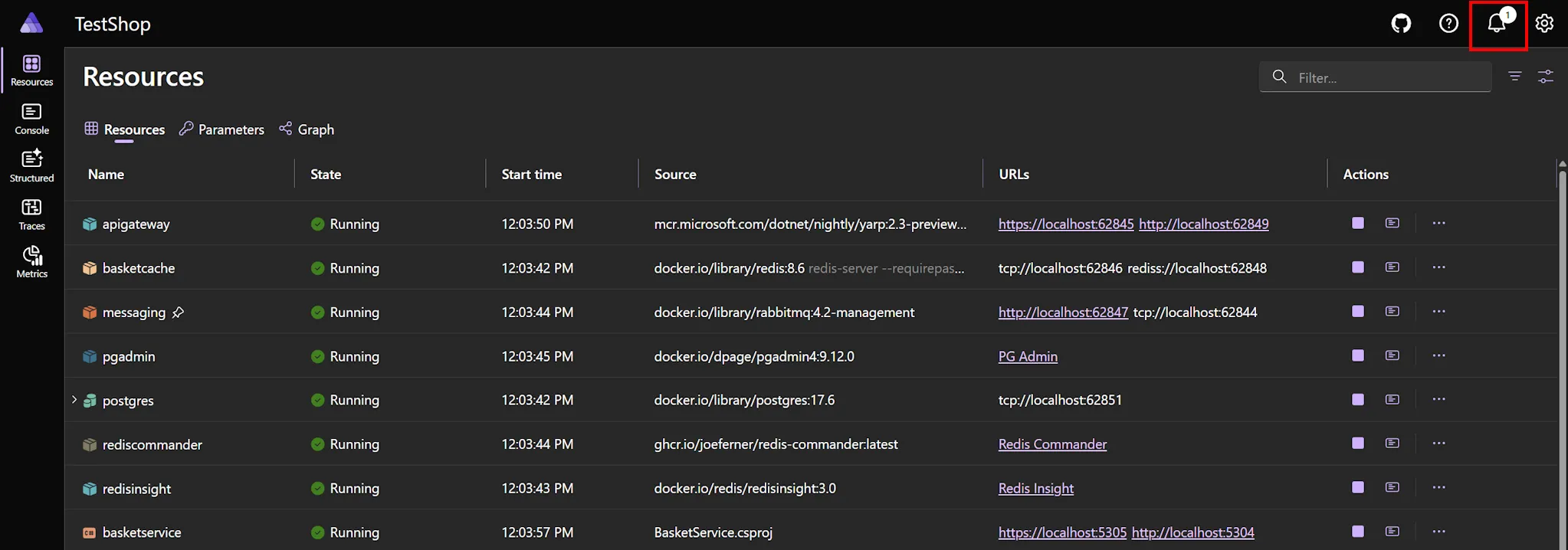
Section titled “Notification center for command results”The dashboard now has a notification center that surfaces results of resource commands and lifecycle events without requiring you to scrape the logs panel. Commands return structured results which the dashboard renders inline.
The notification center is accessible via the bell icon in the top-right corner of the header. When there are unread notifications, a badge with the unread count appears on the icon.
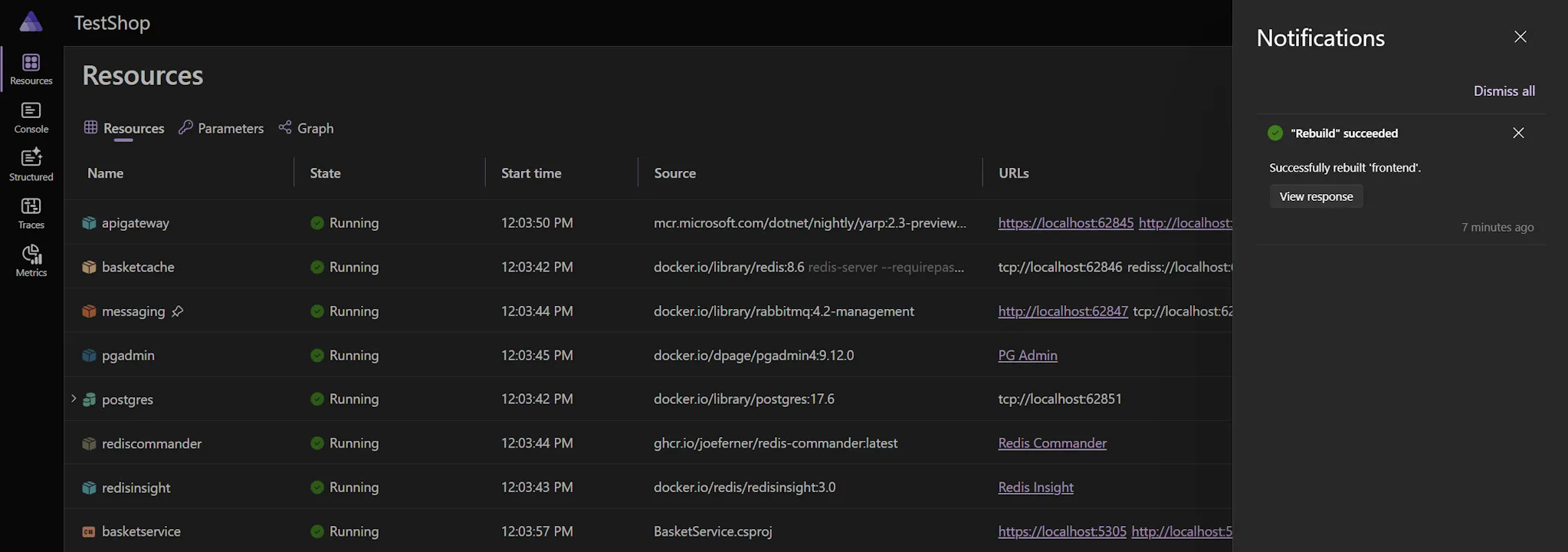
Selecting the bell icon opens the Notifications dialog, which lists all notifications. From here you can view command responses.
Rebuild resource command
Section titled “Rebuild resource command”The dashboard now has a built-in Rebuild command for container and project resources. When triggered, it rebuilds the resource image and restarts the resource, making it faster to pick up code or Dockerfile changes without stopping and restarting the whole AppHost. The result (success or failure) appears in the notification center.
🧰 VS Code extension
Section titled “🧰 VS Code extension”Open dashboard in VS Code Simple Browser
Section titled “Open dashboard in VS Code Simple Browser”When you launch your Aspire app from VS Code, the dashboard now opens in VS Code’s Simple Browser by default rather than spawning an external browser window. The behavior is controlled by the aspire.dashboardBrowser setting.
AppHost CodeLens and gutter decorations
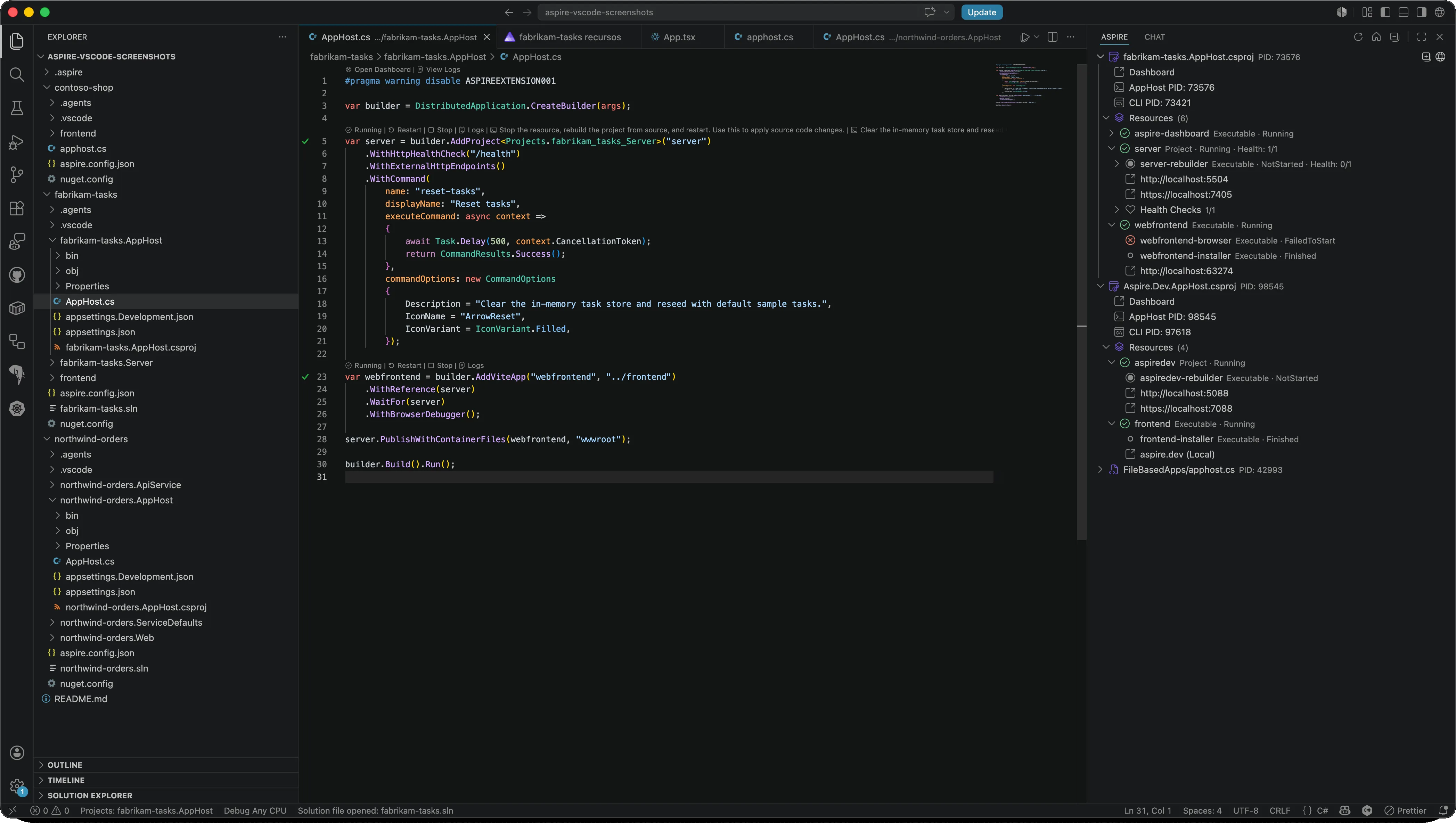
Section titled “AppHost CodeLens and gutter decorations”The extension now renders live resource state in the editor. CodeLens above each resource definition exposes one-click Start, Stop, Restart, and View Logs actions, while gutter decorations in the left margin reflect each resource’s current health. The same health-aware icons appear next to resources in the Aspire Activity Bar.
Other extension changes
Section titled “Other extension changes”- Set
aspire.enableAutoRestoreto have the extension automatically runaspire restorewhen a workspace opens or its configuration changes. - Launch configurations can now specify
envandargsfor the AppHost, just like a regular .NET launch configuration. - Open AppHost source from the Running AppHosts view.
- Open the Aspire Dashboard from the VS Code Command Palette.
- Use right-click context menus on resource endpoint URLs to open or copy them.
- The walkthrough has been updated to cover TypeScript AppHosts.
- The extension auto-detects the Aspire CLI in default install paths even when it isn’t on
PATH.
For more details, see Aspire VS Code extension.
📦 Integration updates
Section titled “📦 Integration updates”🔍 Browser logs and screenshots
Section titled “🔍 Browser logs and screenshots”The new Aspire.Hosting.Browsers integration captures browser console logs, network requests, and screenshots from your frontend resources during development, surfacing them in the dashboard alongside server-side telemetry. Add WithBrowserLogs() to any frontend resource to enable it.
import { createBuilder } from './.aspire/modules/aspire.mjs';
const builder = await createBuilder();
// Capture browser console logs, network requests, and screenshots from// this Vite frontend; they show up in the dashboard alongside server telemetry.const frontend = await builder.addViteApp('frontend', './frontend');await frontend.withBrowserLogs();
await builder.build().run();// Capture browser console logs, network requests, and screenshots from// this Vite frontend; they show up in the dashboard alongside server telemetry.builder.AddViteApp("frontend") .WithBrowserLogs();For more details, see Browser logs.
Durable Task Scheduler for Azure Functions
Section titled “Durable Task Scheduler for Azure Functions”Azure Functions can now declare a Durable Task Scheduler dependency directly from the AppHost, with full local and Azure-deployed support. The APIs are released as experimental under ASPIREDURABLETASK001.
For more details, see Azure Functions hosting.
RabbitMQ v7 with publisher and subscriber tracing
Section titled “RabbitMQ v7 with publisher and subscriber tracing”The RabbitMQ client integration has been updated to support RabbitMQ.Client v7, with OpenTelemetry tracing for both publishers and subscribers.
Aspire.Microsoft.Azure.StackExchangeRedis is stable
Section titled “Aspire.Microsoft.Azure.StackExchangeRedis is stable”The 📦 Aspire.Microsoft.Azure.StackExchangeRedis package is no longer in preview. Use it for Entra-authenticated Azure Cache for Redis and Azure Managed Redis access.
Npgsql metrics align with .NET 10
Section titled “Npgsql metrics align with .NET 10”The Npgsql client integration emits OpenTelemetry metrics that align with the .NET 10 metric naming specification.
☁️ Azure improvements
Section titled “☁️ Azure improvements”Azure Front Door integration — global edge in one API call
Section titled “Azure Front Door integration — global edge in one API call”
You no longer need to stitch together ARM templates or click through portal blades to get a CDN in front of your app. Aspire 13.3 adds a new hosting integration for Azure Front Door, Microsoft’s global edge network for fast, secure, and highly available web apps. Add a Front Door profile in front of your backends with AddAzureFrontDoor and attach origins with WithOrigin:
import { createBuilder } from './.aspire/modules/aspire.mjs';
const builder = await createBuilder();
// Two backend projects exposed as external HTTP endpoints.const api = await builder.addProject('api', '../Api/Api.csproj');await api.withExternalHttpEndpoints();
const web = await builder.addProject('web', '../Web/Web.csproj');await web.withExternalHttpEndpoints();
// Provision an Azure Front Door profile and attach each backend as an origin.// Each withOrigin call creates its own endpoint, origin group, origin, and route.const frontDoor = await builder.addAzureFrontDoor('frontdoor');await frontDoor.withOrigin(api);await frontDoor.withOrigin(web);
await builder.build().run();// Two backend projects exposed as external HTTP endpoints.var api = builder.AddProject<Projects.Api>("api") .WithExternalHttpEndpoints();
var web = builder.AddProject<Projects.Web>("web") .WithExternalHttpEndpoints();
// Provision an Azure Front Door profile and attach each backend as an origin.// Each WithOrigin call creates its own endpoint, origin group, origin, and route.builder.AddAzureFrontDoor("frontdoor") .WithOrigin(api) .WithOrigin(web);Each withOrigin call provisions its own Front Door endpoint, origin group, origin, and route, so every backend is independently routable through its own *.azurefd.net hostname. The integration provisions Front Door in the Standard SKU by default; use ConfigureInfrastructure to customize the Front Door, for example to change SKUs, attach a Web Application Firewall (WAF) policy, enable caching, and more.
For more details, see Azure Front Door integration.
🌐 Azure Network Security Perimeter support
Section titled “🌐 Azure Network Security Perimeter support”Aspire 13.3 adds support for Azure Network Security Perimeters (NSPs), which provide a logical security boundary for Azure PaaS services. NSPs complement the existing virtual network and private endpoint support by operating at the PaaS layer — grouping resources like Storage, Key Vault, Cosmos DB, and SQL so they can communicate with each other while restricting public access via access rules.
Create a perimeter and associate resources
Section titled “Create a perimeter and associate resources”import { createBuilder } from './.aspire/modules/aspire.mjs';import { NetworkSecurityPerimeterAccessRuleDirection } from './.aspire/modules/aspire.mjs';
const builder = await createBuilder();
// Declare a Network Security Perimeter and add an inbound access rule.const nsp = await builder.addNetworkSecurityPerimeter('my-nsp');await nsp.withAccessRule({ name: 'allow-my-ip', direction: NetworkSecurityPerimeterAccessRuleDirection.Inbound, addressPrefixes: ['203.0.113.0/24'],});
// Associate Azure resources with the perimeter — they remain reachable from each// other but become subject to the perimeter's access rules for outside traffic.const storage = await builder.addAzureStorage('storage');await storage.withNetworkSecurityPerimeter(nsp);const keyVault = await builder.addAzureKeyVault('kv');await keyVault.withNetworkSecurityPerimeter(nsp);
await builder.build().run();// Declare a Network Security Perimeter and add an inbound access rule.var nsp = builder.AddNetworkSecurityPerimeter("my-nsp") .WithAccessRule(new AzureNspAccessRule { Name = "allow-my-ip", Direction = NetworkSecurityPerimeterAccessRuleDirection.Inbound, AddressPrefixes = { "203.0.113.0/24" } });
// Associate Azure resources with the perimeter — they remain reachable from each// other but become subject to the perimeter's access rules for outside traffic.var storage = builder.AddAzureStorage("storage") .WithNetworkSecurityPerimeter(nsp);var keyVault = builder.AddAzureKeyVault("kv") .WithNetworkSecurityPerimeter(nsp);NSPs support Enforced mode (blocks traffic that violates the rules) and Learning mode (logs violations without blocking), making it easy to audit traffic before locking down access.
For more details, see Azure Virtual Network integration.
Azure Kubernetes Service (AKS) hosting integration — Kubernetes without the YAML
Section titled “Azure Kubernetes Service (AKS) hosting integration — Kubernetes without the YAML”Aspire 13.3 adds first-class support for provisioning and deploying to Azure Kubernetes Service without writing manifests by hand. Use AddAzureKubernetesEnvironment to declare an AKS environment, customize node pools, and generate a type-safe Bicep and Helm deployment pipeline from your AppHost.
import { createBuilder } from './.aspire/modules/aspire.mjs';
const builder = await createBuilder();
// Declare an AKS environment and customize its system node pool.const aks = await builder.addAzureKubernetesEnvironment('aks');await aks.withSystemNodePool('Standard_D2s_v5', { minCount: 1, maxCount: 3 });
// Bind a project to the AKS environment so it deploys there.const api = await builder.addProject('api', '../Api/Api.csproj');await api.withComputeEnvironment(aks);
await builder.build().run();// Declare an AKS environment and customize its system node pool.var aks = builder.AddAzureKubernetesEnvironment("aks") .WithSystemNodePool("Standard_D2s_v5", minCount: 1, maxCount: 3);
// Bind a project to the AKS environment so it deploys there.builder.AddProject<Projects.Api>("api") .WithComputeEnvironment(aks);WithSystemNodePool lets you customize the system node pool’s VM size and autoscaling bounds. By default the AKS cluster uses the Free control-plane SKU; the AksSkuTier enum is no longer part of the public API.
For more details, see Azure Kubernetes Service integration and Deploy an Aspire app to AKS.
Private endpoint support for Azure Container Registry, OpenAI, and Foundry
Section titled “Private endpoint support for Azure Container Registry, OpenAI, and Foundry”WithPrivateEndpoint is now supported on additional Azure resources, allowing you to provision and connect to Azure Container Registry, Azure OpenAI, and Azure AI Foundry resources over a virtual network without exposing them publicly.
Azure AI Foundry Prompt Agent
Section titled “Azure AI Foundry Prompt Agent”Aspire 13.3 ships a new working implementation of Azure AI Foundry Prompt Agent support through AddPromptAgent. The previous AddAndPublishPromptAgent API and the original shape of AzurePromptAgentResource (which never functioned end-to-end) have been replaced. AddPromptAgent now returns a working AzurePromptAgentResource.
The Foundry model catalog also gained two new models: GPT-5.4 and Qwen3 VL.
For more details, see Azure AI Foundry integration.
Automatic HTTPS upgrade for Azure App Service
Section titled “Automatic HTTPS upgrade for Azure App Service”Endpoints deployed to Azure App Service environments are now automatically upgraded to HTTPS, eliminating the need to manually configure HTTP-to-HTTPS redirects in your services.
Configurable Azure credential process timeout
Section titled “Configurable Azure credential process timeout”The new Azure:CredentialProcessTimeoutSeconds configuration value lets you tune the timeout for Azure credential acquisition during deployments — useful for environments where authentication round-trips can take longer than the default.
{ "Azure": { "CredentialProcessTimeoutSeconds": 60 }}Azure deployment quality-of-life
Section titled “Azure deployment quality-of-life”- Deployment summaries now include clickable links to the Azure Portal for resources that were just provisioned.
- Multi-environment deployments now require explicit compute environment binding. Every resource must specify which environment it deploys to, preventing accidental cross-environment leakage.
🏗️ Templates
Section titled “🏗️ Templates”🐍 Python starter migrated to TypeScript AppHost
Section titled “🐍 Python starter migrated to TypeScript AppHost”The aspire-py-starter template (Starter App with FastAPI and React) has moved from the dotnet new template system to the Aspire CLI template system and now uses a TypeScript AppHost instead of a C# AppHost. This aligns it with the same pattern as the aspire-ts-starter template.
For users of this template:
- Use
aspire new aspire-py-starterinstead ofdotnet new aspire-py-starter. - The AppHost is now authored in TypeScript, so the .NET SDK is no longer required to scaffold or run the Python starter.
- The generated TypeScript AppHost uses
addUvicornAppto run the FastAPI backend. - A new
--use-redis-cacheoption is available to scaffold the template with an optional Redis cache resource.
# Basic Python starteraspire new aspire-py-starter
# Python starter with Redis cacheaspire new aspire-py-starter --use-redis-cache trueFor details on the aspire new command and all available templates, see
aspire new command.
🙏 Community
Section titled “🙏 Community”Aspire is built in the open, and this release wouldn’t be what it is without you. A huge thank you to all community contributors who helped make Aspire 13.3 possible — including @afscrome for the lifecycle Subscribe extension methods, @spboyer for documentation and template polish, @holystix04, and @tranhoangtu-it.
The Aspire core team is
 Adam Ratzman
 Ankit Jain
 Damian Edwards
 David Fowler
 David Negstad
 David Pine
 Ella Hathaway
 Eric Erhardt
 James Newton-King
 José Pérez
 Karol Zadora-Przylecki
 Maddy Montaquila
 Mitch Denny
 Sébastien Ros
Special thanks to everyone whose pull requests shipped in Aspire 13.3, including:
@afscrome, @AndriySvyryd, @annatisch, @DavidZidar, @divyeshio, @GeertvanHorrik, @holystix04, @ideepakchauhan7, @jgbright, @JoshuaKGoldberg, @mitchcapper, @mmitche, @MO2k4, @Muckenbatscher, @philliphoff, @spboyer, @T-Gro, @tommasodotNET, @tranhoangtu-it, @wtgodbe, and @yreynhout
We're always excited to see community contributions! If you'd like to get involved, check out our contributing guide.
⚠️ Breaking changes
Section titled “⚠️ Breaking changes”| Change | Migration |
|---|---|
--log-level renamed to --pipeline-log-level on aspire publish and aspire deploy | Update scripts/CI to use --pipeline-log-level. |
package.json engines.node is no longer used to select Node images for generated Dockerfiles | Specify the Node version explicitly via WithDockerfile or your project’s Dockerfile base image. |
NameOutput renamed to NameOutputReference in Azure Network resources | Replace any usage of *.NameOutput with *.NameOutputReference. |
OtlpEndpointEnvironmentVariableName property removed | Remove references; the OTLP endpoint env var is now managed automatically. |
Dashboard MCP server removed (along with ASPIRE_DASHBOARD_MCP_ENDPOINT_URL) | Use the AppHost-level MCP server with aspire agent init. |
AksSkuTier enum is no longer part of the public AKS API | The AKS control-plane SKU tier now defaults to Free; remove any references to AksSkuTier. |
ASPIREEXTENSION001 JavaScript diagnostic ID renamed | Use ASPIREJAVASCRIPT001. |
Docker Swarm UpdateConfig property types changed | Update generated/hand-written Compose overrides accordingly. |
The non-functional AddAndPublishPromptAgent API and the original AzurePromptAgentResource shape were removed | Use the new AddPromptAgent API (which returns a working AzurePromptAgentResource). |
| CLI telemetry JSON output schema aligned with the MCP tool format | Update any consumers of --format json from telemetry-related CLI commands. |
aspire init no longer fully wires up your AppHost on its own | Run the aspireify agent skill (e.g. via Copilot CLI) to complete wiring after aspire init. |
| Kubernetes Ingress and Gateway routing types moved namespaces | Update using directives if you reference them directly. |
dotnet new aspire-py-starter removed | Use aspire new aspire-py-starter from the Aspire CLI. |
TypeScript AppHost per-kind withEnvironment* helper methods removed | Replace every per-kind helper call with the unified withEnvironment(name, value) API. |
In-dashboard GitHub Copilot UI replaced by agentic development
Section titled “In-dashboard GitHub Copilot UI replaced by agentic development”The GitHub Copilot chat UI previously built into the Aspire dashboard has been replaced by an agentic development model. The Copilot chat inside the dashboard has been disabled and instead AI coding agents now connect to your entire Aspire app through the CLI and MCP tools. This gives agents full context across structured logs, distributed traces, resource status, console output, and your source code.
Agents can now diagnose issues end-to-end, suggest fixes in your actual codebase, and act on telemetry rather than just display it. The old dashboard UI only supported GitHub Copilot in Visual Studio and VS Code; the new approach works with GitHub Copilot, Claude, Cursor, and any other AI coding agent that supports skills or MCP.
Set up agentic development with a single command:
aspire agent initThe aspire agent init command detects your development environment and configures skills and MCP tools for supported AI coding agents. Agents connect to the dashboard through the CLI regardless of how you launched your app — so you get the same AI-powered debugging whether you started with aspire run, VS Code, or Visual Studio.
For full setup instructions, see Use AI coding agents and Dashboard and AI coding agents. If you relied on a specific Copilot dashboard scenario that isn’t covered by the new approach, please file an issue on GitHub so the team can prioritize it.
Migration from Aspire 13.2 to 13.3
Section titled “Migration from Aspire 13.2 to 13.3”- Update the CLI by running
aspire update --self. - Update your projects by running
aspire updatefrom the root of your repository. - Audit
--log-levelusage in CI/CD pipelines and rename it to--pipeline-log-level. - Search for
NameOutput,AddAndPublishPromptAgent, andAksSkuTierin your AppHost code and update them according to the table above. - Replace
dotnet new aspire-py-starterwithaspire new aspire-py-starterfor any new Python starter projects. - Rerun
aspire agent initif you previously relied on the dashboard MCP server. - Re-pin Node versions in your Dockerfiles if you relied on
package.jsonengines.nodefor image selection.
We’d love to hear about your experience with Aspire 13.3. Share what you’re building on GitHub or join us on Discord.
 Aspire