


Set up Azure AI Foundry in the AppHost

This article is the reference for the Aspire Azure AI Foundry hosting integration. It enumerates the AppHost APIs — with examples for both AppHost.cs and apphost.mts — that you use to model a Foundry account, model deployments, Foundry projects, hosted agents, and prompt agents in your AppHost project.
If you’re new to the Azure AI Foundry integration, start with the Get started with Azure AI Foundry integrations guide. For how consuming apps read the connection information this page exposes, see Connect to Azure AI Foundry.
Installation
Section titled “Installation”To start building an Aspire app that uses Azure AI Foundry, install the 📦 Aspire.Hosting.Foundry NuGet package:
aspire add azure-ai-foundryLearn more about aspire add in the
command reference.
This updates your aspire.config.json with the Azure AI Foundry hosting integration package:
{ "packages": { "Aspire.Hosting.Foundry": "13.6.0-preview.1.26479.8" }}aspire add azure-ai-foundryLearn more about aspire add in the
command reference.
Or, choose a manual installation approach:
#:package Aspire.Hosting.Foundry@*<PackageReference Include="Aspire.Hosting.Foundry" Version="*" />For an introduction to working with the Azure AI Foundry hosting integration, see Get started with Azure AI Foundry integrations.
Add a Foundry resource
Section titled “Add a Foundry resource”To add an Azure AI Foundry resource to your AppHost project, call the AddFoundry method providing a name:
import { function createBuilder(): IDistributedApplicationBuilder
Creates a new distributed application builder
createBuilder } from './.aspire/modules/aspire.mjs';
const const builder: IDistributedApplicationBuilder
function createBuilder(): IDistributedApplicationBuilder
Creates a new distributed application builder
createBuilder();
const const foundry: FoundryResource
const builder: IDistributedApplicationBuilder
IDistributedApplicationBuilder.addFoundry(name: string): FoundryResource
Adds a Microsoft Foundry resource to the application model.
addFoundry('foundry');
await const builder: IDistributedApplicationBuilder
IDistributedApplicationBuilder.addProject(name: string, projectPath: string, options?: { launchProfileOrOptions?: string | ProjectResourceOptions;}): ProjectResource (+1 overload)
Adds a .NET project resource
addProject('api', '../ExampleProject/ExampleProject.csproj') .ProjectResource.withReference(source: IResource | EndpointReference | string | uri, options?: { connectionName?: string; optional?: boolean; name?: string;} | undefined): ProjectResource (+1 overload)
Adds a reference to another resource
withReference(const foundry: FoundryResource
const builder: IDistributedApplicationBuilder
IDistributedApplicationBuilder.build(): DistributedApplication
Builds the distributed application
build().DistributedApplication.run(cancellationToken?: cancellationToken): void
Runs the distributed application
run();var builder = DistributedApplication.CreateBuilder(args);
var foundry = builder.AddFoundry("foundry");
builder.AddProject<Projects.ExampleProject>() .WithReference(foundry);
// After adding all resources, run the app...The preceding code adds an Azure AI Foundry resource named foundry to the AppHost project. The WithReferencewithReference method passes the connection information to the ExampleProject project.
Add a Foundry deployment resource
Section titled “Add a Foundry deployment resource”To add a Foundry deployment resource, call the AddDeploymentaddDeployment method with one of the generated FoundryModel entries:
import { function createBuilder(): IDistributedApplicationBuilder
Creates a new distributed application builder
createBuilder } from './.aspire/modules/aspire.mjs';
const const builder: IDistributedApplicationBuilder
function createBuilder(): IDistributedApplicationBuilder
Creates a new distributed application builder
createBuilder();
const const foundry: FoundryResource
const builder: IDistributedApplicationBuilder
IDistributedApplicationBuilder.addFoundry(name: string): FoundryResource
Adds a Microsoft Foundry resource to the application model.
addFoundry('foundry');
const const chat: FoundryDeploymentResource
const foundry: FoundryResource
FoundryResource.addDeployment(name: string, model: FoundryModel | string, options?: { modelVersion?: string; format?: string;} | undefined): FoundryDeploymentResource (+1 overload)
Adds a Microsoft Foundry deployment resource to a Microsoft Foundry resource.
addDeployment('chat', { FoundryModel.name?: string | undefined
FoundryModel.version?: string | undefined
FoundryModel.format?: string | undefined
const builder: IDistributedApplicationBuilder
IDistributedApplicationBuilder.addProject(name: string, projectPath: string, options?: { launchProfileOrOptions?: string | ProjectResourceOptions;}): ProjectResource (+1 overload)
Adds a .NET project resource
addProject('api', '../ExampleProject/ExampleProject.csproj') .ProjectResource.withReference(source: IResource | EndpointReference | string | uri, options?: { connectionName?: string; optional?: boolean; name?: string;} | undefined): ProjectResource (+1 overload)
Adds a reference to another resource
withReference(const chat: FoundryDeploymentResource
ProjectResource.waitFor(dependency: IResource | IResourceWithConnectionString, waitBehavior?: WaitBehavior): ProjectResource
Waits for another resource to be ready
waitFor(const chat: FoundryDeploymentResource
const builder: IDistributedApplicationBuilder
IDistributedApplicationBuilder.build(): DistributedApplication
Builds the distributed application
build().DistributedApplication.run(cancellationToken?: cancellationToken): void
Runs the distributed application
run();var builder = DistributedApplication.CreateBuilder(args);
var foundry = builder.AddFoundry("foundry");
var chat = foundry.AddDeployment("chat", FoundryModel.OpenAI.Gpt5Mini);
builder.AddProject<Projects.ExampleProject>() .WithReference(chat) .WaitFor(chat);
// After adding all resources, run the app...The preceding code:
- Adds an Azure AI Foundry resource named
foundry. - Adds a Foundry deployment resource named
chatusing the generatedFoundryModel.OpenAI.Gpt5Minidescriptor.
If you need a different generated model descriptor, use the corresponding nested type. The FoundryModel class organizes models by provider family: FoundryModel.Microsoft, FoundryModel.OpenAI, FoundryModel.Cohere, FoundryModel.MistralAI, and others. For example, to use FoundryModel.Microsoft.Phi4Reasoning:
import { function createBuilder(): IDistributedApplicationBuilder
Creates a new distributed application builder
createBuilder } from './.aspire/modules/aspire.mjs';
const const builder: IDistributedApplicationBuilder
function createBuilder(): IDistributedApplicationBuilder
Creates a new distributed application builder
createBuilder();
const const foundry: FoundryResource
const builder: IDistributedApplicationBuilder
IDistributedApplicationBuilder.addFoundry(name: string): FoundryResource
Adds a Microsoft Foundry resource to the application model.
addFoundry('foundry');
const const chat: FoundryDeploymentResource
const foundry: FoundryResource
FoundryResource.addDeployment(name: string, model: FoundryModel | string, options?: { modelVersion?: string; format?: string;} | undefined): FoundryDeploymentResource (+1 overload)
Adds a Microsoft Foundry deployment resource to a Microsoft Foundry resource.
addDeployment('chat', { FoundryModel.name?: string | undefined
FoundryModel.version?: string | undefined
FoundryModel.format?: string | undefined
const builder: IDistributedApplicationBuilder
IDistributedApplicationBuilder.addProject(name: string, projectPath: string, options?: { launchProfileOrOptions?: string | ProjectResourceOptions;}): ProjectResource (+1 overload)
Adds a .NET project resource
addProject('api', '../ExampleProject/ExampleProject.csproj') .ProjectResource.withReference(source: IResource | EndpointReference | string | uri, options?: { connectionName?: string; optional?: boolean; name?: string;} | undefined): ProjectResource (+1 overload)
Adds a reference to another resource
withReference(const chat: FoundryDeploymentResource
ProjectResource.waitFor(dependency: IResource | IResourceWithConnectionString, waitBehavior?: WaitBehavior): ProjectResource
Waits for another resource to be ready
waitFor(const chat: FoundryDeploymentResource
const builder: IDistributedApplicationBuilder
IDistributedApplicationBuilder.build(): DistributedApplication
Builds the distributed application
build().DistributedApplication.run(cancellationToken?: cancellationToken): void
Runs the distributed application
run();var builder = DistributedApplication.CreateBuilder(args);
var foundry = builder.AddFoundry("foundry");
var chat = foundry.AddDeployment("chat", FoundryModel.Microsoft.Phi4Reasoning);
builder.AddProject<Projects.ExampleProject>() .WithReference(chat) .WaitFor(chat);
builder.Build().Run();Configure deployment properties
Section titled “Configure deployment properties”You can customize deployment properties using the WithPropertieswithProperties method:
var chat = foundry.AddDeployment("chat", FoundryModel.OpenAI.Gpt5Mini) .WithProperties(deployment => { deployment.SkuName = "Standard"; deployment.SkuCapacity = 10; });The preceding code sets the SKU name to Standard and capacity to 10 for the deployment.
Add a Foundry project
Section titled “Add a Foundry project”Use the AddProjectaddProject method to create an Azure AI Foundry project for agents, project-scoped connections, and related Azure resources:
import { function createBuilder(): IDistributedApplicationBuilder
Creates a new distributed application builder
createBuilder } from './.aspire/modules/aspire.mjs';
const const builder: IDistributedApplicationBuilder
function createBuilder(): IDistributedApplicationBuilder
Creates a new distributed application builder
createBuilder();
const const foundry: FoundryResource
const builder: IDistributedApplicationBuilder
IDistributedApplicationBuilder.addFoundry(name: string): FoundryResource
Adds a Microsoft Foundry resource to the application model.
addFoundry('foundry');const const project: AzureCognitiveServicesProjectResource
const foundry: FoundryResource
FoundryResource.addProject(name: string): AzureCognitiveServicesProjectResource
Adds a Microsoft Foundry project resource to the application model. This will also attach the project as a deployment target for agents.
addProject('my-project');
const const chat: FoundryDeploymentResource
const project: AzureCognitiveServicesProjectResource
AzureCognitiveServicesProjectResource.addModelDeployment(name: string, model: FoundryModel | string, options?: { modelVersion?: string; format?: string;} | undefined): FoundryDeploymentResource (+1 overload)
Adds a model deployment to the parent Microsoft Foundry resource.
addModelDeployment('chat', { FoundryModel.name?: string | undefined
FoundryModel.version?: string | undefined
FoundryModel.format?: string | undefined
const builder: IDistributedApplicationBuilder
IDistributedApplicationBuilder.addProject(name: string, projectPath: string, options?: { launchProfileOrOptions?: string | ProjectResourceOptions;}): ProjectResource (+1 overload)
Adds a .NET project resource
addProject('api', '../ExampleProject/ExampleProject.csproj') .ProjectResource.withReference(source: IResource | EndpointReference | string | uri, options?: { connectionName?: string; optional?: boolean; name?: string;} | undefined): ProjectResource (+1 overload)
Adds a reference to another resource
withReference(const project: AzureCognitiveServicesProjectResource
ProjectResource.withReference(source: IResource | EndpointReference | string | uri, options?: { connectionName?: string; optional?: boolean; name?: string;} | undefined): ProjectResource (+1 overload)
Adds a reference to another resource
withReference(const chat: FoundryDeploymentResource
ProjectResource.waitFor(dependency: IResource | IResourceWithConnectionString, waitBehavior?: WaitBehavior): ProjectResource
Waits for another resource to be ready
waitFor(const chat: FoundryDeploymentResource
const builder: IDistributedApplicationBuilder
IDistributedApplicationBuilder.build(): DistributedApplication
Builds the distributed application
build().DistributedApplication.run(cancellationToken?: cancellationToken): void
Runs the distributed application
run();var builder = DistributedApplication.CreateBuilder(args);
var foundry = builder.AddFoundry("foundry");var project = foundry.AddProject("my-project");
var chat = project.AddModelDeployment("chat", FoundryModel.OpenAI.Gpt5Mini);
builder.AddProject<Projects.ExampleProject>("api") .WithReference(project) .WithReference(chat) .WaitFor(chat);
builder.Build().Run();The preceding code creates a Foundry project and adds a deployment through AddModelDeploymentaddModelDeployment. When you call WithReference(project), Aspire injects the standard connection string and project-specific connection properties such as the project endpoint and Application Insights connection string into the consuming resource.
Configure a Foundry project
Section titled “Configure a Foundry project”You can customize the Azure resources associated with a Foundry project:
import { function createBuilder(): IDistributedApplicationBuilder
Creates a new distributed application builder
createBuilder } from './.aspire/modules/aspire.mjs';
const const builder: IDistributedApplicationBuilder
function createBuilder(): IDistributedApplicationBuilder
Creates a new distributed application builder
createBuilder();
const const foundry: FoundryResource
const builder: IDistributedApplicationBuilder
IDistributedApplicationBuilder.addFoundry(name: string): FoundryResource
Adds a Microsoft Foundry resource to the application model.
addFoundry('foundry');const const appInsights: AzureApplicationInsightsResource
const builder: IDistributedApplicationBuilder
IDistributedApplicationBuilder.addAzureApplicationInsights(name: string): AzureApplicationInsightsResource
Adds an Azure Application Insights resource to the application model.
addAzureApplicationInsights('appinsights');const const keyVault: AzureKeyVaultResource
const builder: IDistributedApplicationBuilder
IDistributedApplicationBuilder.addAzureKeyVault(name: string): AzureKeyVaultResource
Adds an Azure Key Vault resource to the application model.
addAzureKeyVault('keyvault');const const registry: AzureContainerRegistryResource
const builder: IDistributedApplicationBuilder
IDistributedApplicationBuilder.addAzureContainerRegistry(name: string): AzureContainerRegistryResource
Adds an Azure Container Registry resource to the application model.
addAzureContainerRegistry('agents');
await const foundry: FoundryResource
FoundryResource.addProject(name: string): AzureCognitiveServicesProjectResource
Adds a Microsoft Foundry project resource to the application model. This will also attach the project as a deployment target for agents.
addProject('my-project') .AzureCognitiveServicesProjectResource.withAppInsights(appInsights: AzureApplicationInsightsResource): AzureCognitiveServicesProjectResource
Adds an Application Insights resource to the Microsoft Foundry project, overriding the default (which is to create a new Application Insights resource).
withAppInsights(const appInsights: AzureApplicationInsightsResource
AzureCognitiveServicesProjectResource.withKeyVault(keyVault: AzureKeyVaultResource): AzureCognitiveServicesProjectResource
Adds a Key Vault connection to the Microsoft Foundry project.
withKeyVault(const keyVault: AzureKeyVaultResource
IResource.withContainerRegistry(registry: IResource): AzureCognitiveServicesProjectResource
Configures the resource to use the specified container registry for container image operations.
withContainerRegistry(const registry: AzureContainerRegistryResource
var builder = DistributedApplication.CreateBuilder(args);
var foundry = builder.AddFoundry("foundry");var appInsights = builder.AddAzureApplicationInsights("appinsights");var keyVault = builder.AddAzureKeyVault("keyvault");var registry = builder.AddAzureContainerRegistry("agents");
var project = foundry.AddProject("my-project")    .WithAppInsights(appInsights)    .WithKeyVault(keyVault)    .WithContainerRegistry(registry);
AddProject creates a default Azure Container Registry for hosted agents only in publish mode (when deploying to Azure). In local run mode, no default registry is created. Use WithContainerRegistrywithContainerRegistry when you want to point the project at a specific registry.
Add a Toolbox
Section titled “Add a Toolbox”A Toolbox is a Foundry data-plane resource that bundles reusable tools behind a single MCP endpoint. Toolboxes don’t have an ARM or Bicep representation — Aspire manages them directly through the Foundry data-plane API. Use AddToolboxaddToolbox on a Foundry project to declare one:
import { function createBuilder(): IDistributedApplicationBuilder
Creates a new distributed application builder
createBuilder } from './.aspire/modules/aspire.mjs';import { type FoundryToolboxMcpGlobalApprovalMode = "Never" | "Always"const FoundryToolboxMcpGlobalApprovalMode: { readonly Never: "Never"; readonly Always: "Always";}
Enum Aspire.Hosting.Foundry.FoundryToolboxMcpGlobalApprovalMode
FoundryToolboxMcpGlobalApprovalMode } from './.aspire/modules/aspire.mjs';
const const builder: IDistributedApplicationBuilder
function createBuilder(): IDistributedApplicationBuilder
Creates a new distributed application builder
createBuilder();
const const foundry: FoundryResource
const builder: IDistributedApplicationBuilder
IDistributedApplicationBuilder.addFoundry(name: string): FoundryResource
Adds a Microsoft Foundry resource to the application model.
addFoundry('foundry');const const project: AzureCognitiveServicesProjectResource
const foundry: FoundryResource
FoundryResource.addProject(name: string): AzureCognitiveServicesProjectResource
Adds a Microsoft Foundry project resource to the application model. This will also attach the project as a deployment target for agents.
addProject('project');const const search: AzureSearchResource
const builder: IDistributedApplicationBuilder
IDistributedApplicationBuilder.addAzureSearch(name: string): AzureSearchResource
Adds an Azure AI Search service resource to the application model.
addAzureSearch('search');
const const toolbox: FoundryToolboxResource
const project: AzureCognitiveServicesProjectResource
AzureCognitiveServicesProjectResource.addToolbox(name: string, options?: FoundryToolboxOptions): FoundryToolboxResource
Adds a Microsoft Foundry Toolbox endpoint to a Microsoft Foundry project.
addToolbox('field-tools');await const toolbox: FoundryToolboxResource
FoundryToolboxResource.withDescription(description: string): FoundryToolboxResource
Sets the description persisted with each Toolbox version.
withDescription('Tools for field technicians.');await const toolbox: FoundryToolboxResource
FoundryToolboxResource.withWebSearchTool(options?: { name?: string; description?: string;} | undefined): FoundryToolboxResource (+1 overload)
Adds a web search tool definition to the Toolbox.
withWebSearchTool({ name?: string | undefined
description?: string | undefined
const toolbox: FoundryToolboxResource
FoundryToolboxResource.withMcpTool(name: string, endpoint: string | EndpointReference | ReferenceExpression, options?: FoundryToolboxMcpToolOptions): FoundryToolboxResource
Adds an MCP tool definition to the Toolbox.
withMcpTool('inventory', 'https://inventory.example.com/mcp', { FoundryToolboxMcpToolOptions.serverDescription?: string | undefined
FoundryToolboxMcpToolOptions.approvalPolicy?: FoundryToolboxMcpApprovalPolicy | undefined
FoundryToolboxMcpApprovalPolicy.global?: FoundryToolboxMcpGlobalApprovalMode | undefined
const FoundryToolboxMcpGlobalApprovalMode: { readonly Never: "Never"; readonly Always: "Always";}
Enum Aspire.Hosting.Foundry.FoundryToolboxMcpGlobalApprovalMode
FoundryToolboxMcpGlobalApprovalMode.type Always: "Always"
const toolbox: FoundryToolboxResource
FoundryToolboxResource.withAISearchTool(name: string, search: AzureSearchResource, indexName: string, options?: { description?: string;} | undefined): FoundryToolboxResource (+1 overload)
Adds an Azure AI Search tool definition to the Toolbox.
withAISearchTool('knowledge-base', const search: AzureSearchResource
const api: ProjectResource
const builder: IDistributedApplicationBuilder
IDistributedApplicationBuilder.addProject(name: string, projectPath: string, options?: { launchProfileOrOptions?: string | ProjectResourceOptions;}): ProjectResource (+1 overload)
Adds a .NET project resource
addProject('api', '../Api/Api.csproj');await const api: ProjectResource
ProjectResource.withReference(source: IResource | EndpointReference | string | uri, options?: { connectionName?: string; optional?: boolean; name?: string;} | undefined): ProjectResource (+1 overload)
Adds a reference to another resource
withReference(const toolbox: FoundryToolboxResource
const api: ProjectResource
ProjectResource.waitFor(dependency: IResource | IResourceWithConnectionString, waitBehavior?: WaitBehavior): ProjectResource
Waits for another resource to be ready
waitFor(const toolbox: FoundryToolboxResource
const builder: IDistributedApplicationBuilder
IDistributedApplicationBuilder.build(): DistributedApplication
Builds the distributed application
build().DistributedApplication.run(cancellationToken?: cancellationToken): void
Runs the distributed application
run();using Aspire.Hosting.Foundry;
var builder = DistributedApplication.CreateBuilder(args);
var foundry = builder.AddFoundry("foundry");var project = foundry.AddProject("project");var search = builder.AddAzureSearch("search");
var toolbox = project.AddToolbox("field-tools") .WithDescription("Tools for field technicians.") .WithWebSearchTool("web-search", "Search the public web.") .WithMcpTool( "inventory", "https://inventory.example.com/mcp", new FoundryToolboxMcpToolOptions { ServerDescription = "Inventory MCP server.", ApprovalPolicy = new() { Global = FoundryToolboxMcpGlobalApprovalMode.Always } }) .WithAISearchTool("knowledge-base", search, "docs");
builder.AddProject<Projects.Api>("api") .WithReference(toolbox) .WaitFor(toolbox);
builder.Build().Run();Parameter details:
The identity running aspire run or aspire deploy needs the Foundry User role on the project to manage Toolbox versions. Deployed compute resources that reference the Toolbox receive this role on the project automatically. The Search index named docs must already exist and contain data: neither AddAzureSearchaddAzureSearch nor WithAISearchToolwithAISearchTool creates or populates it. Toolbox availability depends on the Foundry service preview and its supported regions.
| API | Parameter | Description |
|---|---|---|
AddToolbox(...) | name | The Aspire resource name and the Toolbox name. |
WithDescriptionwithDescription | description | A description persisted with each Toolbox version. |
WithWebSearchToolwithWebSearchTool | name, description | Adds a web search tool definition to the Toolbox. |
WithMcpToolwithMcpTool | name, endpoint, options | Adds an MCP tool definition. endpoint accepts a string URI, an EndpointReference, or a ReferenceExpression for composed URLs. options configures the MCP server label, description, and approval policy. |
WithAISearchTool(...) | name, search, indexName, description | Adds an Azure AI Search tool backed by an AddAzureSearch resource and an existing search index. |
Aspire reuses the current default Toolbox version when its configuration matches. Otherwise, it creates and promotes a new immutable version, using a deterministic configuration fingerprint to detect changes. The default consumer endpoint always serves the promoted version; set the Toolbox resource’s Version only when a consumer must pin a specific immutable version.
Ownership metadata provides best-effort coordination, not an atomic lease. The service doesn’t expose an ETag or conditional update operation. Aspire checks ownership and the current default before promotion and verifies the result afterward, failing rather than overwriting contradictory concurrent changes.
Use an existing Toolbox
Section titled “Use an existing Toolbox”Use the existing-resource methods to validate a remote Toolbox without resolving modeled tools, creating versions, or changing the default:
| Method | aspire run | aspire deploy |
|---|---|---|
RunAsExistingrunAsExisting | Validate existing | Reconcile managed |
PublishAsExistingpublishAsExisting | Reconcile managed | Validate existing |
AsExistingasExisting | Validate existing | Validate existing |
These methods apply to the Toolbox resource itself. Existing mode validates the remote Toolbox, and a pinned version if supplied, without resolving local tools or promoting a version. See Toolbox connection properties for the consumer’s endpoint, authentication scope, and required request header.
Add a hosted agent to Azure AI Foundry
Section titled “Add a hosted agent to Azure AI Foundry”Use AsHostedAgentasHostedAgent to configure an executable or containerized app as a hosted agent in a Foundry project:
import { function createBuilder(): IDistributedApplicationBuilder
Creates a new distributed application builder
createBuilder } from './.aspire/modules/aspire.mjs';
const const builder: IDistributedApplicationBuilder
function createBuilder(): IDistributedApplicationBuilder
Creates a new distributed application builder
createBuilder();
const const foundry: FoundryResource
const builder: IDistributedApplicationBuilder
IDistributedApplicationBuilder.addFoundry(name: string): FoundryResource
Adds a Microsoft Foundry resource to the application model.
addFoundry('foundry');const const project: AzureCognitiveServicesProjectResource
const foundry: FoundryResource
FoundryResource.addProject(name: string): AzureCognitiveServicesProjectResource
Adds a Microsoft Foundry project resource to the application model. This will also attach the project as a deployment target for agents.
addProject('my-project');const const chat: FoundryDeploymentResource
const project: AzureCognitiveServicesProjectResource
AzureCognitiveServicesProjectResource.addModelDeployment(name: string, model: FoundryModel | string, options?: { modelVersion?: string; format?: string;} | undefined): FoundryDeploymentResource (+1 overload)
Adds a model deployment to the parent Microsoft Foundry resource.
addModelDeployment('chat', { FoundryModel.name?: string | undefined
FoundryModel.version?: string | undefined
FoundryModel.format?: string | undefined
const builder: IDistributedApplicationBuilder
IDistributedApplicationBuilder.addPythonApp(name: string, appDirectory: string, scriptPath: string): PythonAppResource
Adds a Python application to the application model.
addPythonApp('agent-python', '../agent', 'main:app') .ExecutableResource.withReference(source: IResource | EndpointReference | string | uri, options?: { connectionName?: string; optional?: boolean; name?: string;} | undefined): PythonAppResource (+1 overload)
Adds a reference to another resource
withReference(const project: AzureCognitiveServicesProjectResource
ExecutableResource.withReference(source: IResource | EndpointReference | string | uri, options?: { connectionName?: string; optional?: boolean; name?: string;} | undefined): PythonAppResource (+1 overload)
Adds a reference to another resource
withReference(const chat: FoundryDeploymentResource
ExecutableResource.asHostedAgent(project: AzureCognitiveServicesProjectResource, options?: HostedAgentOptions): IResourceWithEndpoints
Configures the resource to run and publish as a hosted agent in Microsoft Foundry using the Responses protocol version 2.0.0.
asHostedAgent(const project: AzureCognitiveServicesProjectResource
const builder: IDistributedApplicationBuilder
IDistributedApplicationBuilder.addProject(name: string, projectPath: string, options?: { launchProfileOrOptions?: string | ProjectResourceOptions;}): ProjectResource (+1 overload)
Adds a .NET project resource
addProject('agent-dotnet', '../Agent/Agent.csproj') .ProjectResource.withHttpEndpoint(options?: { port?: number; targetPort?: number; name?: string; env?: string; isProxied?: boolean;} | undefined): ProjectResource (+1 overload)
Adds an HTTP endpoint
withHttpEndpoint({ targetPort?: number | undefined
ProjectResource.withReference(source: IResource | EndpointReference | string | uri, options?: { connectionName?: string; optional?: boolean; name?: string;} | undefined): ProjectResource (+1 overload)
Adds a reference to another resource
withReference(const project: AzureCognitiveServicesProjectResource
ProjectResource.withReference(source: IResource | EndpointReference | string | uri, options?: { connectionName?: string; optional?: boolean; name?: string;} | undefined): ProjectResource (+1 overload)
Adds a reference to another resource
withReference(const chat: FoundryDeploymentResource
ProjectResource.asHostedAgent(project: AzureCognitiveServicesProjectResource, options?: HostedAgentOptions): IResourceWithEndpoints
Configures the resource to run and publish as a hosted agent in Microsoft Foundry using the Responses protocol version 2.0.0.
asHostedAgent(const project: AzureCognitiveServicesProjectResource
const builder: IDistributedApplicationBuilder
IDistributedApplicationBuilder.build(): DistributedApplication
Builds the distributed application
build().DistributedApplication.run(cancellationToken?: cancellationToken): void
Runs the distributed application
run();var builder = DistributedApplication.CreateBuilder(args);
var foundry = builder.AddFoundry("foundry");var project = foundry.AddProject("my-project");var chat = project.AddModelDeployment("chat", FoundryModel.OpenAI.Gpt5Mini);
builder.AddPythonApp("agent-python", "..\\agent", "main:app") .WithReference(project) .WithReference(chat) .AsHostedAgent(project);
builder.AddProject<Projects.Agent>("agent-dotnet") .WithHttpEndpoint(targetPort: 9000) .WithReference(project) .WithReference(chat) .AsHostedAgent(project);
builder.Build().Run();In run mode, AsHostedAgent(...) configures a local http endpoint for the agent. Aspire first checks whether the resource already has an endpoint named http. If that endpoint has a target port, Aspire preserves it. If there is no existing http target port, Aspire defaults to 8088.
Aspire also injects the selected port as DEFAULT_AD_PORT, so hosted-agent apps can bind to the right port:
var port = Environment.GetEnvironmentVariable("DEFAULT_AD_PORT") ?? "8088";builder.WebHost.UseUrls($"http://+:{port}");If your hosted agent listens on a different port, declare the endpoint before calling AsHostedAgent(...):
const dotnetWeatherAgent = await builder  .addProject(    'weather-agent-dotnet',    '../WeatherAgent.Dotnet/WeatherAgent.Dotnet.csproj'  )  .withHttpEndpoint({ targetPort: 9000 })  .withReference(project)  .waitFor(project)  .withReference(chat)  .waitFor(chat);
await dotnetWeatherAgent.asHostedAgent(project);
var dotnetWeatherAgent = builder.AddProject<Projects.WeatherAgent_Dotnet>("weather-agent-dotnet") .WithHttpEndpoint(targetPort: 9000) .WithReference(project).WaitFor(project) .WithReference(chat).WaitFor(chat);
dotnetWeatherAgent.AsHostedAgent(project);In run mode, Aspire also opens the agent’s dashboard URL at the selected protocol path, defaults that path to /responses, adds a dashboard command for sending a message to the selected path, and enables OpenTelemetry environment variables for agent instrumentation.
For .NET hosted agents, add your Service Defaults project reference and call builder.AddServiceDefaults() in the hosted-agent app so logs, metrics, traces, HTTP instrumentation, and OTLP export flow into the Aspire dashboard. Then enable telemetry on the Foundry Responses chat client that backs the Microsoft Agent Framework (MAF) agent.
In publish mode, Aspire creates an AzureHostedAgentResource and publishes the container to the project-associated registry.
For C# AppHosts, the parameterless AsHostedAgent() overload reuses an existing Foundry project from the app model or creates one automatically. TypeScript AppHosts pass the project resource explicitly.
Select a hosted agent protocol
Section titled “Select a hosted agent protocol”AsHostedAgent defaults to the Responses protocol version 2.0.0. If your hosted agent implements a different protocol or protocol version, use the C# AsHostedAgent(project, protocol, version) overload or the polyglot/TypeScript asHostedAgentWithProtocol export. For example, some Microsoft Agent Framework (MAF) agents use the Invocations protocol:
await builder .addPythonApp('agent-python', '../agent', 'main:app') .withReference(project) .withReference(chat) .asHostedAgentWithProtocol(project, HostedAgentProtocol.Invocations, '1.0.0');builder.AddPythonApp("agent-python", "../agent", "main:app") .WithReference(project) .WithReference(chat) .AsHostedAgent(project, HostedAgentProtocol.Invocations, "1.0.0");The defaulted asHostedAgent entry point and the explicit asHostedAgentWithProtocol entry point are both exported to polyglot AppHosts, so existing AppHosts that call asHostedAgent(project, options?) continue to work unchanged with the Responses 2.0.0 default. Reach for asHostedAgentWithProtocol only when you need a protocol or version other than the default.
Add and publish a prompt agent
Section titled “Add and publish a prompt agent”For prompt-only scenarios, use AddPromptAgentaddPromptAgent on a Foundry project:
import { function createBuilder(): IDistributedApplicationBuilder
Creates a new distributed application builder
createBuilder } from './.aspire/modules/aspire.mjs';
const const builder: IDistributedApplicationBuilder
function createBuilder(): IDistributedApplicationBuilder
Creates a new distributed application builder
createBuilder();
const const foundry: FoundryResource
const builder: IDistributedApplicationBuilder
IDistributedApplicationBuilder.addFoundry(name: string): FoundryResource
Adds a Microsoft Foundry resource to the application model.
addFoundry('foundry');const const project: AzureCognitiveServicesProjectResource
const foundry: FoundryResource
FoundryResource.addProject(name: string): AzureCognitiveServicesProjectResource
Adds a Microsoft Foundry project resource to the application model. This will also attach the project as a deployment target for agents.
addProject('my-project');const const chat: FoundryDeploymentResource
const project: AzureCognitiveServicesProjectResource
AzureCognitiveServicesProjectResource.addModelDeployment(name: string, model: FoundryModel | string, options?: { modelVersion?: string; format?: string;} | undefined): FoundryDeploymentResource (+1 overload)
Adds a model deployment to the parent Microsoft Foundry resource.
addModelDeployment('chat', 'gpt-5-mini', { modelVersion?: string | undefined
format?: string | undefined
const webSearch: WebSearchToolResource
const project: AzureCognitiveServicesProjectResource
AzureCognitiveServicesProjectResource.addWebSearchTool(name: string): WebSearchToolResource
Adds a Web Search tool to a Microsoft Foundry project, enabling agents to retrieve real-time information from the public web and return answers with inline citations.
addWebSearchTool('web-search');
await const project: AzureCognitiveServicesProjectResource
AzureCognitiveServicesProjectResource.addPromptAgent(name: string, model: FoundryDeploymentResource, options?: { instructions?: string;} | undefined): AzurePromptAgentResource (+1 overload)
Adds a prompt agent to a Microsoft Foundry project with the specified tools.
addPromptAgent( 'web-researcher', const chat: FoundryDeploymentResource
instructions?: string | undefined
AzurePromptAgentResource.withTool(tool: FoundryToolResource): AzurePromptAgentResource
Adds a tool to a prompt agent.
withTool(const webSearch: WebSearchToolResource
const builder: IDistributedApplicationBuilder
IDistributedApplicationBuilder.build(): DistributedApplication
Builds the distributed application
build().DistributedApplication.run(cancellationToken?: cancellationToken): void
Runs the distributed application
run();var builder = DistributedApplication.CreateBuilder(args);
var foundry = builder.AddFoundry("foundry");var project = foundry.AddProject("my-project");var chat = project.AddModelDeployment("chat", FoundryModel.OpenAI.Gpt5Mini);
var webSearch = project.AddWebSearchTool("web-search");
var webResearcher = project.AddPromptAgent(chat, name: "web-researcher", instructions: """ You are the Web Researcher. Use web search for current information, cite sources, summarize tradeoffs, and keep answers concise and practical. """) .WithTool(webSearch);
builder.Build().Run();Parameter details:
| API | Parameter | Description |
|---|---|---|
AddPromptAgent(...) | model | The Foundry model deployment resource the prompt agent uses, such as chat from project.AddModelDeployment(...). |
AddPromptAgent(...) | name | The Aspire resource name and Foundry agent name. This also drives generated environment variable prefixes, for example web-researcher becomes WEB_RESEARCHER. |
AddPromptAgent(...) | instructions | Optional system instructions for the prompt agent. Use this to define behavior, tool-use guidance, and response style. |
WithToolwithTool | tool | A Foundry tool resource created on the same Foundry project, such as AddWebSearchTooladdWebSearchTool, AddCodeInterpreterTooladdCodeInterpreterTool, or AddAISearchTooladdAISearchTool. |
Prompt agents are deployed to Azure AI Foundry even during local development. Local apps call the cloud-provisioned agent through the injected project endpoint and agent name.
Invoke agents from the Aspire dashboard
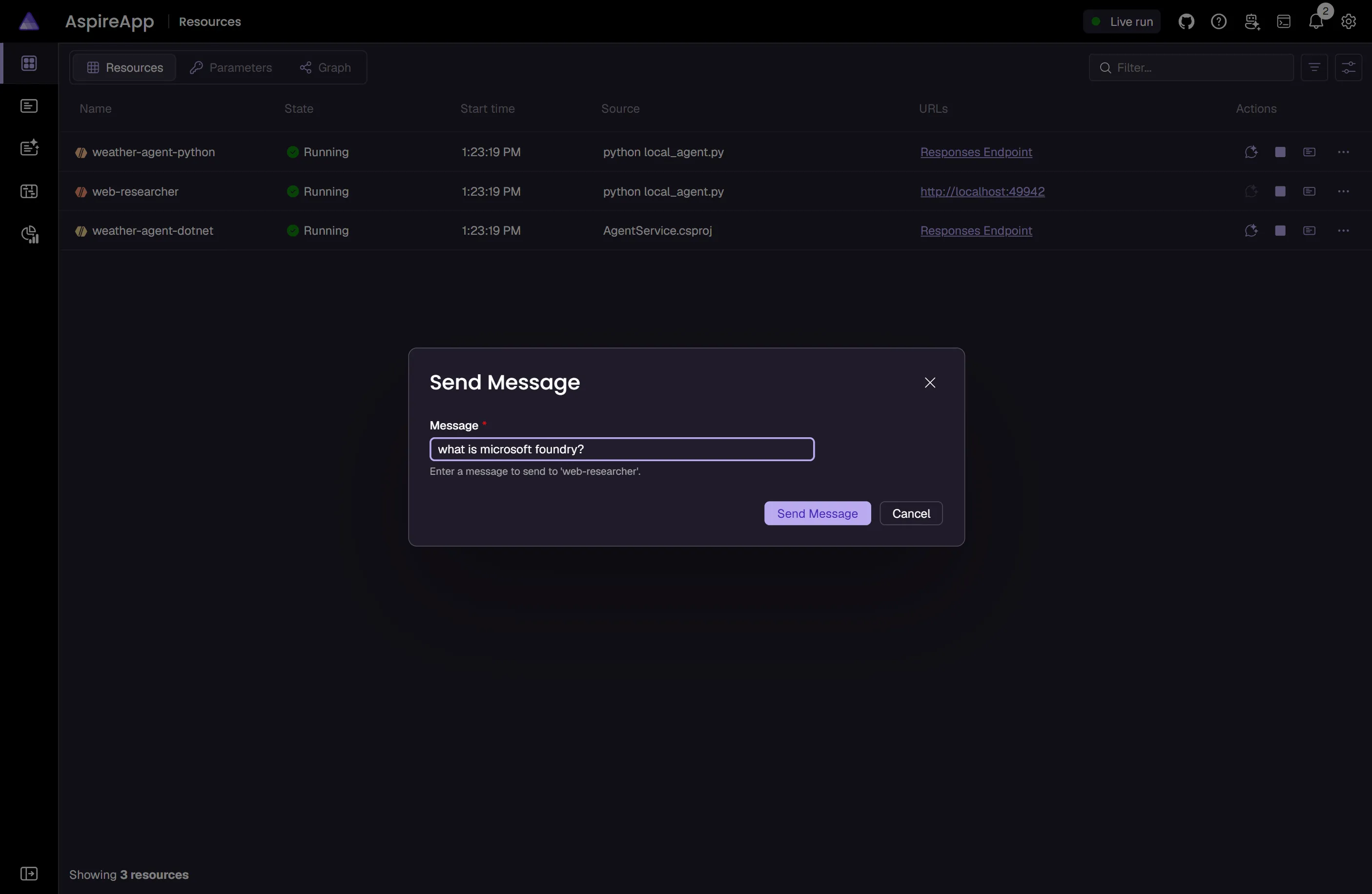
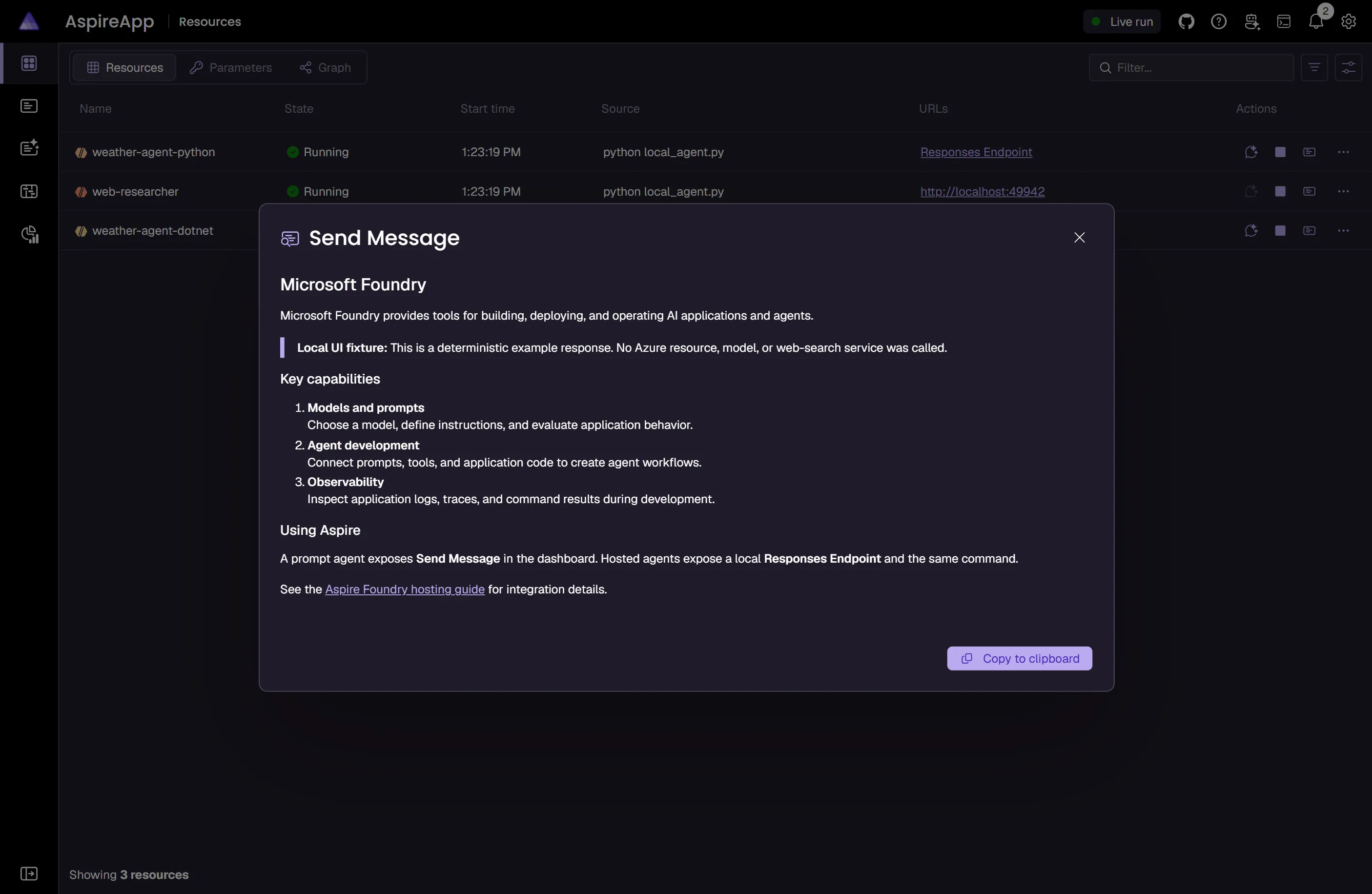
Section titled “Invoke agents from the Aspire dashboard”Aspire also makes the declared agents easy to try from the dashboard. Prompt agents get a Send Message command from AddPromptAgent(...). Hosted agents configured with AsHostedAgent(...) get a highlighted Send Message command that posts to the selected protocol path, which defaults to the local /responses endpoint.
The following screenshots use a local demonstration fixture with deterministic example responses to illustrate the dashboard’s command dialogs. They don’t show a live Azure AI Foundry invocation.
Connect to an existing Foundry service
Section titled “Connect to an existing Foundry service”You might have an existing Azure AI Foundry service that you want to connect to. You can chain a call to annotate that your FoundryResource is an existing resource:
import { function createBuilder(): IDistributedApplicationBuilder
Creates a new distributed application builder
createBuilder } from './.aspire/modules/aspire.mjs';
const const builder: IDistributedApplicationBuilder
function createBuilder(): IDistributedApplicationBuilder
Creates a new distributed application builder
createBuilder();
const const existingFoundryName: ParameterResource
const builder: IDistributedApplicationBuilder
IDistributedApplicationBuilder.addParameter(name: string, options?: { value?: string; publishValueAsDefault?: boolean; secret?: boolean;}): ParameterResource (+1 overload)
Adds a parameter resource
addParameter('existingFoundryName');const const existingFoundryResourceGroup: ParameterResource
const builder: IDistributedApplicationBuilder
IDistributedApplicationBuilder.addParameter(name: string, options?: { value?: string; publishValueAsDefault?: boolean; secret?: boolean;}): ParameterResource (+1 overload)
Adds a parameter resource
addParameter( 'existingFoundryResourceGroup');
const const foundry: IAzureResource
const builder: IDistributedApplicationBuilder
IDistributedApplicationBuilder.addFoundry(name: string): FoundryResource
Adds a Microsoft Foundry resource to the application model.
addFoundry('foundry') .AzureBicepResource.asExisting(name: string | ParameterResource, resourceGroup?: string | ParameterResource): IAzureResource
Marks the resource as an existing resource in both run and publish modes.
asExisting(const existingFoundryName: ParameterResource
const existingFoundryResourceGroup: ParameterResource
const builder: IDistributedApplicationBuilder
IDistributedApplicationBuilder.addProject(name: string, projectPath: string, options?: { launchProfileOrOptions?: string | ProjectResourceOptions;}): ProjectResource (+1 overload)
Adds a .NET project resource
addProject('api', '../ExampleProject/ExampleProject.csproj') .ProjectResource.withReference(source: IResource | EndpointReference | string | uri, options?: { connectionName?: string; optional?: boolean; name?: string;} | undefined): ProjectResource (+1 overload)
Adds a reference to another resource
withReference(const foundry: IAzureResource
const builder: IDistributedApplicationBuilder
IDistributedApplicationBuilder.build(): DistributedApplication
Builds the distributed application
build().DistributedApplication.run(cancellationToken?: cancellationToken): void
Runs the distributed application
run();var builder = DistributedApplication.CreateBuilder(args);
var existingFoundryName = builder.AddParameter("existingFoundryName");var existingFoundryResourceGroup = builder.AddParameter("existingFoundryResourceGroup");
var foundry = builder.AddFoundry("foundry") .AsExisting(existingFoundryName, existingFoundryResourceGroup);
builder.AddProject<Projects.ExampleProject>() .WithReference(foundry);
// After adding all resources, run the app...Use Foundry Local for development
Section titled “Use Foundry Local for development”Aspire supports the usage of Foundry Local for local development. Add the following to your AppHost project:
import { function createBuilder(): IDistributedApplicationBuilder
Creates a new distributed application builder
createBuilder } from './.aspire/modules/aspire.mjs';
const const builder: IDistributedApplicationBuilder
function createBuilder(): IDistributedApplicationBuilder
Creates a new distributed application builder
createBuilder();
const const foundry: FoundryResource
const builder: IDistributedApplicationBuilder
IDistributedApplicationBuilder.addFoundry(name: string): FoundryResource
Adds a Microsoft Foundry resource to the application model.
addFoundry('foundry').FoundryResource.runAsFoundryLocal(endpoint?: string): FoundryResource
Configures a Microsoft Foundry resource to use an Aspire-managed or existing Foundry Local service.
runAsFoundryLocal();
const const chat: FoundryDeploymentResource
const foundry: FoundryResource
FoundryResource.addDeployment(name: string, model: FoundryModel | string, options?: { modelVersion?: string; format?: string;} | undefined): FoundryDeploymentResource (+1 overload)
Adds a Microsoft Foundry deployment resource to a Microsoft Foundry resource.
addDeployment('chat', { FoundryModel.name?: string | undefined
FoundryModel.version?: string | undefined
FoundryModel.format?: string | undefined
const builder: IDistributedApplicationBuilder
IDistributedApplicationBuilder.addProject(name: string, projectPath: string, options?: { launchProfileOrOptions?: string | ProjectResourceOptions;}): ProjectResource (+1 overload)
Adds a .NET project resource
addProject('api', '../ExampleProject/ExampleProject.csproj') .ProjectResource.withReference(source: IResource | EndpointReference | string | uri, options?: { connectionName?: string; optional?: boolean; name?: string;} | undefined): ProjectResource (+1 overload)
Adds a reference to another resource
withReference(const chat: FoundryDeploymentResource
ProjectResource.waitFor(dependency: IResource | IResourceWithConnectionString, waitBehavior?: WaitBehavior): ProjectResource
Waits for another resource to be ready
waitFor(const chat: FoundryDeploymentResource
const builder: IDistributedApplicationBuilder
IDistributedApplicationBuilder.build(): DistributedApplication
Builds the distributed application
build().DistributedApplication.run(cancellationToken?: cancellationToken): void
Runs the distributed application
run();var builder = DistributedApplication.CreateBuilder(args);
var foundry = builder.AddFoundry("foundry") .RunAsFoundryLocal();
var chat = foundry.AddDeployment("chat", FoundryModel.Local.Phi4);
builder.AddProject<Projects.ExampleProject>() .WithReference(chat) .WaitFor(chat);
// After adding all resources, run the app...When the AppHost starts, Aspire automatically starts the Foundry Local service using the foundry CLI (supporting both the legacy foundry service and the current foundry server command generations). It then discovers the service endpoint, loads any cached models before downloading new ones, and stops the service when the AppHost shuts down or is disposed. You do not need to pre-start Foundry Local manually.
This requires the foundry CLI to be installed and available on PATH. For installation instructions, see Foundry Local get started.
The RunAsFoundryLocalrunAsFoundryLocal method configures the resource to use the local service. It downloads and loads the specified models locally, provides health checks for the local service, and fully manages the Foundry Local lifecycle — including start and stop — through the foundry CLI.
Connect to a remote Foundry Local service
Section titled “Connect to a remote Foundry Local service”Windows Subsystem for Linux (WSL2) and Linux AppHosts can’t manage the Foundry Local lifecycle directly because
the foundry CLI targets Windows or macOS. To connect from one of these hosts
to a Foundry Local service that’s already running elsewhere (for example, on the
Windows host), pass the service’s reachable endpoint to RunAsFoundryLocal:
const foundry = await builder.addFoundry('foundry')    .runAsFoundryLocal({ endpoint: 'http://windows-host:5273' });
const chat = await foundry .addDeployment('chat', 'Phi-3.5-mini-instruct', { modelVersion: '1', format: 'Microsoft' }) .withProperties(async (deployment) => { await deployment.localModelId.set('Phi-3.5-mini-instruct-generic-gpu:1'); });var foundry = builder.AddFoundry("foundry") .RunAsFoundryLocal("http://windows-host:5273");
var chat = foundry.AddDeployment("chat", FoundryModel.Local.Phi4Mini) .WithProperties(deployment => { deployment.LocalModelId = "Phi-4-mini-instruct-generic-gpu:5"; });When you pass an endpoint, Aspire treats the service as unmanaged: it observes the remote service’s health and loaded models but doesn’t start, stop, download, or load models on that host. The model must already be downloaded and loaded on the remote service.
The endpoint must be reachable from the AppHost and every consuming resource.
Set LocalModelId (C#) or localModelId (TypeScript) to the model identifier
reported by the remote service when the deployment’s model name is an alias
rather than the exact identifier the remote service expects.
Assign roles to resources
Section titled “Assign roles to resources”You can assign specific roles to resources that need to access the Azure AI Foundry service. Use the WithRoleAssignments method:
import { function createBuilder(): IDistributedApplicationBuilder
Creates a new distributed application builder
createBuilder, type FoundryRole = "CognitiveServicesOpenAIContributor" | "CognitiveServicesOpenAIUser" | "CognitiveServicesUser"const FoundryRole: { readonly CognitiveServicesOpenAIContributor: "CognitiveServicesOpenAIContributor"; readonly CognitiveServicesOpenAIUser: "CognitiveServicesOpenAIUser"; readonly CognitiveServicesUser: "CognitiveServicesUser";}
Enum Aspire.Hosting.FoundryRole
FoundryRole } from './.aspire/modules/aspire.mjs';
const const builder: IDistributedApplicationBuilder
function createBuilder(): IDistributedApplicationBuilder
Creates a new distributed application builder
createBuilder();
const const foundry: FoundryResource
const builder: IDistributedApplicationBuilder
IDistributedApplicationBuilder.addFoundry(name: string): FoundryResource
Adds a Microsoft Foundry resource to the application model.
addFoundry('chat');
await const builder: IDistributedApplicationBuilder
IDistributedApplicationBuilder.addProject(name: string, projectPath: string, options?: { launchProfileOrOptions?: string | ProjectResourceOptions;}): ProjectResource (+1 overload)
Adds a .NET project resource
addProject('api', '../Api/Api.csproj') .ProjectResource.withFoundryRoleAssignments(target: FoundryResource, roles: FoundryRole[]): ProjectResource
Assigns the specified roles to the given resource, granting it the necessary permissions on the target Microsoft Foundry resource. This replaces the default role assignments for the resource.
withFoundryRoleAssignments(const foundry: FoundryResource
const FoundryRole: { readonly CognitiveServicesOpenAIContributor: "CognitiveServicesOpenAIContributor"; readonly CognitiveServicesOpenAIUser: "CognitiveServicesOpenAIUser"; readonly CognitiveServicesUser: "CognitiveServicesUser";}
Enum Aspire.Hosting.FoundryRole
FoundryRole.type CognitiveServicesUser: "CognitiveServicesUser"
ProjectResource.withReference(source: IResource | EndpointReference | string | uri, options?: { connectionName?: string; optional?: boolean; name?: string;} | undefined): ProjectResource (+1 overload)
Adds a reference to another resource
withReference(const foundry: FoundryResource
const builder: IDistributedApplicationBuilder
IDistributedApplicationBuilder.build(): DistributedApplication
Builds the distributed application
build().DistributedApplication.run(cancellationToken?: cancellationToken): void
Runs the distributed application
run();var builder = DistributedApplication.CreateBuilder(args);
var foundry = builder.AddFoundry("chat");
builder.AddProject<Projects.Api>("api") .WithRoleAssignments(foundry, CognitiveServicesBuiltInRole.CognitiveServicesUser) .WithReference(foundry);
builder.Build().Run();The preceding code assigns the CognitiveServicesUser role to the api project, granting it the necessary permissions to access the Microsoft Foundry resource.
Provisioning-generated Bicep
Section titled “Provisioning-generated Bicep”If you’re new to Bicep, it’s a domain-specific language for defining Azure resources. With Aspire, you don’t need to write Bicep by-hand, instead the provisioning APIs generate Bicep for you. When you publish your app, the generated Bicep provisions an Azure AI Foundry resource with standard defaults.
@description('The location for the resource(s) to be deployed.')param location string = resourceGroup().location
resource ai_foundry 'Microsoft.CognitiveServices/accounts@2024-10-01' = {  name: take('aifoundry-${uniqueString(resourceGroup().id)}', 64)  location: location  identity: {    type: 'SystemAssigned'  }  kind: 'AIServices'  properties: {    customSubDomainName: toLower(take(concat('ai-foundry', uniqueString(resourceGroup().id)), 24))    publicNetworkAccess: 'Enabled'    disableLocalAuth: true  }  sku: {    name: 'S0'  }  tags: {    'aspire-resource-name': 'ai-foundry'  }}
resource chat 'Microsoft.CognitiveServices/accounts/deployments@2024-10-01' = {  name: 'Phi-4'  properties: {    model: {      format: 'Microsoft'      name: 'Phi-4'      version: '1'    }  }  sku: {    name: 'GlobalStandard'    capacity: 1  }  parent: ai_foundry}
output aiFoundryApiEndpoint string = ai_foundry.properties.endpoints['AI Foundry API']
output endpoint string = ai_foundry.properties.endpoint
output name string = ai_foundry.name
The preceding Bicep is a module that provisions an Azure Cognitive Services resource configured for AI Services. Additionally, role assignments are created for the Azure resource in a separate module:
@description('The location for the resource(s) to be deployed.')param location string = resourceGroup().location
param ai_foundry_outputs_name string
param principalType string
param principalId string
resource ai_foundry 'Microsoft.CognitiveServices/accounts@2024-10-01' existing = {  name: ai_foundry_outputs_name}
resource ai_foundry_CognitiveServicesUser 'Microsoft.Authorization/roleAssignments@2022-04-01' = {  name: guid(ai_foundry.id, principalId, subscriptionResourceId('Microsoft.Authorization/roleDefinitions', 'a97b65f3-24c7-4388-baec-2e87135dc908'))  properties: {    principalId: principalId    roleDefinitionId: subscriptionResourceId('Microsoft.Authorization/roleDefinitions', 'a97b65f3-24c7-4388-baec-2e87135dc908')    principalType: principalType  }  scope: ai_foundry}
resource ai_foundry_CognitiveServicesOpenAIUser 'Microsoft.Authorization/roleAssignments@2022-04-01' = {  name: guid(ai_foundry.id, principalId, subscriptionResourceId('Microsoft.Authorization/roleDefinitions', '5e0bd9bd-7b93-4f28-af87-19fc36ad61bd'))  properties: {    principalId: principalId    roleDefinitionId: subscriptionResourceId('Microsoft.Authorization/roleDefinitions', '5e0bd9bd-7b93-4f28-af87-19fc36ad61bd')    principalType: principalType  }  scope: ai_foundry}
The generated Bicep is a starting point and is influenced by changes to the provisioning infrastructure in C#. Customizations to the Bicep file directly will be overwritten, so make changes through the C# provisioning APIs to ensure they’re reflected in the generated files.
Customize provisioning infrastructure
Section titled “Customize provisioning infrastructure”All Aspire Azure resources are subclasses of the AzureProvisioningResource type. This enables customization of the generated Bicep by providing a fluent API to configure the Azure resources—using the ConfigureInfrastructureconfigureInfrastructure API:
builder.AddFoundry("foundry")  .ConfigureInfrastructure(infra =>  {      var resources = infra.GetProvisionableResources();      var account = resources.OfType<CognitiveServicesAccount>().Single();
account.Sku = new CognitiveServicesSku { Tier = CognitiveServicesSkuTier.Enterprise, Name = "E0" }; account.Tags.Add("ExampleKey", "Example value"); });The preceding code:
- Chains a call to the
ConfigureInfrastructureAPI:- The
infraparameter is an instance of theAzureResourceInfrastructuretype. - The provisionable resources are retrieved by calling the
GetProvisionableResourcesmethod. - The single
CognitiveServicesAccountresource is retrieved. - The
Skuproperty is assigned to a new instance ofCognitiveServicesSkuwith anE0name andEnterprisetier. - A tag is added to the Cognitive Services resource with a key of
ExampleKeyand a value ofExample value.
- The
 Aspire